The 7 Best Free Rank Tracker Tools to Monitor Your SEO in 2026

Hello! We are VH Info, and we help SaaS (software) companies build links to their websites. A big part of any good link-building and SEO strategy is knowing where your website stands on Google. How do you know if your work is paying off? You check your keyword rankings.

If you want to get more organic traffic (visitors from Google), you need to know which target keywords you are ranking for. This is where a free rank tracker tool comes in. This guide will show you the best free tool options to help you watch your ranking positions.

Here at VH Info, we know that link building is powerful. But it’s even more powerful when you know which pages to build links to. A rank tracker gives you that ranking data, so you can focus your SEO efforts and see your search visibility grow.

Let’s look at these simple SEO tools.

What Is A Rank Tracker Tool (and Why Is A Free One Worth It?)

What Is A Rank Tracker Tool?

A rank tracker tool (or rank checker) is a piece of SEO software that helps you see where your website pages appear in search engine results. You tell the tool your domain name (your website’s address) and the specific keywords you care about.

The tool then checks the search engine (like Google Search) and finds your page. It tells you, “For the search term ‘best accounting software,’ your website is position #7.” This is your keyword rank. A free rank tracker tool does this for you without any cost.

For a new website or a small business, this is a great way to start measuring SEO performance without spending money.

How Rank Tracking Works?

Rank tracking is pretty simple on the outside. You put in your list of relevant keywords.

The rank tracker then goes to the search engine (like Google) and performs a search for each search term, just like a person would. It then looks through all the organic results (the regular links, not the ads) to find your domain name.

When it finds your page, it records the position.

This is your keyword position. Good rank tracker tools can even check for local rank (your position in a specific city) and see if you are in SERP features like featured snippets. It saves this ranking data so you can see if your search engine rankings go up or down over time.

The Benefits of Monitoring Your Keyword Rankings

Watching your keyword rankings is a very important part of any SEO strategy.

  • First, it shows you if your SEO efforts are working. When you write a new blog post or, like we do at VH Info, build new links to a page, you want to see the keyword rank go up.
  • Second, it helps you find opportunities. A page that moves from #20 to #11 is good, but it still needs a push to get on page 1. This data tells you where to focus.
  • Third, it helps you watch your search visibility. As you rank for more target keywords, more people can find you. Monitoring your ranking positions helps you see your SEO performance improve and get more organic traffic.

Free Vs. Paid Tools: Setting Expectations

A free rank tracker tool is a wonderful starting point. But it’s good to know what you get.

A free tool will almost always limit the number of keywords you can track. You might only get to track 10 or 20 specific keywords. They also might not give you daily updates; maybe they update your ranking data once a week.

Paid SEO tools let you track thousands of keywords, give daily updates, and let you track your competitors. Many paid SEO software companies offer a free trial, so you can test their SEO features.

But to begin, a free rank tracker gives you enough keyword data to make good decisions.

Our Top Picks: The 7 Best Free Rank Tracker Tool Options

Best Free Rank Tracker Tool Options

Here are some of the best rank tracker options that are free. They each work a little differently.

Google Search Console

Google Search Console

Google Search Console (GSC) is the best 100% free tool because it comes directly from Google. It is not a classic rank tracker tool in the same way as others. Instead of you giving it keywords, GSC tells you which search terms people are already using to find your site.

It gives you the most accurate data on your average position for all your keywords.

It’s a goldmine for keyword suggestions and for seeing your true search performance. Every website owner must use Google Search Console. It doesn’t just show keyword performance; it also helps you find technical problems on your site.

Ahrefs Webmaster Tools (AWT)

Ahrefs Webmaster Tools (AWT)

Ahrefs is a very famous SEO software company.

Their Ahrefs Webmaster Tools (AWT) is a very generous free tool. You have to verify you own your website. Once you do, it acts as a powerful SEO rank tracker. It will scan your site and show you all the keyword rankings it can find.

It gives you a lot of keyword data, including search volume and difficulty. AWT is more than just a rank checker; it also includes a site audit feature to find problems. For a free service, it provides a huge amount of SEO metrics and is one of the best rank tracker options available.

Semrush (Free Plan)

Semrush

Semrush is another top-tier SEO tool used in digital marketing. Their free plan is more limited, but still useful. It lets you set up one “Project” and track up to 10 target keywords. The rank tracking feature will give you daily updates on those 10 keyword positions.

This is a great way to test their user experience and see how their SERP tracking works. The free account also gives you a few free uses of their other tools, like the keyword research tool and site audit tool, each day. It’s a small taste of a very powerful SEO software suite.

Ubersuggest (Free Tier)

Ubersuggest

Ubersuggest, run by marketing expert Neil Patel, is a very friendly SEO tool for beginners. The free tier lets you track a small number of keywords. You can add your domain name and a few of your most important relevant keywords to watch.

It’s best known as a strong keyword research tool. It gives you lots of keyword suggestions, search volume data, and even content ideas. The rank tracker part is simple, but it does the job for basic keyword tracking. It’s a good all-in-one free tool if your SEO efforts are just starting.

Moz Keyword Explorer (Free Community Account)

Moz

Moz is one of the oldest and most respected companies in SEO. They are famous for SEO metrics like “Domain Authority.” Their free community account gives you a limited number of “queries” per month for their Keyword Explorer.

This is not a full-time rank tracker that updates automatically. Instead, it’s a keyword research tool where you can check the keyword rank for specific keywords on demand. You can type in a keyword, see its search volume, and use a live SERP checker to see who ranks in the top 10.

It’s useful for checking your search performance on a few key terms.

SEO PowerSuite (Rank Tracker – Free Desktop Version)

SEO PowerSuite

This one is different. SEO PowerSuite is SEO software that you download and run on your computer (Windows, Mac, or Linux), not on a website. Their Rank Tracker module has a free version that is very powerful.

You can track an unlimited number of keywords, which no other free tool offers. It can also check ranking positions in major search engines, not just Google. The big limitation is that the free version does not let you save your rank tracking history.

So, it’s a great rank checker for a big, one-time check, but you can’t easily see your keyword performance over time.

What’s My SERP (WMS)

What's My SERP

What’s My SERP (WMS) is a dedicated rank tracker tool.

Many other tools are part of a big SEO software bundle, but WMS focuses just on rank tracking. This makes it a simple free rank checker. The free plan gives you a limited number of keywords you can track with daily updates.

It is a no-frills free SERP checker that does one job: it checks your keyword positions in Google Search. If you do not need a full site audit or a complex keyword research tool, WMS is a good choice for simple, reliable SERP tracking.

What Are the Limitations of Using A Free Rank Tracker Tool?

What Are the Limitations of Using A Free Rank Tracker Tool?

A free rank tracker tool is helpful, but it’s important to know what it can’t do.

Limited Number of Keywords

This is the biggest limit.

Most free rank trackers will only let you track a very small number of keywords, like 10 or 20. This is fine for a small blog, but as your website grows, you will have hundreds of target keywords you want to track. You have to choose only your most specific keywords for your free tool.

Infrequent Data Updates

Your keyword rankings can change every day. Paid rank tracker tools often give you daily updates on your ranking data. Many free tool options only update your keyword positions once a week or even less.

If you are in a fast-moving industry or just launched a new SEO strategy, waiting a week for new ranking data can feel too slow.

Lack of Competitor Tracking

Knowing your own Google rankings is only half the story. You also need to know how your competitors are doing. Paid SEO tools let you add your competitors’ domain names and track their keyword performance right next to yours.

This is a very valuable SEO feature that is almost never included in a free rank tracker tool.

Limited Features (E.g., Reporting, Local Tracking)

Paid SEO software is packed with extra SEO features. You can get detailed reports, track SERP features (like featured snippets or video carousels), and do deep local SEO tracking. A free rank tracker tool usually just gives you the basic keyword rank.

Tracking your local rank (e.g., in “Boston” vs. “New York”) or your spot in the local pack is often a paid feature.

How to Choose the Best Free Rank Tracker Tool For Your Needs?

How to Choose the Best Free Rank Tracker Tool For Your Needs?

With many options, how do you pick the best rank tracker for you? Ask these questions.

Assess Your Keyword Tracking Volume

First, how many keywords do you really need to track right now?

If you are just starting and only care about your brand name and 5-10 main target keywords, a free tool like the Semrush free plan or WMS is perfect. If you need to check hundreds of keywords (even just one time), the SEO PowerSuite free desktop version is a good choice.

For all-around tracking, Google Search Console and Ahrefs Webmaster Tools give you the most keyword data for free.

Check For Data Accuracy and Update Frequency

You need accurate data. After you use a tool, do a quick Google Search yourself (in an “Incognito” window) to see if the ranking data matches. A good rank checker should be very close. Also, check how often it updates. If you need daily updates on a few key terms, make sure your free tool offers that. If you just want a general check-in on your SEO performance each week, most tools will be fine.

Consider Your Need For Other SEO Features

Do you just want a rank tracker, or do you need more?

Many of these free rank tracker tools come bundled with other SEO features. Ahrefs Webmaster Tools gives you a site audit. Ubersuggest gives you a great keyword research tool. Google Search Console helps you find technical errors. If you want one free tool that does many jobs, pick one of these. If you only care about rank tracking, a simple free rank checker is all you need.

FAQ’s:

What is the Best 100% Free Rank Tracker Tool?

For 100% free, Google Search Console is the best rank tracker. It gives you the most accurate data about your search performance because it comes straight from Google. It shows you your average position for all search terms.

For a more traditional rank tracker feel, Ahrefs Webmaster Tools (AWT) is the best free tool, as it gives you a huge amount of keyword data, keyword rankings, and site audit features for free.

How Accurate Are Free Rank Tracker Tools?

Most high-quality free rank tracker tools are very accurate. The ranking data for your keyword positions should be very close to what you see in a real Google Search. Keep in mind that search engine results can change based on your location (local search) or device.

The most accurate data for your site’s average search performance will always be in Google Search Console.

Why Do I Need A Rank Tracker If I Have Google Analytics?

This is a great question. Google Analytics is a tool for tracking visitors. It answers, “How many people visited my site from organic search?” A rank tracker is a tool for tracking positions.

It answers, “Where do I show up in search engine results?” You need both. The rank tracker shows if your SEO efforts are working (your rank is rising), and Google Analytics shows if that work is leading to more organic traffic.

Can A Free Rank Tracker Tool Check Mobile Vs. Desktop Rankings?

Some can, but many cannot. This is often a feature of paid SEO tools.

Search engine rankings can be very different on a phone versus a computer. The best free tool for this is Google Search Console. It easily lets you filter your search performance to see your keyword performance and average position on mobile devices separately from desktop devices.

Conclusion

Knowing where you stand is the first step to getting where you want to go.

A free rank tracker tool is a perfect first step for any SEO strategy. It takes the guesswork out of your SEO efforts. You can watch your keyword rankings improve, see your search visibility grow, and get real ranking data to prove your work is paying off.

At VH Info, we work with SaaS clients to build high-quality links. Our most successful clients are the ones who track their keyword performance. They use ranking data from a rank tracker to find pages stuck on page 2. Then, we build high-authority links to that page.

Watching that page climb in the search engine results and bring in new organic traffic is the goal.

Start with a free tool from this list. Watch your keyword positions. And when you see a page that needs a boost, remember that a strong link-building strategy is the best way to climb the Google rankings.

Get Your Instant & Accurate Keyword Ranking Report (Free)

Why do you have a website? You want people to find it. When people look for things on the internet, they use Google search. They type in words, and Google shows them a list of websites. These words are your target keywords.

But how do you know if people are finding your website? How do you know if your SEO efforts are working? The answer is a free keyword ranking report. This report is like a report card for your website. It tells you exactly where you show up in search results.

Without this report, you are just guessing about your SEO performance. You need to know your keyword rankings to make smart choices.

At VH-info, we know that a good SEO strategy starts with good keyword data. This report is the first step. It shows you where you stand with search engines and helps you get more organic search visitors. Let’s look at what these reports are and how they can help you.

What Is A Free Keyword Ranking Report (And Why You Need One)?

What Is A Free Keyword Ranking Report?

A free keyword ranking report is a simple list. It shows you which search terms (keywords) your website shows up for when people use Google search. Most importantly, it tells you your ranking positions. Are you on page 1 (positions 1-10)? Or are you lost on page 10?

This is very important because most people only click on the first few search engine results.

If you are not near the top, people will not find you. This report is the best way to check your SEO work. It shows you what is working and what is not. It gives you valuable insights into your website’s health.

Understanding the Core SEO Metrics

Your free keyword ranking report gives you key numbers, or “metrics.” You will see your keyword positions for each given keyword.

For example, it might say you are in position #5 for a specific keyword. You will also see your average position for many different search queries. Some reports show you the monthly search volume (or keyword search volume).

This number tells you how many people type that exact keyword into Google each month. The report might also show SERP features.

These are the special boxes in Google search, like videos, “People Also Ask” boxes, or Google Ads. These features can take clicks away from your website. Knowing this keyword data helps you build a better SEO strategy and work to improve your Google rankings.

How Rank Tracking Drives Your Content Strategy?

Your report helps you decide what to write about. This is called keyword rank tracking or position tracking.

Imagine your report shows you have a keyword rank on page 2 (maybe position #12). This is a huge opportunity! Google already thinks your page is good, but not great. You can update this page with new information or build more links to it.

This can push your ranking positions to page 1. This report also helps you find new keywords and related keywords to write about. You can see what people are searching for.

The Difference Between Free Vs. Paid Ranking Reports

A free tool is a great way to start. Many big SEO tools offer a free version or a free trial. These free reports give you a quick look at your top keywords. However, a free keyword rank checker often has limits. It might limit the number of keywords you can check.

It might only let you check your keyword rank once a week.

Paid SEO tools offer much more. A paid rank tracker checks your keyword rankings every single day. It can track thousands of target keywords. It gives you more details on competitors and a bigger keyword list. A paid keyword tool is a must-have for SEO professionals.

But a free keyword rank checker is perfect for beginners and small businesses to learn their SEO performance.

Top Tools to Generate A Free Keyword Ranking Report

Top Tools to Generate A Free Keyword Ranking Report

There are many SEO tools you can use. Some are completely free, while others offer a limited free version.

Here are some of the best ones to get you started.

Google Search Console

Google Search Console

This is the most important free tool for any website owner. Google Search Console (GSC) comes straight from Google. It gives you the most accurate data because Google is the search engine. It’s not a guess.

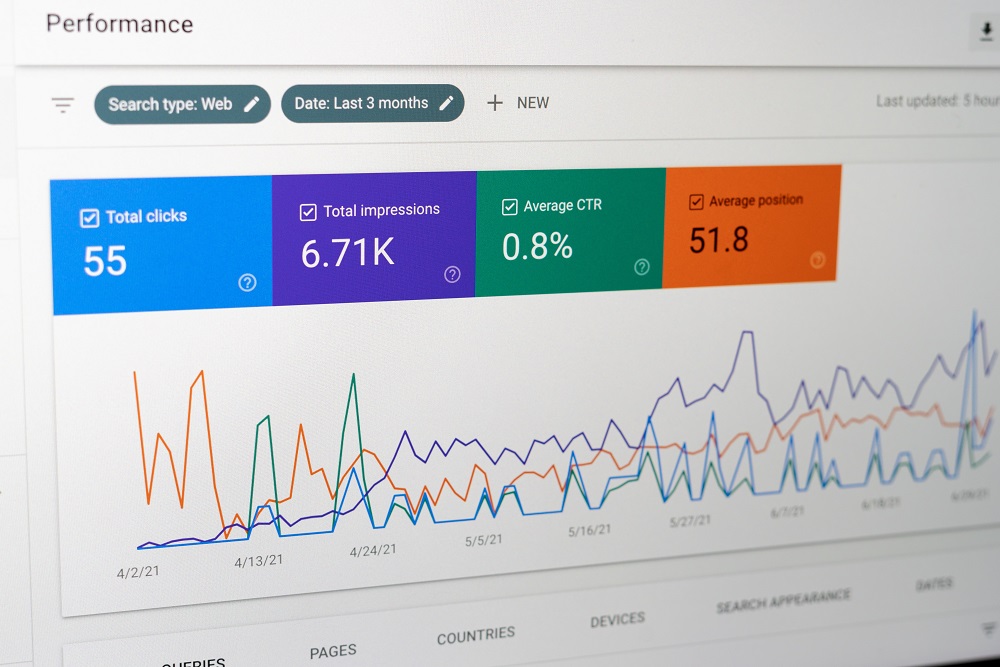
GSC shows you a real free keyword ranking report. It tells you the exact search queries people typed to find your site. You can see your keyword positions, how many people saw your site (impressions), and how many clicked. It shows your average position for every specific keyword. At VH-info, we always look at GSC first. It shows us which pages get organic traffic and where your Google rankings are.

This keyword data is key for finding pages that need a link-building boost. It’s the best keyword rank tracker for your own site.

Ahrefs’ Free Keyword Rank Checker

Ahrefs' Free Keyword Rank Checker

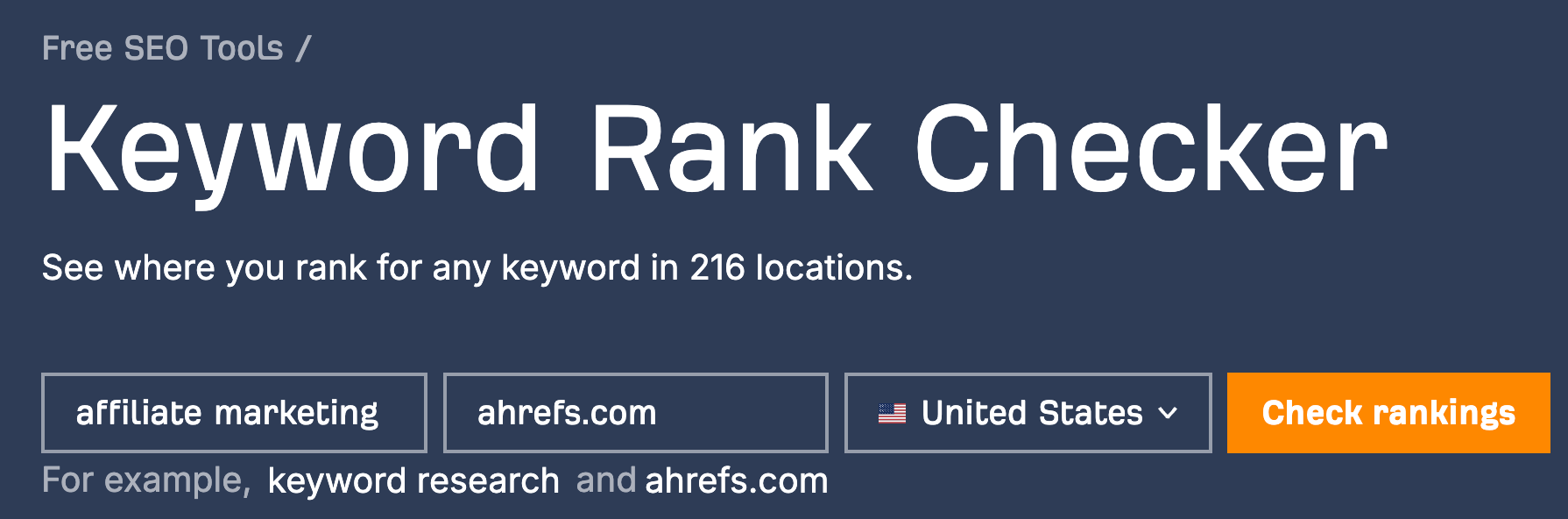
Ahrefs is a very powerful keyword research tool used by SEO professionals. They have a free keyword rank checker that is very helpful for a quick look. You do not even need an account. You just type in your domain name, a given keyword, and your country. This rank checker will check your keyword rank for that one term. While the free version is very limited, it gives you a small peek at their powerful keyword data.

For your important keywords, it can show you the keyword difficulty and keyword search volume. This helps you decide if a specific keyword is worth your SEO efforts. It’s a simple keyword tool for checking one or two ranking positions quickly.

SEMrush

SEMrush

SEMrush is another one of the top SEO tools in digital marketing. They offer a free trial that lets you use their powerful position tracking features for a short time. You can also sign up for a free account with limited access.

With it, you can enter your domain name and get a keyword list of the top keywords you rank for. This is great for keyword research. You can even type in a competitor’s site to find new keywords.

Their keyword tool gives you valuable insights like monthly search volume and ideas for Google Ads. Even the free account lets you track position changes for a small number of keywords, helping you monitor your SEO performance.

Ubersuggest

Ubersuggest

Ubersuggest is a very popular keyword rank checker tool. It is known for being easy to use.

It has a free version that gives you a good amount of keyword data. You can add your domain name and a keyword list to its rank tracker. It will then give you a free keyword ranking report and track your position changes over time.

This keyword rank checker is also good for local SEO.

It shows you keyword search volume, gives you keyword ideas, and even helps with social media topics. It is a good all-in-one keyword tool for beginners who need to monitor their SEO work on a daily basis (or weekly) without paying.

Google Trends

Google Trends

Google Trends is a very different kind of free tool. It is not a classic keyword rank tracker. It will not tell you, “You are in position #5.”

Instead, this tool shows you the popularity of search terms over time. This is very useful for your keyword research. You can type in a keyword search and see if more or fewer people are searching for it. This helps you find new keywords that are becoming popular.

It also helps you avoid writing about topics that nobody cares about anymore. You can compare different search queries to see which one has higher search volume data. It gives you valuable insights into what your audience is thinking about.

Answer the Public

AnswerThePublic

Answer the Public is a fantastic keyword research tool for finding keyword ideas. It does not give you a free keyword ranking report of your current keyword positions. Instead, it shows you what questions people are typing into search engines. You give it one target keyword, and it shows you all the “who, what, why, where, how” questions people ask about it. It also shows you related keywords and comparisons.

This is gold for your content. You can find many “long-tail keywords” (longer, more specific search queries). This helps you perfectly match search intent, which is a key part of any SEO strategy and helps you get more organic traffic.

Moz Keyword Explorer

Moz

Moz is a famous name in the SEO world. Their Keyword Explorer tool has a free version that lets you do some keyword rank checking. You can type in a specific keyword to see its keyword difficulty score, monthly search volume, and a “SERP Analysis.” This SERP Analysis is like a mini free keyword ranking report. It shows you the top 10 search engine results that rank for that keyword search.

This lets you see who your competitors are and how strong their pages are. The free access limits the number of keywords you can check each day, but it gives accurate data and valuable insights for your keyword research and SEO work.

Keyword.com SERP Checker

Keyword.com SERP Checker

Keyword.com is a very simple and specific keyword rank checker tool.

As its name says, this free tool is all about checking the search engine results (SERP). It does one job: it checks your keyword rank right now. You put in your domain name, a given keyword, and your location (like a city or zip code).

This is very useful for local SEO because you can see your Google rankings from a specific place. It is not a full rank tracker built for keyword rank tracking over time. But for a quick, real-time check on your important keywords, this rank checker is fast, free, and easy.

How to Read and Act on Your Free Keyword Ranking Report?

How to Read and Act on Your Free Keyword Ranking Report?

Getting the report is the first step. The real value comes from acting on that keyword data. Your free keyword ranking report is a map. It shows you where to focus your SEO efforts to get the most organic traffic and improve your search engine rankings.

Identifying “Quick Win” Keywords (Pages 2-3)

Look through your keyword list for target keywords where you rank on page 2 or 3 of Google search. This means your average position is between 11 and 30. These are your “quick wins.”

Google already likes your page for that search term. It just needs a little push. These pages often do not need to be completely rewritten. They might just need a content update or, very often, more high-quality backlinks.

This is where a link-building agency like VH-info helps. We can look at this keyword data, see these “quick win” pages, and build powerful links to them. This is often the fastest way to push your ranking positions onto page 1, where the clicks are.

Spotting Ranking Drops and Content Decay

Your keyword rank tracking will also show you bad news sometimes. You might see position changes going down.

A keyword rank that was #6 last month might be #15 this month. This is called “content decay.” It means your content is getting old, or a competitor wrote something better. Your free keyword ranking report is your warning system. It tells you which pages to fix now.

Check the search intent for that given keyword. Has it changed? Go to that page, add new information, update old facts, and build some fresh links to it to protect your search engine rankings.

Finding New Content Opportunities

Your report, especially from Google Search Console, will show you search queries that you rank for by accident.

These are keyword ideas you did not even know you had. People might be finding your site using related keywords that you only mentioned one time. This is a clear signal from Google. It is telling you, “People want you to make a whole page about this!

You can take that specific keyword, check its keyword search volume with a keyword tool, and create a new piece of content. This is a core part of a smart SEO strategy that leads to more organic traffic.

Benchmarking Your Rankings Against Competitors

Many SEO tools, even those with a free version, let you put in a competitor’s domain name. You can get a free keyword ranking report for them. This is a very powerful part of digital marketing. You can see their top keywords and keyword rankings.

Are they ranking for important keywords that you are not? This gives you a new keyword list to target. You can look at their pages, see why they are winning in the search engine results, and then create much better content.

This checking is key to making sure your SEO performance beats theirs.

FAQ’s:

What is the Most Accurate Tool For A Free Keyword Ranking Report?

The most accurate data for your own website’s Google rankings comes from Google Search Console. It is Google’s own free tool, so it reports the exact search terms and keyword positions it sees. For checking competitor rankings or keyword search volume, other SEO tools like Ahrefs or SEMrush give very good estimates based on lots of keyword data. But only GSC is 100% accurate for your own domain name.

Can I Use Free Keyword Ranking Report Tools to Track Rankings Over Time?

Yes, but with limits. Some tools, like the free version of Ubersuggest, are made for keyword rank tracking and will show you position changes on a daily basis (or weekly). Google Search Console also lets you compare date ranges to see if your keyword rank went up or down.

But, most free rank checker tools are for one-time checks. A paid keyword rank tracker is usually needed for serious, long-term position tracking for a large number of keywords.

How Often Should I Check My Keyword Rankings?

For a new site, checking your keyword positions daily is exciting, but your rankings will jump around a lot.

For most businesses, checking your important keywords once a week is a good plan.

For SEO professionals (like us at VH-info), we monitor top keywords and position changes on a daily basis. This is our job. A good schedule for most people is a weekly check on your main target keywords and a bigger review of your full free keyword ranking report once a month.

Can I Check My Competitors’ Keyword Rankings For Free?

Yes, in a limited way. Some SEO tools with a free trial or free version, like SEMrush or Ubersuggest, let you type in a competitor’s domain name. They will show you some of their top keywords. This gives you valuable insights into their SEO strategy.

You will not get their full keyword list, but you can get enough keyword ideas to help your own keyword research and SEO efforts.

Conclusion

A free keyword ranking report is more than just a list of numbers. It is a guide for your entire SEO strategy.

It shows you what people are looking for in Google search and how they find (or do not find) your website. By using SEO tools like Google Search Console and a keyword rank checker, you get accurate data on your keyword rankings and organic traffic.

Reading this report helps you find “quick win” target keywords, fix pages with dropping ranking positions, and find new keywords for your content. This is the foundation of all good SEO work. But getting valuable insights from keyword data is only half the job.

At VH-info, we are experts in building high-quality links for SaaS companies.

We take the keyword data from your reports and build a strategy to get your most relevant keywords to the top of the search engine results. A free keyword ranking report tells you where to aim. We help you get there.

Best Backlink Management Tools to Manage Link Building in 2026

If you have a website, you want people to find it. One of the best ways people find your site is through search engines like Google. A big part of how Google decides to rank your site is based on “backlinks.”

A backlink is a link from another website to your website. Think of it as a “vote” for your page. The more good votes you get, the more important Google thinks your site is. This helps your search rankings. But link building—the job of getting these votes—is only half the story. You also need to watch and take care of all the links you get. This job is called backlink management.

It can be a lot of work. You need to check for new links, see if you lost any links, and make sure no “bad” websites are linking to you.

Doing this by hand is almost impossible. That’s why smart digital marketers use a backlink management tool.

This article will explain what these SEO tools are, why they are so important for your SEO strategy, and how you can use one. Here at VH-info, we work with SaaS link building every day. We know that a healthy backlink profile is a must-have for growing your organic traffic.

This guide breaks down everything you need to know.

What Is A Backlink Management Tool and Why Do You Need One?

What Is A Backlink Management Tool and Why Do You Need One?

A backlink management tool, or backlink management software, is a program that helps you track, check, and organize all the links pointing to your website. Think of it as a command center for your link profile.

It shows you every link, tells you if it’s good or bad, and helps you keep your profile clean and strong.

Defining Backlink Management

Backlink management is the process of checking your backlink profile all the time. It involves a few key jobs:

  • Finding new backlinks as soon as they show up.
  • Monitoring links you already have to see if they get lost or broken.
  • Doing a backlink analysis to check the link quality of each one.
  • Finding and getting rid of harmful backlinks that could hurt your site.

It’s like being a gardener for your website. You want to water the good plants (quality backlinks) and pull out the weeds (spammy links).

The Importance Of A Clean Backlink Profile

A clean backlink profile is one that is full of quality links from other good, trusted websites. It has very few (or zero) links from spammy or bad websites. This is so important. Search engines like Google want to send their users to good websites. If they see you have a lot of spammy links, they might think you are trying to cheat the system. This can hurt your search engine rankings and even get your site penalized.

A clean profile shows Google that you are trustworthy and that your site has real value. This helps you rank higher and get more visitors.

How A Tool Streamlines Your SEO Efforts?

You could try to do all this work by hand. You could use Google Sheets to keep a list of your links. But you would miss thousands. Your website might have tens of thousands of external links pointing to it.

A backlink management tool makes this easy. It puts all your backlink data in one place.

  • It finds all your links automatically.
  • It checks the link quality of new links in seconds.
  • It sends you alerts when you get new links or lose old ones.
  • It helps you find bad links quickly.

For link builders, SEO agencies, and anyone serious about their SEO efforts, a good tool isn’t just nice to have. It’s necessary. It saves hundreds of hours and gives you the detailed metrics you need to make smart decisions.

Core Features of the Best Backlink Management Tool

Core Features of the Best Backlink Management Tool

When you look at different backlink tools, you will see they offer many features. The best tools for backlink management usually have these core features.

Backlink Monitoring (New & Lost Links)

This is one of the most important features. Good backlink monitoring means the tool is always watching your website’s profile.

  • New Links: When a new website links to you, the tool will find it and send you an alert. This is great. You can see who is talking about you. You can go say “thank you” or build a relationship with that website owner.
  • Lost Links: The tool also tells you when a link disappears. Maybe a website updated its page, and your link was removed. This alert lets you email the site owner and ask them to add your link back.

Competitor Backlink Analysis

This is a powerful feature for any SEO strategy. A good tool lets you put in your competitor’s website address and see their entire backlink profile. You can see every website that links to them. This gives you a road map for your own link-building efforts.

Why is this so great? If a website links to your competitor, they are clearly interested in your topic. This means they might be willing to link to you, too! This is how SEO professionals find many of their best link-building opportunities. It’s a key part of competitive analysis.

Backlink Auditing & Toxic Link Identification

A backlink audit is a deep check-up of your entire link profile. The tool goes through every single link and helps you decide if it is good or bad.

To do this, it often uses a “toxic” or “spam score.” It looks at many signals to figure out the link quality:

  • Is the link from a low-quality site with a bad authority score?
  • Does the website look like spam?
  • Is the site on a list of known bad websites?
  • Does the site have a very low Trust Flow (a metric from the tool Majestic)?

The tool gives you a list of all the potentially harmful backlinks that could be hurting your SEO performance.

The Disavow Tool & Spammy Link Removal

Once you find those spammy links, what do you do?

The tool helps you make a “disavow list.” This is a special text file that lists all the bad websites you don’t want to be associated with.

You then take this list and upload it to a special tool inside Google Search Console (GSC). This is you telling Google, “Please ignore any links coming from these websites. I don’t know them, and I don’t want their ‘vote’.”

This can help clean your profile and fix problems from bad links.

Anchor Text Distribution Tracking

Anchor text is the clickable text in a link. For example, if the words “best SaaS software” link to a page, that is the anchor text.

Anchor text distribution is a report that shows you all the different anchor texts used for your links.

Why does this matter? Because you want it to look natural.

  • Natural Profile: Has a lot of “brand” links (like “VH-info”) and “naked” links (like “vh-info.com”).
  • Spammy Profile: Has 100% of its links with the same anchor text, like “best SaaS software.”

A good tool does anchor text analysis and shows you a pie chart of your distribution. This helps you make sure your link profile looks natural and safe to search engines.

Comprehensive Reporting & Dashboards

These tools gather a huge amount of backlink data. A good backlink manager will show you this data in easy-to-read dashboards and reports.

You can see all your key metrics in one place:

  • Total number of links
  • Total number of linking websites
  • Your Authority Score or Domain Authority (a score from 0-100)
  • A chart of new backlinks over time
  • Your top anchor text

You can also create PDF reports to share with your team or clients, or export the data to Google Sheets for your own analysis.

Top Backlink Management Tools For Your SEO Strategy

Top Backlink Management Tools For Your SEO Strategy

There are many backlink tools on the market. Some are big all-in-one platforms, while others focus only on links. As a SaaS link-building agency, we at VH-info are familiar with what these platforms offer.

The “best” one depends on your budget and your needs. Here are some of the most popular ones used by SEO professionals.

SEMrush

SEMrush

SEMrush is like a giant toolbox for your website. It’s one of the best tools because it’s an “all-in-one” platform. This means it doesn’t just do backlink management; it helps with your whole SEO strategy.

SEO agencies and digital marketers love it because they can do keyword research, check their keyword rankings, and manage their backlink profile all in one place. Its “Backlink Audit Tool” is a powerful backlink checker.

It scans all your external links and finds harmful backlinks by giving them a “Toxicity Score.” This helps you clean up spammy links. SEMrush also has its own SEO metric called an “Authority Score” to help you judge the link quality of sites for your link building campaigns.

Ahrefs

Ahrefs

Ahrefs is famous among SEO professionals for one big reason: it has a giant map (or index) of all the backlinks on the internet. Its main tool is called “Site Explorer,” and many link builders think it’s the best backlink analysis tool available.

We find it’s amazing for competitive analysis. You can type in any competitor’s website and see their entire backlink profile. This gives you a perfect list of link-building opportunities.

Ahrefs uses its own score called “Domain Rating” (DR) to measure a site’s strength. It is excellent for backlink monitoring—it tells you about new links and lost links right away. If you are serious about building links, Ahrefs is a top-choice link-building tool.

Moz Pro

Moz Pro

Moz Pro is one of the original and most respected SEO tools.

They are famous because they invented the SEO metrics “Domain Authority” (DA) and “Page Authority” (PA). These are scores from 0 to 100 that indicate how strong a website is and how well it might rank in search engines.

Their link-building tool is called “Link Explorer.” It’s a great backlink manager for doing a full backlink analysis of your link profile.

You can see your quality links, check competitor backlinks, and find spammy links. Moz gives you a “Spam Score” for every link, which makes it easy to spot harmful backlinks that need to be cleaned up. It’s a solid tool for any SEO strategy.

Majestic

Majestic

Majestic is a very special backlink management tool. Unlike the other tools, it focuses only on backlink data.

It doesn’t do keyword research or track keyword rankings. It is built for one job: to be the best backlink analysis tool. It invented its own famous SEO metrics called “Trust Flow” and “Citation Flow.” Trust Flow is one of the best ways to judge link quality.

It measures how trustworthy a site’s links are, not just the number of links it has. This helps SEO professionals find truly valuable links. SEO agencies often use Majestic’s detailed metrics to get a deep understanding of a strong backlink profile.

SE Ranking

SE Ranking

SE Ranking is another great all-in-one backlink management software. It has become very popular with small businesses and SEO agencies because it gives you many of the same powerful features as the bigger tools but often costs less.

Its backlink checker lets you do a deep backlink analysis on your own site or on competitor backlinks. The backlink monitoring tool is great; it watches your link profile and sends you alerts when you get new links or lose old ones.

This is very helpful for your link-building efforts. You can also use SE Ranking to track your keyword rankings and find link-building opportunities, making it a great value for your SEO efforts. Many users start with its free trial.

Google Search Console

Google Search Console

This tool is 100% free and is made by Google. If you have a website, you must use Google Search Console (GSC).

It is the most important tool because it shows you your backlink profile exactly as Google sees it. It is not a full backlink management tool—for example, you can’t check competitor backlinks with it. But it is the source of truth for your own backlink data.

It shows you your external links, your top anchor text, and which pages get the most new backlinks. Most importantly, GSC is the only place where you can upload a “disavow” file. This file tells Google to ignore spammy links or harmful backlinks that are pointing at your site.

Linkody

Linkody

Linkody is a backlink manager that is perfect for people who want something simple and easy to use. It’s not a giant, complicated link-building tool. Its main job is backlink monitoring, and it does it very well. You set it up, and it watches your backlink profile 24/7.

It will send you an email alert as soon as you get new links or when you lose valuable links.

This lets you act fast. You can also use it to peek at competitor backlinks and track your key metrics like Domain Authority. It’s a great choice for small businesses or anyone who just wants to focus on backlink management without all the extra features.

SEO SpyGlass (From SEO PowerSuite)

SEO SpyGlass

This backlink management tool is a little different. It’s not a website; it’s software you download to your computer.

It’s part of a group of tools called SEO PowerSuite. Because it runs on your computer, SEO SpyGlass can check a huge number of links and give you very detailed metrics. It’s a powerful backlink analysis tool for doing a deep “audit” of your link profile.

It helps you find harmful backlinks by checking a link’s Spam Score and other key metrics. SEO professionals use it for deep competitive analysis, letting you compare your profile to many competitors’ backlinks at once. It’s a very detailed tool for serious SEO efforts.

How to Effectively Use Your Backlink Management Tool: A Step-by-Step Process

How to Effectively Use Your Backlink Management Tool?

Having a tool is great. But knowing how to use it is what gets results. Here is a simple process you can follow.

Step 1: Conduct an Initial Backlink Audit

The first thing you must do is get a complete picture of your health.

Run your website through your chosen backlink management tool. Let it pull all your backlink data. This is your starting point. Look at the key numbers: total links, total linking websites, and your main authority score. This will show you where you stand right now.

Step 2: Analyze Your Top Competitors’ Profiles

Next, make a list of your top 3-5 competitors. Run each of their websites through the tool’s Site Explorer. This is your competitive analysis. Look for patterns.

  • Where do they get their valuable links?
  • What websites link to all of them, but not to you?
  • What kind of anchor text do they use?
  • What pages on their site have the most links?

This will show you what their target audience is reading and give you a “shopping list” of websites to target for your own link building.

Step 3: Identify and Disavow Harmful Links

Now, go back to your own profile. Use the tool’s audit feature to find all the harmful backlinks. Look for links with a high spam score or links from very low-authority websites that look like spam. Create a list of all these bad links and export it in the disavow file format.

Go to your Google Search Console account and submit that list. This cleans up your profile.

Step 4: Set Up Automated Monitoring & Alerts

This step is simple but very important. In your tool’s settings, turn on email alerts for “new links” and “lost links.”

This puts your backlink monitoring on autopilot. You will get an email as soon as something changes. You should also set up alerts for brand mentions. This tells you when someone types your brand’s name but doesn’t link to you. You can then email them and ask for the link!

Step 5: Find New Link Building Opportunities

Use the competitor data from Step 2 to start your link building campaigns. Make a list of all the good websites you found. Plan your outreach campaigns. You can also find opportunities for guest posts. This is when you write an article for another website’s blog.

In return, they let you include a link back to your site. Your backlink management tool can help you find good websites for this.

Step 6: Track Your Progress and Report on KPIs

Backlink management is not a one-time job. You must check your progress. Every month, look at your key metrics.

  • Is your total number of quality links going up?
  • Is your authority score improving?
  • Are you getting links from new, good websites?

Most important, check if this work is helping your business. Are your keyword rankings for important terms getting higher? Is your organic traffic from Google increasing? This shows that your SEO strategy is working.

FAQ’s:

Why Is Managing Backlinks Important?

It is important because your backlink profile is one of the biggest factors that Google uses to decide your search engine rankings. Managing your links helps you build a strong backlink profile full of good links, and it protects your site from bad links that could hurt your rank.

A clean link profile is key to long-term SEO success.

How Often Should I Check My Backlinks Using A Management Tool?

You should have automated backlink monitoring running all the time.

This means the tool is checking for you every day. You should personally log in to check your new backlinks and dashboard at least once a week. You should do a full, deep backlink audit and clean-up of spammy links every 3-6 months, or more often if your site is very large.

Are There Free Backlink Management Tools Available For Beginners?

Yes. The most important free tool is Google Search Console. You must set this up. It shows you what Google sees. Many of the big tools (like Ahrefs, SEMrush, and SE Ranking) also offer a limited free trial or a free version that lets you do a few checks.

These are a good way for beginners to start.

How Do Backlink Management Tools Help Identify Toxic Links?

They use a lot of data. They check the linking website’s authority score, spam score, and Trust Flow. They see if the site has very little traffic. They check the anchor text to see if it looks spammy.

They check if the link is a nofollow link (which tells Google not to count it). They look at the page authority of the exact page. They combine all these SEO metrics to give you a single “toxic” score so you can decide if you need to disavow it.

Conclusion

A backlink management tool is one of the most powerful weapons in your SEO strategy. It takes the guesswork out of your link building efforts. It helps you see your backlink profile clearly, find out what your competitors are doing, and protect your site from harmful backlinks.

From backlink monitoring to anchor text analysis, these tools handle the heavy lifting. This lets you focus on what really matters: building links that grow your business. Using these SEO tools is the first step. The second step is having a smart strategy.

That’s where we, at VH-info, come in. As a SaaS link building agency, this is what we do all day. We use these powerful tools to build and manage high-quality link profiles for our clients, helping them increase their organic traffic and grow.

A great tool combined with an expert strategy is the key to success in digital marketing.

10 Best Internal Link Tools to Automate & Boost Your SEO (2026 Review)

On your website, you have many different pages. An internal link is a link that goes from one page on your site to another page on your site. This is different from external links, which go to other websites.

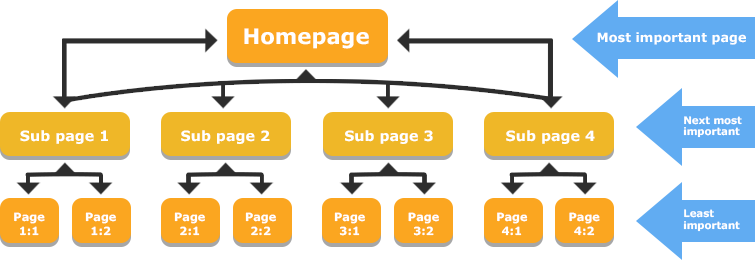
Your internal linking is very important. It helps people find related content and stay on your site longer. It also helps search engines like Google find all of your pages and know which ones are the most important pages.

A good internal linking structure guides both users and Google. But building this link structure by hand takes a lot of time. This is why many people use an internal link tool to help. This guide will show you the best tools and how to use them.

What is an Internal Link Tool & Why Do You Need One?

What is an Internal Link Tool & Why Do You Need One?

An internal link tool is a piece of software that helps you manage your internal linking strategy. It scans your entire website to find internal link opportunities. It can find pages that need more links and suggest relevant pages to link to.

This is much faster than looking for link opportunities yourself. These tools can save website owners and SEO professionals countless hours.

The Problem With Manual Internal Linking

Doing your internal linking by hand is hard.

  • It takes too much time: If you have hundreds of pages, finding every good linking opportunity is almost impossible. You have to check all your existing content every time you write new content.
  • You miss pages: It is easy to forget about older posts. This creates orphan pages, which are pages with no internal links pointing to them. Search engines have a hard time finding orphan pages, so they often don’t show up in Google search results.
  • It’s hard to track: Do you know all your anchor texts (the clickable words in a link)? Are you linking to your important pages enough? Without a tool, it’s hard to see your internal link structure clearly.

Key SEO Benefits: How Internal Linking Tools Help

Using an internal link tool helps your SEO performance in big ways:

  • Passes “Link Juice“: Every page has link equity, also called link juice. When you link from one page to another, some of this “juice” flows to the new page. This tells Google that the linked page is also important. A good internal linking structure spreads this link juice to all your important pages.
  • Helps Google Find Content: A tool helps you fix orphan pages. This makes sure Google can crawl your entire site and find all your relevant content.
  • Improves User Experience: When you provide relevant internal links, you help visitors find more related content. This makes them stay on your site longer and lowers bounce rates.
  • Builds Topical Authority: You can use tools to build topic clusters. This is when you link many related articles to one main “pillar” page. This shows Google you are an expert on that topic, which helps your search engine rankings.

How These Tools Work (AI Suggestions Vs. Automation)

Internal linking tools work in a few different ways.

  • Rule-Based Tools: Some tools follow simple rules you set. For example, “Every time I write the words ‘SEO strategy’, link to my ‘SEO Strategy Guide’ page.” This can be fast but is not very smart.
  • AI Suggestions: A modern ai internal linking tool is much smarter. It uses natural language processing (NLP). This means it reads your new content like a human. It uses semantic analysis to find relevant keywords and topics. Then, it suggests contextual links to your existing content that are truly relevant. This is much better for user experience and SEO performance.

Key Features to Look For in an Internal Link Tool

Key Features to Look For in an Internal Link Tool

When you look for the best internal link tool, here are the advanced features you should check for.

AI-Powered Contextual Link Suggestions

This is the most helpful feature. An AI internal linking tool will read your post as you write it. It will find relevant pages and related posts on your own site to link to. This is much better than just matching keywords. It finds links that are actually helpful.

Orphan Page & Broken Link Reports

A good tool must be ableP to scan your entire site and find problems.

  • Orphan Page Reports: It must show you a list of all orphan pages. You should be able to quickly add internal links to these pages so they get found.
  • Broken Link Reports: The tool should also find broken internal links. These are bad for user experience and waste link juice.

Anchor Text Management & Reporting

The anchor text is the clickable text of a link. You don’t want all your links to have the same anchor texts. A good tool will show you a report of all the anchor texts used for different pages. This helps you make your linking structure look natural.

Bulk Linking & Automation Rules

For a large website, you need speed. Some tools let you add relevant internal links to many pages at once. For example, you could add a link to your new blog post from 10 old, related posts with just a few clicks. This saves a lot of time.

CMS Integration (WordPress, Shopify, etc.)

Your internal link tool must work with your website. If you have a WordPress site, you will want a WordPress plugin like Link Whisper or Rank Math. These tools work right inside your editor, making the internal linking process very easy.

The 10 Best Internal Link Tools to Scale Your SEO in 2026

Best Internal Link Tools to Scale Your SEO

Here are 10 great tools that SEO professionals and website owners use.

Link Whisper

Link Whisper

Think of Link Whisper as a very smart link assistant that sits inside your WordPress site. It’s a special WordPress plugin built only for internal linking. As you write new content, Link Whisper uses AI to read your words.

It then looks at all your existing content and suggests relevant internal links for you to add. This makes the internal linking process so much faster. It’s a true ai internal linking tool because it suggests contextual links (links that make sense in the sentence) to relevant pages.

It is also amazing at finding orphan pages—those lonely pages with no links pointing to them. You can easily add links from other posts and choose your anchor texts. This tool saves website owners countless hours and helps you build a smart internal link structure that search engines love.

AIOSEO (All in One SEO)

AIOSEO

AIOSEO is a popular SEO plugin for WordPress that helps with many parts of your SEO strategy. It has a special feature called “Link Assistant” which acts as your internal link tool. This tool scans your entire website and gives you a big report.

This report shows you all the internal linking opportunities you missed. It will point to an old post and suggest you add a link to your new content, or find related content that should be linked together. It’s great for fixing your site structure because you can see your whole linking structure clearly. You can see the anchor texts you are using and find related pages to link to. This helps you build a better internal linking strategy without ever leaving your WordPress dashboard, which helps both user experience and your search rankings.

Ahrefs

Ahrefs

Ahrefs is a giant, powerful tool that SEO professionals use for their whole SEO strategy.

It is not just an internal link tool, but its “Site Audit” feature is one of the best for this job. You tell Ahrefs to scan your entire site. It will crawl all of your internal pages just like search engines do. Then, it gives you a detailed report on your site architecture. It will find every single orphan page you have. It also shows you how link equity (or link juice) flows through your website.

You can see which important pages have a lot of page authority and which ones need more relevant links. It’s a very technical tool, but it gives you complete control over your internal linking structure and is perfect for fixing problems on large websites to improve SEO performance.

Internal Link Juicer

Internal Link Juicer

The Internal Link Juicer is a WordPress plugin that is all about automation. This is a great internal link tool if you want to “set it and forget it.” Here is how it works: You tell the plugin what your specific keywords are for your important pages.

Then, whenever you write those relevant keywords in other posts, the plugin automatically adds a link to that important page. This is a very fast way to build your internal link structure and pass link juice to your main pages.

It’s especially useful for building topic clusters, as you can make sure all your related posts link back to your main pillar page. It also has a good free version to help you start improving your site structure and get relevant links to your relevant pages right away.

Yoast SEO (Premium)

Yoast SEO

Many people use the free version of the Yoast SEO plugin.

The premium (paid) version of Yoast SEO includes a helpful internal linking feature. It is simpler than other tools, but very useful. As you are writing a post, Yoast SEO will show you a box with a list of related posts from your own site.

It scans all your existing content to find relevant content that matches your new post. This makes it easy to find good link opportunities without having to search your own site. This helps you guide users to related pages and improves your user experience.

It also makes sure your internal pages are connected, which is good for your site structure and helps search engines understand your content. It’s a great, simple way to find internal linking opportunities and boost your search engine rankings.

LinkStorm

LinkStorm

LinkStorm is a newer and very smart ai internal linking tool. It is not a plugin. It is a web tool that focuses on one big thing: building topic clusters. You use it when you have new content ready to publish. You give your new article to LinkStorm, and it uses semantic analysis (a smart way of understanding topics, not just keywords) to scan your entire website.

Then, it gives you a list of the best existing content to link from. It helps you build topical authority by showing Google you have many pages on one topic, all linked together. It’s a powerful tool for a modern SEO strategy because it creates smart contextual links that help you own a topic. It’s a great way to plan your internal linking strategy and show search engines you are an expert.

Linkilo

Linkilo

Linkilo is another strong ai internal linking tool that works as a WordPress plugin. It is packed with advanced features.

Like other tools, it suggests internal link opportunities as you write. But Linkilo has a special trick: it can connect to your Google Search Console data. This helps it find relevant pages that are already getting some traffic, so you can link from them. It also gives you great suggestions for your anchor texts. Its best feature for website owners with big sites is “bulk linking.” You can add one new contextual link to dozens of your old posts with just a few clicks. This part of its internal link building system can save you countless hours.

It’s a very fast way to improve your internal link structure and get your pages to rank better in search results.

LinkActions

LinkActions

LinkActions is an internal link tool that works a bit differently. It is a “cloud-based” tool, which means it’s a website you log into.

It works for any kind of website, not just WordPress. You connect your site, and LinkActions scans your entire website to understand your site structure. Its main job is to find problems and give you a simple “to-do” list.

It will find all your orphan pages and show you which important pages need more link juice.

It gives you clear internal link opportunities to work on. This is great for website owners who want a clear plan. By following its suggestions, you can build topical authority, fix your linking strategy, and improve your SEO performance and search rankings step by step.

Rank Math

Rank Math

Rank Math is a very popular SEO plugin for WordPress that has grown fast. It is an “all-in-one” WordPress plugin that helps with your entire SEO strategy. Its internal linking features are built right in.

As you write, Rank Math suggests relevant content from your existing content to link to. This makes it very easy to add relevant internal links as part of your writing process. The premium version of this internal link tool is even more powerful, helping you track your internal link structure to make sure your most important pages are getting links. Even the free version of Rank Math gives you some help.

It’s a great choice if you want one powerful SEO plugin that helps you build topic clusters and manage all your on-page SEO in one place.

Screaming Frog SEO Spider

Screaming Frog SEO Spider

Screaming Frog SEO Spider is the classic internal link tool for SEO professionals. This is not a simple plugin. It is a powerful program you run on your computer. You tell it your website address, and it “crawls” your entire site just like Google.

It gives you huge spreadsheets of data. You can use it to find every single orphan page, all your broken internal links, and see a map of your entire site architecture. It shows you how link equity flows and helps you spot big problems in your internal link structure.

This tool is very technical and takes time to learn, but it gives you complete control and more data than any other tool. If you want to do a deep, technical audit to improve your SEO performance, this is the tool to use.

Internal Linking Tools For WordPress: What Works Best?

Internal Linking Tools For WordPress: What Works Best?

For a WordPress site, your best choice is a WordPress plugin. This is because the tool works inside your writing editor, making the internal linking process fast.

  • For AI Suggestions: Link Whisper is a top choice. It is built just for internal linking and does it very well. Its suggestions for contextual links are excellent.
  • For an All-in-One Plugin: If you want one SEO plugin to do everything, Rank Math or AIOSEO are great. Their internal link tool features are strong and part of a bigger package.
  • For Automation: If you want to “set it and forget it,” Internal Link Juicer is good. Its ability to automatically link specific keywords helps build topic clusters quickly.
  • For Simple Helpers: Yoast SEO Premium offers good, basic suggestions for related posts if you don’t need all the advanced features.

Are Free Internal Link Tools Worth It?

Are Free Internal Link Tools Worth It?

What about a free internal linking tool?

A free internal linking tool can be useful. For example, the free version of Internal Link Juicer offers good automation for a small site. The free version of Rank Math also gives you some basic help.

However, most free internal link tool options are limited. They might not use AI, or they might not find orphan pages.

They usually don’t have reports for anchor texts or bulk linking. Often, a free trial of a paid tool is a better idea. This lets you try the advanced features and see how much time they can save you. For most serious website owners, a paid internal link tool is a good investment.

How to Effectively Use Your New Internal Link Tool?

How to Effectively Use Your New Internal Link Tool?

Getting a new internal link tool is the first step. Here is how to use it right.

  • Step 1: Running Your First Site Audit – Start by running a full audit of your entire website. Let the tool scan all your internal pages. This will create a map of your current internal linking structure. The tool will find all your broken links and, most importantly, your orphan pages.
  • Step 2: Prioritizing Orphan Pages – Your first job is to fix orphan pages. These pages are invisible to search engines and users. Go through the report and add at least one or two relevant internal links to every orphan page. This gets them into your site structure so they can start getting link juice and ranking in search results.
  • Step 3: Building Topical Clusters – Now, think about your SEO strategy. You want to build topic clusters. Pick your most important pages (your “pillar” pages). Use your internal link tool to find all the smaller, related posts and related pages on that topic. Link all of them to the pillar page. This builds topical authority and tells Google you are an expert.
  • Step 4: Setting Up Automation Without Spamming – If your tool has automation, use it carefully. Don’t just link the same specific keywords 100 times. This looks bad to users and search engines. Set up rules that feel natural. Use the AI internal linking tool features to find contextual links that are truly helpful. Always follow SEO best practices and focus on user experience.

FAQ’s:

What Exactly Does an Internal Link Tool Do?

An internal link tool scans your entire website to find internal linking opportunities. It helps you find orphan pages, suggest relevant links between different pages, manage your anchor texts, and fix your site architecture.

Is an Internal Link Tool Necessary For SEO?

For a very small site (less than 20 pages), you can probably manage your internal linking by hand.

But for any growing website, an internal link tool is a huge help. It saves countless hours and helps you build a much better linking strategy, which is key to improving your search engine rankings.

Can Internal Linking Tools Fix Broken Links Automatically?

No. Most internal linking tools will find your broken internal links and show you where they are. But they cannot fix them automatically. You still need to go to the page and update the link yourself.

Can These Internal Linking Tools Handle Large Websites?

Yes, many of these tools are built for large websites. Tools like Ahrefs and Screaming Frog SEO Spider are designed for SEO professionals managing sites with thousands of pages. A WordPress plugin like Link Whisper or Rank Math can also handle a large WordPress site very well.

Conclusion

A strong internal linking structure is a key part of any good SEO strategy. It guides users to relevant content, helps search engines find your pages, and passes link equity to your most important pages.

While you can do it by hand, an internal link tool makes the internal linking process much faster and more effective. A good tool helps you find orphan pages, get smart AI link suggestions, and build topic clusters that improve your search rankings.

But a tool is just one piece of the puzzle. A tool can suggest links, but building a powerful linking strategy that drives real results for SaaS is different. That requires expert guidance.

At VH-info, we are a SaaS link building agency. We don’t just build external links; we help SaaS companies create a complete linking strategy. This includes building a smart internal linking structure to win in Google search.

While these tools are great for your internal link building, a partnership with an expert can take your SEO strategy to the next level.

Link Building Pricing: What Does It Cost In 2026?

Do you want more people to visit your website? If yes, you need to think about link building. Many site owners know that getting other websites to link to them is key for search rankings. But there is one big question: what is the real link building cost? Finding the right link building pricing can be hard. Some SEO agencies charge a lot of money. Others offer cheap prices but give you bad links.

At VH Info, we believe in being open and helpful. We want you to know exactly where your money goes.

In this guide, we will look at the average price of link building services. We will check real rates from top companies and compare them. We will also share how you can get quality backlinks without spending too much.

Whether you have a small link building budget or a big one, this guide is for you. Let’s find the best way to grow your organic traffic today.

How Our Link Building Pricing Compares to Top Competitors?

How Our Link Building Pricing Compares to Top Competitors?

When you look for best link building help, you will see many prices. It is smart to compare. We checked the pricing model of top agencies to show you the difference.

LinkBuilder.io Vs. Our Rates

LinkBuilder.io is a popular agency. They have different plans. Their “Startup” plan costs $2,999 per month. For this price, you get about 8 links. This means you pay around $375 for one link. Their “Pro” plan is $5,999 per month for 16 links.

At VH Info, we want to give you higher quality at a fair price. Our standard plan gives you 10 links for $2,500 per month (and often less with our deals). That is $250 per link. You get links from sites with good domain authority (DR 50-80).

We help you get more links for your money.

uSerp Vs. Our Rates

uSerp is known for working with big brands. Their prices are very high. Their “Startup” plan costs $10,000 per month. For that huge amount, you only get 11 to 13 links. That is almost $800 or more per link.

If you look at VH Info, our link-building campaigns are much more affordable.

For a link-building budget of roughly $3,600 (our 15-link plan), you get more link placements than uSerp’s $10,000 plan. We focus on quality links that help your search engine rank without the crazy high costs.

Page One Power Vs. Our Rates

Page One Power is another big name. They often make custom plans. Their typical campaigns start around $3000+ per month.

Comparing this to VH Info, you can see the value. We provide manual outreach and content creation for a lower price. We help business goals by saving you money. You can use that saved money for other SEO services or content marketing.

Factors That Influence SEO Link Building Pricing

Factors That Influence SEO Link Building Pricing

Why do some links cost $100 and others cost $1,000? Many things change the price. Here is what you need to know.

  1. Link Type: The types of links you choose matter. A simple link insertion (adding a link to an old post) might cost less. But a full guest post costs more because someone has to write a new article. Editorial backlinks from big news sites are the most expensive premium links.
  2. Domain Authority and Site Quality: Websites with a high domain rating (DR) are harder to get. A site that has millions of monthly visitors knows its value. Building links on these authoritative websites costs more. But these quality backlinks are very strong for your SEO strategy.
  3. Industry/Niche Competitiveness: Some areas, like finance or insurance, are very hard. Many companies are fighting for the top spot. In these competitive niches, link builders have to work harder. This makes the link-building cost go up.
  4. Outreach and Content Creation Costs: To get a good link, you need good content. Content quality is huge for Google. If an agency writes long, helpful blog posts for you, it takes time and money. This content creation is part of the total price. Also, talking to site owners (outreach) takes a lot of time.

Affordable Link Building Pricing: The Best Ways to Get High-Quality Links For Less

Affordable Link Building Pricing: The Best Ways to Get High-Quality Links For Less

You do not always need a huge budget. There are smart ways to get quality link building done for less money.

Guest Post Outreach: Securing Authoritative Links On A Budget

Guest posting is one of the most famous ways to get links without spending a fortune.

Think of it like being a guest speaker at another school. You write a helpful article for someone else’s blog, and in return, they let you put a link back to your own website. This is a fair trade. You give them quality content for their readers, and they give you a backlink.

This method is great because it helps you reach new people who might click on your link, which brings referral traffic.

If you write the articles yourself, you save money on content creation. You just need to find reputable sites that fit your topic. When you share good advice, site owners are happy to work with you. This helps your domain authority grow steadily over time.

HARO (Help A Reporter Out) Link Building For Cost-Effective Authority

HARO is a smart tool where reporters ask questions for their news stories.

If you give them a good answer, they might use it and link to you. This is a powerful way to get editorial links from very big news websites that are usually hard to get. These are high-quality links that tell search engines your site is trusted.

The best part is that joining HARO is free. You do not need a big link-building budget. You just need to know your topic well and answer quickly. When a big news site links to you, it boosts your brand mentions and makes your site look important. It takes some time to write the answers, but the results are worth it. It is a favorite method for SEO professionals who want strong results for less money.

Link Insertions (Niche Edits) For Affordable Relevance

Link insertions, also called niche edits, are different from guest posts.

Instead of writing a whole new article, you find a blog post that already exists. You ask the owner to add your link to that old post. This is often cheaper because nobody has to spend time writing new blog posts. The content is already there, sitting on Google.

This is a very fast way to get link placements. Since the page is already older and has history, the link can help your search rankings quickly. You just need to make sure the link makes sense in the sentence. It should be helpful for the reader.

Many link builders love this because it focuses on relevance. It is a simple way to improve your link profile without a lot of extra work.

Resource Page Link Building At Low Cost

Some websites have special pages called “Resource Pages.” These are lists of helpful tools, guides, or websites for their readers.

For example, a cooking blog might have a list of “Best Baking Tools.”

If you have a great tool or guide, you can ask them to put you on that list. This is a very natural link-building technique. Getting on these lists is often free or very low-cost. You are helping the site owners make their list better for their visitors.

It connects you with authoritative websites that people trust. Because these pages are made to share links, the owners are usually friendly when you ask. It is an easy way to build quality backlinks that bring people to your site who are actually looking for what you offer.

Digital PR Campaigns Tailored For Small Budgets

Digital PR sounds like it is only for big companies, but you can do it too.

It means sharing a cool story or interesting facts about your business with the news. If people find your story interesting, they will write about it and link to you. You do not need to pay for these links; you earn them by being interesting.

For a small budget, you can do a simple survey or share a unique tip. If a blogger or journalist likes it, they give you a brand mention and a link. This can get you many premium links at once from just one good story. It helps your organic traffic explode because news sites have many readers. It is a creative way to run link-building campaigns without spending thousands of dollars.

Broken Link Building: High-Quality Links Without High Prices

Broken link building is a clever trick. You look for links on other websites that do not work anymore. These are called broken links or 404 errors. When you click them, they lead to nowhere. This is bad for the website owner. You can help them by telling them about the broken link. Then, you suggest they replace that bad link with a link to a similar page on your own website. You are solving a problem for them, so they are often happy to say yes. This gets you a high quality link for free. You just need to spend time finding the broken links. It is a win-win situation. You get a quality link building result, and they get a fixed website. It is one of the smartest link building strategies to use.

Directory Submissions For Local SEO Value

If you have a local business, like a shop or a service in a specific city, directories are very important.

These are sites like Yelp, Yellow Pages, or local business lists. Adding your name and website to these lists helps your local SEO value. It tells search engines exactly where you are located. Most of these directories are free to join.

They provide simple types of links that help people find you in search results. While they might not be as strong as a news link, they are very good for trust. They help build a solid base for your backlink profile. It is an easy first step for any business.

Skyscraper Technique For Efficient Link Acquisition

The Skyscraper Technique is about making something better than what is already out there.

First, you find a popular article in your industry that has many links.

Then, you write a new article that is longer, newer, and better. Once your amazing content is ready, you show it to the people who linked to the old article. You ask them to link to your new, better version instead.

Because your content quality is higher, many people will swap the link. This helps you steal links from your competitors. It takes work to write great content, but it is a very efficient way to get link acquisition. You are using quality content to prove you deserve the spot.

Collaboration With Niche Bloggers and Influencers

Working with other people is a fun way to get links. You can team up with bloggers or influencers in your space. Maybe you do a project together, or you interview each other. When you collaborate, they will usually link to your site from their blog or social media.

This builds a natural connection. This is great because it puts you in front of their audience. It creates genuine link opportunities that look very natural to Google. You do not always have to pay money; sometimes you can trade skills or content.

Building relationships with niche bloggers is a long-term link building strategy. It helps you get editorial backlinks from real people who like your work. It is about making friends who help each other grow.

Strategic Content Marketing For Natural Backlinks

Content marketing is the best way to get links without asking. If you write guides, research, or articles that are super helpful, people will want to share them. They will link to you because your information is good. This attracts natural backlinks.

This method focuses on quality over quantity. When you publish great stuff, other site owners use your site as a reference. This boosts your domain rating significantly. You do not have to send thousands of emails. You just focus on creating value.

Over time, this brings steady organic traffic and makes your site an authority. It is the safest and most powerful way to build a strong link profile for the future.

Detailed Link Building Pricing Breakdown By Tier

Detailed Link Building Pricing Breakdown By Tier

At VH Info, we keep things simple. We have packages for every stage of business.

Starter Package Costs

Our starter options are for new sites. For around $2,500, you get 10 links. This helps you start your link profile. We focus on quality content and safe sites. This is perfect for testing the waters.

Growth & Scaling Costs

If you want to grow fast, you need more links. Our middle tier offers 15 links for $3,600. This lowers the price per link. It is great for SaaS companies wanting more organic traffic. We handle the manual outreach for you.

Enterprise Custom Pricing

Big companies need big results. We offer custom plans for seo professionals and large brands. If you need 50 or 100 links, we offer a special price. We ensure every link meets strict domain rating goals.

Why We Offer Better Value Per Link?

Why We Offer Better Value Per Link?

You might ask, How is VH Info cheaper than others?

  1. No High Agency Retainers: Many link-building agencies charge a monthly fee just to talk to you. We do not. You pay for the links and the work, not for a fancy office. We put your budget into link acquisition.
  2. Direct-to-Publisher Relationships: We have spent years talking to website owners. We have direct contacts. We do not need middlemen. This saves costs. We pass these savings to you. It makes our link-building services very efficient.
  3. Transparent Reporting & Metrics: We show you everything. You see the anchor text, the domain authority, and the traffic. We use a Google spreadsheet so you can check anytime. You know you are getting quality backlinks.

How to Choose the Right Link Building Service?

How to Choose the Right Link Building Service?

Choosing the right partner is important for your business goals.

What to Look For in an Agency Or Provider

When you are looking for a link-building agency, you must be careful. You want a partner who is honest and open.

Look for an agency that explains its process clearly. They should tell you exactly how they get the links. A good provider will talk about manual outreach and building real relationships, not using robots. Ask them to show you examples of their work.

They should have case studies that show how they helped other businesses. Look for a team that cares about content quality. They should write good articles that people actually want to read. A good agency focuses on your specific business goals, not just selling you random links.
They should act like a partner who wants you to succeed in the search engine results.

Red Flags and Warning Signs

There are some bad signs you should watch out for.

If an agency promises you “#1 rankings overnight,” run away. SEO services take time to work. Also, be careful of very cheap prices. If a link costs $10 or $20, it is likely from a link farm. These are bad websites that exist only to sell links, and Google hates them.

Avoid anyone who uses “black-hat” tricks or spam. These can hurt your website and get you banned. If they refuse to show you the link placements before you pay, that is a warning sign. You have a right to know where your link is going. Transparency is key.

If they hide things from you, they are probably not doing quality link building. Stick to agencies that use safe, white-hat methods.

Checklist: Questions to Ask Before Hiring

Before you hire anyone, you should ask them some hard questions. This checks if they are good SEO professionals.

Ask them: “Do you do manual outreach or do you own the sites?” You want them to do outreach to real sites. Ask: “Can I see a sample report?” This shows you if they are organized. You should also ask about the link building cost. Make sure there are no hidden fees.

Ask them: “Do you write the content for the guest posts?” Content is important, so you need to know who is writing it. Finally, ask: “What metrics do you use?” They should talk about domain authority (DA) or domain rating (DR) and organic traffic.

This checklist ensures you spend your link building budget on a service that actually helps you grow.

FAQ’s:

What Is A Link-Building Service, and Why Do I Need It?

A link-building service is when a team of experts helps you get backlinks from other websites to your own website.

You need this because Google views these links as votes of trust, which helps your site climb higher in search rankings. Without quality links, it is very hard for people to find you online. It is the best way to boost your organic traffic and build a strong online reputation.

What is the Average Cost For Link-Building Services?

The average price usually falls between $250 and $600 per link, but this changes based on quality. Factors like high domain authority and the cost of content creation play a big role in the final price.

At VH Info, we offer high-quality links starting around $250, which is a very fair deal.

Be careful of very cheap options, as they are often low-quality link farms that can hurt your site.

How Can I Tell If A Link-Building Agency Uses Safe (White-Hat) Strategies?

You should ask if they use manual outreach to talk to real site owners instead of using software. A safe agency focuses on content quality and writing helpful blog posts rather than spamming. If they provide transparent reporting and avoid shady tricks, they are using white-hat methods. Good agencies care about protecting your link profile and following Google’s algorithm to keep you safe.

Is Using A Link-Building Service Still Safe in 2026?

Yes, using a service is very safe in 2026 if they prioritize quality link building over just getting big numbers. As long as the agency builds editorial links through real relationships and content marketing, search engines will like it. You must avoid cheap shortcuts and focus on reputable sites that fit your specific niche. This ensures your SEO strategy stays strong and your website keeps growing without risks.

Is Buying Links Worth It For SEO?

Paying for a link-building campaign is definitely worth it if you want to compete for the top spots in search results. It saves you a lot of time on manual outreach and guarantees you get quality backlinks from strong websites. These links improve your domain rating, which helps you rank for many more keywords. It is a smart investment for your business goals because it brings steady visitors to your shop for years.

How Long Does It Take to See Results From Link Building?

SEO is not instant, so you usually start seeing real changes in 3 to 6 months. It takes time for search engines to find the new links and update your search rankings accordingly. Consistent building of links month after month works best to steadily grow your organic traffic.

If you are patient and focus on quality content, you will see a big difference in how many people visit you.

What Works Best For Agencies With Lots Of Clients?

For agencies managing many accounts, link insertions and guest posting work very well because they are easy to scale. Working with a partner like VH Info helps handle the heavy outreach and content creation for all your clients at once. This ensures every client gets higher-quality links without your team getting overwhelmed. It keeps the link-building cost down while delivering great results for everyone.

How Many Backlinks Does My Website Really Need?

The number of links you need depends on how hard your competitors are fighting for the same spot. You should look at your top competitors and see how strong their backlink profile is to know where to start. For most sites, getting a steady flow of 10 to 15 quality links per month is a perfect plan. Consistency is much more important than getting hundreds of bad links at once for your SEO services.

How Do You Measure ROI For Link-Building Campaigns?

You measure success by watching the growth in your organic traffic and your positions in search rankings.

If your website moves up and you get more referral traffic, the campaign is doing its job.

Ultimately, you want to see if these new visitors are helping you reach your business goals, like making more sales. A good link-building strategy always pays for itself by bringing in more customers over time.

Conclusion

Understanding link-building pricing helps you make smart choices. You don’t have to pay $800 per link to get results.

VH Info proves that you can get high-quality links for a fair price.

Remember, the bottom line is quality. One link from a good site is better than 100 bad ones. Focus on content quality, reputable sites, and consistent effort. Whether you choose guest blogging, digital pr, or niche edits, stick to your plan.

We hope this guide helps you understand the cost of link building. If you are ready to grow your search engine presence, we are here to help.

Let’s build a strong backlink profile together!

StreamEast Links: Your Ultimate Guide to Finding Working URLs For Live Sports

Many sports fans want to watch live sports online. You might be looking for live sports streams of your favorite teams or big sporting events.

In this search, you may have heard of a site called StreamEast. People look for StreamEast links because they want free sports and free live sports. Finding working sports streams for live events can be hard. This article is a guide. We will talk about StreamEast links.

We will explain what StreamEast is and why its links keep changing. We will talk about the big security risks and legal risks of using these illegal streaming sites. We will show you how to find legal alternatives to watch your favorite sports.

Our goal is to give you clear, helpful facts so you can make safe choices. Watching sports content should be fun, not risky.

What is StreamEast?

What is StreamEast?

StreamEast is a popular website known for free streaming of live sports events. It became a top choice for many sports enthusiasts because it offers a wide range of sports for free. Users search for Streameast links to get free access to live coverage of games they might otherwise have to pay for. The site often provides live streams in HD quality, which gives a good viewing experience.

It covers many different sports channels and live matches from around the world, making it a one-stop shop for sports coverage. But it is important to know that StreamEast is not an official or legal broadcaster.

It provides illegal sports streams, which is why it operates in a gray area of the internet.

Key Features of the StreamEast Platform

People like StreamEast for a few reasons.

The main one is that it is free. You do not need a subscription or to pay money. It offers a wide range of sports, so you can find almost any major sport you want. The stream quality is often good, with many live streams available in HD quality.

This makes watching live sports events more enjoyable. The website is often simple to use. You can find the game you want and start the live streaming quickly. It also shows live scores and schedules for upcoming live matches.

These features make it popular, but they do not make it safe or legal.

Popular Sports Covered (NFL, NBA, MMA, Soccer)

StreamEast is known for its huge sports coverage. It streams major leagues from the United States and international sports.

You can find live sports streams for:

  • NFL: This includes regular season NFL games, playoffs, and the Super Bowl. Fans often look for Sunday Night Football and other big matchups. It’s a popular alternative to the official NFL Network.
  • NBA: You can watch many professional basketball games.
  • MMA (UFC) and Boxing: It is a common place to find combat sports events, which are often expensive pay-per-view events.
  • Soccer: This includes top leagues like the Premier League, La Liga, and the Champions League.

It also covers many niche sports, meaning it has one of the widest ranges of free sports content available on one platform. This wide range of sports is what draws so many sports fans to look for streameast links.

How to Find Official StreamEast Links & Mirrors?

How to Find Official StreamEast Links & Mirrors?

If you have tried to find StreamEast, you know it’s not easy. You cannot just type it into Google and find a stable, official site. You are often looking for mirror sites or new URLs.

Why Do StreamEast Links Change So Often?

The reason streameast links change so often is simple: the site is illegal.

It streams sports content without permission from the owners, like the NFL, NBA, or Fox Sports. This is a violation of copyright laws. Because it is an illegal streaming site, law enforcement agencies and companies that own the sports channels are always trying to shut it down.

When one link gets shut down (you might even see a warning from Homeland Security Investigations), the people running StreamEast quickly create a new one. This new link is a “mirror link” or a “mirror site.” It is the same website but with a different name.

This cat-and-mouse game is why sports fans are always searching for the new, working link.

Checking Verified Social Media Accounts

Sometimes, the people who run StreamEast might have social media accounts to share their new links. They might post the new URL when an old one is shut down. However, these accounts also get shut down often.

It is also hard to know which account is “verified” or real. Many fake accounts exist to trick you.

Using Community Forums (Like Reddit) Safely

Many sports fans go to community forums like Reddit to find updated StreamEast URLs. There are special groups (called subreddits) where users share new Streameast links as soon as they find them.

But you must be very careful. Not everyone on these forums is trying to help. Some people will post fake links. These links can send you to websites with malware and malicious ads. When using forums, never click a link you do not trust.

Look for comments from other users. Do they say the link works? Or do they warn about viruses? It is a big security risk.

The Difference Between A Main Site and A Mirror Link

The main site is the original website. For a legal streaming service like YouTube TV, there is only one main site. For a site like StreamEast, the “main site” is just the link everyone was using before it got shut down.

A “mirror link” or “mirror site” is a copy of that website at a new address.

The people running StreamEast set up many mirror sites at once. They do this so if one link is taken down, another one is ready to go. For the user, the mirror site looks and works just like the old one. But all of them are still illegal streaming sites and carry the same legal risks.

The Risks & Legality of Using StreamEast Links

The Risks and Legality of Using StreamEast Links

The promise of free live sports is tempting. But using StreamEast links comes with very real dangers. You need to know about these security risks and legal issues before you click.

Understanding Copyright and ISP Warnings

Watching illegal sports streams is against copyright laws.

The live coverage of NFL games or Premier League matches is owned by companies. They pay billions of dollars for the right to show those games. When you watch on a free streaming site, you are watching stolen content.

Your Internet Service Provider (ISP)—the company you pay for internet—can often see what you are doing online. They may send you a warning letter if they see you using illegal streaming sites. These letters can warn you to stop. In some cases, they might slow down your internet or even shut it off. While it is rare for a single user to get a big fine, it is not impossible. The legal risks are real.

The Dangers of Malware and Malicious Ads

This is one of the biggest security risks. Free streameast sites do not make money from subscriptions. They make money from ads. And these are not normal, safe ads. These sites are full of intrusive ads. Pop-up windows will cover your screen.

Some ads are fake, telling you that your computer has a virus and you need to download a “fix.” This “fix” is the virus. This is called malware. This harmful software can steal your passwords, bank information, or lock up your computer and demand money.

Clicking on the wrong ad or even just visiting the site can put your computer or mobile devices at risk.

How to Protect Yourself: The Importance of a VPN

If you are going to visit these types of websites, you must protect yourself. The most important tool is a Virtual Private Network (VPN).

A VPN is a service that hides your online activity. When you use a VPN, your internet connection is sent through a different server. This does two things:

  • It hides your IP address. Your IP address is like your home address on the internet. A VPN makes it look like you are in a different city or country. This makes it much harder for your ISP or anyone else to see what you are doing.
  • It encrypts (scrambles) your connection. This means even if someone could see your data, they could not read it.

A good Virtual Private Network is a must-have for privacy. It is a key tool for staying safer on the internet, especially if you visit any website that is in a gray area.

Identifying Fake Vs. Functional Links

It is very hard to tell a fake link from a “functional” (working) one. As we said, even the working streameast links are dangerous. But fake links are even worse. They are made only to trick you into downloading malware.

  • Look for strange endings: If a link ends in .xyz or .zip or a bunch of random letters, be very careful.
  • Avoid links that ask you to download: A streaming site should stream in your browser. If a site says you must download a “video player” or “codec” to watch, it is a trick. Do not download it.
  • Trust your gut: If a website looks strange or your browser gives you a security warning, close the tab. It is not worth the risk.

Why is StreamEast Shut Down?

Why is StreamEast Shut Down?

StreamEast gets shut down over and over for one reason: it is illegal. In the United States and most other countries, copyright laws are very clear. You cannot show or share content you do not own.

Official broadcasters (like Fox Sports, ESPN, or the NFL Network) pay huge amounts of money for the exclusive rights to air live sports events. Sites like StreamEast take these live sports streams and give them away for free. This is theft.

Law enforcement agencies, including Homeland Security Investigations (HSI), work with these companies to find and shut down illegal streaming operations. They seize the website domains. This is why you will sometimes see an official-looking warning on a link that used to work. They are always hunting for new mirror sites, and StreamEast is a big target.

Top Legal Alternatives to StreamEast Links

Top Legal Alternatives to StreamEast Links

The best and safest way to watch your favorite sports is to use legal alternatives. Many of these offer a great viewing experience, HD quality, and work on your smart TVs and mobile devices without security risks. Here are some of the best streameast alternatives.

Official Broadcasters For the NFL

To watch NFL games, you have great, safe options.

  • YouTube TV: This streaming service carries many live channels, including those you need for NFL games like CBS, FOX, and ESPN. They also have the NFL Network and the popular NFL RedZone.
  • Hulu + Live TV: Another great choice that includes live TV channels for live coverage of Sunday Night Football and other games.
  • Paramount+: This service streams the NFL games shown on CBS.
  • Peacock: This is the home for Sunday Night Football games.

Legal Streaming Services For the NBA

For basketball sports enthusiasts, you can watch live matches legally.

  • NBA League Pass: This is the NBA’s own streaming service. You can watch almost every game for all teams.
  • Sling TV: This service offers packages that include ESPN and TNT, which show many national NBA games.
  • YouTube TV and Hulu + Live TV: Both also carry the TV channels you need for live NBA coverage.

Where to Watch MMA (UFC) and Boxing Officially

For combat sports, it is best to use the official sources.

  • ESPN+: This is the official home for the UFC. You can stream fight nights and buy the pay-per-view events all in one place.
  • DAZN: This streaming service focuses heavily on boxing and combat sports. They have many exclusive fights.
  • Showtime: This network often has big boxing events, and you can subscribe through their mobile app or other services.

Free-to-Air Sports Streaming Options

Not all legal alternatives cost money. Some live events are shown on free, over-the-air TV channels.

  • Local Channels: Using an antenna, you can often get your local FOX, CBS, ABC, or NBC channels for free. These channels show many big sporting events, including the Super Bowl and the NBA Finals.
  • Free Trials: Many of the paid streaming service options we listed (like YouTube TV) offer a free trial. You can sign up, watch your game, and cancel before you have to pay.

Using these top alternatives means you get great stream quality, no intrusive ads or malware, and you are not breaking any copyright laws.

How to Stay Safe While Using StreamEast Alternatives?

How to Stay Safe While Using StreamEast Alternatives?

Even when you use legal streaming service sites, it is smart to be safe online.

  • Use Strong Passwords: When you sign up for a free trial or a new service, use a long, unique password.
  • Be Careful on Public Wi-Fi: Do not sign in to your accounts or enter credit card information when you are on free Wi-Fi at a coffee shop or airport. Hackers can steal your information.
  • Watch for Phishing Emails: Scammers send fake emails that look like they are from services like YouTube TV. They ask you to “update your password” or “fix a billing problem.” These are tricks to steal your login. Always go directly to the website yourself; do not click links in emails.

FAQ’s:

What is the Current Official StreamEast Link?

There is no “official” StreamEast link. The site is not an official, legal business. It is an illegal streaming site. Because of this, its links are constantly being shut down, and new mirror sites pop up. There is no single, stable link.

Any link you find is a “mirror” that could be gone tomorrow and carries security risks.

Are StreamEast Links Legal to Use?

No. Using StreamEast links to watch live sports streams is not legal.

The sports content is being streamed without permission from the owners (like the NFL or Premier League). This breaks copyright laws. While law enforcement usually targets the people who run the site, viewers can still face legal risks, such as warnings from their ISP or worse.

Are StreamEast Links Safe to Use in the US?

No, they are not safe to use in the United States or anywhere else. There are two types of risks:

  • Legal Risks: Streaming copyrighted sports content is illegal in the United States.
  • Security Risks: These sites are full of malware and malicious ads. They are a big threat to your computer’s safety. Using them without a Virtual Private Network (VPN) and an ad-blocker is very dangerous.

Where Can I Find Updated StreamEast URLs Without Risk?

You cannot find updated StreamEast URLs without risk.

Any place that shares these links (like forums or social media) is also a place where scammers post fake links. There is no “safe” way to find or use illegal sports streams. The only way to watch sports coverage without risk is to use one of the legal alternatives.

What Are the Legal Risks of Streaming Sports Via StreamEast?

The main legal risks for a viewer are from your Internet Service Provider (ISP).

They can see your online activity. If they detect that you are using sites like free streameast, they can send you copyright infringement notices. These notices may warn you to stop. If you continue, they could slow down your internet speed or even stop your service.

While rare, there is also a small risk of fines, as you are technically breaking copyright laws.

Conclusion

Finding live sports streams can feel hard, and the promise of free streaming from sites like StreamEast is very tempting for sports fans.

However, the truth is that streameast links are not worth the trouble. They come with serious legal risks and even bigger security risks from malware and malicious ads. You could harm your computer just trying to watch NFL games or combat sports.

The best choice is to use the many legal alternatives available. Services like YouTube TV, ESPN+, and others offer high-quality, safe, and reliable live coverage of all your favorite sports. Many even offer a free trial.

Enjoying live events through these top streameast alternatives lets you have an excellent viewing experience while avoiding all associated risks.

At VH Info, we are experts in helping SaaS businesses build trust and authority. We do this by creating high-quality, helpful articles—just like this one. Guiding users through complex topics clearly and honestly is the best way to build a reputation.

This trustworthy content is the foundation of a strong link-building strategy, which helps great companies get found online. Choose safety and quality, both in how you watch live sports and in the content you trust.

How to Search For Sites That Link to a URL & Securing Backlinks

Do you want to know how to search for sites that link to a URL? It’s a great question. A link, also called a backlink or an inbound link, is when another website puts a link on one of its web pages that points to your website.

Think of these links as “votes” for your site. Search engines, like Google, see these votes.

The more good votes you have, the more they trust your site. This is a very big part of search engine optimization (SEO), which is the job of helping your site show up higher in search results. These links from other sites are called external links.

They are different from internal links, which are links that just go from one page to another inside your own website.

Knowing who links to you is super important. It helps you see who your fans are, what people like about your site, and how to get more links. This guide will show you exactly how to find every website that links to you, using both free and paid methods.

Why You Should Search For Sites That Link to Your URL?

Why You Should Search For Sites That Link to Your URL?

Looking at your links isn’t just for fun. It’s a key job for improving your SEO performance. When you do a backlink analysis (a big check-up on your links), you get valuable insights that help your site grow.

Here’s why it’s so important.

To Analyze Your Link Profile

Your link profile (or backlink profile) is the full list of all links pointing to your entire website. It’s like a report card.

By checking it, you can answer important questions:

  • Are the sites linking to me good and trustworthy?
  • Are they related to my website’s topic?
  • Do I have a small number of backlinks or a lot?
  • Are the links coming from many unique domains (different websites) or just a few?

A healthy link profile tells search engines that your site is a great resource.

To Find Link Building Opportunities

When you see who already links to you, you can find patterns. Maybe a lot of food blogs link to your SaaS company’s guide on “team lunches.” This tells you that food bloggers like your content. You can then find more food blogs and share your content with them.

This is a smart way to find new link-building opportunities.

At VH-info, this is a key part of our SaaS link-building strategy. We find what’s working and help you get more of those good links. For example, we might find a new place for you to write a guest post, which is an article you write for another site that includes a link back to yours.

To Monitor Competitor Backlinks

This is a big trick that SEO expert teams use. In the same way you check your own site, you can check your competitor’s target website.

You can see exactly who links to them.

  • Did they get a link from a big news site?
  • Are they getting links from a list of “best software“?
  • What anchor text (the clickable words in the link) are they using?

When you find their best links, you can try to get similar links for your own site. If a website links to your top 3 competitors, but not you, that’s a perfect opportunity to reach out to them.

To Identify and Disavow Toxic Links

Not all links are good. Some links, often called bad links or unnatural links, come from spammy or low-quality sites. These sites might be trying to hurt your search rankings, or they might be part of a link scheme.

Too many of these bad links can damage your site’s reputation with Google. When you search for sites that link to your URL, you can find these “toxic” links. Once you find them, you can ask those website owners to remove the link. If they don’t, you can use a special tool from Google to “disavow” them, which tells Google, “Please ignore these links; they are not from me.”

How to Search For Sites That Link to A URL Using Free Tools?

How to Search For Sites That Link to A URL Using Free Tools?

You don’t have to spend money to start finding your links. There are some great free tools available.

Method 1: Using Google Search Console

This is the best and most accurate free tool for checking your own website’s links. Google Search Console (GSC) is a free service from Google. If you are a website owner, you must set this up.

Inside Search Console, there is a “Links” report in the menu. This report shows you:

  • External links: All the links it knows about from other sites.
  • Top linking sites: The referring domains that link to you the most.
  • Top linking text: The most common anchor text people use.
  • Internal links: How you link to your own pages.

Google Search Console gives you a list of URLs that you can export.

It shows you the target page on your site and who is linking to it. This link data comes right from Google, so you can trust it. It’s the best free backlink checker for your own property. You can even connect it with Google Analytics for more data.

Method 2: Using Google Search Operators

This is a quick, but less accurate, way to find links or mentions. You can use the main Google search bar.

There used to be a command link:yourwebsite.com, but Google has said this is no longer very reliable.

A better way is to search for your website’s name in quotes. For example, a search for “vh-info.com” in the Google search results will show pages that mention that exact text. They might not all be links, but it’s a good way to see who is talking about you.

Method 3: Using Free Online Backlink Checkers

Many websites offer a free backlink checker service. You just type in a domain name or a specific target URL, and their link checker will show you some data. A free backlink checker tool is a good starting point.

However, these tools usually have a very limited free version. They might only show you the top 100 links or hide important data. They do this to get you to sign up for a free account or, even better, buy their paid plan to get full access to all their data and advanced features.

How to Search For Sites That Link to A URL With Advanced SEO Tools?

How to Search For Sites That Link to A URL With Advanced SEO Tools?

To get a complete picture, especially for competitor research, you need to use paid SEO tools. These are the powerful tools that professional SEO expert teams and agencies like VH-info use every day to build winning strategies.

These tools don’t just show data from Google. They have their own “robots” (like an SEO spider) that crawl the entire internet, 24/7, to find all web pages and the links between them. They give you a much bigger list of links.

These tools are not just a backlink checker tool; they are a full analysis tool. You can see data from Bing Webmaster Tools (also called Bing Webmaster), check your SE Ranking (a term for your position in search), and do a full site audit.

Using Ahrefs Site Explorer

Ahrefs

Ahrefs is one of the most popular SEO tools. Its “Site Explorer” tool is amazing for backlink analysis. You put in any target website (yours or a competitor’s), and it gives you a huge report.

It shows you:

  • Your backlink profile score (Domain Rating).
  • The total number of backlinks.
  • The number of referring domains (how many different sites link to you).
  • All the new links you just got.
  • The exact anchor text used.
  • Which of your individual web pages get the most links.

Using Semrush Backlink Analytics

Semrush

Semrush is another top-tier backlink analysis tool. Its “Backlink Analytics” is very powerful. You can type in any domain name and see its full link profile.

It’s great for seeing:

  • Your competitor’s inbound links.
  • Your own site’s outgoing links (also called outbound links) are links from your site to other sites.
  • It helps you find “toxic” links that could be hurting your search engine rankings.
  • You can easily compare the link data of several competitors at once.

Using Moz Link Explorer

Moz

Moz is another well-respected name in SEO. Their “Link Explorer” tool is excellent. Moz is famous for creating a metric called “Domain Authority,” which is a score from 1-100 that estimates how strong a website is.

With Moz, you can:

  • See all the links to a specific page.
  • Find broken links (links that go to a 404 error page).
  • See dofollow links (the “voting” links) separately from nofollow links.
  • See additional details that free tools just don’t have.

These advanced tools are necessary for large websites or any business serious about beating competitors in search engine optimization.

What to Do After You Find Sites That Link to Your URL?

What to Do After You Find Sites That Link to Your URL?

Finding the links is just step one. The real magic happens when you use that data to make smart decisions. This link data gives you valuable insights to improve your SEO performance and get more organic traffic (visitors from search, not ads).

Evaluating the Quality of Linking Sites

Don’t just count your links. Look at the quality. A single link from a very trusted, famous website is worth more than 1,000 links from spammy, unknown sites.

Ask these questions for each link:

  • Is this website well-known and respected?
  • Is the content on that site related to my business?
  • Does the site look professional and give a good user experience?

It is always a good idea to aim for quality links over a high quantity of bad ones.

Replicating Your Competitors’ Best Links

This is a powerful strategy. Look at the list of links your competitor has. Find their best ones. Then, ask yourself, “How can I get a link from that same site?

  • If they got a link by writing a guest post, you can pitch a guest post idea, too.
  • If they are listed in a “Top 10” article, you can contact the website owners and ask them to consider adding your site.
  • This is also a great time to try broken link building. You can use a link checker tool to find a broken link on a site (a link that goes to a dead page). Then, you email the site owner, let them know about the broken link, and helpfully suggest your page as a replacement.

Reaching Out For Link Removal (Disavow)

As you check your links, you will find bad links. These unnatural links from low-quality sites can hurt your search rankings.

Your first step is to contact the website owners of the spammy site and ask them to remove the link. Most of the time, they will ignore you.

In this case, you use Google’s Disavow tool. This tool lets you upload a list of website domains or individual web pages that you want Google to ignore when it looks at your link profile. This is an advanced step, so be careful, but it’s very useful for cleaning up a “toxic” backlink history.

FAQ’s:

What Is A Backlink and Why Is It Important For SEO?

A backlink is a link from one website to another. Search engines use backlinks as a signal of trust. If a great website links to you, it’s like a “vote of confidence.” More good votes help improve your search rankings, which means more people will find your site.

Can I Search For Sites That Link to A Competitor’s URL?

Yes. You cannot see their private Google Search Console data. But you can use any of the paid SEO tools like Ahrefs, Semrush, or Moz. Just type your competitor’s target website address into their search bar, and you can see their entire backlink profile.

Why Don’t All My Backlinks Show Up In Google Search Console?

Search Console is amazing, but it doesn’t show you every single link on the internet. It shows you a large sample of your links—the ones Google thinks are most important. Paid backlink checker tool platforms often find more links because they crawl the web differently and save everything they find.

Is There A Way to Find New Backlinks As They Appear?

Yes. The advanced features of paid SEO tools include “new link” alerts. You can set them up to send you an email every time your target URL (or a competitor’s) gets new links.

How Often Should I Check For New Sites Linking to My URL?

This is a good idea to do regularly. If you are actively doing link building, you might check every week.

For most businesses, checking your link profile once a month is a great habit. It helps you monitor your SEO performance, catch any bad links early, and see what’s working. You can also use Google Analytics to see which referring domains are sending you the most visitors.

What is the Difference Between A “Dofollow” and “Nofollow” Link?

This is a key technical point.

  • A dofollow link is a normal link. It passes “link juice” (or “voting power”) from one site to another. These are the links that help your search engine rankings the most.
  • A nofollow link has a special bit of code called a nofollow tag. This tag tells search engines, “Don’t count this link as a vote.” You’ll see both dofollow links and nofollow links in your profile.

Conclusion

Now you know how to search for sites that link to a URL. It’s a key part of any smart search engine optimization plan.

You can start for free using Google Search Console to get accurate link data for your own site. Then, you can use paid SEO tools to get advanced features and see the backlink profile of any website, including your competitors.

Looking at this data helps you understand your site’s strength, find new links, and spot trouble like unnatural links. All of this work leads to a better user experience, more trust from Google, and a higher SE ranking in search results.

For many SaaS companies, this is a full-time job. A single SEO expert can get overwhelmed by the amount of data.

At VH-info, our team lives and breathes SaaS link building. We handle the deep backlink analysis, find opportunities, and build the high-quality links that grow your business, so you can focus on your product.

#1 Guide to SERP Metrics: How to Track & Improve Your SEO Ranks?

Do you want more people to find your website on a search engine like Google? Of course you do. But how do you know if your SEO efforts are working? How can you tell if you’re getting more visitors, or if you’re just guessing? This is where SERP metrics come in.

Think of SERP metrics as a report card for your website. They are numbers that tell you exactly how your web page is doing in Google search results. They show you what’s working, what’s broken, and where you need to improve. Without tracking these numbers, you are working in the dark. You won’t know if your content strategy is helping you get organic traffic, or if your competitors are leaving you behind.

In this guide, we will explain what SERP metrics are.

We will show you the core numbers you must track, the advanced numbers for competitor analysis, and the new SEO metrics that matter in a world with AI Overviews. We will give you the actionable insights you need to improve your search performance.

What Are SERP Metrics? (And Why They Are Critical For SEO)

What Are SERP Metrics?

Let’s start with the basics. “SERP” stands for “Search Engine Results Page.” This is the page of links and answers you see after you type a search query into the search bar. SERP metrics are simply the numbers you use to measure your website’s performance on that page.

Defining SERP Metrics: Beyond Just Rankings

For a long time, search engine optimization was only about one thing: being number one. But the SERP is much more complex today.

It’s not just 10 blue links. The search results now include featured snippets, “People Also Ask” boxes, videos, maps, and AI Overviews.

Because the SERP has changed, just tracking your ranking position is not enough. You also need to know:

  • How many people see your site?
  • Do they click your link?
  • Are you appearing in special SERP features?

True SERP analysis means looking at the whole picture, not just the keyword ranking. This data is vital for a strong SEO strategy.

The Connection Between SERP Metrics, User Behavior, and Revenue

Why do we care about these numbers? Because they tell us about people.

SERP metrics are a direct link to user behavior. They show us what people are looking for (their search intent or user intent) and whether or not they think our web page is a good answer.

Here’s how it works:

  • A user has a problem and types a search query into Google.
  • They see your site on the search engine results page.
  • A good title and meta description (a short summary) makes them click your link. This click is a SERP metric.
  • They arrive on your site, which provides a great user experience and answers their question.
  • This organic traffic is now on your site, where they can become a customer.

Your SEO performance is the starting point for all your online sales. Bad SERP metrics mean you have a “leak” at the very first step. Good SERP metrics mean you are successfully turning searchers into visitors.

Core Vs. Vanity Metrics: What Really Matters?

In search engine optimization, it’s easy to get lost in numbers. Some numbers look good, but don’t actually help you make smart decisions. These are called “vanity metrics.”

  • Vanity Metric Example: “We got 10,000 more impressions this month.” This sounds great! But if no people clicked, it didn’t help your business at all.
  • Core Metric Example: “Our Click-Through Rate (CTR) went up by 2%.” This is a core metric. It means the impressions you are getting are becoming more effective. This is an actionable insight that shows your titles or meta descriptions are improving.

Real SEO success comes from tracking the core SEO metrics that are tied to your business goals. At VH-info, we focus on the SEO data that leads to real growth—more organic clicks, better leads, and a stronger marketing strategy for your SaaS.

The 5 Core SERP Metrics Every Marketer Must Track

Core SERP Metrics Every Marketer Must Track

To get started, you don’t need to track 100 different things. You just need to master these five core metrics. You can find most of them for free inside your Google Search Console account.

Organic Rankings (Keyword Position)

This is the most famous SERP metric.

Organic rankings, or keyword position, tell you where your web page appears for a particular keyword. Are you on the first page (the Top 10 positions)? Are you in the Top 3? Or are you lost on page 10? Your ranking position is the foundation. If you aren’t ranking, you can’t get impressions or clicks. This metric helps you check your progress for every target keyword in your SEO strategy.

Click-Through Rate (CTR)

Click-through rate (CTR) is one of the most important SERP metrics. It is the percentage of people who saw your site in the search results and then clicked on it.

Formula: (Total Clicks / Total Impressions) * 100 = CTR

A high CTR means your page’s title and meta description are very good at grabbing attention and matching the search intent.

A low CTR is a huge red flag. It tells you that people are seeing you but choosing to click on a competitor’s organic result instead. Improving your CTR is one of the fastest ways to get more organic traffic without even changing your SERP position.

Impressions (Search Visibility)

Impressions count how many times your web page was shown to a user in the search engine results. This is your basic search visibility.

You can’t get clicks if you don’t get impressions first. If your impressions are low for a target keyword, it probably means:

  • You are ranking too low (on page 5, for example).
  • People are not searching for that keyword (it has low search volume).

Tracking impressions helps you know how big your potential audience is.

Organic Clicks & Traffic

This is the payoff. Organic clicks are the total number of people who clicked your link from the organic search results (not from Google Ads). This is your organic traffic, or search traffic. These are the real human visitors coming to your site. This metric is your primary goal. More organic clicks mean more people are visiting your store, reading your blog, or signing up for your service.

It’s a direct measure of your SEO performance.

Keyword Ranking Distribution (Top 3, Top 10, etc.)

One or two good keyword ranking positions are great, but you need to see the big picture. Keyword Ranking Distribution looks at all your relevant keywords at once.

It answers questions like:

  • How many specific keywords do we have in the Top 3?
  • How many are on the first page (Top 10)?
  • How many are on page 2 or 3 (positions 11-30)?

This SERP metric is perfect for seeing your overall search performance grow over time. A successful content strategy will slowly move more and more keywords from page 2 onto the first page, and from the first page into the Top 3.

Advanced SERP Metrics For A Deeper Competitive Analysis

Advanced SERP Metrics For A Deeper Competitive Analysis

Once you have mastered the core metrics, you can move on to more advanced SERP analysis. These metrics are often found in professional SEO tool platforms and are amazing for competitive analysis.

Measuring Search Visibility & Share of Voice (SOV)

This is a more powerful version of tracking impressions. Share of Voice (SOV) is a SERP metric that measures your search visibility compared to your competitors.

It asks: “For all the most important keywords in our industry, what percentage of the total clicks or impressions are we winning?”

If your SOV is 25%, it means you are getting one-quarter of all the attention for your industry’s main topics, and your competitors get the other 75%. Tracking this shows if you are gaining or losing ground in your market.

Tracking SERP Feature Ownership (Featured Snippets, PAA, Local Pack)

The modern SERP is full of special boxes called SERP features. The most valuable ones include:

  • Featured Snippets: The answer box at the very top (position zero).
  • People Also Ask (PAA): A set of drop-down questions and answers.
  • Local Pack: The map with 3 local businesses shown (for “near me” searches).
  • Video Carousels: A row of video results.

SERP Feature Ownership” is a metric that tracks how often your web page is the one Google chooses to show in these special spots. Owning a featured snippet can get you a huge number of clicks, even if you aren’t the #1 organic result.

Analyzing SERP Volatility and Rank Fluctuations

Volatility” is a fancy word for “shakiness.” The search rankings can change every day. SERP volatility is a metric that tracks how much the search results for a particular keyword are “shaking up.”

  • Low Volatility: The same 10 pages are always in the Top 10. This SERP is stable and hard to break into.
  • High Volatility: The search rankings change wildly every day. This SERP might be easier to rank in, but it’s also harder to keep your SERP position.

This analysis helps you set your marketing strategy.

Branded Vs. Non-Branded Keyword Metrics

This is a simple but powerful way to split your SEO data.

  • Branded Keywords: People who search for your company name (e.g., “VH-info,” “VH-info link building”). These people already know you.
  • Non-Branded Keywords: People who search for what you do (e.g., “SaaS link building,” “best SEO tool for startups). These people are new customers.

You must track both. Branded searches show your brand strength. Non-branded searches show how well your search engine optimization and content strategy are at finding new people. A good SEO strategy grows both.

New SEO Metrics That Deserve Attention Now

New SEO Metrics That Deserve Attention Now

The search landscape is changing fast, mostly because of AI. Google Search is now showing AI Overviews (the big AI-generated answers) at the top of many search results. This change means we need new SERP metrics to track our performance.

  1. AI Brand Mentions: An AI Brand Mention is when your brand or company name is mentioned in the text of an AI Overview, even if there is no link. This is valuable for building brand awareness. It shows that the AI associates your brand with a particular keyword or topic.
  2. AI Linked References: This is even better. An AI Linked Reference is when the AI Overview not only mentions your brand but also includes a clickable link to your web page. This is a powerful new type of backlink profile signal. It sends you high-quality, relevant organic traffic from the very top of the SERP.
  3. AI Overview Visibility: This is a new SERP metric that is like the new Share of Voice. It tracks how often your domain appears in AI Overviews for your list of target keyword queries. Are you being cited as a source? Is your content being used to build the AI answer? This is the new frontier of search visibility.
  4. Conversion Influence: This is an advanced idea. How many people see your brand in an AI Overview, don’t click the link, but then search for your brand later and become a customer? This is called “Conversion Influence.” It’s harder to track, but it’s very real. Seeing your name in a trusted AI answer builds authority.
  5. AI Citations Link Destination: When an AI Overview does link to a site, where does that link go? This metric tracks which of your pages are being used as AI Citations Link Destinations. This gives you valuable insights into what type of content the AI trusts most. You can then use this knowledge to do more content optimization.
  6. Platform-Specific Performance: This metric reminds you to look beyond just Google Search. Your audience might be asking questions on social media, Quora, or Reddit. Tracking your performance and mentions on these platforms is also important for a complete marketing strategy, as this content often appears in search results, too.

Tracking these new AI-driven SEO metrics is a new challenge. Most traditional SEO tool platforms are still learning how to track them. This is where the expertise of a dedicated partner like VH-info becomes so important. We help SaaS companies build the high-authority external links and content quality that earn these AI Brand Mentions and AI Linked References, keeping your SEO strategy ahead of the curve.

How to Effectively Track and Analyze Your SERP Metrics?

How to Effectively Track and Analyze Your SERP Metrics?

You know what to track. Now, how do you do it?

Using Google Search Console: Your Primary Source of Truth

The most important tool for tracking your own site’s SERP metrics is Google Search Console (GSC). It is 100% free and gives you SEO data straight from Google.

Inside GSC’s “Performance” report, you can see the four core metrics:

  • Organic Clicks
  • Impressions
  • Average CTR
  • Average Keyword Position

You can see this data for every search query, web page, country, and device. It is the best place to find valuable insights and identify technical issues with your ranking pages.

The Best 3rd-Party Tools For Monitoring SERP Metrics (Semrush, Ahrefs, etc.)

Google Search Console is perfect for your own site, but it tells you nothing about your competitors. For that, you need a 3rd-party SEO tool.

Tools like Semrush, Ahrefs, and Moz are industry standards. They help you:

  • Do keyword research to find new relevant keywords.
  • Estimate the search volume and keyword difficulty for any search query.
  • Run a full competitor analysis to see what keywords they rank for.
  • Analyze your backlink profile and find new link building opportunities.

Most of these tools offer a free trial, so you can test them to see which one works best for you.

Creating A SERP Metric Dashboard For Reporting

It’s easy to get lost in all this SEO data. A “dashboard” is a simple, one-page report that shows you only the most important numbers.

You can use a free tool like Google Looker Studio to connect to your Google Search Console and Google Analytics data. In a few clicks, you can build a report that shows your organic traffic, keyword performance, and CTR, all in one place.

This makes it easy to see your SEO performance at a glance.

How to Turn SERP Metric Data Into Actionable Insights?

Numbers are just numbers. You need to turn them into actionable insights. This is the key to a smart SEO strategy.

  • If your Impressions are low, your keyword position is too low. You need to improve your content quality, fix technical SEO issues like Core Web Vitals, or build more external links.
  • If your CTR is low, your ranking position is good, but your title and meta description are weak. You need to do content optimization to make them more compelling.
  • If your Bounce Rate is high, people are clicking your link but leaving right away. This means your web page has a poor user experience or doesn’t match the user intent.
  • If your Organic Clicks are high, you’re doing a great job! See what ranking pages are working best and create more content like them.

This process of “data -> insight -> action” is the heart of search engine optimization. For many SaaS teams, this is a full-time job. That’s why many choose to partner with an agency like VH-info. We handle the SERP analysis and link building so you can focus on your product.

FAQ’s:

What is the Most Important SERP Metric?

This is a common question! There is no single “most important” metric because they all work together. However, many experts would say Organic Clicks & Search Traffic are the most important, as they measure real visitors.

A high Click-Through Rate (CTR) is also very important because it shows your listing is doing its job.

How Do I Check My SERP Metrics For Free?

The best and easiest way is to use Google Search Console. It’s a free tool from Google. You just need to verify you own your website, and it will start showing you detailed SEO data about your impressions, clicks, CTR, and keyword position.

What is the Difference Between Impressions and Clicks?

It’s simple:

  • Impressions: Someone saw your website listed in the search results.
  • Clicks: Someone clicked on your website from the search results.

You always want more clicks from your impressions.

What Is A “Good” CTR As A SERP Metric?

A “good” CTR changes a lot. It depends on your industry, the particular keyword, and your ranking position. The #1 serp position will almost always have the highest CTR. In general, a CTR of 3-5% is considered average, but this can vary. A branded search query (when someone searches for your name) should have a very high CTR (30%+). The best practice is to always try and improve your current CTR.

Conclusion

Tracking your SERP metrics is not an optional task for a modern SEO strategy; it is the only way to know if your SEO efforts are paying off.

These numbers are the pulse of your search performance. They give you valuable insights into your customers, your content, and your competition. By tracking your organic rankings, CTR, and organic traffic, you can stop guessing and start making data-driven decisions.

As the search landscape changes with AI Overviews, the metrics we track will also change. Staying on top of your organic search results, from keyword ranking to new metrics like AI Brand Mentions, is the key to long-term SEO success.

This is what we focus on at VH-info. We provide the expertise in link building and SERP analysis that SaaS companies need to grow. Use these metrics, turn them into actionable insights, and watch your organic traffic reach new heights.

Link Equity Manager: Beginner’s Guide to Maximizing SEO Authority

Do you want your website to show up first in Google search results? To get to the top, a search engine like Google needs to see that your site is important and trusted. One of the main ways it figures this out is by looking at the links pointing to your site. Think of links as “votes.”

When one website links to another, it’s like casting a vote, telling Google, “Hey, this other site is good!” This system of votes is called link equity. But what happens when you have thousands of votes?

Some votes are strong, some are weak, and some might even be bad. What about the “votes” you give to your own pages? Managing all of this “link power” is a big job. It’s too much for most people to handle while also running a business.

This is where a link equity manager comes in. This guide will explain what a link equity manager is, what they do, and why they are a key part of any serious search engine optimization (SEO) strategy.

Getting this right is how you build a strong website that attracts more organic traffic and beats your competition in the search results.

At VH-Info, our SaaS link building agency, we do the hard work of getting these strong votes for you. We offer monthly plans to build high-quality links that help your software business grow, and you can always email our sales strategist, Megan, at megan@vh-info.com to get started.

What Is A Link Equity Manager?

What Is A Link Equity Manager?

A link equity manager is an expert or a special tool focused on managing your website’s link equity. Their main job isn’t just getting new links; it’s about protecting, guiding, and using all the “link power” your site already has to improve your search engine rankings.

They act like a plumber for your website. If link equity is water (“juice”), the manager makes sure the pipes (links) are all connected, sends the water to the most important pages (like your product or service pages), and stops any leaks (broken links) that waste that power.

Defining Link Equity (Vs. “Link Juice” and PageRank)

You will hear a few terms that mean similar things:

  • Link Equity: This is the professional term. It’s the value of a link that is passed from one page to another. A link from a trusted, authoritative website (like a major news site) passes a lot of link equity. A link from a small, unknown blog passes very little.
  • Link Juice: This is a casual, popular nickname for link equity. It helps people picture the concept—like juice flowing from one page to the next.
  • PageRank: This was the original name for Google’s system of counting links as votes. While the formula is now much more complex, the main idea is the same: links pass authority.

When a page links to you, it gives your page a “vote of confidence.”

This vote increases your page authority (the strength of that one page) and your domain authority (the strength of your whole website). A link equity manager works to get as many good votes as possible and uses them wisely.

Key Responsibilities: More Than Just Link Building

Many people think SEO is just about link building—the act of getting new external links (also called inbound links or backlinks). A link equity manager does that, but their job is much bigger.

Their key responsibilities include:

  • Auditing the Backlink Profile: Looking at every single link pointing to your site to find good ones, bad ones, and lost ones.
  • Optimizing Internal Linking: Controlling how “link juice” flows inside your own site. This is a huge part of the job.
  • Managing Site Changes: Protecting link equity when you move your site, delete pages, or redesign.
  • Cleaning the Link Profile: Getting rid of spammy links that could be hurting your site.
  • Strategy: Deciding which pages need more link power and creating a plan to get it there.

They look at the entire site structure and link profile to make sure every drop of “juice” improves your SEO performance and supports a good user experience.

Link Equity Manager: Human Expert Vs. Software Tool

A link equity manager can be two things:

  • A Human Expert: This is an SEO specialist who has deep knowledge of how links work. They create SEO strategies, analyze data, and make decisions. They use various SEO tools to do their job, but the strategy comes from their brain.
  • A Software Tool: This is a program designed to do the work of a manager. These advanced SEO tools can audit your backlink profile automatically, find broken links, and show you how your internal linking structure is set up.

In reality, the best setup is a human expert using powerful software. An expert needs a tool to find the problems, and a tool needs an expert to decide what to do. At VH-info, our tools are built to give you the power of an expert manager. They help you see where your link equity is going, find opportunities, and fix problems, making it much easier to manage your site’s authority.

How A Link Equity Manager Strategically Boosts Your SEO?

How A Link Equity Manager Strategically Boosts Your SEO?

A link equity manager doesn’t just guess. They use proven strategies to directly improve your search visibility and search rankings.

Preserving Link Equity During Site Migrations and Redesigns

This is one of the most important jobs for a link equity manager. Imagine you move your website to a new address (a new domain) or just change the design.

  • The Problem: If you just move or delete web pages, all the quality backlinks you earned over the years will break. They will point to pages that no longer exist (a 404 error). All that amount of link equity is instantly lost. Your search engine rankings can drop overnight.
  • The Solution: A manager uses 301 redirects. A 301 redirect is a permanent “moved” note. It tells both users and the search engine that the old page has moved to a new page. This automatically sends almost all the link equity from the old page to the new one, saving your rankings. They also fix any new broken links that pop up.

Optimizing Internal Linking to Distribute Authority

How you link your own pages together is just as important as the links you get from other sites. This is your internal linking structure.

  • The Problem: Many websites have “orphan pages” (pages with no internal links pointing to them) or send all their link power to unimportant pages. Their homepage might have a high domain authority, but their product pages have weak page authority.
  • The Solution: A manager maps out the flow of “juice.” They use contextual links (links within your main content) from high-authority pages (like a popular blog post) to your important pages (like a “buy now” page). They use smart anchor text (the clickable text you see) based on keyword research to tell Google what the target page is about. This guides both users and link equity to where they need to go.

Reclaiming Lost Link Equity (Broken Links and 404s)

Over time, other external websites that link to you might make a mistake. They might misspell your page’s URL or link to a page you deleted years ago.

  • The Problem: These broken links lead to 404 error pages. The value of a link stops flat. It’s like a “vote” that doesn’t get counted. You earned that link equity, but it’s being wasted.
  • The Solution: A link equity manager uses tools like Google Search Console to find these broken inbound links. Then, they fix them. They might contact the other website and ask them to fix the link. Or, more commonly, they will set up a 301 redirect on their own site to send that “juice” from the broken URL to a live, relevant content page. An expert agency like VH-info specializes in this process, using a suite of tools and expertise to reclaim the lost SEO value.

Auditing and Sculpting the External Backlink Profile

Not all links are good for you. Some links are “toxic.”

  • The Problem: Spammy links (also called toxic backlinks) come from bad neighborhoods on the web (like link farms or scam sites). If you have too many of these, Google might think you are trying to cheat the system, and your search rankings can suffer.
  • The Solution: A manager regularly audits your entire backlink profile. They check the quality of links and the relevance of the link to your site. They work hard to get new quality backlinks from authoritative sites. At the same time, they find the toxic backlinks and tell Google to ignore them using a “disavow” file. This cleans up your link profile and protects your site.

Key Strategies Used by an Expert Link Equity Manager

Key Strategies Used by an Expert Link Equity Manager

A professional link equity manager uses a specific set of technical skills to control the flow of “juice” and maximize your SEO performance.

Conducting A Comprehensive Link Equity Audit

The first step is always a full check-up. This audit looks at every link related to your site.

  • Inbound Links: Where is your “juice” coming from? They check the quality of links, the number of links, and which of your pages they point to.
  • Outbound Links: Where are you sending your “juice“? Outgoing links (or outbound links) to other sites are normal, but a manager checks that you aren’t linking to spam or passing too much equity to other sites unnecessarily.
  • Link Types: They check for Dofollow links (which are follow links that pass link equity) and Nofollow links (which tell Google not to pass equity). A good profile has a natural mix of both.

This audit gives them a complete map of your site’s authority and shows them exactly where the problems and opportunities are.

Mastering Redirects (301, 302) and Canonical Tags

A manager needs to be an expert at giving directions to a search engine.

  • 301 Redirect: As we covered, this is a permanent “moved” signal. It’s the best way to pass link equity from an old page to a new target page.
  • 302 Redirect: This is a temporary redirect. It tells Google, “This page has moved for a short time, but the original linking page is still the main one.” This is used for things like A/B testing or site maintenance and does not pass link equity in the same way.
  • Canonical Tags: Sometimes, you might have two pages with very similar main content (like a product page that has a separate version for “blue shirts” and “red shirts”). This is “duplicate content.” A canonical tag is a piece of code that tells Google, “Of these similar pages, this one is the main, or ‘canonical,’ version.” This stops Google from getting confused and combines the link equity of all the similar pages into one strong page.

Identifying and Disavowing Toxic Backlinks

When a manager finds toxic backlinks during an audit, they must act.

If your link profile has many spammy links from low-quality or irrelevant sites, it’s a risk. A manager will first try to get these links removed by contacting the other site. But most of the time, these bad sites won’t respond.

The next step is to “disavow” them. The manager creates a list of all the bad links and submits it to Google through the Disavow Tool. This is a direct message to Google that says, “I don’t trust these links. Please don’t count them when you judge my site.

This can help a site recover from a penalty or prevent one from happening, protecting its search traffic.

Using Deep Links For Maximum Impact

A “deep link” is any link that points to a specific page on your website that is not your homepage.

Many people make the mistake of pointing all their new external links to their homepage. The homepage ends up with all the page authority, while the important product and service pages get none.

An expert link equity manager knows this is wrong. When they are doing link building, such as writing guest posts (also called guest blogging) for other authoritative websites, they make sure the links point deep into the site.

They get relevant links to point directly to the most relevant content page that will help the target audience. This spreads the link equity around your whole site, making all your important pages stronger.

FAQ’s:

What is Link Equity?

Link equity (or link juice) is the value or authority that passes from one page to another through a link. Think of it as a “vote” that helps the linked page rank higher in search engine rankings.

Why is Internal Link Equity Important?

Internal link equity is how you spread that “vote” power around your own site. It helps Google find your important pages, shows Google which pages are most important, and improves the user experience by guiding visitors through your site structure.

How Do Internal Links Affect Link Equity?

Internal links pass the amount of link equity they receive. A linking page with high authority (like your homepage) can pass a lot of equity to a linked page (like a new product page), helping it get seen and ranked by Google faster.

They also show the topical relevance between pages.

Can Internal Links Pass More Equity Than External Links?

No. External links (especially from high authority sites) are what bring new link equity (new “juice”) into your website. Internal links don’t create new equity; they just distribute the equity you already have from your number of links and their quality.

How Does A 301 Redirect Affect Equity?

A 301 redirect passes almost all (90-99%) of the link equity from the old page to the new one. It’s the best practice for permanently moving a page so you don’t lose your hard-earned page authority.

How Does Link Equity Affect New Pages and Their Rankings?

A new page starts with zero link equity. It has no votes.

By using strong internal links from your other pages, you give that new page its first boost of equity. This helps Google find it (index it) and gives it a starting push in the search rankings, improving its search visibility. It’s a key ranking factor.

How Is A Link Equity Manager Different From A Standard Link Builder?

A link builder is focused on one thing: getting new external links.

A link equity manager has a much bigger, more strategic job. They manage the entire backlink profile (including cleaning up bad links), optimize the internal linking structure, and protect all link value during site changes. Link building is just one part of their job.

What Are The Most Common Tools A Link Equity Manager Uses?

Experts use a full set of SEO tools.

The most common are Google Search Console (to see how Google views your site and find broken links), Ahrefs, Semrush, or Moz (to analyze the backlink profile of any site), and site crawlers like Screaming Frog (to audit internal links). This is where partnering with a specialized agency like VH-info comes in. We handle the complex task of managing these tools and strategies for you.

Can Poor Link Equity Management Hurt My Website’s rankings?

Yes, absolutely. If you let broken links build up, you waste your authority. If you don’t fix spammy links, you risk a Google penalty. If you have a bad internal linking structure, your important pages will be weak.

All of this can seriously harm your search rankings and lower your organic traffic.

What Are the Best Ways to Maximize Link Equity On My Site?

The best practices are:

  • Earn quality backlinks from authoritative websites in your niche.
  • Build a smart internal linking structure that sends power to your most important pages.
  • Regularly find and fix all broken links (both internal and external).
  • Point deep links to relevant content, not just your homepage.
  • Clean up toxic backlinks from your link profile.

Conclusion

A link equity manager is a vital part of any advanced search engine optimization plan. They are the guardians of your website’s authority, which is one of the most important factors in how Google ranks your site. They do more than just link building.

They are technical experts who audit, clean, protect, and guide your link equity to get the maximum possible SEO value from every single link. They make sure that all the hard work you put into your content marketing, guest blogging, and social media pays off in the search engine results. Managing all your inbound links, outbound links, internal links, and redirects is a complex, ongoing job.

But it’s what separates a site that struggles from a site that dominates the search results.

At VH-info, our SaaS link-building agency helps you implement the strategies of an expert link equity manager. We do the heavy lifting—finding your best link opportunities, fixing your worst problems, and building the right SEO strategies—to grow your organic traffic.

Allintitle Search: The ONLY Needed Guide to Powerful SEO Operator

Getting your website to the top of Google search results is the main goal of search engine optimization (SEO).

A big part of this job is keyword research. This means finding the words and phrases people type into a search engine. But how do you know which relevant keywords are good to target? Many people just guess, or they look at search volume and stop there. This is a mistake.

A smart SEO strategy goes deeper. You need to know how many other web pages are also trying to rank for that exact search term. This is where a powerful advanced search tool comes in. It’s not a fancy, expensive program.

It’s a simple command you can type directly into the Google search box. This command is called the allintitle search.

At VH-Info, we use simple, effective methods like this to build powerful link-building strategies for SaaS companies. We believe in breaking down complex digital marketing topics into clear, helpful advice.

This guide will teach you how to use allintitle to improve your search engine optimization and find low-competition target keywords. We will explain what allintitle is and show you how to use this search operator to make smarter choices for your blog posts and website content.

What Is an Allintitle Search? (And Why It Matters For SEO)

What Is an Allintitle Search?

Before you can use this command, you need to know what it is and why it helps. It’s one of the most useful advanced Google search operators for content creators and site owners.

Defining the “Allintitle:” Search Operator

The allintitle search is a special command, also known as a Google search operator. You type it into the search bar to give Google very specific instructions. When you type allintitle: followed by a search phrase, you are telling Google:

“Show me only the web pages where all of the specific words I typed are in the page title.”

The page title (or title tag) is the blue, clickable headline you see in a search result. It’s one of the most important parts of a page for SEO. If your keyword phrase is in the title tag, it’s a very strong signal to Google that your page is about that topic.

The Key Difference: Allintitle Vs. Intitle

People often get confused between allintitle: and another advanced search operator called intitle:. The difference is simple but important.

  • intitle:: This operator finds pages with at least one of your specified words in the title.
    • Example: intitle:best saas tools might show pages titled “Best CRM Tools” or “Useful SaaS Products.”
  • allintitle:: This operator allintitle is much stricter. It finds pages that have all of your specified words in the title, in any order.
    • Example: allintitle:best saas tools will only show pages that have “best,” “saas,” AND “tools” in their title, like “The Best SaaS Tools of 2025” or “Tools for SaaS: Our Best Picks.”

For keyword research, allintitle: gives you a much clearer picture of your direct competition.

How Google Interprets an Allintitle Query?

When you use a normal Google search, the search engine looks for your search queries all over the page—in the text, in the headings, in the internal link structure, etc. It tries to find relevant pages based on hundreds of factors.

But when you use an allintitle search, you force Google to ignore almost everything else. It narrows its focus to just one thing: the page title.

This filters out all the pages that just mention your specific keywords and shows you only the pages that are directly targeting your exact phrase or keyword set. The number of results you see on the search page is a key piece of data.

How to Use the Allintitle Search Command (Step-by-Step)

How to Use the Allintitle Search Command?

Now for the practical part. Using this command is easy. Here is how to use allintitle in your own keyword research.

Basic Syntax and Correct Formatting

The format is the most important part. If you get it wrong, it won’t work.

  1. Open your browser and go to the Google search box.
  2. Type the command allintitle: (all one word, with a colon at the end).
  3. Do not put a space after the colon.
  4. Type your keyword phrase immediately after the colon.
  • Correct: allintitle:saas link building strategies
  • Incorrect: allintitle: saas link building strategies (This space breaks the command).

You don’t need to use quotation marks unless you are looking for that exact phrase within the title, but it’s usually not necessary with allintitle:. This command is one of many advanced operators you can use.

Examples: Finding Keyword Competition

Let’s see this in action. Imagine your target keywords are “project management tools for small business.”

  • Step 1: Normal Search
    • Type project management tools for small business into the Google search bar.
    • Look at the number of results. You will probably see hundreds of millions. This number is big and scary, but it’s not very helpful. It includes every page that even mentions these words.
  • Step 2: Allintitle Search
    • Now, type allintitle:project management tools for small business into the search box.
    • Look at the number of results again.
    • This number will be much smaller. It might be 5,000, or 500, or even just 50.

This second number is your real competition. These are the web pages that have all those words in their title tag. They are your direct competitors. A low number of Google search results here means you have a much better chance of getting organic traffic.

Common Mistakes to Avoid (Like Using Spaces)

Using advanced Google search operators can be tricky. Here are the most common mistakes to avoid:

  1. The Space After the Colon: As mentioned, allintitle: keyword is wrong. The space makes Google treat it as a normal search. It must be allintitle:keyword.
  2. Using it for One Word: allintitle:seo is pointless. It does the same thing as intitle:seo. The “all” part of allintitle is only useful for two or more specific words.
  3. Confusing it with site:: The site: operator (like site:vh-info.com) searches a specific website. The allintitle: operator searches the entire internet. You can combine them, but they do very different jobs.
  4. Misinterpreting the Results: A low allintitle count is good, but it’s not everything. You still need to make sure people are actually searching for that term (i.e., it has decent search volume). A count of 0 might mean nobody is searching for it.

Using Allintitle Search For Advanced Keyword Research

Using Allintitle Search For Advanced Keyword Research

This is where the allintitle search command really shines. It moves you from basic keyword research to a more comprehensive keyword research process.

Gauging “True” Keyword Competition

Most keyword research tools (and there are many best tools out there) will give you a “keyword difficulty” score. This score is just an estimate. The allintitle search is a great way to get a real-world, live number from Google itself.

Why does this matter? Let’s say you have two keyword phrases:

  • Keyword A: 1,000 searches/month, allintitle results: 2,000
  • Keyword B: 800 searches/month, allintitle results: 50

A beginner might choose Keyword A because it has a higher search volume.

But a smart SEO (like the team at VH-Info) would see that Keyword B is the real opportunity. With only 50 competing pages, it will be much easier to rank and get that organic traffic. This is a core part of a smart seo strategy.

Understanding the Keyword Golden Ratio (KGR)

This method of “gauging ‘true’ keyword competition” was popularized by a concept called the Keyword Golden Ratio (KGR). While it sounds complex, the KGR formula is a simple way to find low-competition, long-tail keywords.

The KGR formula is:

KGR = Number of Allintitle Results / Monthly Search Volume

Here’s the rule for this golden ratio:

  • If the KGR is less than 0.25: This is a fantastic keyword. It means the number of direct competitors is extremely low compared to the number of people searching for it.
  • If the KGR is between 0.25 and 1.00: This is still a good, low-competition keyword.
  • If the KGR is over 1.00: This is a very competitive keyword.

Example:

You find a keyword “how to track saas churn” with a search volume of 300.

You do an allintitle search: allintitle:how to track saas churn

The number of results is 15.

KGR Formula: 15 / 300 = 0.05

This KGR of 0.05 is way under 0.25. This is a golden ratio keyword! You should write a blog post on this topic immediately.

Finding Low-Competition, Long-Tail Keywords

You don’t have to follow the KGR formula exactly. The main idea is to use the allintitle search to find low-competition, long-tail keywords. Long-tail keywords are longer, more specific search queries (usually 3+ words).

When you do content research, think of a few search phrase ideas. Check the allintitle count for all of them.

The one with the lowest count is often your best bet. This helps content creators focus their efforts on topics they can actually win. You’re looking for topics where the search intent (what the user wants) is clear, but the competition is low.

Allintitle Search For Competitor & Content Analysis

Allintitle Search For Competitor & Content Analysis

This google search operator isn’t just for keyword research. It’s also a powerful tool for competitor research and finding content gaps.

How to Analyze Your Competitors’ Title Tags?

Want to know what target keywords your competitors are focused on? You can use allintitle: combined with the site: operator.

  • Command: site:competitor.com allintitle:keyword
  • Example: site:hubspot.com allintitle:saas metrics

This search will show you all the pages on HubSpot’s specific website that have “saas” and “metrics” in the page title.

This is an easier way to see their content strategy than clicking through their whole site. You can analyze the titles they use, which relevant keywords they include, and how they frame the topic.

Identifying Content Gaps In Your Niche

A “content gap” is a topic that people are searching for, but that no one has written a good article about. The allintitle search is perfect for this.

Let’s say you’re doing content research for your SaaS blog. You have an idea: “best crm for saas startups.

  • allintitle:best crm for saas startups
  • You search this and find 1,500 results. This topic is very competitive.

You have another idea: “how to connect crm to slack.

  • allintitle:how to connect crm to slack
  • You search this and find only 30 results.

You just found a content gap! People are likely searching for this, but very few site owners have created content that directly targets it in the title. This is a huge opportunity. This also helps you avoid creating duplicate content that 100 other sites have already published.

Combining Allintitle With Other Search Operators

This is where Google Advanced Search gets really fun. The allintitle: operator can be combined with other special commands to get very specific results.

  • Find Guest Post Opportunities: allintitle:"write for us" saas or allintitle:"guest post" link building. This finds pages that are about SaaS or link building and have “write for us” in their title. This is a tactic we use at VH-Info to find guest post opportunities.
  • Exclude Your Site: allintitle:saas marketing -site:vh-info.com. This finds all pages with “saas” and “marketing” in the title, except for pages on our own site.
  • Find Specific File Types: allintitle:saas kpi report filetype:pdf. This finds PDF reports with “saas,” “kpi,” and “report” in the title.
  • Search Other Google Tools: These advanced search operators can sometimes work in Google News or Google Scholar for academic or news-based research.
  • Find Related Sites: While related: is its own operator (e.g., related:vh-info.com), you can use allintitle: to find lists of sites, like allintitle:best saas blogs.
  • Advanced Combinations: You can even use the minus sign to exclude words (allintitle:saas tools -free) or look for a range of numbers (allintitle:best crm 2024..2025). You can even use it to find local content by adding a zip code to your query.

This is much more powerful than just scrolling through social media or looking at a cached version of a web page. It’s active, focused research.

FAQ’s:

What is the Difference Between Intitle: and Allintitle:?

intitle: finds pages with at least one of your words in the title. allintitle: (or operator allintitle) is stricter: it finds pages with all of your words in the title. For keyword research, allintitle: is almost always more useful.

Can You Combine Allintitle: With Other Search Operators?

Yes. This is one of its most powerful features. You can combine this advanced search operator with site:, filetype:, the minus sign (-) to exclude terms, and others to make your google advanced search queries very precise.

How Accurate is Allintitle For Determining Keyword Competition?

It is one of the most accurate free methods available.

The number of results comes directly from Google’s index. It’s not an estimate from a third-party tool. However, it’s just one piece of data. You should always use it along with search volume data from keyword research tools.

It’s one of the best seo tips for a quick, real-world check.

Can I Use Allintitle For Long-Tail Keyword Research?

Yes, it is perfect for this. It is one of the best ways to find low-competition, long-tail keywords. Using the Keyword Golden Ratio (KGR) method is a great, structured way to do this.

What Should I Avoid When Conducting Allintitle Searches?

  • Avoid the space: Don’t type allintitle: keyword. It must be allintitle:keyword.
  • Don’t rely on it alone: It’s a tool for measuring competition, not demand. You still need search volume.
  • Don’t use it for one word: It’s pointless. Use intitle: or just a normal search.

Following these best practices will make your comprehensive keyword research much more effective.

Conclusion

The allintitle search command is a simple, free, and incredibly powerful tool in your search engine optimization kit. It cuts through the noise of massive search engine results and shows you the real number of direct competitors for any keyword phrase.

With this tool, you’re empowered to move away from guesswork and toward decisions backed by data; it enables you to identify long-tail keywords with low competition, uncover content gaps within your niche, and examine the SEO tactics employed by your competitors.

At VH-Info, our entire focus is on building effective SaaS link-building strategies.

This starts with smart content research and competitor research. Tools like the allintitle search are a great way to find opportunities that others miss, from finding the right target keywords to identifying the best sites for a guest post. A successful SEO strategy isn’t just about one thing—it’s about using the best tools and best practices for everything from keyword research to your internal link and anchor text structure.

Adding this advanced Google search operator to your process is a simple step that can lead to big results.