
Squarespace SEO 2025: #1 Easy Guide To Optimize Your Site Fast

Getting more visitors to your Squarespace site starts with good search engine help. This is called SEO. SEO helps your site show up higher in Google Search results. This way, you get more organic traffic, which means no need to pay for ads.

Use the Google Search Console and the right words to make your blog posts easy to find. A simple checklist can help you improve your SEO. It includes setting a clear page title, meta description, and adding alt text for images.

Following these tips can improve user experience and build better content. This will increase the traffic to your site. Start by doing keyword research and using your target word in the URL slugs. Make sure to keep your site updated, too.

With these steps, your Squarespace site can reach more readers and climb higher in search results.

What Is Squarespace SEO?

What Is Squarespace SEO?

Squarespace SEO means using simple search engine optimization steps to help your Squarespace website show up in Google Search results.

First, you choose the right keywords. Then, you add these keywords to your page title. You also need to add them to your meta description and URL slugs.

Next, add alt text to images on your site. It’s also important to use clear headings. This makes it easier for search engines to read your web pages. Following these tips can bring more visitors to your Squarespace site.

Why SEO Matters For Squarespace Websites?

Why SEO Matters For Squarespace Websites?

SEO is important for your Squarespace website because it helps your site get found by people searching for what you offer.

Here’s why it matters:

  1. Increases Organic Traffic: Good SEO helps your home page, blog page, and other web pages appear higher in search results. When your site name and site description show up at the top of Google, more people click your link.
  2. Brings Free Website Traffic: Unlike paid ads, organic traffic from SEO is completely free. Following a Squarespace SEO checklist helps you get more website traffic without spending money on advertising.
  3. Builds Trust and Credibility: When your Squarespace site ranks high in search engine results, people see it as more trustworthy. Users often think websites on the first page of Google are more reliable than those on later pages.
  4. Improves User Experience: Using the SEO tab and following best practices makes your site easier to use. This includes adding alt text to images, fixing broken links, and making sure pages load quickly.
  5. Helps You Win Featured Snippets: A good SEO strategy can help your content appear in featured snippets at the top of Google. These special boxes get lots of clicks and bring even more organic traffic to your site.
  6. Reaches Your Target Audience: Keyword research and proper SEO optimization help you connect with people who are looking for exactly what you offer. This means better quality visitors who are more likely to become customers.
  7. Works With Built-in Tools: Squarespace comes with helpful SEO tools like Google Search Console integration, automatic sitemaps, and rich snippets. These features make it easier to optimize your site without needing extra plugins.
  8. Provides Long-term Results: Good SEO efforts keep working for you over time. Once your pages start ranking well, they can bring steady traffic month after month without extra work.

Can Squarespace Rank On Google?

Can Squarespace Rank On Google?

Squarespace sites can rank on Google if you follow a few simple search engine optimization steps.

First, use the built-in advanced SEO tools: enable automatic sitemaps, create clean URL slugs, and activate free SSL security to show Google your site is safe.

Next, connect your Squarespace site to Google Search Console and Google Analytics so you can track how your pages appear in search engine results and how much organic traffic you get. Then, set a clear SEO title and write a helpful SEO site description for each page.

Finally, add schema markup to your content so Google can better understand your pages’ topics. With these steps, your Squarespace pages can climb higher in Google’s rankings.

How Do I Optimize SEO On Squarespace?

How Do I Optimize SEO On Squarespace?

Go to the SEO tab in your site Settings and follow this SEO Checklist:

  • Set a clear page title (50–60 characters).
  • Write a short meta description (150–160 characters).
  • Add descriptive alt text to images.
  • Use H1, H2, and H3 headings correctly.
  • Keep URL slugs short and match your target keyword.

Is Squarespace SEO-Friendly?

Is Squarespace SEO-Friendly?

Squarespace is SEO-friendly right out of the box, offering built-in features that make search engine optimization simple and effective. You can easily set your site title, create unique SEO descriptions, and add rich snippets without extra plugins.

Squarespace also provides free SSL security and automatic sitemaps to ensure Google indexes your Squarespace website correctly. By connecting to Google Search Console and Google Analytics, you can monitor your search engine results and track organic traffic.

To maintain good rankings, keep your content fresh, fix any duplicate content, and follow the Squarespace SEO guide for best practices. These tools and habits help your site stay user-friendly and climb higher in Google’s listings.

Essential Squarespace SEO Tips

Essential Squarespace SEO Tips

Here are some Squarespace SEO tips which are as follows:

Research and Use the Right Keywords

Finding the right Squarespace SEO keywords is the first thing you do in SEO. Start by thinking about the words your target audience types into Google Search. Use simple keyword research tools—like Google’s Keyword Planner—to find popular search terms.

Then, pick a few strong main keywords and related secondary keywords to sprinkle naturally into your page title, meta description, and URL slugs. Using the right keywords helps your Squarespace website show up in search engine results when people look for what you offer.

Doing this creates more organic traffic and guides potential visitors directly to your Squarespace site.

Optimize Page Titles and Meta Descriptions

Your page title and meta description are your shop window in search engine results. Keep your SEO title between 50–60 characters and include your target keyword near the front.

For the meta description, write 150–160 characters of clear, helpful text that tells people what your page is about.

Use terms like seo site description, site title, and seo descriptions to reinforce your topic. A well-crafted title and description help Google understand your page and encourage users to click your link, boosting website traffic and improving your search engine optimization.

Use Heading Tags Properly

Headings help both readers and search engines see your page’s structure.

Use one H1 for your main page title, like “Essential Squarespace SEO Tips.” Then use H2s for each major section (such as “Optimize Page Titles and Meta Descriptions”) and H3s for sub-points under each section.

This clear hierarchy makes your web pages easy to read and tells Google which parts are most important. Proper heading tags also help with featured snippet chances in Google Search.

Always include your main keyword or a related Squarespace SEO keyword in some headings for added SEO power.

Update URL slugs

A strong URL slug is short, descriptive, and includes your target keyword. Instead of “mysite.com/p123,” change it to “mysite.com/squarespace-seo-tips.” This simple step makes your site URL easy for people and search engine crawlers to understand.

In your SEO tab, edit each page’s slug to match the page topic and include a key phrase. Short, clear URLs also show up nicely in search results, improving click-through rates. Keeping URL slugs tidy and keyword-focused is a quick win in your Squarespace SEO checklist.

Verify Your Site With Google Search Console

Verifying your Squarespace site with Google Search Console gives you insight into how Google sees your pages.

Go to your Google Search Console account, add your site URL, and follow the simple verification steps. Once verified, submit your sitemap.xml so Google can index your pages more quickly.

Inside Search Console, you can see which keywords drive organic traffic, spot broken links, and fix indexing errors. Using this free tool helps you track your search engine results and improve your search engine optimization over time.

Optimize All Images For SEO

Images make your pages more engaging, but they also need SEO love.

First, compress images so they load fast and boost user experience. Next, rename each file with a descriptive filename, like “squarespace-seo-tips.jpg.” Then add alt text in the SEO tab, describing the image and including a target keyword when it fits naturally.

This helps Google index your images in search results and improves accessibility for visually impaired users. Image SEO can also lead to traffic from Google Images, adding another source of organic traffic to your Squarespace website.

Structure Your Content With Headings

Breaking your content into sections improves readability and SEO. Use H2s for major sections and H3s for details within each section.

Each heading should clearly explain what the following text covers, using simple words and target keywords where it makes sense. This structure helps both readers and search engines scan your page, boosting your chances for a featured snippet.

A clear outline—like “Essential Squarespace SEO Tips” followed by “Research Keywords,” “Optimize Titles,” and so on—creates a logical flow that keeps visitors on your site longer.

Compress Images for Faster Loading

Page speed is a key ranking factor in search engine results. Large, uncompressed images slow down your Squarespace site and frustrate users.

Before uploading, use free online tools or desktop apps to compress images without losing quality. Smaller files load faster, improving your user experience and reducing bounce rates. Faster pages also help you rank higher in Google Search.

In your Squarespace SEO guide, make image compression a regular step before publishing any blog posts or new pages.

Avoid Duplicate Content

Duplicate content can confuse search engines. This can hurt your rankings. It is important that each page on your Squarespace site has a unique SEO description. Each page should also have different text.

If you have similar pages, like service descriptions, rewrite them. Make sure they cover different details or angles. You can use canonical tags in the SEO tab. This helps point Google to your main page. Keeping content unique helps your search engine ranking.

It also makes it clear to Google which page to rank. This keeps your organic traffic from splitting between duplicates.

Include Linking

Linking helps users and search engines find their way around your Squarespace site.

You should add internal links to your blog posts or related pages. This guides visitors to more helpful content. Use simple anchor text that contains a target keyword. It is also good to include external links to trusted sources. This builds trust and adds context to your site.

Both types of links are important for a strong SEO plan. They share page authority across your site, make user experience better, and tell Google that your content is connected to the wider web.

Optimize For Search Engines

You can do more than just change content. Use all the SEO tools that Squarespace offers. Turn on schema markup in the SEO tab.

This adds rich data for products, events, or reviews. Check your site name and title in Settings.

This helps to keep things consistent. Use Google Analytics to check organic traffic. It helps you find pages that need better content. Regularly check your site for broken links or missing alt text.

By mixing these steps with good content tips, you can improve your place in search results.

Keep Your Website Updated

Fresh content makes visitors and search engines happy. You should add new blog posts at least once a month. It is also good to update old pages with new examples or fresh insights. Use your Google Search Console data to check which pages have dropped in rank.

Then, you can revise those pages. Keeping your Squarespace website current shows Google that your site is active. This can help you move up in search results. An updated site also builds trust with your audience. Over time, this brings more organic traffic.

How to Use Heading Tags For SEO On Squarespace?

How to Use Heading Tags For SEO On Squarespace?

Using heading tags well helps both people and search engines like Google understand your Squarespace website.

Follow these simple steps:

H1: The Main Page Title

Your H1 is the biggest heading on each page. It tells Google and readers what the page is about. On Squarespace, set your H1 in the page title field under the SEO tab or in the editor’s title area. Include your main keyword—for example, “Squarespace SEO Tips.”

A clear H1 makes your site title strong and guides Google to rank you higher in search results. Only use one H1 per page so search engines know the main topic, which improves your search engine optimization and helps bring more organic traffic.

H2: Section Headings

Use H2 tags for each main section under your H1. H2s split your content into easy parts.

Examples are “Essential Squarespace SEO Tips” or “Optimize Page Titles.” In the Squarespace editor, select the text and choose Heading 2. Use related Squarespace SEO words in H2s. This helps Google understand the layout of your page.

It also shows which parts are the most important. Well-organized H2s help readers skim through your blog posts quickly. This improves user experience and boosts your rank in search engine results.

H3: Subheadings For Detailed Points

H3 tags are used under H2s to give more detail. Examples include “Add Alt Text to Images” or “Write Meta Descriptions.”

In the Squarespace editor, highlight the subheading text. Then pick Heading 3. Use H3s to organize smaller ideas or steps in a list format. Adding a target keyword in some H3s gives an extra SEO boost.

Clear H3s help visitors and Google skim your web pages quickly. This makes it easy to find information fast. Good use of H3 can also increase your chances of a featured snippet in Google Search. This can drive more traffic to your Squarespace site.

Additional Technical SEO Tips

Additional Technical SEO Tips

Keep URLs Short and Descriptive

Short and clear URLs help both people and search engines understand your page. Instead of using “www.yoursite.com/page12345,” try “www.yoursite.com/squarespace-seo-tips.” In the SEO tab on Squarespace, you can edit the URL slugs. Make sure they include your main keyword and fit the page topic. Descriptive URLs look good in search results. This makes users more likely to click on them. This easy step improves user experience and boosts organic traffic. It also helps you follow your Squarespace SEO checklist without extra effort.

Optimize Image Alt Text

Alt text is a brief description you add to each image. This helps Google and people with screen readers know what the image shows.

In your Squarespace site editor, click on an image. Then, go to the SEO tab. Type a few words that describe the image.

For example, you could write “child reading blog post on SEO.” Make sure to include a Squarespace SEO keyword when it fits well. Good alt text makes your images show up in search results. It also helps with accessibility and brings more visitors from Google Images.

Enable SSL For Security

SSL, or Secure Sockets Layer, makes your website address start with “https://.” This shows that your Squarespace site is safe.

Squarespace offers free SSL. You just need to turn it on in Settings under Security & SSL. A secure site builds trust with visitors. They can see the lock icon in their browser. Google also uses SSL for ranking websites.

So, enabling SSL can help your pages rank higher in search results. SSL keeps data safe and helps with your SEO efforts.

FAQ’s:

What Are Simple Ways To Do SEO On Squarespace?

Use a simple Squarespace SEO list. First, choose the right words. Then, add them to your page title. Also, include them in your meta description and URL slugs. Add alt text for your images. Use H1, H2, and H3 headings the right way. Link your Squarespace site to Google Search Console. This helps you see search engine results. Fix any broken links you find. Keep your content fresh for better traffic.

How Often Should I Update My Squarespace Content For SEO?

Update your blog posts and pages every month. New, useful content tells Google that your Squarespace site is active.

This helps improve your rank in search results. Use Google Analytics to find pages that need new words. You can also check Search Console for updates on SEO descriptions. Regular updates make visitors and search engines happy.

Which Template Is Best For Squarespace SEO?

Choose a mobile-friendly template. It should load quickly. Make sure it lets you add alt text to images.

Also, it should allow easy editing of URL slugs in the SEO tab. Templates with clear layouts for headings are best. Easy navigation helps users find what they need. This improves user experience and boosts your search engine optimization.

Is Squarespace Good For SEO?

Yes. Squarespace has built-in tools for SEO. These include automatic sitemaps and clean URLs. It also offers free SSL and schema markup. You can link to Google Search Console and Analytics. This helps you track your organic traffic.

Following the best tips from a Squarespace SEO guide will improve your site. It makes it easier for Google to rank your site higher.

Is Optimizing SEO For Your Squarespace Free?

Most SEO tools in Squarespace do not cost anything. You receive basic SEO tools, free SSL, and automatic sitemaps. All of these come at no extra charge. Google Search Console is free too. It works well with your Squarespace site.

Google Analytics is also free and easy to use. You only need some time to complete the Squarespace SEO checklist.

How Do I Add Alt Text To Images On Squarespace For SEO?

In the editor, click on an image. Then, open the SEO tab. You should type a clear and short description. For example, use “squarespace seo tips graphic.” This will help explain the image better.

Also, include a target keyword if it fits well. Good alt text helps Google find your images. It also makes your site easier to use for everyone.

What Are The Downsides To Squarespace, And How Can You Overcome Them?

Squarespace has fewer add-ons than WordPress. It also has less custom code options. You can fix this by using the built-in SEO tools. These tools include schema markup and rich snippets found in the SEO tab. You should use Google Search Console to find and fix issues.

Simple SEO tips can help you grow your organic traffic. This can be done without needing extra add-ons.

How Does Social Media Integration Impact My Squarespace SEO?

Linking your Squarespace site to social media pages helps get more clicks and shares. This drives more traffic to your site.

Social signals do not change Google rankings directly. However, they can help raise organic traffic and brand awareness. You should add share buttons to your posts.

Also, share your blog posts on social media. This will help grow your audience and support your search engine optimization efforts.

Conclusion

Good Squarespace SEO helps bring more free traffic. You can do this without paying for ads. Start with easy steps.

First, do keyword research. Then, set a clear page title and meta description. Also, use alt text for images. Use your SEO tab to add proper heading tags. Keep URL slugs short for better results.

Connect your Squarespace site to Google Search Console and Google Analytics. This will help you watch your search engine results closely. Fix any broken links you find. Enable SSL for security and compress images for faster loading times.

Follow this Squarespace SEO checklist and update your content often. With these simple SEO tips, your Squarespace website will rise in search results. This way, you will reach more readers and grow your website traffic effectively.

How to Get Blog Traffic: Secret Hacks to Go From 0 to 100K+ Views

Blog traffic is the number of people who visit your blog. For SaaS companies, more blog traffic means more website visitors and potential customers. Driving organic traffic through search engine optimization and quality content helps your blog appear in Google search results.

Sharing blog posts on social media channels and building an email list are great ways to drive traffic without extra cost. Using email marketing and guest post strategies can boost website visitors and improve domain authority.

Monitoring your traffic in Google Analytics and Google Search Console shows which blog content works best. VH Info’s expert tips make it easy to get blog traffic and grow your audience.

Why Blog Traffic Matters For Your Online Success?

Why Blog Traffic Matters For Your Online Success?

Blog traffic shows how many website visitors find your blog post through Google search or social media channels. More organic traffic from search engine optimization and keyword research means new readers see your useful content.

When you drive traffic with email marketing and social sharing buttons, you grow an email list without extra cost. Higher blog traffic boosts domain authority and quality backlinks through link building and guest post strategies.

Tracking with Google Analytics and Google Search Console helps you learn which content strategies work best. Strong blog traffic leads to more potential customers, better user experience, and steady growth for your business goals.

How to Get Blog Traffic?

How to Get Blog Traffic?

Optimize Your Content For SEO

Optimizing your content for search engine optimization means picking the right search terms and using them in your blog post, meta description, and headings.

Start with keyword research using tools like Google Trends and Google Search Console to find what people type into Google search when they look for your topic. Write quality content that answers those search intent questions clearly.

Use internal links to other blog content on your site and add a few external links to high domain authority sources.

This helps you build quality backlinks and boosts your search engine results. Good SEO makes it easier for new readers to find your blog without extra cost, growing your organic traffic and bringing more website visitors over time.

Use Social Media Platforms

Sharing your blog posts on social media is a great way to boost traffic. Use sites like Facebook, Twitter, and LinkedIn.

Post fun snippets or pictures that link back to your blog. Ask readers to click the share buttons and leave comments on your Facebook page or Instagram. You can also make short video clips for YouTube or TikTok. These videos should guide viewers back to your blog.

Posting often in your Facebook group and on Twitter keeps your latest content in view. This plan helps your social media grow. It also brings more visitors to your site. Plus, it helps build an email list. You can collect emails from people who are interested.

Engage With Blogging Communities

Joining online groups and forums can help your blog get more traffic. You can find these groups on Reddit, Slack, or Facebook.

Look for places where your audience spends time. Read the chats and find common questions about your topic. When you spot a question you can answer, respond with helpful content. Make sure to add a link to your blog post that relates to the topic.

This builds trust and brings visitors to your site. Being active shows you know what you’re talking about. This can lead to good backlinks when others mention your tips.

Over time, joining these online groups helps increase your site’s authority and brings new readers back to your blog.

Build Topical Authority

To build your blog’s topical authority, write several posts on related themes over some months.

Use Google Trends or Google Search Console. These tools help you find popular search terms in your area. Write each post to cover different parts of the topic. This way, you can become a trusted source.

For example, if your main topic is link building, write about the basics first. Then cover tools, advanced strategies, and case studies next.

Link these posts together with internal links. This makes it easy for readers to navigate your site. It shows search engines that your site has deep knowledge. This will improve your search results and increase organic traffic over time.

Use Email Marketing to Drive Traffic

Building an email list from your blog helps bring back visitors. You can add forms or pop-ups to gather email addresses. Offer a free checklist or guide for their emails. Use email tools to send a weekly newsletter. This newsletter should show your latest content and new blog posts.

Automatic emails can be sent when you publish good content. These reminders encourage subscribers to come back to your site.

This method may cost more if you upgrade your tool, but basic plans are free. Sending regular emails keeps your audience interested and brings more traffic to your website. It also makes the user experience better by giving helpful tips right in their inbox.

Use User-Generated Content

User-generated content is when your readers share their own tips, reviews, or stories on your blog.

You can invite them to share their thoughts in the comments or through a form. Show the best entries in a special post and credit each person who contributed. This gives you useful content and encourages writers to share your post online.

When they do this, it increases clicks on your social media buttons. It also builds community and trust because people like real experiences. More shares and links from contributors bring in organic traffic. This helps raise your domain authority without extra costs.

Collaborate With Other Bloggers

Working with other bloggers through guest blogging or content swaps is an effective way to drive traffic. Identify blogs in your niche with a similar target audience and reach out to propose a guest blog post.

Include a link to your site in your author bio or within the content where it fits naturally. In return, invite them to write on your blog. This exchange brings new website visitors from their audience to yours and earns quality backlinks that boost your SEO.

Over time, these partnerships help both parties grow their email list and organic traffic through mutual promotion.

Collaborate With Micro-Influencers

Micro-influencers have small, loyal followings on social media. You should find them in your field. Then, suggest a deal where they share your blog posts or videos. In return, offer to feature them in an article or an interview on your site. Their followers trust what they say.

This can lead them to visit your site. This boosts traffic from Facebook and other social media sites. This plan usually costs less than working with big influencers. It can also bring more engagement since micro-influencers connect well with their audience.

Recommend Other Blog Posts

At the end of each article, suggest three related posts on your site with catchy titles.

Use phrases like “Read more about…” to prompt clicks. This practice keeps new readers on your site longer, lowering bounce rate and improving user experience. It also helps internal links, which spread link equity across your site and strengthen topical authority.

When people browse through more blog content, they’re more likely to subscribe to your email newsletter or share your posts on social media, driving even more organic traffic and helping your content strategies succeed.

Become A Guest Blogger

Guest blogging on well-known websites is a great way to get good backlinks. It also helps you reach new readers. You can pitch blog ideas that fit the site’s theme. Make sure to add a short bio with a link to your blog. Good sites will share your post on their social media.

This exposes your work to many new readers. More readers mean more visits and better authority for your site.

Over time, writing guest posts builds your name in the field. It also brings regular traffic back to your site. This can help grow your email list and improve search results, too.

Run Facebook Ads

Using Facebook ads can show your best blog posts to the right people. Make an ad that links to your newest content.

Set a small daily budget for this ad. Choose an audience based on their interests, age, or where they live. You should track the results in Facebook and Google Analytics. This will help you see which posts work best. Paid ads can help your free methods by giving you quick website visitors. At the same time, you can build organic traffic through SEO and social sharing.

Even with a small budget, Facebook ads can highlight your good content and bring steady blog traffic.

Automatic Triggered Blog Emails

Setting up automatic emails helps your subscribers get a message when you post something new. You can use an email tool like Mailchimp or ConvertKit.

First, create a workflow that sends a welcome email when someone signs up. Then, send regular updates about your blog. These emails serve as reminders for your readers. They encourage your email list to check out your site for new content.

Since this process is automatic, you won’t have to send each message by hand. This keeps your audience interested and increases return visits. It also helps grow your traffic over time without much work needed.

Collect Email Addresses On Your Blog

To grow your email list, use signup forms that pop up or slide in. Place them on pages with lots of visitors. Offer something useful, like a free guide or checklist. You can also give a template in return for an email address. Have a clear message, such as “Join our newsletter.”

The more people you get to sign up, the bigger your audience becomes. This helps your email marketing bring steady traffic when you share news. Collecting emails helps you stay in touch with new readers. It can help turn them into loyal fans without spending money on ads.

Reference Companies and People In Your Post — Then Reach Out To Them

When you mention other companies or people in your blog post, it can help you get shares. You can send them an email to let them know.

If you share someone’s success story or quote, they might share your link. This brings more visitors to your site and helps build good backlinks. Always write a nice thank-you email with the link included. It is a cost-effective way to use their audience.

This method boosts your organic traffic too. It also helps you make important connections in your field.

Answer Questions On Quora

Quora has many people looking for answers. You can search for questions about your blog topic. Then, write clear and helpful answers. Make sure to show your skills in these answers. Add a link to your blog post for more information. This helps bring focused traffic to your site.

Monitor and Analyze Your Traffic

Use Google Analytics and Google Search Console to watch your website traffic. In Google Analytics, check metrics like pageviews and bounce rate. Also, look at the average session length to see which posts keep readers interested.

In Search Console, find out which search terms bring in visitors. This data shows you what content is working and what needs help. Change your content plans, SEO, and social media based on this information.

Keeping an eye on these things helps you focus on the methods that bring the most blog traffic. This will help you meet your business goals.

How to Get Traffic to Your Website With Listings?

How to Get Traffic to Your Website With Listings?

Submitting your site to online directories and aggregator sites is a great way to drive organic traffic and grow website visitors.

Start by creating profiles on popular platforms like Product Hunt, Capterra, G2, and niche business directories relevant to your industry. Make sure each listing includes a clear meta description, quality images, and a link back to your website.

Next, claim and optimize your Google My Business (GMB) listing.

A complete GMB profile helps you appear in local search engine results, Google Maps, and the Local Pack. Add accurate business information, your website URL, and encourage customers to leave reviews to boost domain authority and click-throughs.

Also, submit to free directory submission sites to improve visibility. Focus on high-quality directories that match your target audience. Use UTM parameters on your listing URLs to track which directories drive the most referral traffic in Google Analytics.

Free Methods to Get Traffic to Your Blog

Free Methods to Get Traffic to Your Blog

Sharing Content on Social Media

Posting your blog on social media sites like Facebook, Twitter, and LinkedIn helps get traffic. You should add sharing buttons to your blog.

This way, visitors can share your posts with friends easily. Use a fun title and a small image or video clip to catch attention in the feed. Share new blog content often. You can also turn parts of your blog into short videos or text posts.

This keeps your audience interested without spending more money. Doing this can help you grow traffic and build an email list over time.

Participating in Online Communities

Join online communities such as Facebook groups, Reddit forums, and niche Slack channels where your target audience hangs out.

Read common questions people ask, then share useful answers with a link to your blog post when it fits. Be genuine and helpful—this builds trust and brings referral traffic back to your site.

Over time, your active presence and quality content earn backlinks and boost your domain authority without spending money.

Writing Guest Posts For Other Blogs

Look for blogs in your field that allow guest posts. Share simple ideas that fit what their readers want.

Make sure to add a link to your blog in your author bio. Writing a guest post helps you connect with new readers. It also brings traffic from the other blog’s social media and email lists. Good backlinks from guest posts help your site rank better on search engines.

This can increase organic traffic to your own blog.

More Ways to Increase Website Traffic

More Ways to Increase Website Traffic

  1. Host Webinars: A webinar is a live online event. It is where you teach or show something useful. You should promote your webinar on social media. Use your email newsletter to spread the word, too. This will help drive more traffic. After the webinar, share the recording on your blog. New readers can then find your great content this way. They may also sign up for your email list.
  2. Start an Online Community: You can start a Facebook group or a Slack channel about your topic. This could be link building or tips for SaaS. Invite readers and business owners to join. Let them chat and share ideas. Post your latest blog posts there. Ask members to post their questions and thoughts. This will help bring in new readers. It will also create more organic traffic for your blog.
  3. Participate In Forums: Look for forums or Q&A sites. Reddit and Quora are good examples. These are places where people ask about your topic. You should answer with simple and helpful content. Make sure to add a link to your blog post for more information. This helps to build trust with readers. It also boosts your site’s authority. Plus, it drives quality backlinks and referral traffic to your blog.
  4. Attend Conferences: Go to industry events or online conferences. Meet other people in digital marketing and SaaS jobs. Share your blog link in follow-up emails. You can also share it on social media. Speaking at a conference helps you gain trust. It also brings new readers to your site.
  5. Submit Your Content to Aggregator Sites: You should share your best articles on sites like GrowthHackers, Flipboard, or Hacker News. These sites gather good blog content all in one spot. When your post is featured, it brings in focused visitors for free. This can also help you get valuable backlinks.
  6. Start an Email Newsletter: Send a regular email with your new blog posts and tips. Use clear subject lines to grab attention. Always link back to your blog posts. This helps readers find your work easily. Growing your email list is important. It allows you to get more visits from readers. A strong email list builds a loyal audience. This audience trusts the helpful content you provide.
  7. Reach Out to Email Newsletters: Look for other email newsletters in your area. Offer your best blog posts to their readers. Many writers want good articles to share. Being featured will bring in new readers. It will also boost your organic traffic. This helps you build strong backlinks, too.
  8. Create A Free Tool: Create a simple online tool. This could be a checklist, calculator, or template. Make sure it relates to your blog topic. Offer it for free in return for an email address. This will help you get more traffic. People will use and share your tool. This also helps grow your email list at no extra cost.
  9. Advertise: You can use paid ads on sites like Facebook or Google Ads. These ads help promote your best blog posts. Start with a small budget. Aim at people who care about your topic. Ads can quickly increase the number of visitors to your site. This happens while you work on getting natural traffic through SEO and social media.

Advanced Tips to Boost Blog Traffic

Advanced Tips to Boost Blog Traffic

Create High-Quality, Evergreen Content

Evergreen content is blog content that stays useful for a long time. You should write clear guides or tutorials.

These should answer common questions and match what people are looking for. Use tools like Google Search Console and Google Trends. They help you find topics that your audience wants to read about. When your posts stay relevant, they keep bringing in organic traffic.

This comes from search results without needing more work. Good content builds authority for your site and gets quality links over time.

Build Internal and External Links

Internal links help link your new blog post to older posts on your site. This guides readers and improves your search ranking.

External links to trusted sites add trust. They can also earn you quality backlinks. These two types of links work together. They improve your rank on Google search results. They also help search engine tools view your blog as good content.

As a result, more visitors find your posts. This helps grow your email list and organic traffic.

Use Analytics to Refine Your Strategy

Check Google Analytics and Google Search Console often. This helps you see which blog posts get the most views. You can also find out which search terms bring traffic. Look at metrics like bounce rate and session time. These will show you what content works best for your readers. Use this information to plan your next blog posts and SEO work. Focus on topics that will attract new readers. This approach keeps your content strategies in line with what users want. It helps raise your blog traffic over time and supports your business goals.

Tools to Help Drive Traffic to Your Website

Tools to Help Drive Traffic to Your Website

Track SEO Metrics in Google Analytics

Google Analytics tells you how many people visit your blog. It shows which pages they enjoy and how long they stay.

You can check if most readers find you through search engines or social media. Use reports like “Acquisition” to look at organic traffic, social media traffic, and email clicks.

By tracking things like sessions, pageviews, and bounce rates, you can see which blog post gets the most visitors. This information helps shape your content plans. It also makes your user experience better without any added cost.

View Your Queries in Google Search Console

Google Search Console shows what words people use to find your blog on Google.

It shows clicks, views, and your average rank for each word. By looking at “Performance,” you can see which keywords bring in traffic and which posts do well. You can send sitemaps and fix errors to improve your site’s trust and search ranking.

Watching queries helps you match your good content to what people are looking for. This can help increase your organic traffic.

Analyze the SERP With SEO Tools

SERP tools like SE Ranking, Ahrefs, or Semrush help you find the top pages for your keyword. They show numbers such as domain strength, link count, and content style.

Examining these aspects reveals the elements of exceptional content. Additionally, you discover opportunities to include links on your site. You can identify SERP features such as snippets and answer boxes, which aids in enhancing your meta description and title.

Doing this lets you plan blog posts that beat competitors. It also brings in more free traffic.

Audit Your Site With Website Graders

Website graders from HubSpot, WooRank, or Neil Patel check your blog’s SEO quickly. They look at page speed and mobile use. They also check meta tags and links within your site. The grader gives you a score based on their check.

It offers simple tips like adding social share buttons. You can also improve your keyword searches. Regular checks of your site help find problems. These problems can slow down your blog or lower search results.

Fixing these issues helps users enjoy your site more. It also brings in more visitors without extra costs.

FAQ’s:

How Often Should I Update My Blog to Increase Traffic?

Aim to post a new blog at least once a week. This helps your site stay fresh in Google searches. It also brings more visitors to your site. New posts keep your email list interested. They give visitors a reason to come back.

Over a few months, this regular posting can increase your domain power. It can also help grow your blog traffic.

Can Social Media Help Increase My Blog Traffic?

Yes. Sharing your blog posts on social media is a great way to get more readers. Use platforms like Facebook, Twitter, and LinkedIn. These sites can help bring more people to your site. You should also add sharing buttons to your posts. Short video clips on YouTube or TikTok can attract attention too. This social sharing increases your visitors for free. It also helps you grow your email list without spending money.

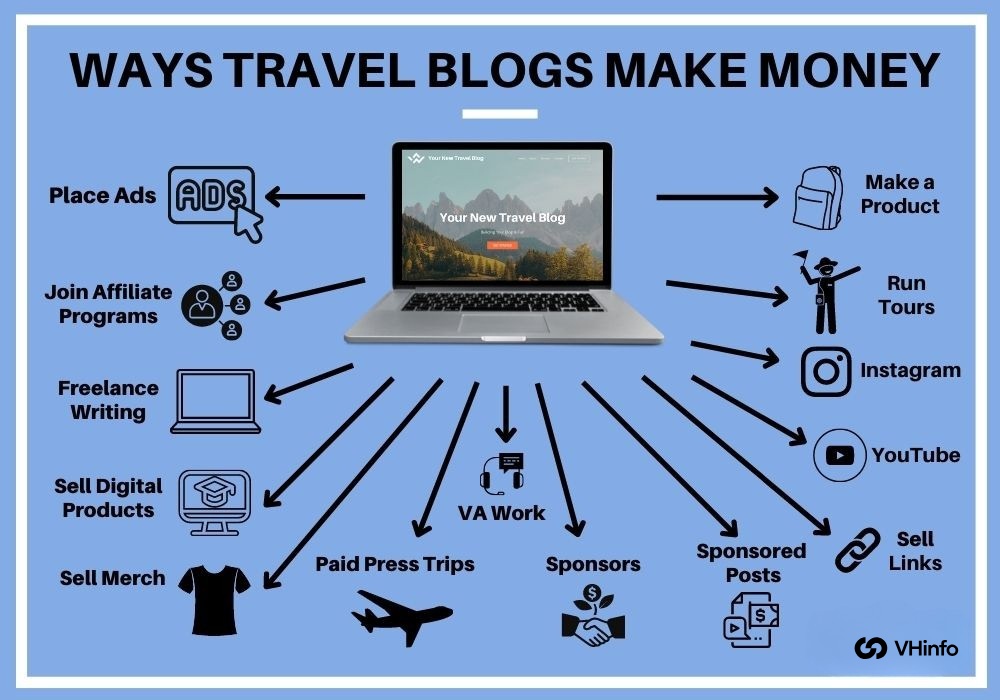
How Do I Monetize My Blog Traffic?

You can add links to other sites, show ads, or have paid posts in your blog.

Selling goods or services is also a good way to earn money. You can share these in your email newsletter too. Good content keeps readers interested. This leads to more clicks on your links and more views of your ads.

As traffic to your site goes up, you can make more money.

What Is Good Traffic For A New Blog?

For a new blog, getting 100 to 200 unique visitors each day is a good start. With good search engine help and quality content, you can grow to 500 to 1,000 daily visitors in a few months.

Checking your Google Analytics and Search Console data shows when you reach these goals. It also helps you improve your content plans.

Is It Hard To Get Blog Traffic?

Getting traffic to your blog takes time and work. You need to do keyword research first. Then, write blog posts that match what people are looking for. Quality backlinks are also important for your blog. Using free ways to get traffic helps a lot.

Social media can spread the word about your blog. Guest blogging lets you reach new readers, too. Email marketing is another great tool for this purpose. Over time, these smart ways add up. They help build steady traffic that comes naturally to your site.

What Metrics Should I Track to Measure Blog Success?

Key numbers to watch are pageviews and unique visitors. You should also track bounce rate and average time on a page.

You can find these numbers in Google Analytics. Use Google Search Console to check which search terms bring clicks. It is also smart to track email sign-ups from your list. Look at how many people buy products or join through affiliate links.

These numbers show what content works well. They will help you decide on your next steps.

Conclusion

Getting more blog traffic helps your SaaS business grow. You can use search engine tricks to improve your site. This means doing keyword research. It boosts your chances of showing up on Google search results. Sharing posts on social media is a good way to get views.

Building an email list helps, too. You can use email marketing without spending extra money. Guest posting and link-building earn quality backlinks. They also help your domain rank higher. Keep track of your website traffic in Google Analytics.

This tool shows you which content works best for you. Use free methods like online groups and Quora with paid ads for steady traffic.

Follow these simple steps to get more visitors, grow your email list, and reach your goals with VH Info’s expert tips.

Business Affirmations For Entreprenuers: Succeed, Lead & Grow

Running a business can bring many challenges. You may face setbacks, big goals, and negative thoughts. Positive statements can help change your thinking. They can lead you to success in your business.

In this article, we will explore what business affirmations are. We will also look at how they work. Small business owners and entrepreneurs can use these affirmations to build strength. They can boost motivation and help you feel worthy of success. VH-info is here to guide you.

We offer simple tips and positive affirmations for your business. These will attract abundance and growth to your company.

What Are Business Affirmations?

What Are Business Affirmations?

Business affirmations are simple, positive statements you repeat to help shift your mind away from negative thoughts.

Using positive and motivational affirmations related to success, such as “I make wise decisions for my business” or “I learn and develop each day,” helps condition your mind to trust in your own capabilities.

This method uses the law of attraction, directing your attention toward possibilities and solutions rather than obstacles.

Over time, repeating these affirmations strengthens your confidence, sharpens your thinking, and helps you notice chances for growth. As a result, you feel more motivated, make better decisions, and build a mindset that supports the success and resilience of your business.

The Science Behind Affirmations

Affirmations work by changing the connections in your brain. Each time you repeat a positive statement, you activate neural pathways that link that phrase to feelings of confidence and hope. Over time, these pathways grow stronger, and negative thoughts lose their hold.

For small business owners, saying things like “I make smart choices” every day helps the brain focus on success rather than worry. This shift in thinking makes business goals feel more real and reachable.

As your brain practices positivity, it becomes a magnet for good ideas and new opportunities. In simple terms, daily affirmations train your mind to see possibilities, reduce doubt, and guide you closer to your business dreams.

How Business Affirmations Work?

Every time you say a good phrase, you make your mind stronger. This helps you stay sure and calm. This easy habit cuts down on doubt about yourself. It also trains your mind to see what you have. You will worry less about what you don’t have.

As a business owner, using these good phrases can boost your mood. They can help you think more clearly each day. You will find it easier to make smart choices. You can guide your team with kindness, too. This will help you solve problems with calmness.

Over time, this practice of saying good things builds strong thoughts. It helps you face new challenges and stick to your goals. You will keep a positive mind ready for success.

How to Use Business Affirmations Effectively?

How to Use Business Affirmations Effectively?

Using affirmations takes simple steps. Make these practices part of your daily routine to keep positivity flowing.

Daily Practices For Success

  • Choose 3–5 positive business affirmations.
  • Speak them aloud each morning.
  • Visualize your business goals as real.

Daily practice cements positive statements in your mindset and primes you for success.

Integrating Affirmations Into Your Routine

  • While getting dressed, repeat a positive affirmation for leadership or productivity.
  • During breaks, silently affirm “I am worthy of success.”
  • At day’s end, write one line of gratitude or abundance.

This steady use of positive business affirmations builds resilience against setbacks and keeps negativity away.

Tracking Your Progress

Keep a simple journal. Write down the affirmations you used. Also, note how they made you feel. As time goes on, you will see patterns. You will notice which affirmations create the biggest changes in your mood and thoughts.

Benefits of Using Business Affirmations

Benefits of Using Business Affirmations

Using business affirmations often gives clear benefits. This is true for every entrepreneur and business owner.

  1. Improved Mindset and Motivation: Affirmations change bad thoughts about failure into good ones. This change helps raise your motivation. It also supports your push for business success.
  2. Enhanced Decision-Making Skills: A positive mind helps you trust yourself. It also helps you make better choices. You can choose wisely about your money, ads, and staff. These choices should match your business goals.
  3. Building Resilience in Business: Facing problems is part of being a business owner. Positive business sayings build strength. They help you recover quickly from hard times.

Top Business Affirmations

Top Business Affirmations

Below are targeted affirmations you can use in different areas of your business journey.

Affirmations For Business Success

  • I grow my business a little more each day.
  • I make good choices that help my business.
  • I learn from every step I take.
  • My business brings value to others.
  • I am proud of what I build.
  • Success comes to me through hard work.
  • I celebrate each small win.

Affirmations to Overcome Self-Doubt

  • I believe in my ideas.
  • I trust myself to do my best.
  • I am strong when things get hard.
  • I can handle any challenge.
  • I let go of negative thoughts.
  • I deserve to feel confident.
  • I grow braver every day.

Business Affirmations For Financial Abundance

  • Money flows to my business easily.
  • I deserve to earn more.
  • My business attracts new income.
  • I make smart money decisions.
  • I welcome growth and abundance.
  • Every sale brings me closer to my goals.
  • I handle my money with care.

Business Affirmations For Productivity & Time Management

  • I use my time in smart ways.
  • I finish one task at a time.
  • I plan my day with clear steps.
  • I stay focused until the job is done.
  • I balance work and rest easily.
  • I find simple ways to work faster.
  • I tackle big goals in small steps.

Business Affirmations For Leadership

  • I guide my team with kindness.
  • I listen to good ideas.
  • I help others do their best.
  • I share my vision.
  • I solve problems calmly.
  • I earn my team’s trust every day.
  • I lead by showing respect.

Business Affirmations For Adaptability

  • I welcome change with an open mind.
  • I learn new things quickly.
  • I turn setbacks into lessons.
  • I stay calm when plans shift.
  • I find fresh solutions easily.
  • I grow stronger when things change.
  • I stay flexible in my choices.

Business Affirmations For Creativity & Innovation

  • I think of new ideas each day.
  • I let my mind imagine big solutions.
  • Creativity flows through me.
  • I try different approaches.
  • I am open to unusual ideas.
  • I bring fresh energy to my projects.
  • I turn ideas into action.

Business Affirmations For Team Building

  • I welcome new team members with kindness.
  • I help my team share ideas.
  • We build trust by working together.
  • I support my teammates every day.
  • We solve problems as a team.
  • I value each person’s strength.
  • Together, we reach our goals.

Business Affirmations For Work-Life Balance

  • I give myself time to rest.
  • I enjoy work and free time equally.
  • I set clear times for work and play.
  • I take breaks when I need them.
  • I care for my health and spirit.
  • I come back to work feeling fresh.
  • Balance keeps me strong and happy.

Business Affirmations For Networking

  • I meet helpful people every day.
  • I share my story with confidence.
  • I listen with real interest.
  • I build friendly connections easily.
  • I give as much as I take.
  • Each conversation brings new ideas.
  • I grow my network with kindness.

Business Affirmations For Learning

  • I learn something new each day.
  • I ask questions without fear.
  • I grow smarter with every lesson.
  • I welcome feedback to improve.
  • I practice new skills with joy.
  • I turn mistakes into growth.
  • I keep an open mind at all times.

FAQ’s:

What is Affirmation in Business?

An affirmation in business is a kind of positive saying. You repeat this saying to help change your mind. It can help replace negative thoughts with good ones. This practice can also draw success to your business.

How Can Affirmations Impact Business Success?

Affirmations can help you feel more motivated. They also lower your self-doubt. This makes it easier to focus on your big goals. When you use affirmations, you can make better choices. This leads to better results for your business.

Why Are Affirmations Important For Female Entrepreneurs?

Female business owners often feel more stress. Positive affirmations help to build confidence and strength. They provide clarity when facing challenges. This support helps them take charge in their work.

Do You Already Have Affirmations As A Part Of Your Daily Routine?

Start with one or two simple, positive statements every morning. This will help you create a good habit. Over time, your mindset will get stronger.

Can Daily Affirmations Improve Your Productivity In Business?

Yes. Positive statements can boost your work and help you manage your time better. They keep your mind focused. This makes it easier to stay on task. They also help cut down on distractions.

What is the Best Time to Practice Business Affirmations?

Morning practice brings a good start to your day. It helps you feel positive and ready. You can say affirmations during breaks too. They are great before big meetings. This can help change how you think.

Conclusion

In your own business, problems will occur. But using positive words and business affirmations can help you keep going.

When a business owner says clear and kind words, their brain learns to change negative thoughts. This good thinking attracts more chances for business success. If you’re looking for further inspiration, consider these Small Business Quotes.

Small business owners who use daily affirmations feel more deserving of success. They also stay focused on their main goals and aims. The law of attraction shows that your mind can find new chances for growth when you think positively.

To truly Manifest Business Success, a positive mindset is key.

Over time, good business affirmations create a strong mindset. They boost your drive and help you through tough times with care. Remember, every positive affirmation brings you closer to your goals.

Make affirmations a part of your daily routine, and see how your goals become real. Consider also, How Much Does Having A Website Increase Business, as a strong online presence can greatly support your efforts.

Let VH-info’s tips guide you to turn simple words into real results in your journey as a business owner.

How Much Does Having A Website Increase Business Revenue? (Guide)

A strong online presence helps small business owners reach more potential customers and boost web traffic every day. Your website goes beyond social media or Google Business listings, giving you a 24/7 online storefront where internet users can learn about your products and services. With clear web design and search engine optimization, your pages rank higher in search results on search engines like Google.

For first-time visitors, an easy-to-use site with contact forms and live chat makes a positive customer experience. By sharing relevant content and using smart marketing strategies, your small business website guides people along the customer journey from browsing to online sales.

A well-built digital presence also builds trust, shows off customer reviews, and offers top-notch customer service. Start with a clear domain name and simple navigation, and watch how your website turns clicks into loyal customers.

Does My Business Need A Website?

Does My Business Need A Website?

Small business owners often ask: Why website is important for small business? The benefits of having a website for your business include:

  • Reach potential customers through search engines and online searches
  • Establish credibility with a professional business website
  • Generate referral traffic and web traffic from social media and online directories
  • Showcase services, products, customer reviews, and social proof
  • Provide live chat, contact forms, and a phone number for real-time customer service

Even a local business benefits: Google Business Profile and Google Maps listings link back to your website, driving foot traffic and online inquiries at any time.

How Much Does Having A Website Increase Business?

How Much Does Having A Website Increase Business?

Studies show small businesses with a website grow between 15% and 50% faster than those without one. Online businesses see:

  • 22% of retail sales are expected to occur online in 2024, indicating a massive opportunity for an online storefront
  • Businesses with websites grow sales 30% faster than brick-and-mortar-only competitors
  • A well-designed website can increase conversion rates by up to 94%

These numbers underscore that an effective website isn’t optional—it’s an excellent way to boost business growth, web traffic, and online sales.

The Impact Of A Website On Business Growth

The Impact Of A Website On Business Growth

  1. Increased Online Visibility and Reach: A website that is made for search engine optimization (SEO) ranks better in search results. This helps people find your business online. More than 90% of web traffic comes from organic search results. This shows why it is important to have an SEO-friendly layout and useful content on your web pages.
  2. Business Credibility and Professionalism: Almost 97% of people think a business’s website is more trustworthy than its social media pages. A good web design has a clear web address. It also shows the brand logo and contact details. These things build trust and show that the business is professional.
  3. Effective Marketing Efforts and Lead Generation: Your website is a central place for your marketing. It brings together email campaigns, social media, and paid ads. These tools help draw users to your landing pages. You can use chat features, contact forms, and other tools on your site. These help turn visitors into potential customers. They make it easier for people to buy from you and share their information.
  4. Showcasing Services and Products To Customers: A business website helps you show product lists and service details. You can also create landing pages and share customer reviews. Good images and videos are important too. They help keep clients interested and guide them. This improves the chances of making a sale. Having clear content is key to success. It leads to a better conversion rate overall.
  5. Enhancing Customer Engagement and Communication: Features like live chat and FAQ sections keep customers interested. Social media links also help to engage them. Regular updates, such as blog posts and email newsletters, create a good experience. This helps to keep loyal customers coming back. Adding social proof can also make them feel more connected.

Features To Consider When Building A Small Business Website

Features To Consider When Building A Small Business Website

  1. User Experience and Navigation: Easy navigation with clear menus helps users. Fast-loading pages also improve the user experience. Strong usability starts with a thoughtful web design strategy that maps navigation and content around how customers actually move through a site. Easy navigation with clear menus helps users. Fast-loading pages also improve the user experience. A simple structure allows visitors to find business details easily. This includes the address, phone number, and CSR policies. Users can find this information without getting frustrated.
  2. Mobile Responsiveness and Optimization: In 2024, 60% of online searches will be done on mobile devices. This makes mobile responsiveness very important. A responsive web design helps your site show up well on phones and tablets. It stops you from losing web traffic.
  3. SEO-Friendly Structure and Content: Use titles that have important keywords. Add meta tags and headings too. Organize your web pages in a clear way. Use H1 to H3 tags for better search results. Include links within your site to help visitors find their way. This will also make it easier for search engines to explore your site.
  4. On-Page Conversion Widgets: Use call-to-action buttons to guide your visitors. Add pop-ups for email marketing to grab attention. Countdown timers can create a sense of urgency. Exit-intent offers can help keep customers engaged. Widgets like live chat improve lead generation. They provide quick help to customers when they need it. This can lead to more sales and better service overall.

Key Ways A Website Boosts Business Success

Key Ways A Website Boosts Business Success

An effective website can help your business grow in many ways.

  1. Attracting New Customers Online: A strong online presence helps people find your small business. This happens through search engines and online searches. SEO-friendly pages and good content help as well. Your site will show up higher in search results. This brings in new customers who want your products or services.
  2. 24/7 Availability and Convenience: Your business website is always open. Internet users can visit your site at any time. A simple web design helps customers find what they need. Contact forms and live chat allow customers to ask questions. They can also make purchases even when your office is shut.
  3. Showcasing Products and Services: A business website helps you show product pictures, service info, and customer reviews all in one spot. You can use landing pages and helpful content to lead visitors. This makes it simple for them to learn about what you offer. It also makes it easy for them to buy online.

Real-World Examples and Case Studies

Small Businesses That Thrived With A Website

A.R.S. Video Inc., a Florida video production company, saw a big jump in relevant leads after working on its digital presence with an SEO focus.

Through effective web design, mobile-friendly layouts, and prominent call-to-action buttons, they facilitated potential customers’ ability to locate them via search engines and reach out for services. Additionally, insightful blog posts and landing pages established them as industry specialists, enhancing their online credibility and assisting new clients in initiating their customer journey directly on their website.

Social media channels and email marketing campaigns then drove traffic back to their pages, turning casual visitors into warm leads through smart marketing strategies like live chat and contact forms.

A local bakery in a crowded market used a mix of social media ads, SEO-friendly content, and engaging blog posts to build a strong online storefront. They added customer reviews, high-quality photos, and clear “Order Now” buttons on landing pages, which made the checkout process smooth for internet users. This blend of relevant content and simple navigation led to a 35% rise in revenues and welcomed many new customers who first found them through online searches and Google Business listings.

Their digital presence became an excellent way to showcase seasonal menus, share baking tips on blog posts, and keep loyal customers coming back with email marketing and social proof widgets.

Statistics On Website Impact

Seventy-one percent of small businesses now have a website, showing how important a strong online presence is for reaching potential clients. Businesses with their own website grow revenue 15–50% faster than those without one, proving an effective website is an excellent way to boost business growth and online sales.

Ninety-four percent of people judge a company’s credibility by its web design the first time they visit, so clear user experience and relevant content are key to a positive experience.

On average, websites get 375,773 unique views per month, offering huge marketing opportunities to attract new customers through search engines and smart digital marketing strategies like SEO and email marketing.

Common Website Mistakes To Avoid For Small Businesses

Common Website Mistakes To Avoid For Small Businesses

Many problems can hurt how well a small business website works.

  1. Not Having A Website At All: Having your website is very important. Without it, you lose a strong online presence. This means you miss out on potential customers. Many people search for services on Google and other search sites. If you only use social media or directories, it limits your web traffic. This can hurt your business growth. A website acts as your store that is open all day and night. It helps attract more customers to your business.
  2. Website That Works Poorly On Smartphone Or Tablet: If your web pages don’t load quickly or look good on phones or tablets, many users will leave. They may not see your products or services at all. A mobile-friendly design helps create a better experience for customers. It also helps improve your ranking in mobile search results.
  3. Key Business Information That Is Absent, Out-of-Date, or Hard to Find: A missing or old phone number can frustrate visitors. It may stop them from reaching out to you. A clear web design is very important. Up-to-date content also helps a lot. This includes business hours and location details. These elements guide potential clients easily. They help make the customer journey smooth and simple.
  4. Missing Clear Calls-to-Action (Web Visitors Don’t Know How to Take Next Steps): If you don’t have clear buttons for “Contact Us,” “Buy Now,” or “Get a Quote,” visitors may be lost. They won’t know what to do next. Adding simple tools and helpful content can change website visits into leads. This also helps increase online sales.
  5. Bad Content: Bad writing, unrelated topics, or too many hard words can push away readers. This can hurt your SEO. Use simple English in your writing. Include keywords that matter for your topic. Provide clear details about your services. This will help boost web traffic. It will also give value to potential customers.
  6. Stale Content (Failing to Update Your Website): An old blog or outdated product pages can make your site seem untrustworthy. This can turn visitors away. It is important to add new content often. You can include blog posts, customer reviews, and landing pages. Doing this helps with search engine optimization. It also keeps loyal customers interested.
  7. Doing Too Much: Too many offers, images, or pop-ups on your homepage can confuse visitors. This also slows down the speed of the page. It is important to focus on a simple web design. You should highlight your main services clearly. Additionally, guide users step by step on their journey. This will help make your website more effective.
  8. Ignoring Google Business Profile and Online Directory Listings: Not using Google Business Profile and local listings can lead to lost chances. You may miss out on local search results and map listings. When you connect your website to these tools, it improves your search visibility. This drives more local traffic to your site. It also helps new customers find your small business easily.

How to Maximize the Benefits of Your Website?

How to Maximize the Benefits of Your Website?

Optimizing For Search Engines (SEO)

Make your small business website easy for search engines. Use keywords in titles, headings, and text from the start.

Organize web pages with clear URLs and meta descriptions. Also, add internal links so search engines can explore every page. This helps show you in search results. Remember to speed up your site, too. You can do this by compressing images.

Use a mobile-friendly design as well. Fast sites often rank higher and keep visitors coming back.

Engaging Content and User Experience

Create simple and useful pages. Use clear headings and short paragraphs. This makes it easy for visitors to skim. They can find answers fast. Use pictures, videos, and bullet lists. These break up text and keep customers reading. Add live chat or contact forms on important pages.

This guides users through their journey. It also helps improve their experience. Regularly update your blog posts and landing pages. Use relevant content like how-to tips or customer reviews. Also, include product updates to keep visitors coming back.

Integrating Social Media and Marketing

Add social media buttons to your site. This will let visitors share your pages easily. It helps boost your online presence.

Link to your social media accounts and Google Business Profile. This can drive traffic from Facebook, Instagram, or Google Maps. It also builds trust in your business. Use email marketing tools to reach more people.

Consider using paid ads on social media, too. These ads should lead to special landing pages on your website. This joined marketing plan turns clicks into loyal customers who care about your brand.

Is A Website Worth The Investment?

Is A Website Worth The Investment?

A website is almost always worth the investment for small businesses. Even a simple site costing between $1,000 and $10,000 gives you a strong online presence that reaches potential customers through search engines and social media.

With clear web design and relevant content, your pages rank higher in search results, boosting web traffic and guiding visitors through the customer journey toward online sales.

Many businesses see revenue grow 15–50% faster once they have a website, and SEO efforts often deliver a return on investment well over 100% within the first year.

A website also works 24/7 as your digital storefront, offering contact forms, live chat, and helpful information to improve the customer experience. By integrating email marketing, landing pages, and on-page conversion widgets, you turn clicks into leads and loyal customers.

In simple terms, spending on a business website pays off through higher online sales, better marketing strategies, and ongoing business growth.

FAQ’s:

Does Having A Website Increase Business?

Yes. Small businesses with a website usually grow their revenue 15–50% faster than those without one. A good online presence helps customers find you easily. They can discover you through search engines and online searches.

This leads to more visitors to your site. Your website is always on, working 24/7 like a digital store. It has contact forms and live chat features. These tools help guide people during their shopping experience.

How Much Value Does A Website Add To A Business?

A good business website can increase revenue by 2.8 times. It does this by making the business easier to find online. This helps attract new customers through search results. A strong web design also makes a business look trustworthy.

75% of people decide if they can trust a business based on its website design. Additionally, websites provide marketing tools like landing pages and email marketing. These tools help create strong bonds with customers and lead to more sales.

How Much Does A Website Increase Sales For Your Business?

Online sales make up almost 19% of all trade in the U.S. This shows how important an online store is. E-commerce sites that have pages made for conversions can get 2.5–3% conversion rates. This means they turn visitors into buyers.

By showing products, customer reviews, and useful content, your site helps users buy at any time.

How Long Does It Typically Take To See An Increase In Revenue From A New Website?

Most small businesses see more web traffic and leads within 2 to 3 months. This happens after they launch a site that is good for SEO.

A full rise in revenue usually shows up in 6 to 12 months. This is true when you keep updating your content. It is also important to optimize for search engines. Using on-page tools can help guide visitors to buy.

Can A Website Still Generate Revenue For A Locally-Focused Business?

Yes. Local businesses gain from having a Google Business Profile. They also benefit from online directory listings that link to their site.

About 91% of customers go to a store after visiting its website. A site that works well on phones helps too. It should have local SEO and clear info like an address and phone number. This leads to more visitors and online questions.

Is Having A Business Website The Right Move For You?

If you want to find more customers, a website is key. It helps you build a strong online presence.

A good website can also increase your web traffic. Spending money on web design and SEO can bring good results. You may see growth of 15–50% faster than before. This can lead to better sales rates too. A business website is the first step to turn clicks into loyal buyers.

Conclusion

A business website is an excellent way to build a strong online presence and reach new customers through search engines and social media.

With clear web design, mobile responsiveness, and relevant content, your pages rank higher in search results and guide visitors through the customer journey. A well-built site works 24/7 as a digital storefront, using contact forms, live chat, and on-page conversion widgets to turn clicks into online sales.

Regular updates—like blog posts, landing pages, and customer reviews—keep your site fresh and boost web traffic. Integrating email marketing, SEO, and social media channels makes your marketing strategies even more effective.

Over time, a good website can grow revenue 15–50% faster and earn loyal customers.

Start with a clear domain name, simple navigation, and strong customer experience to watch your small business thrive online.

Why is SEO Important & Why Does it Matter For Your Business?

Search engine optimization is the best way to grow your online presence and reach potential customers. When people use a search engine like Google Search, they type a search query to find valuable information.

If your website content follows best practices, it can appear on the first page of organic search engine results. This boosts website traffic, organic traffic, and the bottom line of your company.

VH Info’s SEO team and Link Building tools make SEO efforts simple, clear, and effective.

In this article, you will learn the importance of SEO, the benefits of SEO, and the role of SEO in your marketing strategy.

What is SEO?

SEO

Search engine optimization means using tactics to improve organic rankings in search results.

Good SEO strategy includes keyword research, content marketing, link building, and technical seo. The goal is to match your web pages with the search intent of users and get organic search clicks. You can track performance in Google Analytics and Search Console.

A strong SEO strategy works alongside social media, search engine marketing, and other digital marketing efforts to reach your target audience and get more web traffic.

Next, we will look into how SEO works and how its basics can help you get better results.

How SEO Works?

How SEO Works?

  1. Keyword Analysis: First, you conduct keyword research to discover the terms your potential customers are searching for. As a SaaS link-building agency, VH Info uses its expertise and industry connections to guide your keyword analysis. We study competitor rankings, analyze real user search queries, and surface high-value, relevant keywords for your website content. Thorough keyword research drives targeted search traffic by aligning your new content with the exact phrases prospects use when seeking solutions.
  2. Backlink Building: Link building is about getting links from other sites. These links help improve your site’s authority and ranking. VH Info makes good content. Then, they contact blogs and magazines for guest posts. They also fix broken links. This helps with SEO success by bringing in traffic from other websites.
  3. Content Creation: Writing good content is very important for SEO. Each article or page must have relevant and fresh content. This helps cover topics in detail. You should use image alt text and clear headings. Also, include meta titles and meta descriptions. These help search engines understand your pages better. High-quality content meets user needs. It also boosts organic results.
  4. Technical SEO: Technical SEO makes your site work better for search engines. It helps them crawl and index your pages easily. This also improves how users feel about your site. Key parts of this are site speed, mobile use, and removing duplicate content. A fast and mobile-friendly site keeps visitors on your page longer. This lowers bounce rates. VH Info checks your site’s code, XML sitemap, and mobile use closely. They also help with local SEO setup and Google Business Profile. Good technical SEO supports all your link-building and content plans for the best results.

What Are The 5 Important Elements of SEO?

What Are The 5 Important Elements of SEO?

A good SEO strategy depends on five main things. These are Keywords, Content, Off-Page SEO, Local SEO, and Search Engine Marketing. Keywords are at the heart of the plan. The right keywords help people find your web pages.

Let’s now talk more about why keywords are so important for any search engine or SEO strategy.

  1. Keywords: Keywords are the words or phrases that people type into a search engine. This includes Google Search. Doing good keyword research helps you choose the best keywords for your website. It also helps match what users are searching for. Using these important keywords in titles, meta tags, and new content is key. This practice improves search rankings. It also brings more visitors to your web pages.
  2. Content: Quality content provides useful information. It answers questions that people search for. This helps keep readers on your site. You should write clear and relevant content. Adding image alt text and headings is important too. These elements are part of good SEO practices. New and fresh content tells search engines that your pages are active. This can help show your pages in search results. It boosts your online presence and raises brand awareness.
  3. Off-Page SEO: Off-page SEO includes link building and social media shares outside your site. Getting good backlinks from trusted sites improves your domain score. It also helps your site rank higher in search results. These SEO efforts bring in more visitors from other websites. They also help build brand name recognition. This support is key for your overall marketing plan.
  4. Local SEO: Local SEO helps customers near you find your business online. You can improve your local search by optimizing your Google Business Profile. Adding local search words is also important. Good reviews can help too. These steps increase your visibility in local searches. This leads to more foot traffic and phone calls. It turns online users into new customers. It also boosts your presence in local areas.
  5. Search Engine Marketing: Search engine marketing, or SEM, uses paid ads with SEO. This helps to get more space in search results. When you mix paid ads with organic results, it can raise website traffic. It also helps create more demand for your product or service. A good search plan shows the right keywords to use. It also helps in choosing the best marketing steps to reach your audience. This can improve your sales and profits.

Why Is SEO Important?

Why Is SEO Important?

SEO is important because of the following reasons:

Improved Search Engine Rankings

Getting your site to rank higher in search results is important. This means more people will see your pages. They will find you when they type a search in Google or other engines. Using the right words helps your site get better rankings.

If you follow good rules for search engine tips, your organic ranking will improve. Higher rankings lead to more visitors who seek useful information. This constant flow of visitors helps your online marketing work better. It also strengthens your presence on the internet.

Increased Website Traffic

Better organic rankings bring more clicks and visits to your web pages. Doing keyword research helps you find the right words.

This matches what users are searching for. It drives the right traffic to your site. More traffic means more people could become customers. They will explore your website and learn about your products or services.

This rise in organic visits boosts your marketing plan. It also helps build long-term brand awareness.

Search Visibility Drives Brand Awareness and Authority

When your site shows up at the top of search results, people notice your brand. They start to see you as an expert.

This happens again and again, which helps grow brand awareness. It also builds trust with your audience. High search visibility means users spot your business in search results and social media shares.

Over time, people know your website and good content as a helpful resource for information.

Your Competitors Are (Probably) Doing It

Most businesses put money into SEO work. This includes link building, content marketing, and technical SEO. They do this to get more search traffic. If you ignore SEO, you might lose your rankings. You may also fall behind in search results compared to your rivals.

To stay on top, keep up with best practices. Use fresh content and improve your meta descriptions. Also, update your image alt text to help you stay ahead. A strong SEO plan makes sure you don’t miss out on customers that your rivals might win over.

Better User Experience

SEO is not only about keywords. It also helps your site run faster. It makes navigation easier and improves mobile use. A quick and simple site with clear titles keeps users happy. It lowers bounce rates too.

Good technical SEO handles duplicate content well. It also works on site speed and mobile use. This helps your visitors stay longer on your site. When users like your site, they explore more pages. They are also likely to share your content and return later.

Higher Conversion Rates

SEO helps bring in visitors who are already looking for what you provide. They find your site by searching for related words.

When people find what they want on your pages, they are more likely to join, buy, or reach out to you. Good landing pages with clear steps can change searchers into new buyers.

By tracking results in Google Analytics and Search Console, you can see which SEO work gives the best value.

SEO Success Supports Other Marketing Efforts

Data from keyword research shows what topics your audience cares about. Google Analytics and search console also help with this. You can use these findings in your social media posts. They are useful for email campaigns and ads on search engines.

By focusing your digital marketing on strong keywords, you make each channel better. This joined-up method improves your whole marketing plan. It also maximizes the results you get from your efforts.

You Can Reach Prospects Throughout the Buying Journey

People search in different ways at each stage. They first look for information. Then they compare options. Finally, they make a decision. SEO helps you create new content and pages for each step. It targets what people want to find and relevant keywords.

At the start, you inform them with blog posts. Later, you can offer detailed guides or product pages. This strategy helps guide potential customers from their first clicks on search results to making a purchase. It builds trust and keeps them interested.

Keyword Research Makes You Aware of Market Trends

By looking at search traffic and what people search for, you can find new topics. You can also see what customers want. Tools for checking keywords help you know which words are searched more over time.

Manual checks in Google Search Console provide useful data too. This helps you make good content that fits what people need now. It also keeps you ahead of changes in your field. Staying aware of market trends helps your SEO work stay useful and strong.

SEO Results Are Quantifiable

Everything you do in SEO can be tracked. This includes rankings, traffic, click rates, and conversions.

Tools like Google Analytics help with this. They give clear reports on your website’s growth. You can see which keywords do well. This helps you show the value of SEO to others. It also helps you improve your SEO plan using real facts.

When you know what works, you can spend wisely on search engine optimization.

It Helps You Protect Your Brand

Ranking high for your brand name and main industry words stops others from taking your traffic.

If you hold top spots in search results, other sites cannot outrank you. This helps you get clicks on your site. A strong presence also stops low-quality or affiliate sites from misleading customers.

By keeping a strong SEO base with fresh content, good technical SEO, and smart link building, you protect your name. This helps grow your brand’s trust and power.

Why SEO For Business Should Be A Priority?

Why SEO For Business Should Be A Priority?

SEO is Earning A Significant Role in Business Marketing

SEO is an important part of digital marketing for any business. It helps bring visitors to your site without paying for ads.

When you use a good SEO plan and do proper keyword research, your web traffic can grow over time. This steady flow of visitors improves your online presence. It also helps you reach more possible customers.

As businesses notice better organic rankings, they see increased website traffic. This leads them to spend more on SEO. They do this to support their overall marketing plan.

Quality Content is Needed For SEO

Creating good content means writing clear and helpful articles. These should answer what people search for online. Good content marketing uses relevant information along with new ideas. It also includes image alt text so search engines can find your pages.

Fresh and useful content helps keep readers on your site longer. This improves their experience and encourages them to share on social media. Quality content is the base of successful SEO work. It also helps build long-lasting brand awareness.

  • Content Quality: Content quality means providing true value in clear words. Each page needs the right words in titles, headings, and meta tags. This helps search engines find your site for user questions. You should avoid copying content by making every article unique and specific. Good website content brings in natural traffic and builds trust. This can change visits into leads or new customers.
  • Content Relevance: Content relevance is about matching what users want to learn or buy. You should use keyword analysis. This helps you find the exact phrases people type in Google Search and other search engines. Write about topics that help your target audience. Naturally, use relevant keywords. When your content matches what people are searching for, it ranks higher in search results. This drives more traffic from searches. It also supports all your marketing efforts.

The Role of SEO in Business Growth

The Role of SEO in Business Growth

Building Brand Awareness

When your website ranks high in search engine results, more people see your brand name every time they run a search query in Google Search or another search engine.

This repeated exposure in both organic search engine results and on social media makes your company familiar and trusted.

Clear website content, proper meta descriptions, and consistent use of relevant keywords help you appear on the first page of organic search, boosting brand awareness and making your business the go-to choice for information and solutions.

Gaining A Competitive Edge

Most businesses want the same search traffic. A strong SEO plan helps you stand out from others. You can do this by doing good keyword research. Then, publish quality content that matches what people are looking for. This attracts more visitors than your rivals do.

Good link building is also key to success. Strong technical SEO is important too. This means having a fast site and making it easy to use on mobile devices. These things help raise your organic rankings above others.

When potential customers search, they will find your site first. This gives you an edge in getting clicks and leads.

Long-Term Online Visibility

Paid ads stop when you pause your budget. But SEO keeps working every day. Each new piece of content helps. Each faster page also helps. Every link you earn adds to your site’s reach in search results.

Over time, your site gains trust with search engines. This means you get visitors without more ad costs. This steady growth helps your marketing plans. It also protects your brand name. You will stay visible to possible customers for years ahead.

The Role of SEO in Digital Marketing

The Role of SEO in Digital Marketing

SEO is like the backbone of online marketing. It helps people find your website on Google and other search sites.

By using the right words, good content, and strong links, SEO brings free traffic. This means you don’t pay for every click. It works well with social media and paid ads to make your plan better.

Good technical SEO includes fast site speed, mobile friendliness, and clear meta tags. These things improve user experience and keep visitors on your site longer.

Data from Google Analytics and Search Console shows what content works best.

This guides your online posts and social media updates. With smart SEO work, you build brand awareness and boost your online presence. It supports all your marketing in a cost-effective way that lasts.

Should I Have An SEO Strategy?

Should I Have An SEO Strategy?

Yes. An SEO plan gives your business a clear path to follow. It helps you use keyword research, good content, and tech SEO. This can boost your site traffic and online presence.

With a plan in place, you know which keywords to focus on for your website content. This improves your search results and brings in more potential customers. A strong plan also covers link building, local SEO, and meta tags. These help build brand awareness and trust.

By checking results in Google Analytics and Search Console, you can find out what works best. You can then change your marketing plan as needed. This keeps your site traffic steady and helps other digital marketing efforts, too. It also helps you stay ahead of the competition.

With an SEO plan, your marketing becomes targeted and cost-effective. It is also easier to measure success, leading to a better user experience and growth over time.

How SEO Can Boost Your Business?

How SEO Can Boost Your Business?

Build Trust With Your Customers

When your website shows up at the top of search results, people view your brand as an expert. High rankings on Google Search show trust and make visitors more likely to click.

By using good content, clear descriptions, and correct text for images, you show customers that you care. This builds trust and leads to repeat visits. It also encourages recommendations, which makes your online presence even stronger.

Improve User Experience

Good technical SEO helps your site load fast on computers and phones. This gives users a smooth time when browsing. Clear navigation and well-made website content make it easy for people to find answers. Logical headings guide them when they type in a search query.

A fast and easy site lowers bounce rates. This keeps visitors interested, which boosts your site’s organic search views. A better user experience leads to happier visitors. Happy visitors are more likely to check out other pages and share your content.

Increase Lead Generation

SEO helps get free traffic from users who are looking for answers. They use keywords to find what they need.

When you match their searches with good landing pages, more visitors will sign up or ask for info. Good calls-to-action in your new content can change casual readers into possible buyers.

By checking conversions in Google Analytics and Search Console, you can see which SEO work brings the most leads. This way, you can improve your SEO plan for even better results.

How SEO Helps Your Business Beat The Competition?

How SEO Helps Your Business Beat The Competition?

When you use smart SEO, your site can rank higher in search results. This means more people will click on your pages.

By picking the right keywords and watching how users act, you can make your website fit what people want. This gives you a clear edge over rivals who do not get it right. Getting quality backlinks from trusted sites helps boost your domain’s authority.

This makes search engines prefer your pages over others. A fast and mobile-friendly site with easy-to-read meta descriptions keeps visitors happy. Clear image alt text also helps keep people engaged.

In contrast, slower competitor sites lose traffic quickly. Regular keyword research helps find new market trends before others notice them. This lets you post fresh and relevant content that attracts more organic traffic. Insights from Google Analytics and Search Console show which SEO efforts work best for you. This way, you can improve your strategy faster than your rivals can.

Overall, steady SEO work builds strong brand awareness and protects your top spots in search results. This keeps you ahead in a busy market.

Conclusion

SEO is important because it helps your business grow. It boosts your presence online and reaches more customers. This happens through organic search. A clear SEO plan uses keyword research, quality content, and link building. It also includes technical SEO.

With this strategy, your site shows up on the first page of search results. This drives more traffic to your website. Stronger search visibility builds brand awareness and trust. It also gives you an edge over competitors.

A better user experience leads to higher conversion rates. This comes from fast site speed and clear descriptions of pages. Relevant content is also key for success. SEO helps social media and marketing efforts, too. It shows what topics matter to your audience.
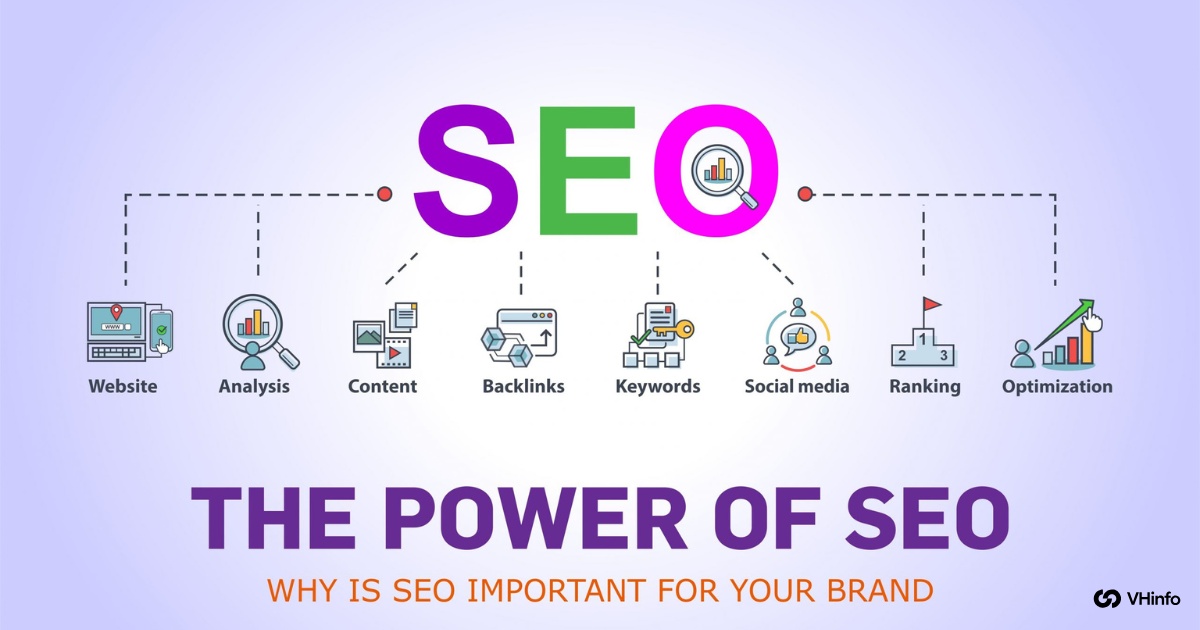
Tools like Google Analytics help track your SEO success easily. You can protect your brand from competitors and keep improving your strategy. In simple words, good SEO is the best way to grow your SaaS business and improve profits steadily.

SEO Friendly Website: Fast Guide For Better Google Search Results

Creating an SEO friendly website helps your site show up higher in Google search results and brings more organic traffic.

A clear URL structure and well-written title tags make it easy for search engine crawlers to find your pages. Fast page speed and mobile-ready design ensure a good user experience on all mobile devices and computers.

Using relevant keywords in your content, meta description, and anchor text helps you reach the right target audience. Simple internal linking lets visitors explore your site’s pages and stay longer.
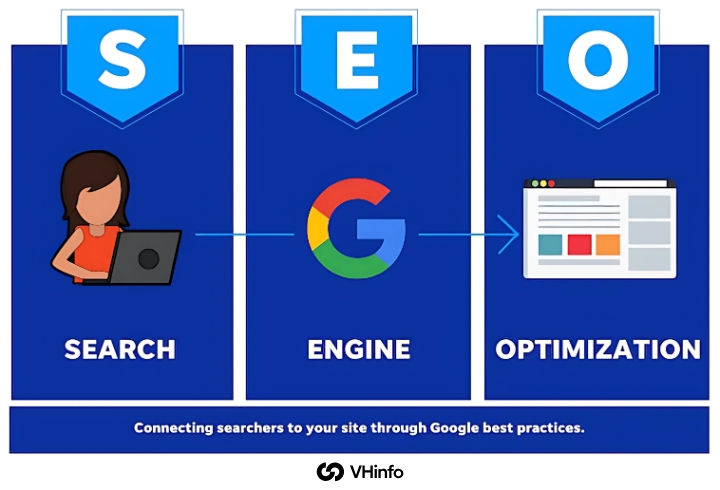
With basic keyword research, you can write helpful content that matches what people search for. This guide uses clear steps so anyone can build a strong, search engine optimization site and grow website traffic.

What Is An SEO Friendly Website?

What Is An SEO Friendly Website?

An SEO friendly website is one built so both people and search engine crawlers can find and read its site navigation, URL structure, and site’s content easily. It uses clear title tags, a simple meta description, and relevant keywords that match what people type in Google search.

Pages load quickly thanks to good page speed, and they work well on mobile devices and computers for a smooth user experience.
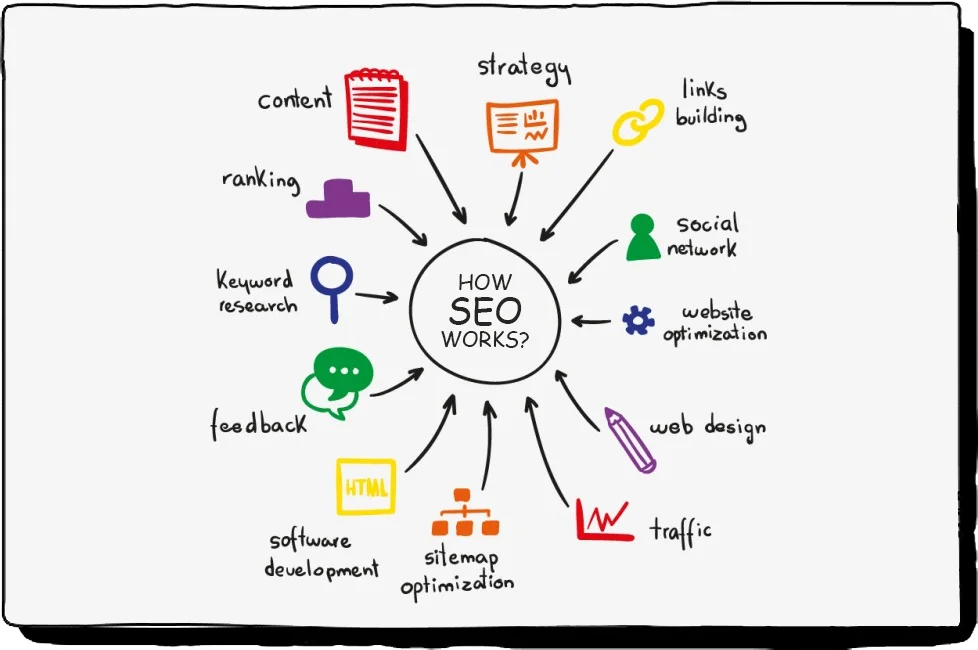
Adding helpful links within the site is important. Clear text for these links helps visitors. This way, they can explore the site more easily. When visitors stay longer, it is good for your site.

All these steps help your site show higher in search results. This can bring in more traffic to your site.

Why Having An SEO-Friendly Website Is Important?

Why Having An SEO-Friendly Website Is Important?

An SEO-friendly website helps increase your site traffic without spending on ads. It does this by ranking higher in Google searches.

A clear URL and fast page load keep users happy. When users are happy, they stay longer on your site. This improves the overall user experience. If your content uses the right keywords, it matches what people search for. This way, you reach the right audience easily.
Tools like Google Search Console and PageSpeed Insights help find issues on your site. They also help you fix these problems to improve SEO performance. With good SEO, your site builds trust and shows up in more search results. This means you get steady organic traffic over time.
Why Do Companies Need An SEO-Friendly Website?

Why Do Companies Need An SEO-Friendly Website?

  1. Ensures customers find your site in organic search, not a competitor’s.
  2. Clear website structure and strong search engine optimization boost visibility in Google search results.
  3. Fast page speed and mobile-friendly design provide a smooth user experience, encouraging exploration of products or services.
  4. Keyword research and use of relevant keywords in title tags, meta descriptions, and anchor text align your site with what your target audience searches for.
  5. Continuous SEO monitoring with tools like Google Analytics tracks website traffic, enhances SEO performance, and grows brand visibility.

Key Elements of an SEO Friendly Website

Key Elements of an SEO Friendly Website

There are a few important parts that help to make an SEO friendly website.

  1. Mobile Optimization: Mobile optimization means your web pages adjust to fit on mobile devices, like phones and tablets, so people can read and click easily. A mobile-ready site uses responsive website design and passes the mobile usability report in Google Search Console. This makes a great user experience and helps your site rank higher in Google search results.
  2. Fast Loading Speed: Fast loading speed means your web pages open quickly when someone clicks a link. You can improve page speed by compressing images, using caching, and cleaning up the site’s code. A fast site keeps visitors happy, lowers bounce rates, and boosts search engine rankings in organic search.
  3. Clean URL Structure: A clean URL structure uses short, clear addresses with relevant keywords separated by dashes (for example, vh-info.com/seo-friendly-website). This simple URL structure helps search engine crawlers and people understand each page’s topic. Clean URLs improve seo performance and make your site easier to navigate.

How to Make an SEO-Friendly Website?

How to Make an SEO-Friendly Website?

The best way to get a SEO friendly website is to use SEO tips often and in the right way.

Use Keywords Throughout Your Content

Choose the right keywords from your research. Place them naturally in your site’s content. This includes paragraphs and lists. Do not stuff keywords into your text. Focus on the words that your target audience types into Google.

Use these keywords in your main text, title tags, and meta description. This helps search engine crawlers understand each page’s topic. It also improves search engine rankings for your site.

Use Header Tags

Break your content into parts using H1, H2, and H3 tags. This shows the order of ideas. Headers help readers and search engines look at your web pages easily. Use important keywords in your headers to boost SEO results.

A good header setup also makes it easier for users. It helps match what people are searching for.

Have A Clean URL Structure

Make short, clear URLs using small letters and dashes. For example, use vh-info.com/seo-friendly-website.

Add one or two keywords to show what the page is about. A clean URL structure makes it easier for people to navigate your site. It also helps search engine tools find and index your pages. Good URLs make your links better for sharing on social media.

Include Keyword-Rich Anchor Text in Your Links

When you link pages, use clear anchor text. This text should have target keywords in it. It helps visitors know what the linked page is about. It also helps search engine crawlers understand the link.

Good internal linking shares authority across your site’s key pages. It keeps users looking around your site longer. This method helps make a strong site structure. It can lead to better organic traffic to your website.

Make Sure The Website Is Mobile-Friendly

Use a design that adapts to all screens. This way, the pages work well on mobile devices and tablets.

Check your site using the mobile usability report in Google Search Console. This helps you find and fix any problems. A site that works well on phones gives users a good experience.

It also helps improve your search engine rankings. This is important for Google’s mobile-first indexing.

Optimize Images

You should compress images to make your page load faster. Use clear file names and alt text that have the right keywords.

Tools such as PageSpeed Insights can help you find which images need to be resized. When images are optimized well, they can rank in Google Images. They will also load more quickly on your site. This helps your site work better and improves your SEO performance.

Make Sure Your Web Pages Load Fast

You can make your page load faster by minifying CSS and JavaScript. You should also enable browser caching.

Choosing a fast hosting provider is important too. Fast web pages lower bounce rates. They improve user experience on both desktop and mobile devices. Use PageSpeed Insights to check your speed. Google Analytics can help you find and fix slow pages.

Use Social Media to Promote Your Content

Share new articles, product pages, and guides on sites like Facebook and Twitter. This helps to bring in more visitors.

Posts that are interesting and include a link to your site can help with SEO. They increase visibility and create chances for backlinks. Social signals can help boost search engine ranking by bringing in more traffic to your site.

Use Google Tools

You should set up Google Search Console and Google Analytics. These tools help track your SEO performance and website traffic. You can submit your sitemap. Then, check for crawl errors, duplicate content, and mobile usability issues.

These tools give useful tips on fixing problems. They also help to improve your search engine rankings over time.

Clean Up and Organize The Site Code

Remove extra CSS and JavaScript. Keep your HTML neat for faster crawling by search engine robots.

A clean technical SEO setup helps a lot. Use proper schema markup and ensure there are no broken scripts. This will boost your site’s performance. Clean code is easier to keep up with and change. It supports your long-term SEO plans.

Add Internal Links

You should link to other important pages on your site. Use natural anchor text for this. It helps guide users and bots through your site. Internal links spread page power and make your site easier to use.

This method increases organic traffic. It encourages visitors to look at more relevant content.

Optimize The Title Tags and Meta Descriptions

Write unique title tags that are less than 60 characters. Also, create meta descriptions that are under 160 characters. These should include your target keywords. Clear and catchy titles can boost your click-through rate on Google.

Good descriptions also help search engines know what each page is about. This helps them match the search intent of users.

Use Images and Videos to Enhance the Content

Add pictures and videos to make your pages more fun. They help show important points clearly.

Include alt text with good keywords for images. Use clear captions for videos too. Visual content can keep people on your page longer. It can also lower bounce rates and make user experience better. All of these things can help your site rank higher on search engines.

Update Your Content Regularly

You should refresh old articles and add new content. This should be based on recent keyword research and search intent.

Regular updates show Google that your site is active and important. Keeping your site’s content fresh helps keep strong organic traffic. It also supports better SEO performance. Most importantly, it gives valuable insights to your audience.

SEO-Friendly Website Checklist

SEO-Friendly Website Checklist

Making a clear checklist helps your site follow SEO best practices. This can help your website show up higher in search results.

Make Your Website Technically Sound

Making your website work well means fixing problems that can harm your search engine rank.

Start by checking your page speed. Use tools like PageSpeed Insights to see if your pages load fast. This is important for both desktop and mobile users. Fix broken links and 404 errors. These issues create a bad user experience and waste crawl budget. Use schema markup to help search engine bots understand what your site has on it. Check that your URL structure is clean and has the right keywords.

Most importantly, run regular SEO audits. Doing this helps you find issues like duplicate content, missing meta tags, and crawl errors before they hurt your SEO results.

Set Up Google Search Console

Google Search Console is a free tool. It helps you track how your site does in Google search results.

First, visit the Google Search Console website. Sign in with your Google account. Then, add your site as a property. You do this by entering your domain name. Next, verify ownership using an HTML meta tag, file upload, or DNS record.

After verification, you can submit your sitemap. You can also track website traffic and see which keywords bring visitors. This tool helps you fix crawl errors, too.

Google Search Console shows the mobile usability report and page speed insights data. This information helps improve user experience on your site. The tool gives you useful insights into organic traffic. It also helps you make better SEO choices for your target audience.

Set Up Bing Webmaster Tools

Bing Webmaster Tools is similar to Google Search Console. It helps with Bing search results. You can visit the Bing Webmaster Tools site to create an account. Use your Microsoft, Google, or Facebook login for this.

After that, you should add your site by entering the URL. You can also import directly from Google Search Console.

To verify ownership, upload an XML file to your main folder. Another way is by adding a meta tag to your homepage. You can also use DNS verification for this task. Once everything is set up, submit your sitemap easily. You can also see which keywords rank on Bing.

Check backlinks and get alerts about site issues, too. Although Bing has a smaller market share than Google, it still brings good traffic. It helps you have different sources of website traffic beyond just Google.

Set Up Ahrefs Webmaster Tools

Ahrefs Webmaster Tools is a free site. It gives strong SEO tools for checking your SEO results.

To start, go to the Ahrefs webmaster tools website. There, you can sign up for a free account. You can bring in sites from Google Search Console easily. You can also add them by typing your domain name.

To prove ownership, use an HTML file upload, a meta tag, or DNS verification. After you set it up, you will see site audit features. These checks for tech SEO problems and give keyword research data. This data shows which keywords you rank for and helps with backlinks analysis.

It also gives estimates of organic traffic to your site. The tool helps find issues like broken links and duplicate content. It will also show missing title tags that hurt your search engine ranks. Use these helpful insights to improve your website’s layout and SEO plans.

Create and Submit A Sitemap

A sitemap is a file that shows all the key pages on your site. This helps search engines find them. Most website builders can create sitemaps by themselves. You can also use online tools for sites with less than 500 pages.

The sitemap should only have pages you want to show up in searches. Do not include redirects, broken links, or any pages blocked by robots.txt. Name the file “sitemap.xml” and put it in your site’s main folder.

Next, submit it through Google Search Console and Bing Webmaster Tools. This will help search engines find your new content faster. You can also add the sitemap link to your robots.txt file like this: “Sitemap: https://yoursite.com/sitemap.xml“.

Updating your sitemap often helps keep good search visibility and boosts your content plan.

Create A Robots.txt File

A robots.txt file shows search engine bots which parts of your site they can see. It also tells them which to skip.

To create this file, make a plain text file and name it “robots.txt.” Place it in the main folder of your website. Use easy commands like “User-agent: *” for all bots. You can also use “Disallow: /private/” to block a folder.

Use “Allow: /public/” to let specific paths be accessed. Don’t forget to add your sitemap link with “Sitemap: https://yoursite.com/sitemap.xml.”

Be careful not to block important pages by mistake. Test your robots.txt file using Google Search Console. Good robots.txt habits help search engine bots focus on your best content. They also keep sensitive areas safe and improve SEO performance.

Make Sure Your Website Is Indexable

Making your website indexable means ensuring search engines can find, crawl, and add your web pages to their database.

Check that important pages don’t have “noindex” tags that prevent indexing. Make sure your site navigation and internal linking help crawlers discover all pages. Remove barriers like required logins, broken internal links, or pages only accessible through forms.

Use Google Search Console to monitor which pages are indexed and fix any crawl errors. Submit new web pages for indexing using the URL inspection tool when you publish new content. Keep your website structure simple and logical so search engine crawlers can easily follow links between pages. Good indexability ensures your quality content appears in search results and drives organic traffic to your site.

Make Sure Your Website Is Accessible At Only One Domain

Having your site accessible at both www and non-www can cause problems. It may create duplicate content issues. This also splits your search engine rankings. Choose either www or non-www as your main domain name. Then, redirect the other version using 301 redirects.

For redirecting from www to non-www, add rules in your .htaccess file. You can also use your hosting control panel for this.

This process helps search engines know which version is the main one. It prevents losing organic traffic across multiple URLs. The redirect also makes it easier for users.

Visitors will always land on the same version of your site. This happens no matter how they type your domain name. Use Google Search Console to set your preferred domain. You can also monitor that the redirects work well.

Consistent usage of your domain helps improve SEO performance. It also helps gather website traffic signals effectively.

Make Your Website Search-Focused

A website focused on search should have an internal search tool. This tool helps visitors find what they need fast when navigation is hard. You should place a clear search box in your header. Label it with the word “Search” and add a magnifying glass icon.

Make the search field the right size. It should be long enough for usual queries but not too big to take over the page. Think about adding suggestions and autocomplete options. These features help users refine their searches.

Design the search results pages with clean layouts. Show the most relevant content at the top of these pages.

For online stores, add filters and sorting options. This helps users narrow down product choices easily.

A good internal search boosts user experience and keeps visitors engaged with your site’s content. This can also help your search engine ranking by increasing time on site and page views.

Common Mistakes To Avoid

  1. Ignoring Mobile Users: Many people use mobile devices like phones and tablets to browse the web. If your site is not mobile-friendly, pages can look cramped or buttons too small, hurting user experience. Google’s mobile usability report will show errors, and fixing them can boost your search engine rankings. A responsive website design ensures a smooth visit on all screens, keeping organic traffic high.
  2. Duplicate Content Issues: When two or more pages have the same text, it creates duplicate content, confusing search engine crawlers about which page to show. This can lower your search engine optimization score and split organic traffic between pages. Use unique meta descriptions and rewrite content so each page covers different topics. Tools like Google Search Console and site audit features in SEO tools can spot these issues.
  3. Broken Links: A broken link happens when a link leads to a missing page, causing a 404 error and a poor user experience. Broken links waste crawl budget and can hurt your SEO performance in organic search. Regularly run a link checker or use Google Analytics to find 404 pages and fix or remove those links. Keeping all internal linking working ensures visitors and search engine crawlers can navigate your website structure smoothly.

Best Practices For Maintaining An SEO Friendly Website

Best Practices For Maintaining An SEO Friendly Website

  1. Regular Content Updates: Adding new content and refreshing old posts keeps your site’s relevant content fresh for both readers and search engine crawlers. Update pages every few months with new facts, images, or examples to match search intent. This signals to Google that your site’s content is active and can boost organic traffic through improved search engine rankings.
  2. Monitor Website Performance: Use tools like Google Analytics, PageSpeed Insights, and Google Search Console to track your site’s performance. Check page speed, bounce rates, and which relevant keywords bring the most visitors. Fix issues such as slow loading or crawl errors to improve user experience and maintain strong SEO performance. Regular monitoring ensures your website structure stays healthy and efficient.
  3. Keep Up With SEO Trends: SEO rules change often, so stay informed by following blogs, SEO tools updates, and Google’s announcements. Learn about new ranking factors like AI content analysis or Core Web Vitals, and adjust your technical SEO and content strategy accordingly. Testing new ideas—such as updated schema markup or video content—helps your site stay competitive in organic search. Regularly reviewing trends ensures your search engine optimization efforts deliver long-term success.

SEO Friendly Website Example

SEO Friendly Website Example

An SEO friendly website example is VH Info’s homepage at vh-info.com. It uses a clear URL structure like vh-info.com/seo-friendly-website so both people and search engine crawlers know what each page is about.

The site loads fast thanks to compressed images and clean code, boosting page speed and keeping users happy on mobile devices and desktops. Its title tags and meta descriptions include relevant keywords such as “seo friendly website” and “organic traffic,” which helps it rank higher in Google search results.

Internal linking uses keyword-rich anchor text to guide visitors to important pages. The design is mobile-friendly and passes the mobile usability report in Google Search Console, ensuring a smooth user experience.

Alt text and descriptive file names on images help Google Images index visuals, giving the site an additional SEO boost.

FAQ’s:

What Makes A Website SEO Friendly?

A website is SEO friendly when it has a clear URL. It should have a fast page speed.

Proper title tags and meta descriptions must include relevant keywords. The site needs to give a smooth user experience on desktop and mobile. This helps search engines find and list the content easily. Good internal links are important too.

Quality content that fits what people are searching for can boost traffic. It also helps improve how high the site ranks on search engines.

How Does Mobile Responsiveness Affect SEO?

Mobile responsiveness means that a website’s design changes to fit screens on phones and tablets. Google uses mobile-first indexing. This means that pages that are friendly to mobile rank higher in search results. A responsive design is important for user experience. It lowers bounce rates and keeps users on the site longer. This leads to more organic traffic from people using mobile devices.

Why is HTTPS Important For An SEO-Friendly Website?

HTTPS keeps data safe between a user’s browser and the website. It helps protect private information.

Google likes secure sites in its search results. So, using HTTPS can improve your SEO score. It also helps build trust with your audience. This trust makes them stay longer and look at more pages.

What Are The Best Practices For URL Structuring?

Use short and clear URLs. Use lowercase letters and dashes to split words (e.g., vh-info.com/seo-friendly-website). Make sure to add keywords that fit the page’s topic. Stay away from extra symbols or codes.

A clean URL structure helps search engines and users. It shows what each page is about. This can boost your site’s visibility in search results.

How Often Should Website Content Be Updated For SEO?

You should update key pages every 3 to 6 months. It is also good to add new content often. Keeping your content fresh helps keep the information up to date. This matches how search needs change over time. New and quality content shows search engines that your site is active. This can help keep or boost your rankings in search results. It also brings steady traffic from organic searches.

Conclusion

Building a website that is good for SEO starts with a clear URL structure. It also needs to have a fast page speed.

A mobile-ready design is vital for a smooth user experience. This should work well on all mobile devices and desktops. Using the right keywords in your title tags helps too. Adding them in the meta description also helps.

Good anchor text aids search engine crawlers in finding your pages. This can help rank your pages higher in search results.

Regular keyword research is important. Fresh quality content keeps your site aligned with what users want. It also attracts the right audience to your site. Tools like Google Search Console and PageSpeed Insights give helpful insights.

They help you monitor SEO performance and fix issues like duplicate content. You can also find and solve slow load times.

Simple internal linking strengthens your website’s structure. Proper schema markup guides visitors through key pages on your site, too. Don’t forget to set up a robots.txt file, submit a sitemap, and make sure Google and Bing can index your site.

User Intent SEO: How to Identify & Optimize for Best Rankings

User intent SEO means matching what someone types into a search engine with the right web pages. When people enter a search query, they show a goal, like finding information, visiting a specific website, buying a product, or comparing options.

Knowing user intent or search intent lets you create content that answers that specific question.

Informational intent pages teach or explain, while transactional intent pages help people buy or act. Navigational intent helps users reach a particular site, and commercial intent guides them in choosing between products.

Using keyword research helps you see what people are looking for. It also helps you understand the search intent of your audience. When you focus on what users want, you can rank higher in search results. This can help you get more traffic to your site.

What Is User Intent In SEO?

What Is User Intent In SEO?

User intent, also called search intent, means the reason behind a user’s search query. It guides the search engine to show relevant results.

When you align your content to user search intent, you increase the chances of ranking on the first result. People use specific words—called keyword modifiers—to show their intent.

For example, “how to write blog posts” shows informational intent, while “buy blue widget online” shows transactional intent.

What Influences User Intent?

What Influences User Intent?

User intent depends on:

  • Search Terms: Words like “best,” “how,” or “buy” indicate different intents.
  • Search Engine Results: The mix of web pages, product pages, featured snippets, and social media links influences what people click.
  • User Behavior: Past clicks, time on page, and bounce rate help refine search results.
  • Content Format: Videos, opinion pieces, landing pages, FAQ pages, and blog posts all serve different user needs.

Importance of User Intent in Search Rankings

Importance of User Intent in Search Rankings

When you match user intent in SEO, search engines see your pages as helpful. This helps show them higher in search results.

When your content answers a person’s search intent, they stay longer and click more. Search intent can be informational, transactional, navigational, or commercial. Using keyword research is key to finding the right intent for your audience.

You should also check SERP features. Clear content that matches user intent can earn a featured snippet. Higher rankings bring more traffic to your site. This improves user experience and makes your content better. It helps build trust with readers, too.

Types of User Intent

Types of User Intent

There are four main types of user intent that you need to think about in SEO.

Informational Intent

Informational intent means a user wants to learn or find an answer. They use search words like “how,” “what is,” or “tips.” These words are common in Google Search or other search tools. This kind of search shows they need facts or details.

To help them, you can create blog posts, guides, or FAQ pages. Using keyword research helps you find the right informational keywords. You can match your content format to these searches. Meeting informational intent can boost traffic and improve user experience.

Navigational Intent

Navigational intent occurs when a user wants to find a particular website or web page.

They may type a brand name, such as “VH Info,” into the search box. They might also enter a product page title. This intent helps them go directly to the landing page or a special part of a site. You can improve meta descriptions and content plans to help users visit your site fast.

Clear content that focuses on navigation reduces bounce rate. It also meets the user’s search needs.

Transactional Intent

Transactional intent means a user wants to buy or do something. This can be actions like “order,” “download,” or “subscribe.”

These types of search words tell you to make product pages or landing pages. It is important to have clear buttons that ask users to take action. You can use keyword research tools to find these words.

An example is “buy link building tool.” When you match transactional intent, it helps guide users through the sales process. This can lead to more sales and more visitors from search engines.

Commercial Investigation Intent

Commercial investigation intent means users are comparing choices before they buy.

They search for terms like “best SaaS tools 2025” or “top link building services.” You can meet this intent by making comparison guides. You can also create reviews or case studies for product pages and blog posts.

Looking at SERP features shows if featured snippets or opinion pieces are best. Serving this type of intent helps build trust with your audience. It guides them toward making a purchase.

How to Identify User Intent?

How to Identify User Intent?

Finding out user intent starts with good keyword research.

  1. Analyzing Search Queries: Start by listing words that your audience may type in Google Search or other search tools. Use keyword tools to check which search terms are popular. Look for terms that match what users want. This will help you find the best keywords for different needs. These needs include looking for information or making a purchase, and more.
  2. Using Keyword Research Tools: You can use tools like Google Analytics, Ahrefs, or SEMrush. These tools help you check keyword metrics. They show search volume for different keywords. You can also see keyword modifiers and related terms. This helps you find user intent patterns easily.
  3. Reviewing SERP Features and Results: Type your main keyword into a search engine. Look at the SERP features that show up. These can include featured snippets, “people also ask,” image packs, or maps. These features help you see what content format users want for that search intent.

User Intent Analysis and Research

User Intent Analysis and Research

  • Keyword Research for Intent Identification: Group keywords by what people want. There are three main types of intent. The first is informational queries, like “What is user intent?” The second is transactional keywords, such as “buy link building tool.” The last type is navigational searches, for example, “VH Info blog.” This helps you see the types of search intent your audience has.
  • SERP Analysis for Intent Understanding: Look at the search engine results page for your main keyword. Check if Google shows articles, product pages, or comparison guides. This shows you which type of content fits user search needs best.
  • User Journey Mapping: You need to track the way people move from info pages to product pages. For instance, they might search “how to do keyword research.” This shows their need for information. Then, they read a blog post. Next, they search for “best link-building tools.” This shows they want to buy something. Finally, they look up “buy link building tool.” This means they are ready to make a purchase.

Optimizing Content For User Intent

Optimizing Content For User Intent

  • Matching Content to Search Intent: You should write blog posts that help with informational intent. Create landing pages for transactional intent. Make comparison guides for commercial investigation intent. Also, use meta descriptions that match the user’s search intent. Title tags should reflect what the user is looking for. This will help improve your SEO and attract more visitors.
  • Structuring Content For Different Intent Types: For informational intent, use clear headings. Also, use bullet lists to make it easier to read. For transactional intent, add call-to-action buttons. Include product details to help users decide. For navigational intent, optimize site links. Make sure internal links work well too.
  • Best Practices For User Intent Optimization: Pick one main keyword for each page. Use it in the title and headings. Also, add it to the meta description. Make sure the content fits what the user is looking for. Do not fill the text with too many keywords.

Advanced Intent Optimization Strategies

Advanced Intent Optimization Strategies

Topic Clusters and Pillar Content

Creating topic clusters means building one pillar page around your main target keyword and then linking to several cluster pages that cover related search terms. The pillar page offers a broad overview of the main topic, while each cluster page dives into a specific subtopic.

This structure helps search engines understand the relationship between your content pieces, boosting your topic authority and improving your chances of ranking for multiple related queries.

When users explore, they can easily navigate between the pillar and cluster pages, guiding them through a logical content journey and satisfying various user search intents.

Conversational Content Creation

Writing in a friendly, direct style—as if you are answering a question aloud—helps match both text and voice search queries. Use natural phrases and full-sentence questions that your audience might speak into Google Search or a smart speaker.

Include question-based headings (e.g., “How do I find user intent?”) and simple, concise answers just below. This conversational tone makes your content feel more helpful and personal, improving user experience and increasing dwell time.

When search engine algorithms detect that your content closely mirrors real user queries, they’re more likely to surface it in featured snippets and voice results.

User Persona Development

User personas are simple profiles representing different segments of your target audience based on their goals, challenges, and stage in the sales funnel.

For each persona, note their common search terms (like informational queries or transactional keywords), preferred content format (blog posts, product pages, FAQ), and typical user behavior patterns.

Tailor your content strategy by mapping each persona to specific pages: create how-to guides for novices with informational intent, comparison articles for researchers with commercial intent, and landing pages with clear calls to action for ready-to-buy users.

This ensures every piece of content aligns with a real user’s intent and needs.

Common Mistakes in User Intent SEO

Common Mistakes in User Intent SEO

Ignoring User Intent Signals

Skipping a deep look at SERP or missing keyword hints can lead to bad content. This means your work might not fit what people really want.

For instance, if you write a long blog post, users may expect a quick answer. If they find a long post when they want short info, they will leave quickly. This can cause higher bounce rates and lower rankings for your site. Always check the search engine results page first.

Look for which type of content is popular for your keyword. This could be an FAQ, list, or product page before you begin writing.

Over-optimization For Keywords

Stuffing too many keywords into titles, headings, and meta descriptions harms user experience and can trigger penalties under search quality evaluator guidelines.

When content reads unnaturally, users leave quickly, signaling to Google that your page doesn’t satisfy user search intent.

Instead, use your target keyword strategically—once in the title, once in the first paragraph, and sparingly in subheadings—while focusing on clear, helpful writing.

Misalignment Between Content and Intent

If your page says “tips” but quickly tries to sell a product, users will leave. This means less time on the page. It can hurt your SEO score. Always give content that fits what users are looking for.

For informational searches, offer step-by-step guides. For transactional searches, provide clear product details. For commercial searches, use comparison tables. Keeping this match builds trust with your users. It also makes them engage more and helps increase organic traffic.

Tools and Resources For User Intent SEO

Tools and Resources For User Intent SEO

  • Keyword Research Tools: Tools like Google Analytics, Ahrefs, and SEMrush are very useful. They help you find different types of keywords. These include informational keywords, transactional keywords, and navigational searches. The tools show important data like search volume. They also show keyword difficulty and related search terms. This data is key for grouping types of search intent. It helps in planning your content strategy well.
  • SERP Analysis Tools: Platforms like Moz and Google Search Console show which SERP features appear for your keywords. These features include snippets, “people also ask,” and image packs. By keeping track of these features over time, you can change your content format. This will help it match the main user search intent. It can also improve your chances of ranking higher.
  • Analytics and User Behavior Tools: You can use Hotjar and Crazy Egg to see heatmaps. These tools show session recordings and click patterns. They help you understand how real users use your pages. You can see where they scroll, what they click, and where they leave. This information helps you improve your content type. It also helps you change your page layout. This way, you can better meet user needs and their search intent.

Case Studies and Examples

  • Successful User Intent SEO Strategies: A SaaS blog post focused on “how to do keyword research.” It had clear question headings and short answers. This matched what readers wanted to know. The post earned a featured snippet. It saw a 120% rise in organic traffic in just two months. This shows how important it is to match content with user intent.
  • Lessons From Failed Attempts: A landing page aimed at “buy link building tool” had a sales pitch only. It did not include any helpful content. This lack of information ignored the needs of buyers. As a result, many visitors left quickly, leading to high bounce rates and low sales. Later, we added a comparison table and a guide on how to use the tool. These changes helped keep visitors on the page longer. Engagement improved, and conversions went up by 35%.

Future Trends in User Intent SEO

Future Trends in User Intent SEO

  • The Role of AI and Machine Learning: AI platforms can look at large amounts of search results and user actions. They help find small changes in what people want. These smart models can guess new keywords. They also suggest changes for your content groups. This helps you keep up with how users are searching.
  • Voice Search and User Intent: More people are using voice assistants now. Voice search questions are longer and sound more like a chat. You should create content that sounds like natural speech. This means using full questions and clear answers. Doing this helps your site show up in voice results. It also increases the chance of being featured on Google snippets.
  • Evolving Search Engine Algorithms: Search engines keep changing their rules. They do this to better understand what users want when they search. They also reward content that gives the best results. It is important to stay updated on these rule changes. You should also focus on matching user intent. This way, your content plan stays strong and works well.

FAQ’s:

What Is An Intent In SEO?

User intent in SEO is the reason for a user’s search. It shows what they want to find or do.

There are different types of intent. One type is informational intent. This means users look for facts. Another type is navigational intent. This means users try to find a specific website. There is also transactional intent, which means wanting to buy something or take action. Lastly, there is commercial intent, where users compare options.

Knowing this user search intent helps you match your content with what people need.

Can User Intent Change Over Time, and How Should SEO Adapt To It?

Yes, user intent can change over time. This happens as trends, products, and questions grow.

To keep up with these changes, use keyword research tools often. Also, check SERP analysis tools to see which search terms are popular. Look at the features shown in the search results, too. Update your content style and keyword focus regularly.

This will help you match the latest user behavior. It will also help you meet search intent signals better for more organic traffic.

How Does User Intent Impact Search Engine Rankings and Visibility?

When your content matches a user’s search intent, search engines like Google see it as relevant and rank it higher on the search engine results page. Pages that satisfy informational intent, transactional intent, or other intents keep users longer, reduce bounce rate, and can even earn a featured snippet. Higher rankings lead to more organic traffic and a stronger content strategy.

How Do I Use Search Intent To Get SEO Results?

First, find out what users want with keyword research. Use tools like SEMrush or Ahrefs for this task. Next, make the right kind of content.

Write blog posts for when people seek information. Create product pages when they want to buy something. Use comparison guides for users looking to compare options. Structure your headings and meta descriptions to match these search terms.

Also, check SERP features to make sure you answer the user’s specific question.

How Does Optimizing For User Intent Affect My Website’s SEO?

Optimizing for user needs helps improve the user experience. It gives readers the content they want to see.

This leads to more time on the page and less chance of quick exits. It also shows search engines that your pages match what users seek. This can help you rank higher in search results. It may also get your site featured in snippets.

Focusing on what users want is key. Having a clear plan boosts natural traffic and builds trust with users.

What Tools Can Help Identify User Intent For Better SEO Results?

Keyword research tools, like Google Analytics and Ahrefs, show search volume. They also show keyword modifiers and types of search intent.

SERP analysis tools, such as Moz and Google Search Console, reveal which SERP features are most common for your keyword. Analytics tools and user behavior tools, like Hotjar and Crazy Egg, help you see how users engage with your pages.

This helps you change your content format to meet real user intent.

Conclusion

Focusing on user intent in SEO is about giving people what they want.

This happens when they type a search query into Google or another search engine. You can use keyword research to find different types of intent. These types include informational, navigational, transactional, and commercial intent.

This helps you match your content strategy with real user needs.

Examining SERP features, such as featured snippets and the “people also ask” section, allows you to identify the most effective content. Carefully structuring your pages is essential; utilize blog posts for informational searches and reserve product pages for transactional keywords.

Comparison guides work well for commercial search intent. Having clear meta descriptions, titles, and headings that focus on keyword intent helps improve user experience. It can also reduce the bounce rate on your site.

Using tools like Google Analytics, Ahrefs, and SEMrush allows you to track how users behave on your site.

This tracking helps you refine your approach over time.

When your content meets what the audience wants, search engines reward you with higher rankings. This means more visibility on the search results page as well. It helps VH Info guide readers to the right web pages every time.

How Long Should A Blog Post Be? (For SEO & Happy Readers)

Blogging is still a powerful way to gain search traffic, social shares, and new customers.

But every writer asks the same big question: How long should a blog post be? The quick answer? Aim for 1,500 – 2,500 words for most goals. Yet the “perfect blog post length” changes with purpose, industry, and target audience.

Let’s break it down in simple steps so you can create the right length, hit the first page, and keep readers coming back to your blog.

How Long Should A Blog Post Be?

How Long Should A Blog Post Be?

Research from Backlinko shows the average first-page result on Google is 1,447 words long.

HubSpot’s study of its top posts points to 2,100 – 2,400 words as a sweet spot for traffic and leads. Orbit Media’s 2024 survey notes the typical blogger now writes about 1,394 words per article, up 77% from ten years ago.

For search engine optimization and reader value, VH Info recommends the optimal blog post length range of 1,800 ± 300 words. This gives enough depth for search engines, allows an engaging table of contents, and suits modern attention spans.

Why Blog Post Length Matters?

Why Blog Post Length Matters?

The Role of Content Depth in Engagement

A higher word count lets you answer search intent fully. Longer blog posts earn more social shares, backlinks, and page views because they feel like a one-stop resource. This boosts organic traffic, supports pillar pages, and raises your domain rating.

Shorter posts (under 800 words) risk becoming thin content. They may rank for high search volume queries if competition is low, yet often lack the quality content and internal links needed to stay on the first page.

Ideal Blog Post Length For Different Purposes

Ideal Blog Post Length For Different Purposes

Short Blog Posts: When to Use Them?

Short blog posts (300-800 words) work best when you need to give quick answers or share simple news using an ai news article generator. You should use short posts for news updates, product announcements, and fast tips that people can read in just a few minutes.

These shorter posts help readers get information quickly without taking up too much of their busy time. They work well on social media because people can read them fast on their phones.

Short posts also help when you want to start conversations with your readers – they’re more likely to leave comments on shorter content. However, short posts don’t usually rank well on search engines like Google, and they rarely get shared as much as longer posts.

VH Info recommends using short posts when you have a simple message that doesn’t need lots of explanation, like announcing a new feature or sharing quick industry news.

Long-Form Blog Posts: Benefits and Best Practices

Long-form blog posts (2,000+ words) are like comprehensive guides that give readers everything they need to know about a topic. These longer posts perform much better for search engine optimization because Google loves detailed, helpful content.

Studies show that posts over 3,000 words get 3.5 times more backlinks than average posts.

Long posts help establish your target audience trust because they show you really know your subject matter. They also keep readers on your own blog longer, which helps with page views and organic traffic.

To write great content for long posts, break up text with bullet points, numbered lists, and images every 300 words.

Best practices include adding a table of contents at the top, using clear headings, and writing in active voice with short paragraphs. Long posts work perfectly for “how-to” guides, pillar pages, and detailed tutorials that serve as quality content resources.

VH Info uses long-form content to build authority and showcase expertise in SaaS link-building strategies.

Average Blog Post Length By Industry

Different industries need different blog post length because readers have different expectations and needs. Marketing blogs typically need 2,000-3,000 words to cover strategies, tools, and detailed analysis that marketing professionals expect.

Finance industry posts work best at 2,200-2,800 words because financial topics require thorough explanations of complex concepts.

Technology blogs can be shorter at 800-1,500 words since tech readers want quick, actionable information they can use right away. Healthcare blogs perform well at 1,000-1,500 words – enough to educate patients without overwhelming them with medical jargon.

News articles stay around 600-800 words because people want current information delivered quickly. Entertainment content works well at 1,000-1,500 words to keep readers engaged without losing their attention.

SaaS companies like VH Info typically write posts over 2,000 words because software topics are complex and need detailed explanations. These industry differences happen because each content length matches what readers expect – busy news readers want quick updates, while business professionals need detailed analysis for important decisions.

Factors Influencing Blog Post Length

Factors Influencing Blog Post Length

Target Audience Preferences

Your audience decides how long your blog posts should be. Different readers have different attention spans.

Business people like quick and useful content. Students and researchers want detailed articles. Young people enjoy short videos that last 15 to 60 seconds. Older readers can handle longer educational pieces. Skilled tech users want clear, brief information.

Marketing experts often look for posts with over 2,000 words of deep analysis. Understanding your audience helps you shape your content well. Busy executives need quick tips. On the other hand, industry experts look for detailed guides with data and examples.

SEO Considerations

Search engines prefer longer blog posts because they provide more comprehensive information.

Studies show the average first-page result on Google is around 1,447 words. Longer posts give you more space to include keywords naturally, create internal links, and cover topics thoroughly.

Search engines want to show users the most helpful content, so detailed articles that answer questions completely tend to rank higher.

However, word count alone doesn’t guarantee rankings – the content must be high-quality and match what people are searching for. Your blog post length should focus on satisfying search intent rather than hitting a specific word count.

Content Format and Topic Complexity

The type of content you’re writing determines how long it should be. Simple topics like definitions or quick tips need fewer words, while complex subjects like financial planning or technical tutorials require detailed explanations.

How-to guides typically need 1,800-2,500 words to include all the steps and examples.

Product reviews need enough space to cover features, pros and cons, and comparisons. News updates can be short at 600-800 words, but comprehensive research articles may need 3,000+ words. The complexity of your topic should match your content length – don’t pad simple topics with unnecessary words, but don’t cut important details from complex subjects.

Next, let’s see how you can make long-form content without all the hard work.

How To Write Long-Form Blog Posts?

How To Write Long-Form Blog Posts?

Writing a 1,000-plus word article can feel easy if you use a few best practices.

  1. Do All Your Research Before You Start: Start writing only after you have all your facts and information ready. Gather all the data, expert quotes, statistics, and examples you need before typing your first word. This saves time and keeps your writing smooth because you won’t have to stop and search for missing information. Good research helps you write with confidence and makes your content more trustworthy for readers.
  2. Pick Strategic Keywords To Use In Your Article: Find the right keywords that your target audience searches for online. Use tools like Google Keyword Planner to find words that people type into search engines about your topic. Smart keyword research helps your blog post rank higher on search engines and brings more organic traffic to your website. Choose keywords that match what people want to learn about and use them naturally in your headings and content.
  3. Create A Brief and Detailed Outline: Write down the main points you want to cover before you start writing the actual blog post. A good outline helps you organize your thoughts and makes sure you don’t miss important information. Break your topic into clear sections with headings that make sense to readers. This planning step makes writing faster and helps create better content that flows well from start to finish.
  4. Clearly Label Headings and Sections: Use proper H2 and H3 headings to break up your content into easy-to-read sections. Clear headings help readers scan your post and find the information they need. Good headings also help search engines better understand your content and can improve your rankings. Make sure each heading tells readers what that section will teach them.
  5. Use Images To Break Up Paragraphs: Add pictures every 300 words or so to make your blog post easier to read. Images give readers’ eyes a break from text and make long posts feel less overwhelming. Pictures help explain your points better and make your content more memorable for readers. Choose images that relate to your topic and help support the message you’re trying to share.
  6. Vary Sentence Structure: Mix short and long sentences to keep your writing interesting and engaging. Don’t use the same sentence pattern over and over because it makes reading boring. Change how you start sentences – sometimes with action words, sometimes with descriptive words. This variety helps readers stay focused and makes your writing sound more natural and professional.
  7. Include Bullet Points and Numbered Lists: Use lists to break up long paragraphs and make information easier to understand. Bullet points help readers scan your content quickly and find key information. Lists work great for tips, steps, examples, and important facts that you want readers to remember. They make your content look cleaner and more organized on the page.
  8. Write Readable Text In Active Voice: Use active voice to make your sentences clear and direct. Active voice means the subject does the action, like “John wrote the blog post” instead of “The blog post was written by John.” Active voice makes your writing stronger, shorter, and easier to understand. It also sounds more confident and keeps readers engaged with your content.
  9. Keep Paragraphs Short and Include Transition Words: Write short paragraphs with only 2-4 sentences each to make reading easier. Long paragraphs look scary on computer screens and make people want to leave your blog. Use connecting words like “however,” “therefore,” and “next” to help your ideas flow smoothly from one paragraph to another. Short paragraphs with good transitions keep readers interested and help them follow your ideas better.
  10. Add Your Original Perspective: Share your ideas, experiences, and opinions to make your blog post unique and valuable. Don’t just repeat what everyone else says – add something new that only you can provide. Your insights and examples help build trust with readers and make your content stand out from other blogs. This original thinking is what makes people want to read your blog instead of someone else’s.

Tips For Determining The Right Blog Post Length

Tips For Determining The Right Blog Post Length

  1. Analyze Competitor Content: Look at top-ranking blogs on the first page and note their average word count and structure. Match or slightly exceed their average blog post length if you can add more quality content, internal links, and valuable examples.
  2. Use Analytics to Gauge Performance: Check your Google Analytics for time-on-page, bounce rate, and page views to see which article length holds readers best. If shorter posts get more organic traffic, stick with them; if longer posts boost search engine results, write more in-depth.
  3. Align Content Length With Goals: Decide if you need a quick answer post or a pillar page guide. For fast tips or social media shares, go shorter; for boosting search traffic and organic traffic, aim for longer, detailed long-form content that covers the topic fully.

Are Longer Blog Posts Really Better?

Are Longer Blog Posts Really Better?

  1. The Correlation Between Blog Length and Success: Studies show a strong positive link between longer blog posts and higher SEO performance: posts over 3,000 words earn about 77% more backlinks on average compared with posts under 1,000 words. Longer posts also tend to generate more social shares, helping boost search engine results and organic traffic.
  2. Longer Blog Length Does Not Mean Comprehensive: A higher word count alone doesn’t guarantee depth or value—fluff and repetition can harm user experience and dilute quality content. Research warns that extremely long posts (e.g., over 10,000 words) may hurt rankings if they fail to address the search intent or add real insights.
  3. The AI and TikTok Effect on Blog Length: With human attention spans now averaging around 8 seconds, driven by the rise of short-form videos on TikTok, readers often favor concise, focused posts that deliver quick, clear answers. AI tools can help tailor optimal blog length by generating content that balances depth with readability, matching modern attention spans and content consumption habits.

Finding The Ideal Length For Your Health System’s Blog Content

Finding The Ideal Length For Your Health System’s Blog Content

Choosing the right length for your health system’s blog content depends on a few things.

What Is The Goal Of My Content?

If you want to educate patients with clear health advice, aim for 1,000–1,500 words so you can explain steps, share resources, and include internal links for deeper reading. For building authority—like publishing medical research or detailed guides—go longer, 1,800–2,500 words, so you cover background, stats, and FAQs fully and match pillar page standards.

Does This Topic Need A Long-Form Post?

Complex topics (treatment overviews, clinical studies) benefit from 2,000+ words to address search intent, cover all subpoints, and include keyword research naturally. Simple updates (new service announcements or event recaps) work well at 600–800 words, offering a quick answer without filler and fitting patients’ shorter attention spans.

Who Is My Audience?

General patients and families prefer straightforward, shorter posts (600–1,000 words) with clear headings, bullet points, and active voice, so they can scan for their needs quickly. Healthcare professionals and specialists expect longer articles (1,500+ words) with data, charts, and internal links to guidelines or pillar pages that deepen their understanding.

What’s The Competition Doing?

Review other local hospital or clinic blogs on the first page: note their average blog post length and how they structure content. If most use 800–1,000 words on patient topics, a 1,200-word post with extra quality content and clear post titles can give you an edge.

For research-heavy content, if competitors write 1,500 words, consider 2,000+ words and a table of contents to outrank them.

FAQ’s:

What Is The Ideal Length Of A Blog Post?

Aim for around 1,500 to 2,500 words. This will help balance content length and reader interest. This word count lets you cover a topic thoroughly. It works well for search engines, too. It also keeps readers interested without adding any extra fluff.

What Should I Consider When Writing My Blog Post?

Start by thinking about what your readers want. You should know who your target audience is. Use keyword research to help create your titles and text. Your article’s length should match how hard the topic is. It should have links to other pages.

Focus on giving good content instead of just adding more words.

Is 500 Words Too Short For A Blog Post?

A blog post of 500 words can provide a quick answer. However, it may seem too thin for SEO needs. Short posts are good for news or updates. Yet, they may find it hard to rank high. They might also miss out on organic traffic without more details and internal links.

Is 4000 Words Too Long For A Blog Post?

A post with over 4,000 words can be good for main pages or detailed guides. This is true only if each part is useful. For most topics, it helps to split long posts into several articles. Adding a clear table of contents also helps readers. It can increase social shares, too.

How Long Should A Blog Post Be To Maximize Reader Engagement?

Studies show that a 7-minute read is best for keeping attention. This is about 1,600 words long. It fits well with how people focus today.

With this length, you can use bullet points and images. You can also add clear headings to help the flow. This helps keep readers engaged. It can also boost page views and social shares.

Can The Length Of A Blog Post Impact Social Media Sharing?

Yes. Posts with 1,000 to 2,000 words often get the most shares on social media. Short posts or very long ones usually get fewer shares. More words allow for more ideas and examples. Readers enjoy sharing these insights.

Conclusion

Finding the right length for a blog post is important. It helps your content perform well. This is true for both search engines and readers.

Aim for 1,500 to 2,500 words for most topics. This range lets you cover ideas fully without adding extra words. Shorter posts of 300 to 800 words work well for quick news or updates. Long posts are better for guides and detailed articles.

Always match your post length to what your audience wants. Keep in mind what search intent requires, too. Use clear headings and a table of contents. Break up text with images and bullet points.

An active voice helps keep readers interested. Remember to include keyword research and internal links in your post.

Adding your unique view can help boost traffic and shares. Focus on quality content instead of just a word count. This way, you’ll create great blog posts that rank well, get page views, and bring readers back for more.

How Many Keywords For SEO? Density Limit Per Page | 2025 Guide

Creating a blog post that ranks well in Google search starts with picking the right keywords. Keywords are the words people type into a search engine when they look for information.

Using the right number of SEO keywords and keeping keyword density around 1–2% helps your content show up for relevant search queries.

Good keyword research with tools like Google Keyword Planner or Ahrefs finds the best primary keyword and related keywords for your main topic. Mixing short-tail and long-tail keywords makes your content helpful for both broad and specific searches.

Avoid keyword stuffing by weaving in terms naturally so your readers enjoy the content.

With VH Info’s expert tips, you’ll learn how many keywords to use and how to use them for better organic traffic and a great user experience.

The Importance of Keywords in SEO

The Importance of Keywords in SEO

What Are SEO Keywords?

SEO keywords are the words or phrases people type into a search engine like Google when they look for information. These relevant keywords tell search engines what your piece of content is about and help your blog post appear in search results.

Choosing the right keywords and using them naturally in your content writing brings more organic traffic to your site.

Why Keyword Quantity Matters?

The number of keywords you use affects how well search engines match your page to a search query. Too few keywords can make your page hard to find, while too many leads to keyword stuffing, which hurts user experience and can lower your ranking.

Finding the right balance ensures your content is clear, helpful, and ranks better in search engine results.

Primary Keyword Vs. Secondary Keyword Vs. Tertiary Keywords

  • Primary keyword is the main topic you focus on in a single page, like the single most important term.
  • Secondary keywords are related terms that support and add context to your main topic, improving semantic richness.
  • Tertiary keywords are extra keyword variations or related keywords that you sprinkle in to cover more search intent without overloading your text.

Factors That Determine the Number of Keywords to Use

Factors That Determine the Number of Keywords to Use

The right amount of keywords to use will depend on a few things.

Website Size and Content Volume

A big website with many pages can target more SEO keywords.

Each page should have a main keyword. It can also have some extra keywords to help it. If you only have one or two pages, use fewer but better keywords on each page. This will help avoid keyword stuffing. It also keeps the user’s experience nice and smooth.

Having more content lets you use keywords better. This way, each piece of content stays on its main topic.

Target Audience and Niche Specificity

Knowing who reads your content is important. It helps you pick the right keywords.

If you aim for a big group, use one main keyword. You should also add some related keywords. This will help capture various search queries. For a small niche, like a special SaaS tool, use long-tail keywords. These should match what your readers want to find.

This method helps you reach people who may find your blog useful. It can also increase your organic traffic.

Competition and Keyword Difficulty

When many sites use the same word, it is harder to rank well. This is known as keyword difficulty or competition.

If a word is too hard to rank for, choose related but simpler words. You can also use longer phrases that include your main word. This way, you can compete better. Use a tool to check how many people search for these words.

Also, look at how hard it is to rank for them. Find a good mix of popular words and those with less competition for the best results.

How Many Keywords Are Ideal For SEO in 2025?

How Many Keywords Are Ideal For SEO?

Short-Tail Vs Long-Tail Keywords

Short-tail keywords are 1–2 word phrases with high search volume and lots of competition, like “seo keywords” or “digital marketing”. They help drive broad organic traffic and boost brand visibility but can be hard to rank for.

Long-tail keywords are 3+ word phrases that match specific user intent, such as “how many keywords for seo guide 2025,” offering lower competition and higher conversion rates.

Using one clear short-tail primary keyword plus 2–3 long-tail secondary keywords gives you the right balance between volume and relevance.

Keyword Density Recommendations

Keyword density is the percentage of times a keyword appears within your content compared to the total word count. Aim for about 1–2 uses per 100 words (1–2% density) to signal relevance without triggering keyword stuffing penalties.

For a 1,000-word blog post, include your primary keyword 10–20 times and mix in related keywords and variations. This approach keeps your seo content natural, helps search engines understand your main topic, and maintains a good user experience.

Balancing Quality and Quantity

Quality content that answers user questions and matches search intent is more important than cramming in the highest number of keywords.

At the same time, you need enough content volume—ideally 1,000–1,500 words per page—to cover your main topic, related topics, and secondary keywords naturally.

Strike the right balance by planning content around a single primary keyword, supplementing with 2–4 secondary keywords, and focusing on helpful insights over keyword frequency alone. This balanced strategy drives sustained organic traffic and positions you as an seo expert.

Common Mistakes When Choosing Keywords For SEO

Common Mistakes When Choosing Keywords For SEO

Choosing the right keywords needs a careful plan. But many things can go wrong.

Keyword Stuffing

Keyword stuffing is when you fill your content with too many keywords. This makes your writing feel strange and hard to read. It can hurt how users feel about your site. It may also lead to penalties from search engines for keyword stuffing.

Instead of cramming in too many words, keep the keyword density between 1% and 2%. You should add related keywords naturally. This way, both your readers and Google will be pleased.

Ignoring User Intent

User intent is what people want when they type in a search. It is important to know this.

If you only think about search numbers, you may miss the point. You need to consider what users want.

They might want to learn something. This is called informational intent. They could also be looking for a page. This is known as navigational intent. Or they might want to buy a product. This is called transactional intent.

To create good content, always link your main keyword and other words to the user’s goal. This way, your content will feel useful and relevant.

Overlooking Long-Tail Keywords

Long-tail keywords are longer phrases that are more specific. They usually have less competition.

However, they can lead to higher conversion rates. If you skip these, you miss out on traffic. This traffic comes from people who know what they want. You should mix long-tail keywords with your main terms.

This helps cover more search needs. It can also boost your organic traffic. Using less crowded keyword options is a smart move.

Tools to Help You Find the Right Number of Keywords

Tools to Help You Find the Right Number of Keywords

Many keyword research tools can help you find the best keywords for your search engine plan.

Google Keyword Planner

Google Keyword Planner

Google Keyword Planner is a free tool for keyword research. It shows the search volume and competition for each SEO keyword. You enter your main keyword or related topics. Then, it gives you ideas for keywords and related words.

This tool helps you decide how many keywords to use on each page. It shows which terms bring in the most traffic from search engines. It also helps you group keywords into themes.

This way, you can avoid using too many keywords. You can focus on writing good content for your main topic.

SEMrush

SEMrush

SEMrush is a tool you pay for. It helps you analyze your rivals and find keywords. You can see which search terms your competitors rank for. This tool also helps you find gaps in your own plan.

SEMrush gives scores for keyword difficulty. This shows you how many keywords you can target. It also tells you which keywords to focus on. The tool tracks how you use keywords and their density.

This helps you keep a good mix of quantity and quality content. You can do this without hurting the user experience.

Ahrefs

Ahrefs

Ahrefs is a well-known tool for finding keywords. It shows how many times people search for words. It also gives click stats and how hard it is to rank for keywords. The Keywords Explorer part suggests other word options and similar terms for your main keyword.

Ahrefs has a rank tracker too. This helps you see how your chosen words do over time. You can then change the number of words and where to place them in titles, headings, and alt text. This regular check helps improve your site’s search engine rank.

Other Useful SEO Tools

Google Analytics is a tool that helps you see which keywords bring real traffic to your site. It also helps monitor what users want on your pages. You can find free LSI keyword generators. They give you ideas to make your content richer and clearer.

Another helpful tool is AnswerThePublic. It shows common search questions linked to your blog topic. Using these tools together helps you choose the best keywords. This way, you keep the right keyword amount and write clear SEO content that helps readers.

Best Practices For Keyword Usage in Your Content

Best Practices For Keyword Usage in Your Content

Natural Keyword Integration

Write your content like a friendly story. It should not feel like a list of keywords. Use your main keyword and related words where they fit.

Place them in sentences that explain your main topic. This helps keep your keyword density around 1–2%. It also avoids keyword stuffing. This makes your SEO content clear for readers and search engines.

Writing naturally improves user experience too. When people enjoy reading, they will stay longer on your blog post.

Using Keywords in Titles and Meta Descriptions

Put your main keyword in the page title. Also, include it in the meta description at the top.

This helps Google and readers know what your content is about right away. Keep titles under 65 letters long. Make sure your meta descriptions are around 150 to 160 letters to avoid being cut off. You can add 1 or 2 extra keywords in the meta description for more context.

Doing this can help improve your search engine ranking. It also attracts more organic traffic to your site.

Regular Keyword Performance Review

Check how your chosen keywords are doing every few months. You can use tools like Google Analytics or a keyword tool. Look at which keywords get the most searches.

Also, find out which pages have the most organic traffic. If a keyword is not working well, try a related keyword instead. You can also use a long-tail keyword to fit user needs better. Regular reviews help you adjust your keyword use.

They also let you update alt text and improve titles. This helps keep your content fresh and effective.

FAQ’s:

How Many SEO Keywords Should I Use Per Page?

A good rule of thumb is one primary keyword per page, supported by 2–4 secondary keywords and a few tertiary keywords.

This keeps your keyword density around 1–2% in a 1,000–1,500 word blog post, avoiding keyword stuffing. Using the right keywords in your page title, headings, and body helps search engines and readers understand your main topic.

Balance the number of keywords so your seo content writing feels natural, boosting organic traffic and a positive user experience.

Is Keyword Density Still Relevant?

Yes, keyword density guides how often you use a keyword, but it’s not a strict rule. Aim for about 1–2 uses per 100 words to signal your target keyword without harming reader flow.

Modern search engine optimization also values semantic richness and related terms alongside exact matches. Focus on writing quality content that naturally answers user questions and fits search intent, rather than obsessing over exact percentages.

Is Too Many Keywords Bad For SEO?

Yes—overloading your page with a bunch of keywords leads to keyword stuffing, which hurts user experience and can trigger search engine penalties. When you force terms in, readability drops, and your content writing feels spammy.

Instead, spread keywords across a single page in titles, meta descriptions, headings, and body text. This balanced keyword usage keeps your content clear and helps search engines rank you higher.

How Does Search Intent Factor Into Keyword Strategy?

Search intent is what a person wants when they type a search query—to learn (informational), find a site (navigational), or buy something (transactional). Match your primary keyword and related keywords to that intent for the best results.

For example, use “how to” long-tail keywords for guides and “buy” keywords for product pages. Understanding intent improves user experience and keeps people on your page longer, boosting organic traffic.

Why is Semantic Richness Important in Content?

Semantic richness means adding related keywords, keyword variations, and latent semantic indexing terms alongside your main keyword.

This helps search engines understand context and keeps your content from repeating the same word too often. It also improves user intent matching, since you cover different ways people search.

Rich, varied language makes your SEO content more helpful, drives better search engine results, and enhances overall user experience.

How Many Keywords Should A Page Target?

A page should target one primary keyword, plus 2–4 secondary keywords and a handful of tertiary keywords. This mix covers various search queries without diluting focus. Keep your keyword density at about 1–2% and spread keywords in titles, meta descriptions, headings, and alt text. This approach balances quality content with strategic keyword usage to attract both broad and niche organic traffic.

Should I Always Target A Specific Keyword?

For core pages, yes—pick a single primary keyword to focus your seo content writing and link-building efforts. Blog posts can be more flexible, using clusters of related topics and keyword variations to build topic authority.

Always start with keyword research to find the right balance of high-volume and long-tail terms. Targeting a clear keyword helps search engines know your main topic, while related keywords add depth and context.

Can I Rank Without Targeting Specific Keywords?

You can rank high by providing great and clear content. This content should meet what users want and answer their questions.

Using specific SEO keywords can help your page show up more. Search engines look for these words to link pages to user queries. Even if you don’t stick to one keyword, using related words helps too. Focus on the meaning of your text for better results.

Clear headings and good keyword use are also important. A strong user experience gives you a better chance of ranking well.

Conclusion

Choosing the right number of keywords is very important. It helps your blog posts show up better in search results. This change can bring more visitors to your site. It does this without costing you anything extra.

It is best to focus on one main keyword for each page. You can add 2-4 extra keywords to reach more searches. Keeping the keyword density at about 1-2% helps your content feel smooth. This also keeps you from adding too many keywords at once.

A mix of short-tail and long-tail keywords obtained from reliable tools like Google Keyword Planner or Ahrefs enhances the relevance of your content to user queries. Placing keywords strategically in titles, headings, meta descriptions, and throughout the main body of text signals search engines about the content’s subject matter.

Monitoring how well your keywords work is important. You can use tools like Google Analytics for this. These tools help you see what is working and what is not. This way, you can make changes as needed. By doing so, you optimize your content.

As a result, your content can rank better on search engines.

When you choose keywords, think about what users want. This is important for your content plan. Knowing what users search for helps you meet their needs. It can also improve your website’s rank on search engines.

10 Cart Abandonment Reasons & How to Fix Them For E-Com Stores?

Cart abandonment occurs when online shoppers put items in their cart but leave without buying. This high rate of abandonment costs ecommerce stores a lot of money. They lose billions in sales, which lowers their conversion rate.

VH Info explains why cart abandonment happens. They also show easy steps that SaaS brands and online stores can take. These steps help to reduce the number of abandoned carts. They can recover lost sales and make the user experience better.

What is Cart Abandonment?

What is Cart Abandonment?

Cart abandonment happens when online shoppers add items to their cart but leave before buying. It is like filling a cart in a store and leaving without paying. A high shopping cart abandonment rate means many possible buyers drop out during checkout.

This leads to lost money for online stores. Shopping cart abandonment shows issues in the checkout process or problems with payment methods, delivery options, or user experience.

Online sellers can identify issues on the checkout page by monitoring the cart abandonment rate, which ultimately aids in boosting sales and revenue for their businesses.

Why Users Abandon Their Cart?

Why Users Abandon Their Cart?

Online shoppers leave their carts for many reasons.

  • First, they often find extra costs. These can be high shipping fees, taxes, or surprise charges. This usually happens late in the process and shocks buyers.
  • Second, some sites require users to make an account. This can be hard when there are too many fields to fill out. It makes checking out slower and more frustrating.
  • Third, if there are few ways to pay or worries about safety, shoppers feel uneasy. They do not want to share credit card info or personal data.
  • Fourth, if delivery times are slow or unclear, shoppers doubt when their items will arrive. This can spoil the online shopping fun.
  • Finally, tech issues, bad mobile design, or missing discounts can break trust with shoppers. It can also make checkout too hard and lead to more carts being left behind.

How to Calculate Your Cart Abandonment Rate?

How to Calculate Your Cart Abandonment Rate?

To find your cart abandonment rate, use this formula:

Cart Abandonment Rate = (Number of Abandoned Carts ÷ Total Number of Shopping Carts Created) × 100

For example, if 100 online shoppers add items to their shopping cart but only 30 complete the purchase, then 70 carts are abandoned. So, the abandonment rate is (70 ÷ 100) × 100% = 70%. This calculation shows the percentage of initiated transactions that did not convert.

Monitoring this metric over time helps ecommerce businesses measure the checkout experience, identify where users drop off, and test improvements to lower the abandonment rate and recover lost revenue.

10 Cart Abandonment Reasons

Cart Abandonment Reasons

Unexpected Additional Costs

When online shoppers get to the checkout page, they may see extra costs. These costs can include shipping fees, taxes, or handling fees. Such extra costs can surprise shoppers. They often make the total price higher than what was planned. This can lead to cart abandonment.

To help reduce this issue, it’s best to show all fees clearly in the shopping cart. Offering free shipping or clear shipping costs also helps lower abandonment. Being clear about costs builds trust with shoppers. This helps keep people moving through the checkout process.

Forced Account Creation

Asking online shoppers to make an account before they buy adds extra steps to the checkout flow.

Filling in personal information and setting passwords can feel like a complicated checkout process. Many users leave rather than go through account creation. Letting people use guest checkout keeps the cart moving and cuts the abandonment rate.

Offering optional signup after purchase can still capture emails without blocking the sale.

Complicated Or Lengthy Checkout Process

A checkout process with many form fields can be tiring. It may have too many pages or questions about credit card details. Each extra step can slow down the user experience. When the checkout design is hard to use, shoppers often leave before they pay.

To fix this, simplify the checkout page. Reduce the number of form fields and add a progress bar. This makes the process quick and clear. It can help increase the number of people who buy.

Slow Or Unclear Delivery Times

If shipping times or delivery choices are unclear, shoppers may worry. They want to know when they will get their order.

Slow delivery without clear dates can drive customers away. Adding notes like “Free delivery in 3–5 days” helps build trust. Showing next-day shipping options also gives confidence.

Clear shipping choices and an easy return plan improve the shopping experience. This can help reduce abandoned carts.

Payment Security Concerns

Shoppers may feel scared when entering their credit card information. This fear grows if they do not trust the site. They worry about sharing their credit card info or personal data. This can lead to cart abandonment.

To help, show SSL badges and security logos on your site. Also, use secure payment methods like Apple Pay and Google Pay. These actions make users feel safer. Providing trust signals and many payment choices can lower the cart abandonment rate.

Limited Payment Options

If an online store has only a few ways to pay, some customers may not complete their purchase.

If there are no PayPal or credit card choices, shoppers might leave their cart. When stores offer many payment options, it helps buyers feel good about paying. This can include digital wallets and local payment choices.

By having more ways to pay, stores can reduce cart abandonment. This also leads to more sales and better conversion rates.

Lack of Mobile-Friendly Design

Many people shop online using their phones. If the checkout page is not easy to use on mobile, it can cause issues.

Buttons may be hard to tap, and forms might be hard to fill out. A busy shopping cart or slow loading times on a phone can lead to shoppers leaving without buying. Making the checkout process better for mobile users helps a lot.

Using a design that fits all screens and making pages load faster can improve the user experience. This change can also lower the number of carts that are abandoned.

Poor User Experience Or Technical Errors

When the checkout page crashes, shoppers get mad and leave. An error or slow loading can make them upset. Even small bugs in the cart can stop card entry or coupon codes. Testing the checkout often is important. Fixing bugs is also key.

Giving clear error messages helps prevent these problems. A good checkout experience means more people will finish their buys.

Missing Discounts Or Incentives

Shoppers enjoy using coupon codes, discount codes, or free delivery offers. If a code does not work, they might leave the cart. They may also leave if there are no perks like free shipping or a small gift. Showing valid coupon codes is important. Displaying discounts early helps too.

Offering discounts for first-time buyers can boost sales. Perks like free shipping or small discounts lower the chance of leaving the cart.

Window Shopping and Browsing Behavior

Online shoppers often add items to their cart. They do this to save them for later, whether it’s everyday products or niche items like lippis omalla logolla. Sometimes, they want to compare prices. This is not a mistake in the checkout process. It is just normal window shopping.

To change these cart abandoners into buyers, use retargeting ads on social media. You can also use emails for abandoned carts or cart recovery. Gentle reminders with product details help recover lost sales. Incentives can also raise the conversion rate.

Why It’s Important to Know the Causes of Cart Abandonment?

Why It’s Important to Know the Causes of Cart Abandonment?

  1. Capturing Revenue: Knowing why people leave their carts can help online stores get back lost money. It also helps boost sales. Stores can use simple ways to fix this. These include offering free shipping, clear costs, and sending emails to remind customers about their carts.
  2. Improving the User Experience: Reducing problems in the checkout process is important. It makes the buying experience better for users. A simple checkout design helps a lot. Also, allowing guest checkout can make things easier. These changes can help raise sales rates. They also help build trust in the brand.
  3. Gaining Operational Insights: Looking at the abandonment rate is important. It helps us understand how well the checkout flow works. We can see which payment methods are popular. We also learn about average rates for cart abandonment. Additionally, we can check what customers expect for delivery. This data is valuable for improving the shopping experience.

How to Reduce Cart Abandonment?

How to Reduce Cart Abandonment?

To help lower cart abandonment, follow these tips mentioned below:

Simplify the Checkout Process

Make your checkout flow short and clear so online shoppers don’t get stuck. Use a one-page checkout or one-click checkout to collect only essential information like shipping address and credit card details.

Remove extra form fields and avoid asking for too much personal information. A progress bar on the checkout page helps users see how close they are to finishing. A simple checkout design cuts the complicated checkout process and boosts your conversion rate.

Offer Guest Checkout Options

Let customers buy items without making an account. Making them create an account adds more steps to the checkout. This can cause many people to leave their carts. Guest checkout only asks for shipping and payment details. This makes buying faster and easier. After they buy, you can ask them to make an account. Allowing guest checkout helps reduce problems and lowers the number of abandoned carts.

Be Transparent About All Costs

Show all extra costs like shipping, taxes, and fees before users reach the checkout page. Hidden costs are a main reason for cart abandonment. Display free shipping limits and any extra costs early on.

Also, show coupon codes at this stage. A clear list of costs builds trust with customers. It helps manage what they expect while shopping online. Clear prices encourage customers to keep going through checkout.

Provide Multiple Payment Methods

Online shoppers like to have many ways to pay. You should offer options like credit cards, debit cards, PayPal, Apple Pay, Google Pay, and buy-now-pay-later services.

If you don’t have popular payment methods, many users might leave without buying. Having different payment choices helps meet the needs of different customers. It also eases worries about payment safety.

When you provide many ways to pay, it makes checking out easier. This can help increase the number of sales you make.

Enhance Site Speed and Mobile Optimization

Most online shopping carts begin on mobile devices. Slow load times or poor design make people leave their carts. You should aim for a mobile site that loads in less than three seconds. The site should work well on all screen sizes.

To speed up the page, optimize images and reduce code size. Also, use browser caching to help with loading times. A faster mobile checkout makes shopping better. It can also lower the cart abandonment rate.

Improve Delivery Options and Transparency

You should show delivery options on the shopping cart and checkout pages. Include estimated delivery dates and shipping costs. Offer choices like standard shipping, free delivery, or next-day delivery. This helps users know what to expect. Provide links for real-time tracking.

Also, have a simple return policy to ease delivery worries. Clear delivery information builds trust with customers. It makes the user experience better and lowers the rate of cart abandonment.

FAQ’s:

What is the Average Rate of Cart Abandonment?

The average rate of cart abandonment on e-commerce sites is about 70.19%.

This means that about seven out of ten online carts are not finished. Many customers leave their carts before checking out. This high rate leads to lost money for online stores. It shows a big chance to make the shopping cart process better.

How Can Improving Checkout Design Decrease Cart Abandonment?

A clear and simple checkout design can help increase sales. Fewer form fields make it easier for buyers. Guest checkout options also help. Visible progress indicators guide shoppers as they check out. These changes can boost conversion rates by up to 35.26%.

When the checkout flow is easy, online shoppers finish their purchases faster. This also helps decrease cart abandonment rates.

What Role Does Customer Support Play In Reducing Cart Abandonment?

Good customer support is important. It can be through live chat, phone, or email. This support helps answer questions quickly. Customers often have questions about payment methods and credit card information. They may also ask about shipping costs and delivery times.

When these issues are resolved quickly, it makes customers happy. Strong support helps fix technical problems, too. It also eases worries about payment safety. Good support improves the user experience a lot. This can help lower the rate of cart abandonment.

Conclusion

Cart abandonment is a big problem for ecommerce brands, SaaS stores, and online shops.

It happens when shoppers leave items in their carts without buying. There are many reasons for this. These include surprise costs, needing to make an account, few payment choices, and bad mobile design.

Understanding these top 10 reasons enables online sellers to address and rectify them. Streamlining the checkout process and allowing purchases without requiring an account can enhance the experience.

Additionally, displaying transparent costs and providing various payment options can lead to increased sales.

Making the site faster, improving mobile use, and better delivery choices will make shopping easier for users.

With these changes, SaaS brands can get back lost money and reduce cart abandonment. This will help increase sales over time.