Marketing Automation Implementation: Easy Steps For Success

Marketing automation implementation has become essential for businesses aiming to streamline repetitive marketing tasks, improve customer engagement, and drive business growth.

It allows companies to automate complex marketing processes like email campaigns, lead scoring, and customer journey mapping, saving time and boosting efficiency.

At VH-info, we’ve seen how SaaS companies benefit from using marketing automation tools to nurture leads, enhance customer retention, and optimize their sales funnel. These platforms enable personalized experiences at scale while freeing up your marketing team to focus on high-value activities.

With advanced features like campaign performance analytics and omnichannel marketing capabilities, implementing the right automation strategy can transform your digital marketing efforts.

This guide will provide practical steps and insights to help you successfully implement marketing automation in 2025 and achieve measurable results.

What is Marketing Automation Implementation?

What is Marketing Automation Implementation?

Marketing automation implementation refers to the process of integrating automation software into your marketing processes. This involves setting up tools and workflows that handle repetitive marketing tasks such as email campaigns, social media posts, and lead nurturing.

By using a marketing automation platform, businesses can optimize their sales funnel, track customer behavior, and deliver personalized experiences at the right time.

How Does Marketing Automation Work?

How Does Marketing Automation Work?

Marketing automation works by using automation tools to manage and execute various marketing tasks.

These tools rely on customer data and predefined workflows to trigger actions such as sending push notifications, delivering dynamic content, or scoring leads based on customer interactions.

For example:

  • Email Workflows: Automate email campaigns based on customer behavior.
  • Lead Scoring: Qualify leads by analyzing their interactions with your brand.
  • Social Media Marketing: Schedule posts and track engagement across platforms.
  • Customer Journey Mapping: Tailor content to key touchpoints in the sales funnel.

By streamlining these processes, marketing automation lets businesses focus on strategy rather than manual execution.

Benefits Of Marketing Automation Implementation

Benefits Of Marketing Automation Implementation

Implementing marketing automation delivers numerous advantages that directly impact your marketing effectiveness and business growth.

The most significant benefits include:

  1. Increased Efficiency and Productivity: Marketing automation helps cut out repetitive tasks that take up time. Your marketing team can focus on important goals instead of doing manual work like sending emails or updating lists. This can lead to a 20% boost in how much marketing teams get done.
  2. Enhanced Lead Generation and Qualification: Automation helps find leads by always sharing the right content with potential customers based on what they like. Lead scoring tools pick out and rank good leads, so sales teams can work with those most likely to buy.
  3. Improved Lead Nurturing: Automated workflows help move leads through the sales process with the right content at each step. This method keeps prospects interested and helps them decide to buy more than random outreach.
  4. Better Sales and Marketing Alignment: Marketing automation links marketing and sales teams with shared data and smooth handoffs. Sales reps get good leads with full history, which helps them have better talks and increases the chances of a sale.
  5. Personalized Customer Experiences: Even though it is automated, modern marketing automation allows for personal chats. Custom content and messages triggered by actions create relevant experiences for each customer on a large scale.
  6. Data-Driven Decision Making: Marketing automation tools give clear data on how campaigns perform. This helps marketing teams get insights to make better plans. The focus on data leads to ongoing growth in marketing success.
  7. Consistent Multi-Channel Marketing: Automation makes sure your messages stay the same across email, social media, and other channels. This creates a unified brand experience no matter how customers connect with your business.
  8. Improved Customer Retention: Automated ways of engaging help keep connections after a sale. They provide right content and offers that encourage repeat buying, which reduces loss—very important for SaaS companies that want subscription renewals.
  9. Scalable Marketing: These benefits combine to create a more effective, efficient marketing operation that delivers better results while consuming fewer resources—a compelling value proposition for businesses of all sizes.

Key Steps For Successful Marketing Automation Implementation

Key Steps For Successful Marketing Automation Implementation

Planning and Strategy

The key to successful marketing automation is good planning and a clear plan.

Start by finding your business goals. These could be getting more leads, keeping customers, or making common tasks easier. Next, map out the customer journey. This will help you see important points where automation can boost engagement.

For example, think about email campaigns or social media posts. Focus on areas that need quick help first.

Then, make a step-by-step plan to add automation slowly. Work with team members from marketing, sales, and IT to stay on the same page. This way, your automation plan will stay focused and meet your business goals.

Technology Selection

Selecting the right marketing automation platform is critical for achieving your goals.

Look for features like email marketing, lead scoring, campaign performance analytics, and social media management. Ensure the platform integrates seamlessly with your existing tools like CRM systems or analytics software to maintain a unified workflow.

Choose a scalable platform that grows with your business and fits within your budget. Platforms like HubSpot, Marketo, or ActiveCampaign are popular options depending on your needs.

Test platforms with free trials or demos to evaluate usability and ensure they meet your team’s technical expertise. A well-chosen platform simplifies marketing processes and enhances customer experience.

Data Migration and Integration

Data migration and integration are essential steps for creating a unified system that connects all your tools.

Start by cleaning up existing customer data—remove duplicates, update outdated information, and ensure consistency in formatting.

Integrate the marketing automation software with key systems like CRM tools, social media accounts, e-commerce platforms, and website analytics tools. This ensures smooth data flow across platforms and helps in tracking customer interactions effectively.

Proper data governance practices should also be established to comply with privacy regulations like GDPR or CCPA. Testing the integration thoroughly ensures workflows trigger correctly based on customer behavior.

Campaign Setup and Testing

Once the platform is integrated, begin by setting up simple automated workflows like welcome emails for new customers or re-engagement campaigns for inactive leads.

Create templates for emails, landing pages, or social media posts to maintain brand consistency while saving time.

Define triggers, such as website visits or email clicks that initiate these workflows. Before launching campaigns, conduct thorough testing to ensure emails display correctly, links work properly, and workflows function as intended. Use A/B testing to refine elements like subject lines or content formats for better campaign performance. Document all settings for future reference.

Training and Onboarding

Proper training ensures that your team can fully utilize the marketing automation tool’s capabilities. Offer role-specific training tailored to marketers handling campaigns, sales teams managing qualified leads, and content creators developing dynamic content for workflows.

Use hands-on workshops, video tutorials, and quick-reference guides to help the team understand the system’s features like lead scoring or email workflows. Designate internal experts who can provide ongoing support and answer questions as they arise.

Regular training updates are important as new platform features are introduced or business needs evolve.

Monitoring and Optimization

Marketing automation is a process that needs ongoing checks and changes. You should track important numbers like email open rates and lead conversion rates. Also, look at how well your sales funnel is working to see how your campaigns are doing.

Use tools in the automation platform to find trends in what customers do. This will help you make better workflows.

Regularly test different parts of your content, such as calls-to-action or send times, to boost engagement. It is also good to check your active workflows often. This way, they match with your current business goals and messages.

By always improving based on data insights, you can get more from your marketing work.

These steps will make sure your marketing automation runs well and meets your business goals. This helps you get better results in getting leads, engaging customers, and growing your business!

Common Challenges in Marketing Automation Implementation

Common Challenges in Marketing Automation Implementation

Despite its benefits, marketing automation implementation comes with several common challenges that organizations must address to achieve success.

  1. Data quality issues can hurt automation success. When customer information is wrong or old, it leads to bad messages. This also causes missed chances. To keep data clean, use regular checks and rules. Think about using data services to improve customer profiles.
  2. Integration problems can happen when joining marketing tools with current systems like CRMs and websites. These issues can slow down the process and cause data gaps. To solve this, check integration options well before choosing a platform. Consider using middleware for tough integrations.
  3. User adoption may face pushback from team members. They might not want to use new tools because they do not see the benefits or fear losing their jobs. To change this, offer strong training and clear talks about how automation helps people, not replaces them. Celebrate early wins to show value.
  4. Over-automation can also be a problem. Some groups might automate too many tasks at once, making things hard to manage and losing personal touch with customers. Start with simple automations that have a big impact and slowly add more as your team learns.
  5. When marketing and sales teams have different goals or terms, it can create confusion. This makes automation less effective instead of helpful. Set shared terms for things like “qualified lead” and make sure both teams work together in planning.
  6. Resource limits like budget or time can make implementation hard. Many groups do not plan enough for what is needed for good automation. Make realistic plans that consider costs, possible help needed, and time from staff. Think about doing steps that fit your resources.
  7. Measuring ROI is another tough issue for many groups. They find it hard to see the results of their marketing automation spending. Set clear starting metrics before starting work and build ways to connect actions to results like money made or costs saved.

How To Create A Marketing Automation Strategy?

How To Create A Marketing Automation Strategy?

Step 1: Define Your Goals

Start by identifying clear and measurable goals for your marketing automation strategy. These could include increasing lead generation, improving conversion rates, or enhancing customer retention.

For example, you might aim to boost email campaign open rates by 20% or reduce the time it takes to qualify leads. Align these goals with your overall business objectives to ensure they deliver meaningful results.

Having specific targets helps your marketing team focus on the right tasks and provides benchmarks to measure success. Clear goals also make it easier to prioritize automation workflows that address key marketing processes.

Step 2: Set Benchmarking and Measurement

Before implementing automation, establish baseline metrics for your current marketing efforts.

Track data like email open rates, lead conversion rates, and customer engagement levels. These benchmarks allow you to measure the impact of your automation efforts accurately. Set up a framework for ongoing measurement using tools within your marketing automation platform.

For example, monitor campaign performance metrics like click-through rates or lead scoring improvements. Regularly review these metrics to identify areas for optimization and ensure your automation strategy is delivering value.

Step 3: Map Your Customer Journey To Uncover Needs

Know your customer journey by outlining each step a potential buyer takes. This starts from first learning about your brand to buying and more. Find important points where marketing automation can improve the experience.

This could be sending custom emails or alerts at the right moment. Search for trouble spots in your sales process where leads stop or slow down. Then, create automated workflows to fix these problems.

For example, use automated follow-ups after a lead downloads a resource or visits a pricing page. A well-mapped customer journey ensures your automation strategy meets customer needs effectively.

Step 4: Find The Right Marketing Automation Tools

Choosing the right marketing automation software is key to success. You should find platforms that have good features.

Look for tools that include email marketing and lead nurturing. They should also help with social media and analytics. It is important that the tool works well with your current systems like CRM software. Make sure it supports all types of marketing efforts.

Good options are HubSpot, Marketo, or ActiveCampaign. Your choice will depend on your business size and needs.

Try out different platforms with free trials. This way, you can see which one fits best with your marketing plans and team’s skills. The right platform makes tasks easier and boosts campaign performance.

Step 5: Implementation and Review

Start your work by using simple tasks like welcome emails or replies when forms are filled out. Use steps to add automation, starting with parts that matter most, like lead checks or email plans. Test every task well before you start it.

This helps make sure triggers, content, and timing all work right. After you launch, keep an eye on how the campaign does. Look at numbers like conversion rates or how customers engage with you.

Check results often to find ways to do better and adjust your tasks as needed. Making changes over time helps your marketing plan grow with customer needs and business aims.

How To Implement Marketing Automation?

How To Implement Marketing Automation?

Design Workflow Triggers

Workflow triggers are the starting points for your automated processes. These triggers are specific actions or conditions, such as a customer downloading a resource, clicking on an email, or visiting a pricing page.

For example, if a lead submits a form on your website, the automation platform can send a follow-up email or notify your sales team.

Define clear criteria for each trigger to ensure workflows activate at the right time. Use customer behavior data to personalize responses, improving customer engagement and lead nurturing.

Properly designed triggers ensure your marketing automation workflows align with key touchpoints in the customer journey.

Monitor and Adjust Workflows

Once your workflows are running, it is key to watch how they perform. You need to track signs like email open rates and click rates.

This helps you see how well workflows reach potential customers. Look for spots where leads might stop or not move forward in the sales process. Change things based on what you learn from data tools. This could mean changing content or timing for better results.

Check your workflows often to make sure they stay useful and fit with your marketing plans. Keeping things updated helps improve campaign success and makes the customer experience better.

Measure and Analyze Success

Measuring how well your marketing automation works is important. You need to track both small details and big results.

Key signs of success are lead qualification rates. You should also look at customer engagement, like email clicks. Check conversion rates at different points in the sales process. Use tools in your automation system to link these actions to bigger goals.

These goals can be making more money or keeping customers longer. Compare your findings to the targets you set before. This helps you see if you are getting a good return on investment (ROI). Regular checks will show trends and spots that need work.

This way, your automation plan can keep helping your business grow and improve campaign results.

Best Practices For Marketing Automation Implementation

Best Practices For Marketing Automation Implementation

Implementing these best practices will help you maximize the value of your marketing automation investment and avoid common pitfalls.

  1. Start With Strategy, Not Technology: Begin with clear goals for your business and the needs of your customers. Focus on what you want to achieve instead of just the features of a platform. The technology should help your strategy, not limit it. Set specific goals and use cases before picking tools.
  2. Focus On Data Quality: Clean and accurate customer data is key for good automation. Set data standards and rules to check data quality. Also, create steps for keeping data updated. Even the best automation will not work with bad data.
  3. Begin With Simple Workflows: Start with easy automations that provide quick benefits before making complex ones. This method helps build team trust and shows value to stakeholders. It also offers chances to learn with less risk.
  4. Prioritize Personalization: Stay away from generic messages that fit everyone. Use segmentation and personalized content to give relevant experiences based on customer traits and actions. Personalization can greatly boost engagement and conversion rates.
  5. Balance Automation With Human Touch: Find moments in the customer journey where human contact is most helpful. Design workflows that support these connections, rather than cut them out. Good automation enhances human relationships instead of removing them.
  6. Create Cross-Functional Alignment: Make sure marketing, sales, customer support, and IT teams share the same goals for your automation plan. Set clear definitions, processes, and handoff methods that go beyond departments.
  7. Invest in Team Training: Put enough resources into building your team’s skills in automation through formal training and ongoing learning. Even the best platform will not work well without skilled users.
  8. Design For The Complete Customer Lifecycle: Expand your automation efforts beyond just getting new customers. Include stages like onboarding, keeping customers engaged, growth, and loyalty as well. Full lifecycle automation offers more long-term value than only focusing on

Measuring The Success Of Your Marketing Automation Implementation

Measuring The Success Of Your Marketing Automation Implementation

To measure the success of your marketing automation implementation, focus on metrics that connect automation activities to business outcomes.

  1. Efficiency Metrics: Track hours saved on repetitive marketing tasks, faster campaign setup times, and increased productivity per marketing team member. These metrics show how automation improves your marketing processes.
  2. Lead Management Metrics: Measure lead volume growth, better lead qualification rates, faster progression through the sales funnel, and reduced cost per lead. This highlights how automation supports lead nurturing and lead scoring.
  3. Conversion and Revenue Metrics: Analyze improvements in conversion rates, shorter sales cycles, higher deal sizes, and revenue directly influenced by automated workflows. This links automation to business growth.
  4. Customer Engagement Metrics: Monitor email open rates, website engagement, customer retention improvements, and repeat purchase rates. These metrics reflect enhanced customer experience and engagement.
  5. ROI Calculation: Compare platform costs (like subscription fees) with financial benefits such as increased revenue and reduced costs. Include long-term value like higher customer lifetime value and improved brand equity.
  6. Comparative Analysis: Benchmark performance against historical data or industry standards to evaluate progress.

Use dashboards to visualize trends and share insights with stakeholders. Conduct quarterly reviews to refine workflows and ensure your automation strategy aligns with business goals.

FAQ’s:

What is The Best Way For A Beginner To Start With Marketing Automation?

Beginners should start small by automating simple tasks like email workflows or lead nurturing campaigns. Focus on using marketing automation software to handle repetitive tasks such as sending welcome emails or scheduling social media posts.

Learn the platform’s features through tutorials, training resources, and hands-on practice. Begin with clear goals, like improving lead generation or streamlining marketing processes, and gradually expand to more complex workflows as you gain confidence.

What is The Typical Timeline For Implementing Marketing Automation?

The timeline for implementing marketing automation depends on your business size and complexity.

Basic implementation, like setting up workflows and integrating CRM systems, typically takes 3-6 months.

This includes platform setup, data migration, campaign creation, and team training. Advanced strategies like lead scoring and omnichannel marketing may take 12-18 months as you refine workflows and optimize campaign performance.

Can Marketing Automation Work For Small Businesses As Well As It Does For Larger Companies?

Yes, marketing automation is highly effective for small businesses.

Platforms like ActiveCampaign or Mailchimp offer affordable solutions tailored to smaller teams. Automation helps small businesses save time on repetitive marketing tasks, improve customer engagement with personalized email campaigns, and manage leads efficiently.

It allows small businesses to compete with larger companies by delivering professional and scalable marketing strategies.

How Do I Measure The ROI Of My Marketing Automation Efforts?

Measure ROI by comparing the costs of your automation platform (like subscription fees and training) with the benefits it delivers.

Track metrics such as increased lead generation, higher conversion rates, reduced customer acquisition costs, and revenue growth from automated campaigns. Use analytics tools within your automation software to evaluate campaign performance and calculate long-term value improvements like customer lifetime value.

Is There Ongoing Support Available For Marketing Automation Platforms?

Most marketing automation platforms offer ongoing support through tutorials, help centers, community forums, and customer service teams.

Many platforms also provide onboarding assistance, regular updates, and advanced training resources to help your marketing team maximize their use of the software. Some vendors offer dedicated account managers or premium support plans for more personalized guidance.

Conclusion

Marketing automation is a great way to make your marketing better. It helps you engage with customers and grow your business.

By automating tasks like email sends, lead care, and social media posts, you save time. This lets you focus on important goals for your business. With the right tools for automation, you can make customer interactions personal.

You can also improve the sales process and track how well your campaigns work. Both small shops and big companies can use these tools. They help everyone work more efficiently and see good returns on investment.

Keeping an eye on results, using data to make changes, and training your team are key to making automation work well.

If you follow good methods and match automation to your goals, you can build processes that help in getting leads, keeping customers, and achieving growth over time.
Contrast Ratio: Meaning, Formula, Standards, Tools & Best Practices

Have you ever squinted at a screen? Sometimes text blends into the background. That’s where contrast ratio helps a lot. It is a number that shows how well text or images stand out against their background. This is very important for web accessibility and display technology.

For SaaS companies and digital platforms, getting the right contrast ratio matters. It is not just about looks; it helps everyone read the content, even those with visual problems. Think of it as a link between good design and inclusion.

By following standards like the Web Content Accessibility Guidelines (WCAG), businesses can make user interfaces that look good and follow rules. Whether you change your website’s text color or improve a monitor’s range, knowing contrast ratios helps create inclusive platforms. These platforms work well on different devices and in various lighting conditions.

Let’s learn how this simple number can lead to better digital experiences for all users.

What Is A Contrast Ratio?

What Is A Contrast Ratio?

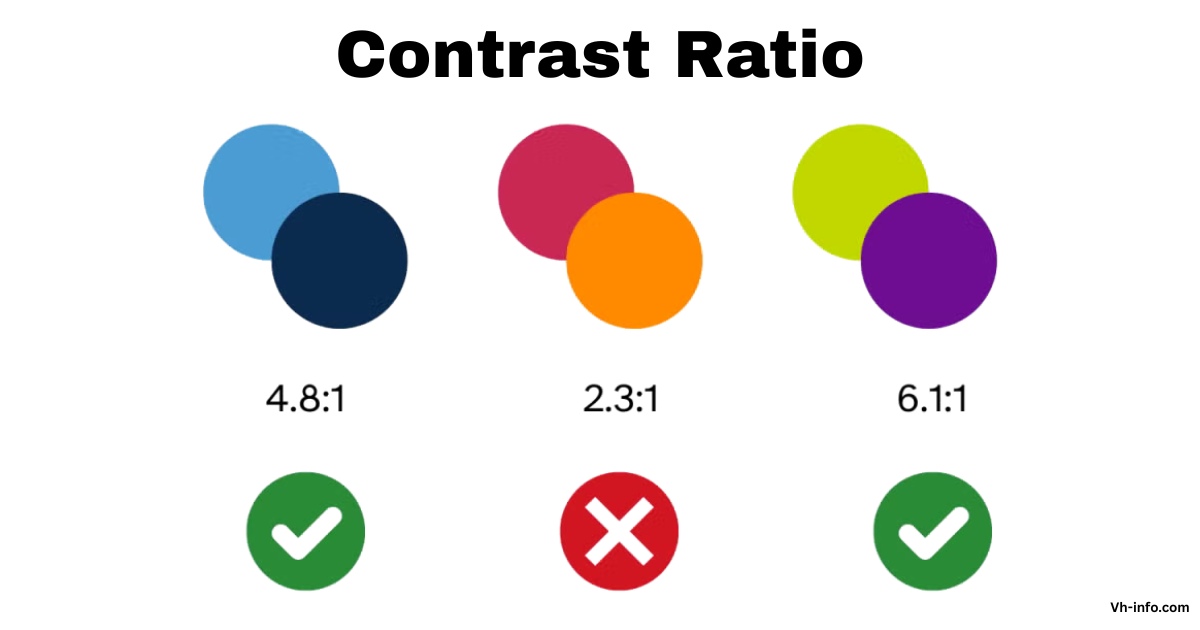
The contrast ratio is a way to measure how different two colors are. It is shown as a ratio from 1:1 to 21:1. This ratio helps users see the differences between items on a screen. It is especially important for reading text against its background color.

A higher contrast ratio means there is a bigger difference between the colors. This leads to better readability and makes things easier to use.

In display systems, the contrast ratio is very important. It shows how well the screen can show bright whites and dark blacks. The calculation uses relative luminance values. These values show how bright colors look on a scale from 0 (darkest black) to 1 (brightest white).

Importance of Contrast Ratio

High contrast ratio measurements are important in digital design. They help make content easier to see.

This is especially true for users with color blindness or trouble seeing. Good contrast makes text easy to read. Users do not need extra tools for help. This importance carries over to normal lighting too.

Brightness and screen quality can change how colors look. SaaS platforms gain a lot from good contrast ratios.

These ratios affect both user experience and rules they need to follow. Companies like VH-info see that smart design helps reach more people. It also leads to happier users from different groups.

Formula For Calculating Contrast Ratio

The contrast ratio formula follows a standardized mathematical approach defined by WCAG specifications: (L1 + 0.05) / (L2 + 0.05), where L1 represents the relative luminance of the lighter color and L2 represents the relative luminance of the darker color.

The addition of 0.05 to both values prevents division by zero when dealing with pure black backgrounds and ensures the maximum possible ratio reaches 21:1.

Relative luminance calculations require converting color values through specific mathematical transformations.

For RGB color values, the formula involves: L = 0.2126 R + 0.7152 G + 0.0722 * B, where R, G, and B represent linearized color components. This calculation accounts for human visual perception, weighting green values more heavily than red or blue components.

What Is A Good Contrast Ratio?

What Is A Good Contrast Ratio?

A good contrast ratio depends on the specific application and accessibility requirements.

For web content, WCAG guidelines establish minimum thresholds that ensure readability across different user groups. The standard considers factors including text size, font weight, and intended audience when determining appropriate contrast levels.

Level AA conformance requires a minimum contrast ratio of 4.5:1 for normal text and 3:1 for large text. These ratios provide sufficient distinction for most users, including those with moderate visual impairments.

For enhanced accessibility, Level AAA standards demand higher ratios of 7:1 for normal text and 4.5:1 for large text. Modern color contrast analyzers and accessibility tools help designers verify these requirements during development.

VH-info emphasizes the importance of testing contrast ratios early in the design process, particularly for SaaS applications where user interface clarity directly affects user adoption and satisfaction.

Contrast Ratio Standards and Guidelines

Contrast Ratio Standards and Guidelines

Web content accessibility guidelines establish comprehensive standards for contrast ratio implementation across digital platforms.

WCAG 2.1 introduces additional requirements for non-text elements, mandating a 3:1 contrast ratio for user interface components and graphics. These standards ensure that interactive elements remain distinguishable from background content.

The success criteria for contrast measurements encompass various content types and presentation contexts.

Level AA compliance serves as the standard requirement for most commercial websites and applications, providing a balanced approach between accessibility and design flexibility. Organizations pursuing Level AAA conformance must meet more stringent requirements, particularly beneficial for platforms serving users with significant visual impairments.

International regulations increasingly include WCAG standards in legal requirements.

The French RGAA 3.0 regulation mirrors WCAG contrast requirements, establishing minimum ratios of 4.5:1 for normal text and 3:1 for enlarged text. These regulatory frameworks highlight the global importance of contrast accessibility in digital content.

Applications of Contrast Ratio in Design

Applications of Contrast Ratio in Design

Contrast ratio applications span multiple design disciplines, from web development to graphic design and user interface creation. In web design, proper contrast ensures text readability across different devices and viewing conditions.

SaaS platforms particularly benefit from consistent contrast implementation, as users often access applications under varying lighting conditions and on different display types.

Color accessibility extends beyond basic text and background combinations.

Modern applications must consider contrast in buttons, form elements, icons, and other interactive components. The dynamic range of display systems affects how contrast ratios appear to users, making testing across different devices essential for comprehensive accessibility.

Graphics and data visualization require special attention to contrast ratios, as these elements often convey critical information through color alone. Charts, graphs, and infographic elements must maintain sufficient contrast to ensure information remains accessible to users with color blindness or other visual impairments.

Tools to Test Contrast Ratio

Tools to Test Contrast Ratio

Multiple contrast ratio checker tools provide developers and designers with accessible methods for verifying compliance.

Browser-based tools like Coolors contrast checker offer real-time feedback as designers adjust color values. These tools calculate contrast ratios automatically and indicate whether combinations meet WCAG standards.

WebAIM’s contrast checker provides comprehensive testing capabilities, including support for alpha transparency and RGB hex values.

The tool evaluates both AA and AAA compliance levels, helping teams choose appropriate contrast levels for their specific accessibility goals. Advanced features include color picker functionality for extracting colors directly from existing designs.

Dedicated contrast ratio calculators offer precise mathematical calculations for complex color combinations. These tools prove particularly valuable when working with custom color palettes or when precise luminance calculations are required for specialized applications.

How Is Contrast Ratio Measured?

How Is Contrast Ratio Measured?

Contrast ratio measurement starts by finding the brightness of each color in the comparison.

This requires changing color values from their original form, like hex or RGB, into brightness numbers between 0 and 1. The change takes into account gamma correction and how humans see colors.

Tools for professionals use screens that are set up correctly and controlled testing to give precise results. But web development often depends on math calculations that mimic real-life viewing situations. The WCAG formula makes changes for usual viewing setups, including light around that affects how contrast is seen. Monitor specs usually show static and dynamic contrast ratio measurements.

Static contrast ratio looks at brightness differences at the same time. Dynamic contrast ratio checks brightness changes over time. These measurements help users choose displays that are best for accessibility needs.

What is Contrast Finder?

What is Contrast Finder?

Contrast Finder is a handy tool for web designers and developers. It helps find good color pairs for accessibility rules.

When current color pairs do not meet WCAG standards, Contrast Finder offers new colors. These new colors keep the design looking nice while ensuring they have the right contrast. The tool solves common design problems when chosen colors do not meet accessibility needs.

Instead of trying many options by hand, Contrast Finder quickly finds valid choices. This makes the design work easier while keeping it accessible. This feature is very useful for SaaS companies like VH-info. They need to keep brand colors while also meeting accessibility rules.

Contrast Finder can handle different types of color inputs, such as color names, hex codes, and RGB values. The tool’s system focuses on color choices that look close to the original but still meet contrast needs.

How To Use This Tool?

How To Use This Tool?

The Contrast Finder interface consists of five mandatory fields that guide users through the color validation process. The systematic approach ensures comprehensive testing while providing clear feedback about compliance status and suggested improvements.

  1. Text Color / Foreground: The foreground color field accepts the text color that will appear over the background. This field supports multiple input formats, allowing designers flexibility in specifying colors. The tool provides real-time preview functionality, showing how the specified color appears in the interface.
  2. Color Keyword: Standard CSS color keywords provide convenient shortcuts for common colors. Examples include “Black,” “Silver,” “YellowGreen,” and “MediumPurple“. These keywords correspond to standardized color values defined in CSS specifications from Level 1 through Level 4.
  3. Color With RGB values: RGB color specification follows the format RGB(255,255,255) or simplified notation like 255,255,255. This format provides precise control over individual red, green, and blue color components, essential for exact color matching and brand consistency requirements.
  4. Color With Hexadecimal Values: Hexadecimal color notation uses formats like #AABBCC or abbreviated #ABC. The tool automatically expands abbreviated notation and accepts values with or without the # symbol. Hex values provide web-standard color specification compatible with CSS and HTML implementations.
  5. Minimum Ratio: Three ratio options correspond to WCAG compliance levels: 3, 4.5, and 7. The choice depends on text size, font weight, and desired accessibility level. Large text (24px) requires a 3:1 ratio for AA compliance, while normal text demands 4.5:1. AAA compliance increases these requirements to 4.5:1 and 7:1, respectively.
  6. Background Color: The background color field functions identically to the foreground color input, supporting the same range of input formats. This color serves as the base against which the text color contrast is measured.
  7. Text Size Understanding: Text size categories determine appropriate contrast ratio requirements. Large text, defined as 24px normal weight or 19px bold weight, requires lower contrast ratios than normal text. These specifications align with WCAG definitions that consider both pixel size and font weight in accessibility calculations.
  8. All Details About The Contrast Ratio: The tool provides comprehensive feedback, including the calculated contrast ratio, compliance status for different WCAG levels, and specific recommendations for improvement. This detailed output helps designers make informed decisions about color combinations while maintaining brand consistency and accessibility requirements.

Disclaimer and Additional Info

Contrast ratio calculations are important for following the rules about accessibility. They help to ensure that designs are easy to use.

However, designers need to think about other things too. These factors can change how easy a design is to read in real life.

For example, font choice matters. Background patterns also play a role. Additionally, animated effects can make text harder to see. All these elements affect readability more than just contrast measurements do.

Required Contrast Ratios For WCAG Conformance

WCAG conformance levels establish minimum standards for different accessibility requirements.

These levels provide structured approaches to accessibility implementation, allowing organizations to choose appropriate compliance targets based on their user needs and regulatory requirements.

  1. Level AA – Text: Level AA compliance requires a 4.5:1 contrast ratio for normal text and 3:1 for large text. Large text specifications include 18pt (typically 24px) regular weight or 14pt (typically 18.66px) bold weight text. These requirements serve as standard benchmarks for most commercial websites and applications.
  2. Level AA – Non-Text: Non-text elements including user interface components and graphics require 3:1 contrast ratio under Level AA standards. This requirement ensures that buttons, form controls, and informational graphics remain distinguishable from background elements for users with visual impairments.
  3. Level AAA – Text: Level AAA standards demand a 7:1 contrast ratio for normal text and a 4.5:1 for large text. These enhanced requirements provide maximum accessibility for users with significant visual impairments but may limit design flexibility in some applications.

Conclusion

Contrast ratio is key for good digital design. It provides rules to make content easy to read for all users. A clear method for checking contrast ratios helps designers and builders make sure their work is open to everyone. They can also keep the look nice and match their brand.

Companies like VH-info do well by using contrast tests in their work processes. Good contrast ratios help with user experience and meet legal needs. They also help products reach a wider audience.

As rules for accessibility change, knowing about contrast ratios is very important for making great digital sites. The tools and rules in this guide give clear steps to use effective contrast methods. Simple calculators and better color checkers help teams confirm they are meeting standards while keeping the design nice. Regular checks make sure that accessibility is part of the design from the start, not just added later.

New tech and changing rules will keep updating contrast needs. Keeping up with WCAG changes and new best practices helps ensure that digital products are accessible while giving great user experiences for all kinds of users and devices.

The Rule Of 40 For SaaS: Formula, Calculations & Real-World Impact

The Rule of 40 serves as a critical benchmark for SaaS companies seeking to balance growth and profitability.

This metric provides a straightforward way to measure financial health, offering a clear signal to investors, board members, and management teams about business sustainability.

At VH Info, our work with numerous SaaS companies has shown that understanding and tracking this metric is essential for companies aiming to grow effectively while maintaining healthy financials.

What Is The Rule Of 40?

What Is The Rule Of 40?

The Rule of 40 states that a healthy SaaS company’s combined revenue growth rate and profit margin should equal or exceed 40%, reflecting its growth potential. This formula creates a single metric that balances two competing priorities: growing quickly and operating profitably.

For example, if your SaaS business has a 30% annual recurring revenue growth rate and a 15% profit margin, your Rule of 40 score would be 45%, indicating your company achieves a favorable balance of growth and profitability, meeting the benchmark for financial health. Conversely, if you have 50% growth but a -15% profit margin, your score would be 35%, falling short of the standard.

The Rule of 40 was popularized by venture capitalist Brad Feld in 2015, though it was already being used by investors before then. It recognizes the inherent trade-off SaaS companies face: investing in growth often means sacrificing near-term profitability.

Who Uses The Rule Of 40?

The Rule of 40 is primarily used by:

  • Venture capital firms evaluating potential investments
  • SaaS company executives monitoring their financial performance
  • Board members assessing management team effectiveness
  • Financial analysts comparing companies within the SaaS industry
  • Potential acquirers evaluating acquisition targets

While originally intended for SaaS companies with over $50 million in annual revenue, the Rule of 40 is now applied to businesses at various stages, though it’s most relevant for companies with established revenue streams.

How The Rule Of 40 Works?

The Rule of 40 works by acknowledging a fundamental reality: fast-growing companies typically invest heavily in sales, marketing, and product development to acquire new customers, often operating at a loss.

This often requires a robust SaaS Content Strategy and effective customer acquisition channels like PPC For SaaS to drive growth. Meanwhile, others may partner with a top SaaS Design Agency to refine the user experience, which also requires significant investment.

Meanwhile, highly profitable SaaS companies might have lower growth rates because they’re investing less in expansion.

This creates flexibility in how SaaS companies can meet the benchmark:

  • A high-growth startup might have 60% growth with -20% profit margin (Rule of 40 score: 40%)
  • A mature SaaS company might have 15% growth with a 25% profitability margin (Rule of 40 score: 40%)
  • A high-performing company might have 50% growth with a 10% profit margin (Rule of 40 score: 60%)

Each of these companies would meet or exceed the Rule of 40 through different combinations of growth and profitability.

Why Use The Rule Of 40? Here Are Four Important Benefits

Why Use The Rule Of 40?

The Rule of 40 offers several significant advantages for SaaS companies:

  1. Simplified Performance Assessment: The Rule of 40, often considered a rule of thumb, combines two critical metrics into a single number, making it easier to gauge a company’s financial health. Management teams can use this as a starting point for deeper analysis.
  2. Balanced Growth Approach: Many SaaS companies fall into the “growth at all costs” trap, burning through cash without a path to profitability. The Rule of 40 encourages a more balanced approach by recognizing that extreme growth at the expense of profitability isn’t sustainable.
  3. Investor Attraction: SaaS companies that meet or exceed the Rule of 40 typically command higher revenue multiples from investors. Venture capital firms often use this metric as a screening tool when evaluating potential investments.
  4. Strategic Decision Framework: The Rule of 40 helps inform resource allocation decisions. If your score is well above 40%, you might have room to invest more aggressively in growth. If you’re below 40%, you might need to focus on improving efficiency or profitability.

When To Use The Rule Of 40: Should You Measure The Rule Of 40 As A Startup?

When To Use The Rule Of 40: Should You Measure The Rule Of 40 As A Startup?

While valuable, the Rule of 40 isn’t equally applicable to all SaaS companies at every stage:

  1. Early-Stage Startups (Pre-Revenue Or <$1M ARR): The Rule of 40 is less relevant. Focus instead on product-market fit and establishing initial revenue streams. Following a comprehensive SaaS launch checklist can help ensure all critical steps are covered during this foundational phase.
  2. Growth-Stage Companies ($1M-$10M ARR): Begin monitoring the Rule of 40, but recognize that heavy investment in growth might mean your score is below 40%. At this stage, companies often explore scalable growth channels, establishing SaaS affiliate programs or building out SaaS partnership models to expand their reach. Investors will understand this if your growth metrics are strong.
  3. Scale-Up companies ($10M+ ARR): The Rule of 40 becomes increasingly important. At this stage, investors expect to see a clearer path to balancing growth and profitability.
  4. Mature SaaS companies ($50M+ ARR): The Rule of 40 is a critical benchmark. Companies at this scale are expected to demonstrate sustainable economics while maintaining reasonable growth.

Brad Feld initially suggested the Rule of 40 was most applicable to companies with over $50 million in annual revenue, but many investors now apply it to companies with as little as $1-5 million in ARR, adjusting their expectations based on company’s stage.

The Rule Of 40 Formula

The Rule Of 40 Formula

The basic Rule of 40 formula is straightforward:

Rule of 40 = Revenue Growth Rate (%) + Profit Margin (%)

While this looks simple, there are important considerations about which specific metrics to use:

  1. Revenue Growth Rate: Most commonly measured as year-over-year growth in total revenue, annual recurring revenue (ARR) or monthly recurring revenue (MRR)
  2. Profit Margin: Can be measured using several metrics, including:
  • EBITDA margin (most common)
  • Free cash flow margin
  • Operating margin
  • Net income margin

The specific profit metric you choose can significantly impact your Rule of 40 calculation. EBITDA margin is most commonly used because it excludes non-operational factors like interest expense and focuses on core business performance.

Implementing a SaaS ERP system can help streamline operations and provide clearer insights into profitability.

How To Calculate The SaaS Rule Of 40 (Example)

How To Calculate The SaaS Rule Of 40 (Example)

Let’s examine practical examples of calculating the Rule of 40 for two hypothetical SaaS companies.

Example 1: A Company Meeting The Rule Of 40

SaaSCo has the following metrics:

  • Current ARR: $25 million
  • Previous year ARR: $17.5 million
  • EBITDA: $0.75 million

Step 1: Calculate The Revenue Growth Rate:

($25M – $17.5M) / $17.5M = 0.429 or 42.9%

Step 2: Calculate The Profit Margin:

$0.75M / $25M = 0.03 or 3%

Step 3: Apply The Rule Of 40 Formula:

42.9% + 3% = 45.9%

With a Rule of 40 score of 45.9%, SaaSCo exceeds the 40% benchmark, indicating a healthy balance between growth and profitability. The company is growing rapidly while maintaining slight profitability.

Example 2: A Company Not Meeting The Rule Of 40

CloudApp has the following metrics:

  • Current ARR: $15 million
  • Previous year ARR: $12 million
  • EBITDA: -$2.25 million

Step 1: Calculate The Revenue Growth Rate:

($15M – $12M) / $12M = 0.25 or 25%

Step 2: Calculate The Profit Margin:

-$2.25M / $15M = -0.15 or -15%

Step 3: Apply The Rule Of 40 Formula:

25% + (-15%) = 10%

With a Rule of 40 score of just 10%, CloudApp falls significantly short of the 40% benchmark. This suggests the company may need to either accelerate growth or improve profitability to reach a healthier balance.

How To Calculate The SaaS Rule Of 40?

How To Calculate The SaaS Rule Of 40?

Let’s break down the calculation into its parts.

Revenue Growth Rate Calculation

For SaaS companies, the revenue growth rate typically focuses on recurring revenue metrics:

Revenue Growth Rate = (Current Period Revenue – Prior Period Revenue) / Prior Period Revenue

The preferred revenue metric is typically:

  • Annual Recurring Revenue (ARR) for companies with mostly annual contracts
  • Monthly Recurring Revenue (MRR) for companies with monthly subscription models

MRR is calculated as:

Monthly Recurring Revenue (MRR) = Total Number of Active Accounts × Average Revenue Per Account

To convert MRR to ARR, simply multiply by twelve:

Annual Recurring Revenue (ARR) = Monthly Recurring Revenue (MRR) × 12 Months

To improve these metrics, it’s essential to understand B2B SaaS funnel conversion benchmarks to identify areas for optimization.

Profit Margin Calculation

The profit margin measures how much of your revenue translates to profit. EBITDA margin is most commonly used for the Rule of 40:

EBITDA Margin = EBITDA / Revenue

Where EBITDA stands for Earnings Before Interest, Taxes, Depreciation, and Amortization.

Some companies use free cash flow margin instead:

Free Cash Flow Margin = Free Cash Flow / Revenue

The choice of profit metric can significantly impact your Rule of 40 score, so it’s important to be consistent and transparent about which metric you’re using.

Add The Growth Rate and Profit Margin

Once you have calculated both components, simply add them together:

Rule of 40 = Revenue Growth Rate (%) + Profit Margin (%)

If the result is 40% or higher, the company meets the Rule of 40 benchmark.

How Many SaaS Companies Exceed The Rule Of 40?

How Many SaaS Companies Exceed The Rule Of 40?

Based on market data, only a minority of SaaS companies achieve the Rule of 40 benchmark.

According to our research, approximately 20-30% of public SaaS companies meet or exceed the Rule of 40, with the percentage varying based on market conditions.

Looking at the list from our search results, we can see numerous companies that meet the Rule of 40, including Adobe, Microsoft, Oracle, and other established software companies. The list also includes smaller, high-growth companies with scores well above 40%.

Meeting the Rule of 40 becomes more common as companies mature and achieve scale.

SaaS companies that consistently exceed the Rule of 40 are typically either:

  1. High-growth companies with strong unit economics
  2. More mature SaaS businesses that have found an optimal balance
  3. Category leaders with strong network effects or high barriers to entry

The companies on the Rule of 40 list demonstrate a wide range of scores, from just above 40% to some with remarkably high scores of 100%+ (often high-growth companies with modest losses).

Is The Rule Of 40 Still Relevant?

Is The Rule Of 40 Still Relevant?

  1. The First Test Of The Rule Of 40: The Rule of 40 gained popularity during a period of economic stability and strong SaaS growth from 2015-2020. It faced its first significant test during the economic disruption of 2020-2021, when many SaaS companies saw fluctuating growth rates and changing profit margins.
  2. Growth Slowdown: In recent years, we’ve seen a growth slowdown across the SaaS industry as markets have matured and competition has intensified. This has made it harder for companies to achieve the high growth rates seen in previous years, putting pressure on the growth component of the Rule of 40.
  3. Inflation and The Rule Of 40: In recent years, we’ve seen a growth slowdown across the SaaS industry as markets have matured and competition has intensified. This has made it harder for companies to achieve the high growth rates seen in previous years, putting pressure on the growth component of the Rule of 40.
  4. Focus On Profitability: Since 2022-2023, there’s been a notable shift in investor sentiment toward profitability and sustainable economics. The “growth at all costs” mentality has been replaced by a greater emphasis on unit economics and path to profitability. This has made the Rule of 40 even more relevant, but with greater emphasis on the profit component.
  5. The Future Of The Rule Of 40: The Rule of 40 is still relevant in 2025, but investors now focus on its consistency over time, trends in revenue growth and profitability, and other efficiency metrics. While specific benchmarks may shift with market conditions, the core idea of balancing growth rate and profit margin remains a trusted measure of financial health for SaaS companies.

Rule Of X – An Alternative To Rule Of 40?

Rule Of X – An Alternative To Rule Of 40

Some investors and analysts have proposed variations on the Rule of 40, sometimes called the “Rule of X,” where X varies based on company stage, industry segment, or market conditions.

Common variations include:

  • Rule of 30: For earlier-stage companies or during challenging economic periods
  • Rule of 50: For high-performing SaaS companies or during strong market conditions
  • Rule of 60: For top-tier SaaS businesses with exceptional economics

The appropriate benchmark may vary based on:

  • Company size and maturity
  • Growth rate of the specific SaaS segment
  • Overall market conditions
  • Competitive landscape
  • Capital availability

At VH Info, we recommend SaaS companies benchmark against peers in their specific segment and stage rather than applying a one-size-fits-all approach to the Rule of 40.

FAQ’s:

What Constitutes A Good Rule Of 40 Score?

A Rule of 40 score above 40% is generally considered good, indicating a healthy balance between growth and profitability.

Scores of 50% or higher are excellent, suggesting a company that’s either growing very quickly with acceptable losses or growing steadily with strong profitability.

Early-stage companies may temporarily fall below 40% while investing heavily in growth, but should aim to reach this benchmark as they mature.

How Often Should SaaS Companies Calculate The Rule Of 40?

Most SaaS companies calculate the Rule of 40 quarterly, aligning with their financial reporting cycles.

However, tracking it monthly can provide earlier signals of changes in performance. When reporting to investors or board members, quarterly or annual Rule of 40 calculations are most common. What’s most important is consistency in how and when you measure it.

Can The Rule Of 40 Be Applied To Non-SaaS Companies?

While the Rule of 40 was developed specifically for SaaS businesses, the underlying principle of balancing growth and profitability applies to other subscription-based or recurring revenue business models.

Some adaptations have been made for managed service providers, e-commerce subscription businesses, and certain fintech models with recurring revenue.

The specific 40% threshold may need adjustment for different business models with different margin structures or growth expectations.

How Does Investor Perception Change With Rule Of 40 Scores?

Investor perception generally improves as Rule of 40 scores increase:

  • Below 20%: Often indicates fundamental business model issues
  • 20-30%: Below average, may face valuation discounts
  • 30-40%: Approaching healthy territory but room for improvement
  • 40-50%: Healthy, attractive to most investors
  • 50%+: Premium valuations likely, highly attractive to investors

Higher Rule of 40 scores typically correlate with higher revenue multiples, though the relationship isn’t perfectly linear and varies with market conditions.

Where Did The Rule Of 40 Come? Can You Be Too Far Over The Rule Of 40?

The Rule of 40 was popularized by venture capitalist Brad Feld in a 2015 blog post, though he attributes the concept to a late-stage investor he encountered during a board meeting. The rule quickly gained traction in the venture capital community and among SaaS executives.

As for being “too far” over 40%, it’s generally not a problem to exceed the benchmark significantly. However, an extremely high score (e.g., 80%+) might indicate unsustainable growth that will inevitably slow down or under-investment in areas that could drive future growth.

How Many Companies Outperform The Rule Of 40?

Based on market data, approximately 20-30% of public SaaS companies exceed the Rule of 40 benchmark at any given time. The percentage varies with market conditions and can change substantially during economic shifts.

Among the companies meeting the Rule of 40, there’s significant variation in how they achieve it – some through high growth with minimal profitability, others through moderate growth with strong margins.

Conclusion

The Rule of 40 remains a valuable benchmark for SaaS companies seeking to balance growth and profitability.

By offering a unified metric that integrates two key components of financial performance, it enables executives, board members, and investors to swiftly evaluate a company’s health and sustainability.

While not every SaaS company needs to meet the Rule of 40 at every stage of development, it provides a north star to guide strategic decision-making as businesses mature. Companies that consistently meet or exceed this benchmark typically enjoy stronger valuations, greater investor interest, and more strategic options.

At VH Info, we work with SaaS companies to improve their link building strategies and digital presence. We’ve seen how strong financial fundamentals support every aspect of a SaaS business, from marketing effectiveness to customer acquisition efficiency.

A well-defined saas marketing Playbook is essential for aligning marketing efforts with business goals.

A deep understanding of your SaaS Buyer Personas ensures that your messaging resonates with the right audience, while engaging communications like those found in these SaaS Newsletter Examples can help nurture leads and retain customers.

Whether you’re just starting to track the Rule of 40 or looking to improve your current score, focus on the underlying drivers of sustainable growth and improving unit economics.

Remember that the Rule of 40 is a means to measure business health, not an end in itself – the goal is building a sustainable, valuable SaaS business that creates long-term value for customers, employees, and shareholders.

How to Get Backlinks With Google Docs: A Simple Guide

Backlinks are like friendly votes from other websites that help your website show up higher in search engine results. While most people try to get these votes through blog posts or ads, Google Docs offers a simpler way.

Imagine creating helpful content that others naturally want to share—like a school project everyone wants to copy, but in a good way!

Google Docs lets you write, edit, and share content easily with a unique URL. When you make your document public, anyone online can find it, share it on social media, or link to it from their blog. This builds your website’s credibility and visibility without needing fancy tools.

Unlike regular web pages, Google Docs encourages teamwork. You can work with experts to create high-quality guides or reports, making your content more trustworthy.

When others see this useful info, they might mention your website in their articles or videos, giving you free backlinks.

This guide will show you the best way to use Google Docs for SEO, from setting up shareable documents to avoiding common mistakes. Let’s turn your simple docs into backlink magnets!

What Are Backlinks: The Basics?

What Are Backlinks?

Backlinks are links from one website to another web page. When someone links to your content from their blog, social media profile, or any other webpage, that creates a backlink to your site.

Search engines like Google use these links as signals of trust and authority, treating them as votes of confidence in your content.

The quality of backlinks matters more than quantity in today’s SEO landscape.

A single high quality backlink from an authoritative site in your niche carries more weight than dozens of low-quality links from irrelevant directories. This is why content creation that naturally attracts links has become so valuable for improving rankings.

Why Use Backlinks in Google Docs?

Google Docs creates a unique opportunity for link building because it allows you to create content that can be easily shared and referenced.

While links within Google Docs themselves are nofollow, the real value comes from how people discover and reference your Google Doc content on their own websites and blogs.

When you create valuable content in a Google Doc and share it widely, other content creators may reference your work in their blog posts, cite your research on social media, or link to your website after discovering your expertise. This indirect approach to link building can be particularly effective for SaaS companies looking to establish thought leadership in their niche.

Benefits of Using Google Docs For Backlink Building

Benefits of Using Google Docs For Backlink Building

Easy Collaboration and Sharing

Google Docs makes collaboration simple, allowing multiple people to contribute to your content.

This collaborative approach can lead to natural backlinks when contributors share the finished work with their networks. The real-time editing features enable you to work with industry experts, influencers, and other professionals who can help amplify your content reach.

The sharing capabilities of Google Docs extend beyond simple collaboration. You can share your doc via URL across social media platforms, include it in email campaigns, or embed it on your website.

Each sharing method creates additional opportunities for people to discover your content and potentially link back to your website.

Publicly Accessible Content

Making your Google Doc publicly accessible increases its potential for generating backlinks.

When your content is easily accessible through a simple URL, it removes barriers that might prevent people from referencing your work. This accessibility is particularly valuable for research, guides, and other resource-type content that people frequently cite.

The public nature of Google Docs also makes them searchable and discoverable.

While the docs themselves may not always appear in search engine results, people who find them through other channels can easily access and share the content. This creates a viral effect that can lead to multiple backlinks from various sources.

Enhanced Credibility and Trust

Creating well-researched, professional content in Google Docs can enhance your credibility within your niche.

When industry professionals reference your Google Doc content, it signals to search engines and users that your website is a trusted source of information. This enhanced credibility can lead to more organic backlinks over time.

The collaborative nature of Google Docs also adds credibility. When multiple experts contribute to your content, it carries more weight than a single-author piece. This collaborative credibility often translates into more shares, citations, and ultimately, backlinks to your primary website.

How to Get Backlinks With Google Docs?

How to Get Backlinks With Google Docs?

Building backlinks with Google Docs can be simple if you use the right steps.

Setting Up Your Google Doc For Public Access

Optimizing your Google Doc for backlink building starts with making sure that your document is set to be seen by everyone.

Follow these steps:

The first step in using Google Docs for backlink building is setting up proper public access. You need to configure your sharing settings to allow “Anyone with the link” to view your document.

This ensures that anyone who receives your URL can access the content without requesting permission.

For maximum visibility, consider using the “Publish to web” feature. This creates a publicly accessible version of your doc that can be more easily indexed by search engines. When you publish to web, you get a unique URL that you can share across different platforms, including social media, email campaigns, and your own blog posts.

Remember to organize your Google Doc with clear headings and structure.

Use proper HTML-style formatting that makes your content easy to scan and reference. This professional presentation increases the likelihood that others will cite your work in their own content creation efforts.

Creating High-Quality, Shareable Content

Content quality determines the success of your Google Docs backlink strategy.

Focus on creating comprehensive guides, research reports, or industry insights that provide genuine value to your target audience. The content should be substantial enough to warrant citations and references from other websites in your niche.

At VH Info, we’ve found that data-driven content performs particularly well for generating backlinks.

Consider creating industry surveys, case studies, or research compilations that other bloggers and content creators will want to reference. This type of content naturally attracts backlinks because it provides unique insights that aren’t available elsewhere.

Make sure your Google Doc includes clear attribution information and links back to your website.

While the Google Doc links themselves may be nofollow, readers who find value in your content will often visit your website directly and potentially link to it from their own blog posts or web pages.

Promoting Your Google Doc to Gain Backlinks

Creating great content is only half the battle – you need to actively promote your Google Doc to maximize its backlink potential.

Start by sharing the URL across your social media channels, including LinkedIn, Twitter, and any niche-specific platforms where your audience is active.

Reach out to industry contacts, collaborators, and influencers who might find your content valuable.

Send them the Google Doc URL and explain how it might benefit their audience. Many will share it with their networks, creating additional opportunities for backlinks and website traffic.

Consider submitting your Google Doc to relevant directories and resource lists in your niche. Many industry websites maintain curated lists of valuable resources, and your comprehensive Google Doc could earn a spot on these lists, generating high quality backlinks to your website.

Common Mistakes to Avoid When Building Backlinks With Google Docs

Common Mistakes to Avoid When Building Backlinks With Google Docs

Not Making the Document Public

One of the biggest mistakes is failing to properly configure your document’s sharing settings.

If your Google Doc requires permission to access, most people won’t bother requesting it, limiting your content’s reach and backlink potential.

Always ensure your document is set to “Anyone with the link can view” or use the publish to web feature for maximum accessibility.

Double-check your sharing settings before promoting your Google Doc. Test the URL in an incognito browser window to make sure it opens without requiring login credentials. This simple step can prevent you from losing potential backlinks due to access issues.

Ignoring Content Quality

Poor content quality will hurt your backlink building efforts and damage your brand reputation.

Avoid creating thin, low-value content just to have something to share. Instead, focus on creating comprehensive, well-researched content that genuinely helps your target audience solve problems or gain insights.

Your Google Doc content reflects on your brand and website. If people find low-quality content in your Google Doc, they’re unlikely to visit your website or consider linking to it. Invest the time and effort needed to create content that positions you as an authority in your niche.

Forgetting to Promote Your Google Doc

Creating excellent content means nothing if nobody sees it.

Many businesses create valuable Google Docs but fail to promote them effectively, missing out on potential backlink opportunities. Develop a promotion strategy that includes social media, email outreach, and direct contact with industry influencers.

Don’t rely solely on organic discovery. Actively share your Google Doc URL in relevant online communities, forums, and industry groups. The more exposure your content gets, the higher the chances of earning natural backlinks from people who find it valuable.

Best Practices For Maximizing Backlink Opportunities

Best Practices For Maximizing Backlink Opportunities

Optimizing Headings and Structure For SEO

Structure your Google Doc content with clear headings and subheadings.

Use descriptive headings that include relevant keywords while maintaining readability. This structure makes your content easier to scan and reference, increasing the likelihood that others will cite specific sections in their own content. Consider how your Google Doc content might be referenced on other websites. Create sections that can stand alone as quotable insights or statistics.

This approach makes it easier for other content creators to cite your work, leading to more backlinks and mentions across the internet.

Encouraging Shares and Citations

Include calls-to-action within your Google Doc that encourage sharing and citations.

Add your website URL prominently throughout the document, making it easy for readers to find and link to your primary web page. Consider adding a section that explicitly encourages readers to share the content if they find it valuable.

Make it easy for people to cite your work by including suggested citation formats or providing key statistics in easily quotable formats. The easier you make it for others to reference your content, the more likely they are to do so in their own blog posts and articles.

Tracking Backlinks and Engagement

Monitor the performance of your Google Doc backlink strategy using analytics tools and backlink monitoring software. Track how many people visit your website from your Google Doc URL and monitor for new backlinks that mention your brand or reference your content.

Set up Google Analytics goals to track conversions from your Google Doc traffic. This data helps you understand which types of content generate the most valuable backlinks and website visitors, allowing you to refine your strategy over time.

FAQ’s:

Can Google Docs Really Help Improve My Backlink Profile?

Yes, Google Docs can contribute to your backlink profile, but not in the direct way you might expect. While links within Google Docs are nofollow, the real value comes from increased visibility and content sharing. When you create valuable content in Google Docs and promote it effectively, people discover your expertise and naturally link to your website from their own blog posts and web pages.

How Can I Ensure My Google Doc is Visible to Search Engines and Users?

To maximize visibility, use the “Publish to web” feature in Google Docs. This creates a publicly accessible URL that search engines can potentially index. Additionally, actively promote your Google Doc across social media platforms, email campaigns, and industry forums. The more you promote your content, the more likely people are to discover and reference it.

Are There Risks of Duplicate Content When Using Google Docs?

Duplicate content can be a concern if you publish identical content on your website and in Google Docs.

To avoid this issue, create unique content specifically for your Google Docs that complements but doesn’t duplicate your website content. Alternatively, use Google Docs for collaborative drafts and then publish the final version exclusively on your website or blog.

What Types Of Businesses Benefit Most From This Strategy?

SaaS companies, consultancies, and service-based businesses benefit most from Google Docs backlink building. These businesses can create valuable resources like industry guides, research reports, and best practice documents that naturally attract citations and backlinks.

At VH Info, we’ve seen particular success with this strategy for B2B companies that serve professional audiences who actively share valuable resources.

How Do I Track Backlinks Generated From My Google Docs?

Use backlink monitoring tools like Semrush, Ahrefs, or free alternatives like Google Search Console to track new backlinks to your website. Look for patterns in referring domains that might have discovered your content through your Google Docs.

Additionally, monitor your website analytics for traffic coming directly from your Google Doc URLs to gauge engagement levels.

Conclusion

Google Docs offers a unique approach to backlink building that complements traditional SEO strategies.

While the links within Google Docs themselves don’t pass direct SEO value, the platform’s collaborative and sharing features create opportunities for natural link building and increased visibility across the internet.

Success with this strategy requires creating high quality, valuable content that serves your target audience’s needs.

Combined with active promotion across social media and industry networks, Google Docs can help establish your authority and attract organic backlinks from people who discover your expertise.

At VH Info, we recommend including Google Docs into your broader link building strategy rather than relying on it exclusively.

When used alongside guest posting, content creation, and other proven tactics, Google Docs can add another dimension to your SEO efforts and help you reach audiences you might not connect with through traditional channels.

SEO Task Management: Meaning, Tasks, Strategies & Tools

In the fast-paced realm of SaaS digital marketing, staying ahead requires more than just innovative software. Effective search engine optimization (SEO) is critical to ensure your product reaches its intended audience.

However, managing the various SEO tasks involved can quickly become overwhelming.

That’s where SEO task management comes in. It transforms the complex process of search engine optimization into manageable steps, helping you drive organic traffic and achieve your SEO goals.

At VH Info, we understand the challenges of SEO project management, and we’re here to guide you through creating an effective SEO strategy that delivers the best results.

What is SEO Task Management?

What is SEO Task Management?

SEO task management is the process of planning, organizing, and overseeing all SEO activities required to improve a website’s traffic and search results.

It involves breaking down a larger SEO project into smaller, actionable daily tasks, assigning responsibilities, setting deadlines, and monitoring project progress. Think of it as project management specifically tailored for SEO efforts.

This structured approach ensures that all aspects of your SEO campaign, from keyword research to link building, are handled efficiently and effectively. By implementing robust SEO management, you can optimize your resources and achieve better SEO performance.

Why is SEO Task Management Important?

Why is SEO Task Management Important?

SEO task management is vital for several reasons. It brings structure and clarity to your SEO strategies, ensuring that all various tasks are completed on time and to a high standard. Without it, you risk wasting resources on uncoordinated SEO efforts that yield poor SEO results.

Effective SEO project management helps you:

  • Stay Organized: Keeps track of all SEO tasks and deadlines.
  • Improve Efficiency: Streamlines workflows and minimizes wasted effort.
  • Enhance Team Collaboration: Ensures the entire team is on the same page.
  • Maximize SEO Performance: Drives better keyword rankings and organic traffic.
  • Achieve SEO Goals: Aligns SEO activities with your business objectives.
  • Optimize Resources: Makes the most of your budget and personnel.
  • Track Progress: Monitors performance metrics to measure success.

Essential SEO Tasks

Essential SEO Tasks

Every successful SEO project includes several core components.

Here’s a breakdown:

  1. Keyword Research and Analysis: This is where you figure out what words people type into search engines like Google to find businesses like yours. It’s not just about guessing; it’s about using tools to find target keywords that can drive website traffic and boost your SEO efforts. Understanding these new keywords helps shape your content and SEO strategy.
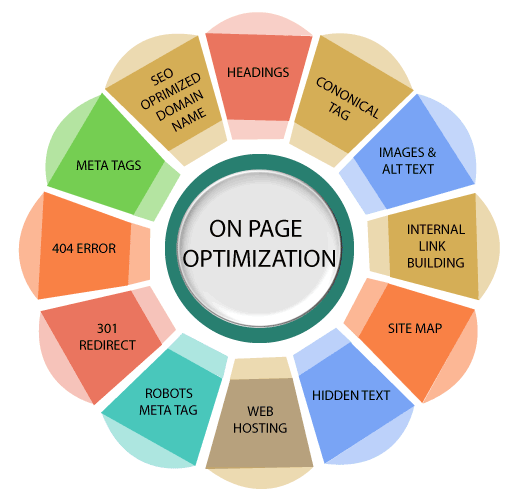
  2. On-Page Optimization: Think of this as tidying up your website so that search engines understand what each page is about. This means tweaking titles, meta descriptions, and content to include your target keywords naturally. Good on-page optimization improves user experience and helps search engines rank your site higher, resulting in better search results.
  3. Link Building: This is like getting votes of confidence from other websites. When other credible sites link to yours, it tells search engines that your site is trustworthy and authoritative. Effective link building is essential for improving your SEO performance and increasing organic traffic; VH Info offers SEO services for link building that can help you grow your online presence.
  4. Technical SEO: This is the behind-the-scenes stuff that makes your website easy for search engines to crawl and understand. It includes things like improving site speed, ensuring your site works well on mobile devices, and fixing broken links. A technically sound website is important for achieving high keyword rankings.
  5. Content Creation and Optimization: High-quality content is what keeps visitors engaged and coming back for more. Producing high-quality content consistently is fundamental to any successful SEO strategy, as it helps draw in your target keywords and potential customers while enhancing your SEO management through effective content optimization.

How To Build An Effective SEO Project Management Plan – A Step-By-Step Guide

How To Build An Effective SEO Project Management Plan?

Creating a robust SEO project management plan ensures that your SEO efforts are coordinated and effective.

Here’s a step-by-step guide:

Step 1: Initial Research and Analysis

Before diving into any SEO activities, it’s important to understand where you stand. Start with a competitive analysis to see what your competitors are doing and where they’re succeeding.

Also, use tools like Google Search Console and Google Analytics to analyze your current keyword rankings and organic traffic. This initial research will help you identify opportunities and set realistic SEO goals.

Step 2: Setting Goals and KPIs

Now that you have a clear picture of your current situation, it’s time to define what you want to achieve. Set specific, measurable SEO goals, such as increasing organic traffic by a certain percentage or improving keyword rankings for key terms.

Identify your Key Performance Indicators (KPIs), like conversion rate and bounce rate, to measure project progress. These goals will guide your SEO strategies and help you track SEO performance.

Step 3: Task Identification and Assignment

With your goals in mind, break down your SEO project into smaller, manageable SEO tasks.

Identify all the various tasks needed, from keyword research and on-page optimization to link building and technical SEO. Assign each SEO task to a specific team member, ensuring everyone knows their responsibilities.

This ensures efficient SEO management and team collaboration.

Step 4: Establishing Timelines To Reach Milestones

Create a realistic timeline for each SEO task, setting deadlines and milestones to keep your project progress on track.

Use a project management template or project management software to visualize your timeline and ensure everyone knows when tasks are due. This helps maintain focus and avoid delays in your SEO efforts.

Step 5: Resource Planning

Assess the resources required for each SEO task, including budget, personnel, and tools.

Make sure you have the necessary resources to complete each task effectively. Proper resource planning ensures that your SEO team has what they need to achieve the best results and that your SEO campaign stays within budget.

Step 6: Implementation and Execution

Put your SEO strategies into action and start implementing the identified SEO tasks.

Ensure that all SEO activities are executed to a high standard and align with your SEO goals. Regular monitoring and quality checks are essential during this phase to achieve the desired SEO results.

Step 7: Monitoring and Reporting

Regularly monitor your performance metrics and track project progress.

Use Google Analytics and other tools to measure your SEO performance and identify areas for improvement. Generate regular reports to keep stakeholders informed about the SEO results and the impact of your SEO efforts on website traffic.

Step 8: Review and Optimization

At the end of each month (or specified period), review your SEO results and analyze what worked and what didn’t.

Identify areas where you can improve your SEO strategies and optimize your plan accordingly. Continuous review and optimization are essential for maximizing your SEO performance and achieving long-term success in your SEO project.

Who Should Be In Charge Of SEO Task Management?

Who Should Be In Charge Of SEO Task Management?

The person in charge of SEO task management can change based on the size of the company.

In small businesses, it is often the marketing manager or an SEO expert. They make sure tasks match with business goals.

In bigger companies, there is usually an SEO project manager. This person focuses on organizing tasks and checking progress. They use special software to help with this.

A digital marketing agency like VH Info can also handle your SEO work. We offer skilled help for your projects.

Do SEO Tasks Need To Be Done Every Month?

Do SEO Tasks Need To Be Done Every Month?

Yes, absolutely! SEO maintenance is an ongoing process, and many SEO activities should be performed monthly to keep your website traffic growing and your search results strong.

While some SEO tasks, like initial keyword research, are one-time, many others require regular attention. This includes monitoring keyword rankings, analyzing organic traffic patterns, optimizing content with target keywords, and conducting link building outreach.

Regular SEO maintenance ensures that your website stays competitive, adapts to algorithm updates, and continues to attract organic traffic from search engines. It’s all about consistent SEO management to achieve the best results over time.

SEO Tasks For Monthly Maintenance

SEO Tasks For Monthly Maintenance

Monthly SEO maintenance means doing regular checks and updates to keep your website in good shape.

  1. Examine Organic Traffic Patterns: Keep a close eye on your website’s traffic from search engines. Look for any big changes—spikes or drops—and figure out why they’re happening. Understanding these patterns helps you refine your SEO strategies and capitalize on what’s working. This analysis is key to maintaining steady growth in organic traffic.
  2. Evaluate Your Rankings: Regularly check where your target keywords rank in search results. Are you moving up, down, or staying put? Knowing your keyword rankings helps you gauge the effectiveness of your SEO efforts and identify areas that need more attention. Consistent monitoring ensures you stay competitive in the search engine.
  3. Review SERP Features: SERP features (like featured snippets or knowledge panels) can significantly boost visibility. Keep an eye on which ones you’re showing up in and try to optimize for more. Capturing these features can drive more organic traffic and establish your site as an authority.
  4. Optimize Outdated or Underperforming Content: Over time, some content may become stale or lose keyword rankings. Identify these pages and update them with fresh information and target keywords. Content optimization not only improves search results but also provides a better user experience, keeping visitors engaged.
  5. Add New Internal Links: Internal link building helps search engines understand your website’s traffic structure and improve navigation. Adding new links to relevant pages can boost their authority and help spread link building juice throughout your site. Effective internal linking enhances both SEO and user experience.
  6. Research New Keywords to Target: Don’t get stuck on the same old keywords. Continuously research new keywords to identify emerging trends and opportunities. Targeting new keywords can help you attract a wider audience and stay ahead of the competition.
  7. Analyze the Competition: Regularly conduct competitor analysis to see what your competitors are doing right (and wrong). Identify their target keywords, link building strategies, and content tactics. This intel helps you refine your SEO efforts and stay competitive.
  8. Keep Up With Trends: SEO is always changing, so it’s vital to stay informed about the latest trends and algorithm updates. Follow industry blogs, attend webinars, and experiment with new strategies. Keeping up with trends ensures your SEO management remains effective.
  9. Produce New Content: Consistently create blog posts and publish fresh, high-quality content. New content attracts organic traffic, keeps your website relevant, and provides opportunities to target new keywords. Regular content creation is a cornerstone of a successful SEO strategy.
  10. Audit New and Lost Backlinks: Monitor your backlink profile to identify new and lost backlinks. Investigate any lost backlinks and take steps to reclaim them if possible. Also, analyze new backlinks to ensure they’re from reputable sources.
  11. Conduct Link Building Outreach: Actively reach out to other websites to build relationships and earn valuable backlinks. Focus on creating high-quality content that others will want to link to. Effective link building outreach is essential for improving your domain authority.
  12. Check for Errors and Technical SEO Issues: Regularly check your website for technical SEO issues like broken links, crawl errors, and site speed problems. Use tools like Google Search Console to identify and fix these issues. Addressing these technical aspects improves user experience and SEO performance.
  13. Improve Site Speed and User Experience: Site speed is an important ranking factor. Optimize your website to improve its loading time and enhance user experience. A fast, user-friendly site keeps visitors engaged and signals to search engines that your site is valuable.
  14. Benchmark Performance: Track your performance metrics over time to see how your SEO efforts are paying off. Compare your SEO results against industry benchmarks to identify areas for improvement. Regular benchmarking ensures that you’re making progress and achieving your SEO goals.

Challenges In SEO Project Management

Challenges In SEO Project Management

SEO project management is very important for being seen online. However, some challenges can get in the way of reaching our goals. Tackling these problems early on helps SEO campaigns run smoothly.

This section will look at common problems faced in SEO project management. It will also provide clear solutions to help. By knowing these issues and using the right strategies, we can improve our results.

  1. Creative (And Unmanageable) Team Members: The content for your SEO campaign needs to be unique and creative, which means you need creative people. However, creative minds don’t always stick to timelines. Getting them to respect deadlines while still letting them be creative can be tricky. The solution is to set clear, approved timelines upfront and make sure everyone sticks to them. VH Info is a leader in SaaS link building SEO services, and understands the balance of working with creative teams!
  2. Rewarding Team Members Can Be Difficult: SEO is often a team effort, where many various tasks need to be done together to get results. Because of this, it can be hard to link a specific result to a specific person, making it tough to reward individuals. To solve this, make sure everyone’s input is recognized to create trust and camaraderie. Also, celebrate milestones to maintain enthusiasm for your SEO team and content marketing.
  3. Lack Of SEO knowledge: If people don’t understand SEO, it can be a challenge. It’s important to educate your team and even clients about how SEO works. For example, clients need to understand that you can’t just add target keywords to a website and expect to rank number one on Google right away. The key is to have a clear plan of what you can deliver and to set realistic expectations.
  4. Lack Of Visibility For Clients: Clients need to know what’s going on with their SEO project. If they don’t see what you’re doing or understand the SEO results, they might get frustrated. Provide regular updates and reports to show them the project progress and explain how your SEO efforts are paying off.
  5. It Takes Time To Show Results: SEO results don’t happen overnight. It usually takes months to see sustained increases in organic traffic, leads, and revenue. Managing client expectations is important. Be upfront about the timeline and explain that SEO is a long-term investment.
  6. Staying Up-To-Date On What Google Wants: Google’s algorithms change all the time, so it’s essential to stay informed about the latest updates. Follow Google’s official announcements, read industry blogs, and attend webinars to keep up with trends. Adapting to these changes is vital for maintaining your keyword rankings and ensuring your SEO strategies remain effective.

Strategies For Effective Workflow and Task Management

Strategies For Effective Workflow and Task Management

Making workflow and task management better is important for success. Using the right methods can boost efficiency, cut down on mistakes, and raise productivity in SEO teams.

The strategies below aim to improve workflows and task management. This helps SEO experts stay organized and concentrate on getting great results for their clients.

  1. Partner With White-Label Agencies: When you need extra help with SEO services or specialized skills, teaming up with a white-label agency can be a smart move. They can handle specific SEO tasks like link building or content optimization while you focus on overall SEO management and client relationships. VH Info’s SaaS link building SEO services are designed to augment your team’s capabilities and improve your SEO performance.
  2. Use Project Management Tools: To keep your SEO projects organized, use project management software like Asana, ProProfs Project, Trello, or Monday.com. These tools help you track SEO tasks, assign responsibilities, set deadlines, and monitor project progress. They improve team collaboration and ensure everyone stays on the same page.
  3. Organize Regular Team Meetings: Regular team meetings can help to make sure that you have effective team collaboration. Schedule regular meetings to discuss project progress, address challenges, and share updates on SEO strategies. This helps maintain alignment and keeps everyone informed about the various tasks at hand.
  4. Focus On Task Prioritization: When you have a lot of SEO tasks to juggle, it’s important to prioritize. Focus on the tasks that will have the biggest impact on your SEO goals. Prioritize keyword research, content optimization, and link building efforts that directly contribute to improving keyword rankings and driving organic traffic.
  5. Never Miss Out On Documentation and SOPs: Create detailed documentation and standard operating procedures (SOPs) for all SEO tasks. This ensures that everyone on your team follows the same processes and maintains a consistent level of quality. Clear documentation also makes it easier to train new keyword team members and scale your SEO operations.
  6. Create Effective Feedback Loops: Establish feedback loops to gather input from your team and clients. Encourage open communication and solicit feedback on your SEO strategies and processes. Use this feedback to identify areas for improvement and optimize your workflows.
  7. Invest In Training and Development: SEO is a constantly evolving field, so it’s important to invest in ongoing training and development for your team. Provide opportunities for them to learn about the latest SEO trends, algorithm updates, and best practices. This ensures that your team has the skills and knowledge to deliver the best results and stay ahead of the competition.

Trends In SEO Project Management Software For 2025

Trends In SEO Project Management Software For 2025

  1. Evolving Features: Project management software is getting smarter all the time. We’re seeing more AI-powered features that can automate SEO tasks, predict potential issues, and even suggest SEO strategies. These evolving features help SEO teams work more efficiently and make data-driven decisions to improve SEO performance.
  2. Novel and Unusual Functionality: Some project management software is starting to offer unique features you might not expect. Think gamification to make SEO tasks more engaging, or even virtual reality integration for team collaboration. This novel functionality can help boost productivity and make SEO project management more fun.
  3. Most Important and In-Demand Features: Even with all the fancy new stuff, some features remain essential. SEO teams still rely heavily on task management, team collaboration, time tracking, and detailed reporting to stay organized and on track. These in-demand features are the foundation of effective SEO project management.
  4. Declining in Importance: As project management software becomes more integrated with other digital marketing tools, some features are becoming less critical. For example, basic file sharing and email integration aren’t as important now that many platforms offer seamless connections to other services. Instead, teams are looking for features that directly enhance SEO efforts and improve SEO results.

KPIs To Track The SEO Performance Of Larger Projects

KPIs To Track The SEO Performance Of Larger Projects

  1. Organic Traffic: This is the lifeblood of your SEO efforts. It’s the number of visitors coming to your website from search engines. Monitoring organic traffic helps you see if your SEO strategies are actually driving more people to your site. An increase in organic traffic usually means your keyword rankings are improving and your content optimization is working.
  2. Keyword Rankings: Keep a close eye on where your target keywords rank in search results. Are you on page one for your most important terms? Tracking keyword rankings shows you how well your SEO efforts are performing and helps you identify opportunities to improve your SEO strategies.
  3. Backlink Profile: The quality and quantity of backlinks pointing to your website are important. A strong backlink profile signals to search engines that your site is authoritative and trustworthy. Monitor your backlink profile to ensure you’re earning valuable backlinks from reputable sources, as this directly impacts your SEO performance. VH Info’s SaaS link building company is dedicated to enhancing your online presence.
  4. Conversion Rate: It’s not just about getting people to your site; it’s about what they do once they get there. Track the conversion rate of your organic traffic to see how well your website turns visitors into leads or customers. A high conversion rate means your SEO efforts are attracting the right audience and your website is effectively engaging them.
  5. Bounce Rate and Dwell Time: These metrics tell you how well visitors interact with your content. A low bounce rate and high dwell time indicate that people are finding your content valuable and spending time on your site. Improving these metrics enhances user experience and signals to search engines that your website is worth ranking higher.
  6. Technical SEO Metrics: Pay attention to technical SEO factors like site speed, mobile-friendliness, and crawl errors. Addressing these technical SEO issues improves user experience and helps search engines crawl and index your website more efficiently. Good technical SEO is essential for achieving optimal SEO performance.

Best Tools For SEO Task Management

Best Tools For SEO Task Management

Asana

Asana

Asana is a solid project management tool that brings structure to your SEO task management.

Think of it as your central hub for organizing and tracking all the moving pieces of your SEO projects.

You can break down complex projects into smaller, manageable SEO tasks, assign responsibilities to team collaboration members, and set deadlines to ensure everything stays on track.

Custom fields are a great addition that allows you to include vital info for the tasks, like target keywords, search volume, or client names. Asana makes it easier to streamline your SEO workflows and monitor project progress, leading to improved SEO performance.

Trello

Trello

Trello’s visual and intuitive interface makes it a favorite for SEO teams looking for a flexible way to manage SEO tasks. Using boards, lists, and cards, you can create a customized workflow that suits your specific SEO strategies.

For example, a board could represent an entire SEO campaign, with lists for “To Do,” “In Progress,” and “Completed” SEO tasks.

Cards can then be created to represent individual SEO activities, like keyword research or link building outreach. The drag-and-drop functionality makes it easy to prioritize SEO tasks and keep everyone updated on project progress, fostering team collaboration.

GanttPro

GanttPro

When visualizing timelines and managing dependencies is important, GanttPro shines as an SEO project management tool.

It uses Gantt charts to help you schedule SEO tasks, allocate resources effectively, and track project progress against deadlines. You can create task dependencies (like “Optimize Content” after “Conduct Keyword Research”) to avoid critical errors.

GanttPro also helps you set milestones and deadlines. GanttPro’s focus on timelines makes it ideal for managing complex projects with multiple moving parts and ensuring all SEO tasks are completed in the right order.

Teamwork

Teamwork

Tailored for agencies and remote teams, Teamwork offers a comprehensive suite of features for SEO task management.

From task management and time tracking to billing and client management, Teamwork provides everything you need to run your SEO operations efficiently. It facilitates effective team collaboration, allows for monitoring the progress of all SEO activities, and helps identify areas where you can improve processes.

With its focus on streamlining workflows and enhancing team collaboration, Teamwork helps you deliver exceptional SEO services and achieve best results for your clients.

Monday.com

monday.com

Monday.com distinguishes itself with a visually appealing interface and highly customizable workflows, making it an excellent choice for SEO task management.

Its boards can be tailored to fit different SEO strategies, and its automation features can help streamline repetitive SEO tasks.

Collaborate effortlessly with your team, track project progress in real-time, and integrate Monday.com with other essential tools to optimize your SEO efforts. This versatility makes it a great choice for handling the diverse requirements of SEO projects.

Zoho Projects

Zoho Projects

Designed specifically for SEO specialists and digital marketing professionals, Zoho Projects helps you plan, track, and streamline all your SEO activities from start to finish.

It allows you to manage every aspect of an SEO campaign, from keyword research and on-page optimization to link building and content creation. It also makes it easy to share your plan with clients to keep them up to date on the work that you are doing.

Zoho Projects offers a comprehensive solution for organizing SEO projects, improving team collaboration, and monitoring SEO performance.

Jira

Jira

While primarily used for issue tracking in software development, Jira can also be a powerful tool for SEO task management, particularly for technical SEO.

Its focus on breaking down SEO tasks, improving team collaboration, and streamlining workflows makes it well-suited for managing complex projects with multiple moving parts.

Jira’s agile project management features enable SEO teams to adapt quickly to changing priorities and algorithm updates, ensuring SEO strategies remain effective. The system is best for breaking down SEO tasks and organizing them efficiently.

Adobe Workfront

Adobe Workfront

A robust, enterprise-level project management tool, Adobe Workfront is designed for large SEO teams and agencies managing complex projects with intricate workflows.

It offers a wide range of features, including resource management, workflow automation, and detailed reporting, enabling you to efficiently handle even the most challenging SEO campaigns. The tool can integrate with other Adobe products as well.

With its ability to handle large-scale SEO efforts, Adobe Workfront ensures all SEO tasks are completed on time and within budget.

Accelo

Accelo

Accelo is a project management tool designed for service businesses, offering CRM, project management, and billing features.

It’s an excellent fit for a digital marketing agency and similar outfits. Since those businesses sell services, Accelo offers time-tracking tools, budget estimating, the ability to create invoices, and ways to manage customer relationships, among other features.

Basecamp

Basecamp

Basecamp has an emphasis on communications features that makes it a great project management tool for distributed and remote teams that collaborate primarily through the internet.

It’s known for its intuitive interface and simple way to manage task lists, create group chats, and create messages. While you may not want to use Basecamp to manage every detail of a campaign, you can use it to manage SEO projects on a high level.

FAQ’s:

What Is The Role Of An SEO Project Manager?

An SEO project manager is like the conductor of an orchestra, overseeing all the moving parts of an SEO campaign. They plan, organize, and execute SEO strategies, ensuring all SEO tasks are completed on time and to a high standard.

From keyword research and content optimization to link building and technical SEO, they manage all aspects of the SEO project, aligning them with business objectives to drive organic traffic and improve keyword rankings.

How Can Effective SEO Project Management Impact My Business?

Effective SEO project management can significantly impact your business by improving your online visibility and driving more organic traffic to your website. This leads to higher keyword rankings, increased brand awareness, and more qualified leads, all of which contribute to increased sales and revenue. By optimizing your SEO efforts and maximizing your SEO performance, you can achieve sustainable growth and a competitive advantage in the digital marketing landscape.

What Is The Best Way To Prioritize SEO Tasks?

Prioritize SEO tasks based on their potential impact and urgency. Focus on the SEO activities that will drive the most significant SEO results and align with your business objectives.

Start with foundational tasks like keyword research and technical SEO, then move on to content creation and link building. Regularly assess the effectiveness of your SEO strategies and adjust your priorities as needed to maximize your SEO performance.

How Often Should I Review and Update My SEO Tasks?

Regular review and updates are essential for maintaining the effectiveness of your SEO efforts.

You should review and update your SEO tasks at least monthly to ensure they are still relevant and aligned with your SEO goals. Monitor your performance metrics, analyze your keyword rankings, and adapt your SEO strategies based on the latest trends and algorithm updates.

How Does An SEO Project Manager Stay Updated With Industry Changes?

The SEO landscape is constantly evolving, so an SEO project manager must stay informed about the latest trends and algorithm updates. They do this by following industry blogs and websites, attending SEO conferences and webinars, and actively participating in online communities.

By staying ahead of the curve, they can adapt their SEO strategies to maintain best results.

What Metrics Should I Track To Measure The Success Of Your SEO Task Management?

To measure the success of your SEO task management, track key metrics such as organic traffic, keyword rankings, conversion rate, bounce rate, and dwell time.

These metrics provide valuable insights into the effectiveness of your SEO efforts and help you identify areas for improvement. By regularly monitoring these metrics, you can optimize your SEO strategies and achieve your business objectives.

Conclusion

In conclusion, mastering SEO task management is essential for any SaaS business aiming to thrive in the competitive online landscape.

By understanding the importance of structured SEO project management, focusing on essential SEO tasks like keyword research, content optimization, and link building, and using the right project management software, you can significantly improve your SEO performance.

It’s important to implement a step-by-step plan, track relevant performance metrics, and adapt your SEO strategies to stay ahead of algorithm updates.

Overcoming challenges requires effective team collaboration, clear communication, and a commitment to continuous learning.

VH Info is dedicated to supporting your journey toward effective SEO, helping you achieve sustainable organic traffic growth and realize your SEO goals.

Best Syndication Services: Amplify Your Content & Maximize Reach

In today’s digital landscape, standing out from the crowd requires more than just creating great content. VH Info understands the importance of reaching a wider audience, and that’s where syndication services come in.

This guide will walk you through everything you need to know about syndication services, from understanding what they are to implementing effective content syndication strategies.

By using these services, you can amplify your brand visibility, generate valuable leads, and establish yourself as a thought leader in your niche.

What Are Syndication Services?

What Are Syndication Services?

Syndication services involve republishing your web content on third-party websites to reach a wider audience. This practice allows businesses to tap into new audiences, enhance SEO by building backlinks, and establish authority in their niche.

It’s a strategic content distribution method that maximizes your content’s reach and impact. The goal is to get your valuable content in front of the right audience, increasing brand awareness and driving traffic back to your site.

Key Components Of Syndication Services

Key Components Of Syndication Services

Syndication services are made up of several important parts that work together to make sure content is shared and handled effectively. Understanding each of these components helps both those who manage the system (administrators) and those who use it.

  1. Content: This is the actual information that is being shared, such as blog posts, videos, ebooks, or infographics. High-quality and relevant content assets are important for attracting the right audience and keeping them engaged. The goal is to create valuable content that people want to read, watch, or share.
  2. Syndication: This refers to the process of delivering content from its source to different users or platforms. It involves republishing the content on various channels to extend its reach. Effective content syndication is about getting your message out there on a wider scale.
  3. Syndicator: The syndicator is the entity or platform responsible for distributing the content. This could be a company like VH Info that helps SaaS brands build and improve their SEO. The syndicator works to get the content in front of new audiences through various channels.
  4. Administrator: The administrator manages the syndication service. They handle tasks like creating and managing content providers, offers, and contracts. Administrators also control user access and manage subscriptions to ensure the service runs smoothly.
  5. User: A user is someone who is allowed to subscribe to and access the syndicated content. This could be anyone from a casual reader to a paying subscriber. Users benefit from having access to valuable content delivered right to them.
  6. Content Provider: The content provider is the source of the material that is being syndicated. This could be your own company or a third-party that creates the content. The content provider ensures that the content is high-quality and relevant for syndication.
  7. Content Connector: A content connector is a software component that allows syndication services to interact with external content repositories. Think of it as a bridge that helps pull content from different sources. It enables content to be easily accessed and syndicated.
  8. Resource: This is the specific location where the content is stored. It could be a folder in a file system or a web-accessible folder. The resource is where the syndication service pulls the content from to distribute it.
  9. Offer: An offer is the smallest unit of content that users can subscribe to. Each content provider resource can have its own offer. This allows users to select specific types of content they are interested in.
  10. Contract: A contract contains the business terms, expiration policy, and delivery rules associated with an offer. It outlines the conditions under which the content is syndicated. This ensures both the content provider and the syndicator are on the same page.
  11. Business Terms: These are the conditions under which the content is syndicated. This includes usage rights, attribution requirements, and payment terms. Clear business terms are essential for ensuring fair and transparent content syndication.
  12. Expiration Policy: The expiration policy dictates how long content remains syndicated and when it should be removed. This ensures that the content stays fresh and relevant. Expired content is automatically removed to maintain quality.
  13. Delivery Rules: Delivery rules are the guidelines that determine how and when content is delivered to subscribers. These rules ensure that users receive the content in a timely and convenient manner. Effective delivery rules enhance the overall user experience.
  14. Subscriptions: Subscriptions are the process by which users gain access to syndicated content. This involves managing user access, reviewing subscription statuses, and handling renewals or terminations. Subscriptions are essential for providing ongoing access to valuable content.

Benefits Of Using Syndication Services

Benefits Of Using Syndication Services

Using syndication services offers numerous benefits that can significantly enhance your content marketing efforts.

  1. Wider Audience: Syndication helps you reach new audiences that may not be aware of your brand.
  2. Increased Brand Awareness: By consistently syndicating content on high-traffic websites, you can enhance brand awareness and visibility.
  3. Improved SEO: Syndication can improve your website’s SEO by building valuable backlinks from reputable sites. VH Info’s SaaS link building services can help improve your Google search engine rankings.
  4. Lead Generation: Content syndication can be a fast and effective way to generate leads by capturing prospect information through gated content.
  5. Enhanced Credibility: When your content appears on reputable sites, it benefits from the credibility and trust associated with those platforms.
  6. Cost Efficiency: Content syndication is a cost-effective method for distributing existing content assets across multiple platforms.
  7. Time Savings: Syndication reduces the time and effort required to manually update and distribute content across various channels.
  8. Better Analytics: Many syndication platforms provide insights into content performance across channels, helping you refine your strategies.
  9. Improved Customer Experience: Syndication ensures customers receive detailed, accurate, and up-to-date information, enhancing their overall experience.

How To Implement Syndication Services?

How To Implement Syndication Services?

Implementing syndication services effectively requires a structured approach to ensure your content reaches the right audience and achieves your marketing goals.

Creating A Structured Content Outline

Start by planning out the content you want to syndicate. Focus on topics that your audience cares about and that showcase your expertise. Think about what makes your content valuable and how it can help your target audience.

A solid content outline helps ensure that the content you syndicate is high-quality and aligned with your brand’s message. Consider using various content assets like blog posts, ebooks, and infographics to keep things interesting.

Identifying Target Platforms

The next step is figuring out where your potential customers hang out online. This involves researching which platforms your target audience uses, whether it’s social media sites like LinkedIn or content hubs like Medium.

Choosing the right platforms is important for ensuring that your content reaches the right audience. Understanding where your audience spends their time helps you optimize your content distribution efforts and boost brand visibility.

10 Best Syndication Services To Maximize Your Content’s Reach

10 Best Syndication Services To Maximize Your Content's Reach

To maximize your content’s reach, consider these top syndication services:

Outbrain

Outbrain

Outbrain is a content discovery platform that helps businesses reach a wider audience by recommending their content on various websites. It uses algorithms to suggest relevant content to users based on their interests and online behavior.

By using Outbrain, you can increase brand awareness, attract potential customers, and drive traffic back to your website using a cost-per-click pricing model. It is a valuable tool for increasing visibility and generating leads with high-quality content.

Taboola

Taboola

Taboola functions similarly to Outbrain as a content discovery and native advertising platform. It assists publishers, marketers, and brands in effectively reaching and engaging their audiences online.

Taboola uses algorithms and machine learning to provide personalized content recommendations in the form of articles, videos, or slideshows that seamlessly blend into the user experience.

The platform’s business model revolves around creating an interactive ecosystem where content can be effectively monetized and distributed, making it a go-to for advertisers and publishers.

LinkedIn

LinkedIn

LinkedIn stands out as a prime professional networking platform where you can publish articles and engage directly with industry experts, boosting your brand visibility.

It’s an ideal place to share your expertise and connect with a very targeted audience, drawing in potential customers interested in your niche.

You can share your content by posting updates or publishing full articles directly on the platform, offering diverse ways to showcase your thought leadership. LinkedIn also provides valuable analytics into who is reading your content, including their job titles and companies, which helps refine your content marketing strategies.

By actively using LinkedIn for content syndication, you can significantly expand your audience reach and establish strong industry connections, generating referral traffic to your site.

Medium

Medium

Medium is an online publishing platform where users can write, share, and read articles on a variety of topics, making it a prime location for content marketing.

It’s a great place to republish your blog posts and reach a large audience, enhancing brand visibility and attracting potential customers.

To avoid duplicate content issues, make sure to add a note at the end of your syndicated article stating that it was “Originally published at [your website with a link back to the original post“.

This best practice helps maintain your SEO while tapping into Medium’s audience reach, establishing you as a thought leader in your niche.

Substack

Substack

Substack is a platform that allows writers to create and distribute subscription-based email newsletters, offering a direct connection with their target audience.

It’s a great way to connect directly with your audience via email and build a community around your content, fostering brand awareness and loyalty. Substack operates on a subscription model, where readers pay to access exclusive content, providing a potential source of revenue for content creators. By delivering valuable content regularly, you can cultivate a dedicated following and establish yourself as a thought leader in your niche through consistent syndication efforts.

SlideShare

SlideShare

SlideShare is a platform for sharing presentations, infographics, and other visual content, making it an effective tool for content distribution.

It’s an effective way to repurpose your existing content assets into a visually appealing format and reach a different audience, expanding your audience reach and enhancing brand awareness. You can upload presentations, documents, and infographics to SlideShare and embed them on your website or blog to drive traffic.

By using SlideShare, you can transform complex information into easily digestible visuals, attracting potential customers and establishing yourself as a thought leader.

Reddit

Reddit

Reddit is a social media platform with diverse communities, or subreddits, where users can share and discuss content, offering a unique opportunity for content syndication.

Sharing your content on relevant subreddits can drive traffic and engagement, increasing brand visibility and attracting a wider audience.

However, be sure to actively participate in the community and follow the rules of each subreddit to avoid being marked as spam; authenticity is key to success on Reddit.

By understanding the nuances of Reddit’s communities, you can effectively use this platform to enhance your content marketing strategy.

Quora Spaces

Quora Spaces

Quora Spaces are communities within Quora where users can ask and answer questions on specific topics, providing a platform for sharing your expertise and syndicated content.

By sharing your knowledge and content in Quora Spaces, you can reach a targeted audience and establish yourself as a thought leader in your niche. You can also link back to your website or blog in your answers to drive referral traffic, generating potential leads and increasing brand awareness. Engaging with users and providing valuable content on Quora Spaces can significantly enhance your content marketing efforts.

Flipboard

Flipboard

Flipboard is a news aggregator and social networking platform where users can create and share magazines on various topics, offering a unique channel for content distribution.

Syndicating your content on Flipboard can help you reach a broader audience interested in your niche, expanding your audience reach and boosting brand visibility. Flipboard allows you to create articles, videos, and photos for visually appealing magazines, attracting potential customers and driving traffic to your website.

By using Flipboard’s magazine-style format, you can effectively showcase your syndicated content and establish yourself as a thought leader.

RSS Feeds

RSS Feeds

RSS (Really Simple Syndication) feeds allow users to subscribe to updates from your website or blog, providing a direct line for content syndication.

By promoting your RSS feed, you can make it easy for others to syndicate your content and reach new audiences, expanding your audience reach and increasing brand awareness.

RSS feeds automatically distribute your new content to subscribers, ensuring they never miss an update, and are a simple way for you to get your content in front of a wider audience.

RSS feeds are a powerful tool for distributing valuable content and establishing yourself as a thought leader.

Best Practices For Content Syndication

Best Practices For Content Syndication

To make your content syndication strategies more effective, follow best practices.

  1. Foster Relationships: Aim for long-term relationships with your syndication partners to build a consistent presence on their network.
  2. Avoid Duplicate Content Issues: Implement canonical links and attribution to ensure search engines recognize your original content.
  3. Tailor Your Content: Adapt your content to suit the platform’s audience and format.
  4. Monitor Performance: Use analytics to track the performance of your syndicated content and refine your strategies.
  5. Provide Value: Focus on creating high-quality, educational content that provides readers with helpful advice.
  6. Be Transparent: Always be transparent about your needs and collaborate with your content syndication partners.
  7. Maintain Brand Consistency: Provide collaborators with your brand guidelines to ensure your content aligns with your brand’s personality and voice.

Examples Of Syndication Services In Action

Examples Of Syndication Services In Action

Here are 5 examples of syndication services:

  1. Google: Google uses content syndication to boost its sales pipeline by delivering content to the right audience. By partnering with content syndication services, Google ensures that its high-quality content reaches potential customers who are actively seeking information related to their products. For example, Siemplify (acquired by Google) partnered with ViB to get 4 times more leads in their pipeline, a 50% lead-to-opportunity ratio, and achieve 100% satisfaction, showing improved brand visibility and lead generation.
  2. Abnormal Security: This cloud-based email security provider generates 1,000-1,500 qualified leads monthly through targeted content syndication. By focusing on C-level executives and senior roles, Abnormal Security ensures that their content reaches the decision-makers, leading to high-quality leads and improved conversion rates. They are able to generate opportunities worth over $800,000 monthly, showing the potential of content syndication strategies in lead generation.
  3. Buffer: Buffer, a social media management tool, has been using content syndication for several years to reach a wider audience and grow its customer base. Buffer has syndicated its content to a variety of websites, including Entrepreneur, Forbes, and Inc. As a result of its content syndication efforts, Buffer has seen a significant increase in website traffic and social media engagement.
  4. Dell: Dell, a multinational computer technology corporation, uses content syndication to promote its products and services to a wider audience. Dell has syndicated its content to a variety of websites, including The Wall Street Journal, The New York Times, and PC World. As a result of its content syndication efforts, Dell has seen a significant increase in website traffic and brand awareness.
  5. Samsonite: Samsonite partnered with Bazaarvoice to syndicate reviews and other content across new channels to create an exceptional online shopping experience and increase revenue. By using content syndication, Samsonite was able to significantly increase revenue and create an exceptional online shopping experience across all sales channels.

FAQ’s:

How Can Content Syndication Benefit My Marketing Strategy?

Content syndication boosts your marketing by getting your content in front of a wider audience, increasing brand awareness, and establishing you as a thought leader. It also drives traffic back to your website and generates valuable leads, enhancing your brand visibility and SEO efforts.

What Should I Look For In A Content Syndication Service?

When choosing a syndication service, look for one that offers targeted distribution to reach the right audience.

Also, consider services that provide real-time analytics and multi-channel capabilities, which can help you measure ROI and optimize your content distribution strategies.

Can Content Syndication Help In SEO And How?

Yes, content syndication can help your SEO by building valuable backlinks from reputable websites. These backlinks improve your website’s search engine rankings and drive organic traffic, enhancing your online visibility on Google and other search engines.

What Is The Role Of A Lead Arranger In Loan Syndication?

This question is not related to content syndication and is instead about financial syndication. The lead arranger structures and organizes a loan with multiple lenders, handling negotiations and documentation.

What Questions Should Investors Ask When Considering A Syndication Investment?

This question is also related to financial syndication and not content syndication. Investors should ask about the investment’s risk factors, potential returns, and the track record and experience of the syndicate team.

Conclusion

In conclusion, syndication services are a powerful way to amplify your content’s reach and impact in the crowded digital space.

By strategically republishing your valuable content on third-party websites, you can tap into new audiences, enhance your brand visibility, and establish yourself as a thought leader in your niche.

Implementing effective content syndication strategies, such as creating a structured content outline and identifying target platforms, is key to maximizing your marketing ROI. Services like Outbrain, LinkedIn, and Medium offer diverse avenues for content distribution, each with unique benefits for reaching potential customers.

By following best practices and consistently delivering high-quality content, you can use syndication to drive traffic, generate leads, and boost your overall SEO performance.

SEO Mentor: What To Look For in SEO Mentors in 2025

In the ever-changing world of search engine optimization (SEO), staying ahead requires continuous learning and adaptation.

An SEO mentor can be the missing piece in your journey to mastering search engine rankings and achieving next level success in digital marketing

VH Info offers actionable advice and resources to help you navigate the complexities of SEO and link building for SaaS companies.

What Is An SEO Mentor?

What Is An SEO Mentor?

An SEO mentor is an experienced SEO expert who provides personalized guidance, support, and industry knowledge to help individuals and businesses improve their search engine optimization.

They share real SEO industry experience and offer insights beyond what you might find in standard courses or online resources. An SEO mentor can help narrow your focus, saving you time and effort by identifying the most relevant SEO techniques for your specific needs.

Do You Need An SEO Mentor?

Do You Need An SEO Mentor?

If you’re struggling to improve your website’s rankings, keep up with the latest Google updates, or simply feel lost in the vast world of SEO, an SEO mentor can provide clarity and direction.

Whether you’re completely new to SEO or an experienced professional seeking to refine your SEO skills, a mentor or even a Professional Career Coach can offer personalized guidance to accelerate your SEO career.

An SEO mentor can assess your current SEO strategies, taking into account your company size and available resources, and guide you through the exact steps you need to take to make an impact.

Benefits Of Hiring An SEO Mentor

Benefits Of Hiring An SEO Mentor

An SEO mentorship program offers numerous benefits that can significantly impact your SEO journey:

  1. Personalized Guidance: An SEO mentor provides tailored advice based on your unique strengths, weaknesses, and career aspirations. This personalized approach ensures that you receive the most relevant and actionable advice for your specific situation.
  2. Expert Knowledge: SEO mentors possess extensive practical experience and a deep understanding of SEO best practices. They can share their industry knowledge, insights, and real-world strategies that aren’t always found in textbooks or webinars.
  3. Objective Perspective: A mentor can offer an unbiased perspective on your SEO efforts, identifying blind spots and areas for improvement that you may have overlooked. This objective feedback can be invaluable in optimizing your SEO strategies and achieving better results.
  4. Goal Setting: An SEO mentor can help you set realistic and achievable goals, providing a clear roadmap for your SEO journey. By working with a mentor, you can define your objectives, prioritize your efforts, and track your progress more effectively.
  5. Accountability: An SEO mentor can provide accountability, ensuring that you stay on track and follow through with your SEO commitments. Knowing that someone is invested in your progress can motivate you to push through obstacles and achieve meaningful results in a short period of time.

What to Look For in an SEO Mentor?

What to Look For in an SEO Mentor?

Finding the right SEO mentor is important for a successful mentorship experience.

Here are some key qualities to look for:

  1. Experience and Expertise: A good SEO mentor should have years of experience in the SEO industry and a proven track record of successful projects. They should possess a deep understanding of various aspects of SEO, including technical SEO, keyword research, content marketing, and link building.
  2. Communication Skills: Effective communication is essential for a successful mentorship. Your mentor should be able to clearly articulate complex SEO concepts, provide constructive feedback, and actively listen to your concerns and questions.
  3. Teaching Ability: A great mentor is not only knowledgeable but also possesses the ability to effectively teach and guide their mentees. They should be patient, understanding, and able to adapt their teaching style to suit their individual learning needs.
  4. Availability and Commitment: Your SEO mentor should be available to provide ongoing support and guidance. They should be committed to your success and willing to invest the time and effort necessary to help you achieve your goals.

How To Find An SEO Mentor?

How To Find An SEO Mentor?

Finding the perfect SEO mentor can be a straightforward process with the right approach.

Here are some effective strategies to help you in your search for a wonderful mentor who can share their extensive practical experience:

Online Communities

Engage with SEO professionals in online communities, forums, and social media groups.

Platforms like LinkedIn, Twitter, and Facebook host numerous SEO groups where you can connect with experienced professionals and potential mentors. These online spaces are great ways to find industry experts sharing tips and discussing search engine optimization techniques.

By participating in these communities, you can network, ask questions, and learn from industry leaders, gaining valuable industry knowledge and building relationships that could lead to a fulfilling mentorship.

Industry Events

Attend SEO conferences, workshops, and industry events to network with SEO experts and learn about potential mentorship opportunities. These events often feature guest speakers who are industry leaders and may offer mentorship programs.

SEO conferences are a great way to meet potential mentors where you can learn from their speeches and workshops, and talk with them afterward to see if they offer an SEO mentorship service. These gatherings provide a chance to meet like-minded professionals, gain insights from experts, and stay updated on the latest SEO strategies and best practices.

Referrals

Seek referrals from your professional network or colleagues in the digital marketing industry.

Personal recommendations can be a valuable way to find a reputable and experienced SEO mentor. Reach out to trusted colleagues or friends in your industry and ask if they know any experienced professionals who might be willing to be your mentor.

When a colleague or acquaintance introduces you to a potential mentor, follow up promptly and professionally. Tapping into your existing network is a great way to potentially make a huge step in the right direction as you seek the earth guidance of your next SEO coach.

Best SEO Mentors In 2025

Best SEO Mentors In 2025

While VH Info strives to provide the best SEO mentorship, here’s a list of experts to consider in 2025:

Content – Nick Jordan

Nick Jordan

Nick Jordan is a standout SEO expert specializing in content strategy.

As the CEO and founder of Workello, he’s known for his content-first approach, growing projects from scratch to significant organic traffic. His strategy revolves around consistently publishing high-quality content that surpasses the competition.

Jordan’s experience includes scaling content teams and creating tools like Cluster AI, which simplifies topic clustering, and Workello, a platform for finding skilled writers.

If you’re looking to scale your content production without relying heavily on link building or technical tweaks, Nick Jordan offers valuable insights.

Technical SEO – Aleyda Solis & Kristina Azarenkoal Setup

Aleyda Solis

Aleyda Solis, founder of Orainti, is an international SEO consultant with a broad knowledge of technical SEO, content marketing, and international SEO.

Kristina Azarenko is an experienced SEO and LinkedIn Learning instructor who specializes in technical SEO. She’s the creator of the “TSP Method,” which helps SEO professionals gain confidence in their technical skills.

If you’re looking to improve your site’s technical SEO, both Solis and Azarenko are industry leaders with proven expertise.

Agency Outsourcing – Joe Davies

Joe Davies

Joe Davies is an expert in agency outsourcing.

Many marketing agencies have been working alongside Davies, who outsources SEO for clients, for over 10 years. Davies helps agencies with outsourcing by providing quality deliverables, which allows them to stay lean and grow without massive overheads.

Lead Generation – James Dooley

James Dooley

James Dooley is a well-known SEO expert with a focus on lead generation. With over 20 years of experience, James Dooley knows how to generate leads.

Dooley is also the CEO of PromoSEO, a lead generation agency, and founder of FatRank, a mindset blogging website. His approach involves understanding customer behavior, using innovative tools, and tailoring strategies to meet specific business needs.

Google Updates – Marie Haynes & Lily Ray

Marie Haynes

Marie Haynes and Lily Ray are industry experts on Google algorithm updates. They specialize in understanding how these updates impact SEO practices, helping businesses adapt and maintain their search rankings.

Ray has over a decade of experience in SEO, offering expert insight on Google algorithm updates and their effect on SEO techniques.

Niche Sites – Niche Site Lady

Niche Site Lady

Niche Site Lady is your go-to SEO expert for mastering niche sites. She makes $70k per month, with less than half of her traffic coming from Google and a third coming from Facebook, which demonstrates her knowledge.

If you’re looking to dive into niche sites, this SEO expert can guide you through the best practices and strategies to generate revenue and traffic with minimal dependence on search engine optimization.

Site Acquisition – Mushfiq Sarker

Mushfiq Sarker

Mushfiq Sarker specializes in buying, growing, and selling content-based websites, an SEO technique known as site acquisition.

His journey began in 2008 when he developed CheapestVoIPCalls.net, a site in the Voice Over Internet Protocol (VoIP) niche, which he successfully sold for $25,000 in 2010.

If you’re considering site acquisition as a growth strategy, Mushfiq Sarker can share insights on identifying lucrative opportunities, enhancing site value, and executing successful exits in the SEO industry.

SEO Updates & Google News – Barry Schwartz

Barry Schwartz

Barry Schwartz is an SEO expert who excels at reporting on SEO updates and Google News. He is the President of RustyBrick and editor of Search Engine Roundtable.

His work keeps industry professionals informed about changes in search engine optimization, helping them adapt their SEO strategies to maintain high rankings. If you want to stay informed of SEO updates & Google News, Barry is your go-to expert in 2025.

Google Itself – John Mueller

John Mueller

John Mueller is a Google Search Advocate and an important figure in the SEO world. He communicates Google’s guidelines, shares search engine optimization best practices, announces Google updates, and responds to public inquiries about Google Search.

His role is to explain how Google search works and to assist webmasters in optimizing their websites.

If you’re interested in learning about Google, John Mueller can help!

FAQ’s:

How Do I Know If I Need An SEO Mentor?

You may need an SEO mentor if you’re facing difficulty boosting your website’s rankings, grappling with Google algorithm updates, or feeling overwhelmed by the complexities of SEO. A mentor provides tailored guidance, helping you understand best practices and avoid common mistakes. They’ll help you prioritize your efforts and focus on the most effective SEO techniques for your specific goals.

Is It Possible To Find A Free SEO Mentor?

Finding a completely free SEO mentor can be challenging, but not impossible. Many industry experts share valuable tips and advice on social media platforms like LinkedIn and Twitter, offering free insights and actionable guidance.

Actively engage with SEO communities and attend free webinars to learn from experts and potentially connect with someone willing to offer informal mentorship. VH Info is also a great mentor!

How Much Does An SEO Mentor Cost?

The cost of an SEO mentor can vary widely, depending on their experience, expertise, and the structure of the mentorship program.

Some mentors charge hourly rates, while others offer monthly packages or project-based fees. Prices can range from a few hundred to several thousand dollars per month, so it’s essential to research and compare options to find a mentor who fits your budget and needs.

How Long Should I Work With An SEO Mentor?

The duration of your engagement with an SEO mentor depends on your individual goals and learning pace. Some may benefit from short-term mentorships focused on specific issues, while others prefer ongoing support for long-term growth.

Discuss your objectives with your mentor to determine a suitable timeframe that aligns with your needs and allows for steady progress.

Can I Learn SEO From An SEO Mentor If I’m Completely New To SEO?

Absolutely! An SEO mentor can be invaluable for beginners, providing foundational knowledge, step-by-step guidance, and practical exercises to help you grasp core SEO concepts. A mentor can simplify complex topics, offer personalized feedback, and help you build a solid understanding of SEO principles from the ground up.

Can SEO Mentorship Help Me Land A Job In SEO?

Yes, SEO mentorship can significantly improve your chances of landing a job in the SEO industry. A mentor can provide career advice, networking opportunities, and help you develop the professional skills and SEO expertise that employers seek.

They can also offer resume reviews, interview preparation, and insights into the industry to help you stand out from other candidates.

What Should I Look For In A Potential SEO Mentor?

When seeking an SEO mentor, look for someone with extensive experience, expertise in your areas of interest, a proven track record of successful projects, and strong communication skills.

They should also be passionate about teaching, available to provide ongoing support, and committed to your success. Also, choose an SEO mentor that’s compatible with your personality and learning style.

Do You Provide SEO Mentorship For Advanced SEO Professionals?

VH Info provides SEO mentorship at all levels, including for advanced SEO professionals.

Mentorship for advanced professionals focuses on refining skills, tackling complex issues, and providing feedback on advanced strategies. Advanced mentorship is about enhancing existing skills and tackling complex SEO challenges.

How Long Should An SEO Mentorship Last?

The ideal length of an SEO mentorship depends on your individual goals and learning pace. A structured, ongoing learning approach is most effective for steady progress. Most mentees find monthly or bi-monthly sessions most effective for steady progress.

What Makes You Qualified To Be An SEO Mentor?

VH Info’s team comprises dedicated SaaS link building services experts with years of experience in content marketing and helping SaaS sites grow. Our team offers real-world knowledge, tested strategies, and a commitment to ethical SEO practices.

VH Info has a proven track record and dedication to providing quality advice.

Is SEO Mentorship Right For Freelancers and Agencies?

SEO mentorship is ideal for freelancers and agencies looking to refine their SEO skills, improve client outcomes, or expand their service offerings. A mentor can help you develop effective strategies, stay updated on industry trends, and enhance your ability to deliver results for your clients.

What Results Can I Expect From SEO Mentoring?

With SEO mentoring, expect customized insights, practical advice, and accountability, leading to a clear path forward and improved SEO skills. While specific results can vary, you can expect to gain a deeper understanding of SEO, improved skills in implementing strategies, and, ultimately, better performance of your website in search engine rankings.

Conclusion

An SEO mentor can be the key to unlocking your potential in search engine optimization, whether you’re a beginner or an experienced professional.

They provide personalized guidance, expert knowledge, and accountability to help you achieve your goals in a short period of time.

From improving technical SEO to mastering content marketing and link building, the right mentor can guide you through proven SEO techniques and best practices.

With options like online communities, industry events, and referrals, finding a great mentor is easier than ever. Whether you’re looking to refine your SEO skills, land a job in the SEO industry, or grow your digital marketing agency, mentorship offers a huge step toward success.

VH Info is here to support you with actionable advice and resources tailored to your needs.

Start your journey with an SEO mentorship program today and take your SEO career to the next level!

Best URL Structure For SEO: Boost Your Search Rankings

Creating the best URL structure for SEO is more than just a good idea—it’s essential for improving your search engine ranking and enhancing user experience.

A clear, simple URL structure helps search engine bots understand the content of a page, making it easier to index your web pages and rank them higher in search results.

At VH-info, we specialize in SaaS link building and digital marketing strategies, and we know firsthand how impactful a well-created URL can be in driving organic traffic, boosting website traffic, and attracting potential customers.

What is URL Structure?

What is URL Structure?

URL structure refers to the format of a Uniform Resource Locator (URL), which is the address used by internet users and search engine bots to locate a specific page on a website. A full URL includes various components such as scheme, domain name, subdirectories, and parameters. An SEO-friendly URL structure communicates the content of a page using descriptive words and relevant keywords.

Why is URL Structure Important For SEO?

Why is URL Structure Important For SEO?

  1. Ranking Factor: URL structure is a direct ranking factor used by search engines like Google. When your URL includes relevant keywords, it helps search engine bots understand the content of a page clearly. Although it’s a minor ranking factor, a well-optimized URL can significantly improve your website’s visibility in Google search results and attract more organic traffic.
  2. User Experience: A simple URL structure improves user experience by clearly indicating what internet users can expect on the destination page. Friendly URLs with descriptive words make it easier for visitors to understand the content of a page before clicking, leading to higher satisfaction and lower bounce rates.
  3. Increased Click-Through Rates (CTR): SEO-friendly URLs that contain relevant keywords and descriptive words attract more clicks from users in search results. A clear idea of what the web page offers encourages internet users to click through to your site, increasing organic traffic and improving overall website traffic.
  4. Better Sharing and Link Building: A clear and simple URL structure makes sharing easier across social media platforms. Short, descriptive URLs also become natural anchor text when shared, making them ideal for effective link building. At VH-info, we emphasize this strategy to enhance SaaS link building efforts.
  5. Accessible Links: URLs that are short, clear, and descriptive are easier for accessibility tools and screen readers to interpret. This ensures that your content reaches all internet users, including those with disabilities, enhancing user experience across diverse audiences.
  6. Mobile Optimization: Shorter URLs display better on mobile devices, fitting neatly onto smaller screens without truncation or confusion. Since most internet users now browse via mobile devices, optimizing URL length and readability significantly improves user experience on smartphones and tablets.
  7. Facilitation of Site Navigation: A logical URL structure helps both users and search engine bots navigate your particular website efficiently. Organizing content into categories and subcategories within your URL paths provides a clear hierarchy, making it simpler for visitors and search engine bots to find relevant content quickly.

The Parts Of A URL

The Parts Of A URL

  1. Scheme: The scheme is the first part of the URL, indicating how internet users access a web page. Common schemes include Hypertext Transfer Protocol (HTTP) and Hypertext Transfer Protocol Secure (HTTPS). HTTPS provides a secure connection using SSL certificates, which is a ranking factor preferred by search engines.
  2. Subdomain: A subdomain is an optional part of the URL placed before your main domain name. It helps organize content into specific sections like “blog.example.com” or “shop.example.com.” Subdomains can be useful for small businesses targeting local SEO or separating different types of content.
  3. Second-Level Domain: The second-level domain is your unique website identifier, usually your brand or business name. It helps potential customers easily recognize and remember your particular website. Choosing descriptive words relevant to your business can positively impact search engine rankings and user experience.
  4. Top-Level Domain: The top-level domain (TLD) is the extension at the end of your domain name, such as “.com,” “.org,” or “.net.” It can indicate the type or location of your site, influencing user trust and click-through rates in search results. Selecting a popular TLD like “.com” often provides a clear idea about your site’s credibility.
  5. Subdirectory: Subdirectories are folders within your website used to organize content logically. For example, “vh-info.com/blog/” clearly indicates that the content belongs to a blog post category. Using descriptive subdirectories helps search engine bots and internet users easily navigate your website structure.
  6. Port: The port is a technical detail specifying how your web server communicates with internet users. It’s usually hidden from view and rarely appears in URLs visible to users. Standard ports (like 80 for HTTP or 443 for HTTPS) are typically handled automatically by browsers, ensuring a smooth user experience.
  7. Path: The path identifies the specific page location within your site after the domain name and subdirectories. It’s often called a URL slug and should include relevant keywords separated by hyphens. A simple URL structure with clear paths helps search engines better understand the content of a page.
  8. Query: A query is a string of characters added to URLs after a question mark (?) to request specific information from the web server. Queries often include dynamic URL parameters used by website builders or news sites to display customized content based on user actions or searches.
  9. Parameters: URL parameters are additional pieces of information within queries that modify or filter the content displayed on a particular page. While useful, dynamic URL parameters can sometimes cause duplicate content issues if not managed properly, potentially harming search engine optimization efforts.
  10. Fragments: Fragments appear at the end of URLs after a hash (#) symbol, pointing directly to a specific section within the destination page. They help internet users quickly jump to relevant content sections without scrolling through long URLs or pages, enhancing the overall user experience.

Key Elements of an SEO-Friendly URL

Key Elements of an SEO-Friendly URL

  1. Short and Simple URLs: Short and simple URLs are easier for internet users to read and understand quickly. Keeping your URL length concise helps search engine bots identify the content of a page. Short URLs also improve user experience, leading to higher click-through rates from search results and social media shares.
  2. Keywords in URLs: Including relevant keywords in your page URL helps search engines understand exactly what your web page is about. Proper keyword research ensures you select descriptive words that match your content, boosting your search engine ranking. However, avoid keyword stuffing, as it can negatively affect your SEO efforts.
  3. Use of Hyphens: Always use hyphens to separate words in your URL slug instead of underscores. Google’s John Mueller confirms that hyphens help search engine bots recognize individual descriptive words, making your URL structure clear and SEO-friendly. Hyphens also enhance readability for internet users.
  4. Lowercase Letters: Using lowercase letters consistently in URLs prevents duplicate content issues caused by uppercase letters. Web servers often treat uppercase and lowercase letters differently, potentially creating multiple versions of the same specific page. Adopting lowercase letters is a best practice recommended by digital marketing experts to avoid confusion and ensure smooth indexing by search engines.

7 Types Of URLs and Their Impact On SEO

Types Of URLs and Their Impact On SEO

  1. Static URLs: Static URLs are simple, fixed web addresses that don’t change based on user actions or URL parameters. They usually include descriptive words and relevant keywords separated by hyphens. Static URLs improve user experience, are easily readable by internet users, and help search engine bots quickly understand the content of a page, positively impacting your search engine ranking and link building efforts.
  2. Dynamic URLs: Dynamic URLs contain dynamic URL parameters that change based on user interactions or database queries. They often include strings of characters like “?id=1234&category=5678,” making them less readable for users and search engine bots. If not optimized properly, dynamic URLs can lead to duplicate content issues, negatively affecting your search engine optimization efforts. However, when correctly managed with canonical URLs, they can still perform well.
  3. Descriptive URLs: Descriptive URLs indicate the content of a page using relevant keywords and descriptive words. They enhance user experience by providing a clear idea of what users will find on the destination page. Descriptive URLs also attract higher click-through rates in search results and social media shares, which helps increase organic traffic and improve overall website traffic.
  4. Non-Descriptive URLs: Non-descriptive URLs are unclear or generic addresses that don’t provide useful information about the content of a page (e.g., “example.com/page123”). These URLs negatively impact user experience as internet users can’t quickly understand what the web page is about. Non-descriptive URLs typically have lower click-through rates and are less effective for link building, potentially harming your site’s SEO performance.
  5. HTTPS Vs. HTTP URLs: HTTPS (Hypertext Transfer Protocol Secure) provides a secure connection between the user’s browser and your web server using SSL certificates. Google prioritizes HTTPS websites over non-secure HTTP sites in search results, making HTTPS an important ranking factor. Switching from HTTP to HTTPS improves user trust, reduces bounce rates, and positively impacts your search engine ranking.
  6. Canonical URLs: Canonical URLs indicate to search engines the preferred version of a particular page when multiple versions exist. They help prevent duplicate content issues by consolidating signals like backlinks into one authoritative URL. Proper use of canonical URLs saves crawl budget, ensures efficient indexing by search engine bots, and improves your website’s overall SEO performance.
  7. URLs With Redirects: URLs with redirects send internet users from one URL to another automatically. A 301 redirect permanently moves users to a new URL while preserving SEO value from backlinks pointing to the old URL. Properly implemented redirects ensure link equity is transferred effectively, maintaining organic traffic levels after changes to your website structure or URL structure.

How To Create SEO-Friendly URLs (+ Examples)

How To Create SEO-Friendly URLs?

Write For The User, Not For Google

Always prioritize creating URLs that are easy for internet users to read and understand. A clear and simple URL structure helps users quickly identify the content of a page and improves user experience.

For example, a URL like example.com/best-seo-tools is more user-friendly than example.com/page123.

Know What To Avoid

Avoid long URLs, uppercase letters, special characters, and unnecessary stop words (e.g., “and,” “the”).

These elements can confuse users and search engine bots while causing duplicate content issues. Stick to lowercase letters and eliminate any clutter to maintain a clean, SEO-friendly URL.

Include Relevant Keywords

Include relevant keywords into your URL slug to help search engines understand the content of your page.

For instance, example.com/seo-tips is better than example.com/page1. Keywords in URLs also improve click-through rates as they give users a clear idea of what the web page offers.

Use Hyphens To Separate Words

Use hyphens instead of underscores to separate words in your URL slug. Search engines treat hyphens as word separators, making it easier for bots to interpret the content of a page.

For example, example.com/seo-friendly-urls is more readable than example.com/seo_friendly_urls.

Keep It Concise

Shorter URLs are easier to read, share, and remember. Aim for URLs with fewer words while still being descriptive.

For example, example.com/seo-tips is better than example.com/how-to-optimize-seo-for-your-website. Keeping it concise also prevents truncation in search results.

Create Logical URL Paths

Organize your website into logical categories and subcategories within the URL structure. This helps search engine bots and users navigate your site easily while improving site hierarchy.

For instance, example.com/blog/seo-tips is more structured compared to example.com/12345.

Minimize Click Depth When Applicable

Reduce the number of clicks required to reach a specific page by keeping important pages closer to the root domain in your URL structure.

For example, use example.com/contact instead of example.com/about/team/contact. This improves user experience and helps search engines crawl your site efficiently.

Reflect Subfolder Categories in Your URL Structure

  • Default “Category” Subfolder: Using default subfolders like “category” helps organize content effectively without complicating the structure. For example, example.com/category/seo-tips provides clarity about the type of content within that subfolder.
  • Custom Category Subfolder: Custom subfolders allow you to tailor your URL structure for specific topics or audiences. For instance, example.com/blog/seo-strategies is a custom subfolder that reflects both the blog section and the topic being discussed, enhancing user experience and SEO relevance.

By following these practices, you can create SEO-friendly URLs that improve search engine ranking, enhance user experience, and drive more organic traffic to your website.

Common URL Mistakes To Avoid

Common URL Mistakes To Avoid

Long ID Numbers

URLs with long ID numbers, such as example.com/blog/14316664, are harder for internet users to read and understand.

They lack descriptive words and relevant keywords, which are important for search engine optimization. While IDs may be necessary for database purposes, they can negatively impact user experience and reduce click-through rates from search results.

Non-ASCII Characters

Non-ASCII characters, such as symbols or letters outside the standard English alphabet, can cause issues with search engine bots and web browsers. These characters often require encoding into formats like Punycode, which complicates indexing and may lead to errors.

For example, URLs like example.com/منتجات can confuse users and harm your SEO strategy. Stick to ASCII characters to ensure better compatibility and user experience.

Words Joined Together

Joining words without separators in URLs, such as example.com/bluedress, makes them harder to read for both users and search engines. Search engines struggle to interpret the content of a page when words are jammed together.

Instead, use hyphens to separate descriptive words (e.g., example.com/blue-dress) for a simple URL structure that improves readability and ranking.

Underscores in URLs

Using underscores in URLs (e.g., example.com/summer_clothing) instead of hyphens can negatively impact SEO. Search engines treat underscores as connectors rather than separators, making it difficult to interpret individual words.

Hyphens (e.g., example.com/summer-clothing) are preferred because they separate words, improving both user experience and search engine ranking.

12 SEO Best Practices For URLs

SEO Best Practices For URLs

Follow these 12 important SEO best practices to improve your URLs:

  1. Follow A Good URL Structure: A well-organized URL structure helps search engine bots and internet users easily navigate your website. Use logical subdirectories to group related content, ensuring clear paths to each specific page. For example, example.com/blog/seo-tips is more effective than a cluttered URL like example.com/12345.
  2. Use HTTPS Protocol: HTTPS (Hypertext Transfer Protocol Secure) ensures a secure connection between users and your web server, protecting sensitive data with SSL certificates. Google prioritizes HTTPS URLs in search results, making it a ranking factor that boosts website traffic and user trust.
  3. Hide The WWW Prefix: Hiding the “www” prefix simplifies your URL, making it shorter and easier for users to remember. For example, example.com is cleaner than www.example.com. While both versions work, hiding “www” can enhance user experience and improve search engine optimization.
  4. Edit The Page URL To Be Relevant: Ensure your page URLs include descriptive words that match the content of a page. For example, example.com/seo-tools is more relevant than example.com/page1. Editing URLs to reflect the content helps search engines understand the page better and improves click-through rates.
  5. Keep It Short and Simple: Short URLs rank better in search results because they are easier for users to read and share. Avoid long strings of characters or unnecessary subfolders. For example, example.com/seo-guide is preferable over example.com/category/subcategory/seo-guide.
  6. Use Meaningful Keywords: Including relevant keywords in your URL slug helps search engines understand the page’s topic and improves rankings for specific search queries. For instance, example.com/local-seo-tips is better than a generic URL like example.com/page123.
  7. Use Hyphens To Separate Words: Hyphens are the preferred word separators in URLs because they make them easier to read for both users and search engine bots. For example, example.com/seo-friendly-urls is clearer than example.com/seofriendlyurls.
  8. Eliminate Stop Words: Remove unnecessary stop words like “and,” “the,” or “is” unless they add clarity to the URL. For instance, example.com/hearing-loss-guide reads better than example.com/the-hearing-loss-guide. However, assess this on a case-by-case basis to avoid confusing users or altering the meaning of the URL.
  9. Use Lowercase Letters: Always use lowercase letters in URLs to prevent duplicate content issues caused by case sensitivity on web servers. For example, example.com/seo-tips is treated differently from Example.com/SEO-Tips, which can harm your SEO performance.
  10. Redirect Old URLs: When changing a URL structure, use 301 redirects to guide users and search engines from old URLs to new ones. Redirects preserve link equity and prevent broken links that could harm your search engine ranking or frustrate internet users.
  11. Remove Dates From Blog Posts: Removing dates from blog post URLs makes the content appear timeless and evergreen, improving its relevance in search results over time. For example, example.com/seo-strategies is better than example.com/2023/03/seo-strategies, as dated URLs may discourage clicks.

  12. Spell Out Numbers (Sometimes): When numbers are part of the content’s context (e.g., “210 freeway”), they can be included in the URL as-is (example.com/the210). However, for general readability or when numbers don’t add clarity, spelling them out (example.com/two-ten) might be a better choice for SEO-friendly URLs.

URL Best Practices Recommended By Google Executives

URL Best Practices Recommended By Google Executives

Category Structure: Hierarchical Vs. Flat

For larger websites, Google recommends using a hierarchical category structure. This approach organizes content into broad categories and subcategories, creating a clear pathway for search engine bots and internet users to navigate the site efficiently.

For example, a hierarchical structure might look like example.com/blog/seo-tips. It improves user experience and site crawlability, which boosts search engine rankings.

On the other hand, a flat site structure is better suited for smaller websites.

In this setup, all pages are directly linked to the homepage, making them accessible within one or two clicks. While flat structures simplify navigation, they may lack the depth needed for larger sites with diverse content.

Language in URL Slugs: English Vs. Other Languages

The choice of language in URL slugs depends on your audience and SEO goals. Using English slugs is ideal for websites targeting a global audience or primarily English-speaking users, as it makes URLs more accessible and understandable worldwide (e.g., example.com/seo-tips).

For local SEO or region-specific websites, using URL slugs in the local language can improve relevancy and user experience.

For example, example.com/de/seo-tipps would resonate better with German-speaking users searching in their native language.

Impact of Double Slashes in URLs

Double forward slashes in URLs typically occur due to coding errors in CMS systems or .htaccess files.

While technically not problematic according to Google’s guidelines, they can confuse users and web crawlers. The confusion caused by double slashes may indirectly affect usability and search engine ranking by reducing user engagement and crawl efficiency.

To address this issue, identify the root cause using tools like Screaming Frog or Google Search Console. Fixing coding errors ensures clean URLs that enhance user experience and improve website visibility in search results.

Google Revised URL Parameter Best Practice

Google recommends minimizing unnecessary URL parameters to avoid duplicate content issues and crawling inefficiencies.

For example, instead of example.com/page?id=123&category=seo, simplify the URL to example.com/seo-tips.

Using canonical tags is Google’s preferred solution for managing duplicate content caused by dynamic URL parameters. These tags signal to search engines which version of a page should be indexed.

Additionally, selectively blocking certain parameters using robots.txt can optimize crawl resources.

Configuring Google Search Console settings further refines how parameters are treated during crawling and indexing, ensuring better site performance and visibility in search results.

Great SEO URL Structure Examples

Great SEO URL Structure Examples

Zoom

Zoom

Zoom’s URLs are a great example of simplicity and clarity.

For instance, a URL like https://zoom.us/meetings uses a short, descriptive path that clearly indicates the content of the page. This simple URL structure improves user experience by making it easy for internet users to understand what the page offers.

Additionally, Zoom avoids unnecessary parameters or long strings of characters, which ensures better indexing by search engine bots. The use of lowercase letters and relevant keywords like “meetings” helps boost its search engine ranking and makes the URL shareable on social media.

Norton

Norton

Norton excels at creating logical and SEO-friendly URLs.

For example, the URL https://ca.norton.com/blog/how-to/computer-maintenance is structured with clear subfolders like “blog” and “how-to,” which organize the content effectively. This logical categorization improves navigation for both users and search engines.

The inclusion of relevant keywords like “computer” and “maintenance” in the URL slug helps search engines understand the content of the page, enhancing its visibility in search results.

Norton also avoids clutter by keeping URLs concise and easy to read, making them ideal for link building and sharing.

Rainbow Restoration

Rainbow Restoration

Rainbow Restoration demonstrates how to create clean and hierarchical URLs.

An example like https://rainbowrestores.com/blog/category/fire-safety starts with “blog,” signaling that this is part of their blog section.

The subfolder “category” further organizes the content, while the slug “fire-safety” clearly describes the specific topic of the page. This structure provides context for both users and search engine bots, improving site navigation and SEO performance.

By using descriptive words and avoiding unnecessary elements, Rainbow Restoration ensures their URLs are user-friendly and optimized for organic traffic.

FAQ’s:

What Makes A URL Structure SEO-Friendly?

A URL structure is SEO-friendly when it is short, simple, and includes relevant keywords that describe the content of a page.

Using lowercase letters, hyphens to separate words, and avoiding unnecessary parameters ensures better readability for users and search engine bots. Logical paths and descriptive words improve user experience and help boost search engine ranking.

Why Are Hyphens Important In URLs?

Hyphens are important because they clearly separate words in a URL slug, making it easier for search engine bots to understand the content of a page. Unlike underscores, hyphens improve readability for internet users and help avoid confusion in search queries.

For example, example.com/seo-tips is more effective than example.com/seo_tips.

Should I Use Keywords In My URL?

Yes, using relevant keywords in your URL helps search engines understand the topic of your web page. Keywords improve your search engine ranking by signaling the content’s relevance to specific search queries.

However, avoid keyword stuffing as it can harm your SEO performance and user experience.

How Do Keywords In URLs Affect Search Rankings?

Keywords in URLs act as a ranking factor by making your page more relevant to specific search queries.

When users see descriptive words in a URL, they are more likely to click on it, increasing organic traffic. Properly placed keywords also help search engine bots index your page accurately.

Can Changing A URL Structure Harm Existing SEO Performance?

Yes, changing a URL structure without proper 301 redirects can harm SEO performance by breaking links and losing link equity.

Redirects ensure that users and search engine bots are guided from old URLs to new ones without losing ranking or website traffic. Always plan changes carefully to avoid duplicate content issues.

Should URLs Include Categories and Subcategories?

Including categories and subcategories in URLs is a good idea for organizing content logically.

For example, example.com/blog/seo-tips makes navigation easier for users and search engine bots. It improves user experience by providing a clear hierarchy while boosting local SEO for specific pages within your site structure.

Conclusion

Creating an SEO-friendly URL structure is essential for improving search engine rankings, enhancing user experience, and driving organic traffic.

A simple URL structure with descriptive words, relevant keywords, and logical paths helps search engine bots efficiently index your web pages while providing internet users with a clear idea of the content of a page.

Using lowercase letters, hyphens, and avoiding unnecessary parameters ensures readability and prevents duplicate content issues.

Implementing best practices like HTTPS protocol, short URLs, and proper redirects preserves link equity and boosts website traffic. Including categories and subcategories in your URL structure further organizes content for better navigation.

At VH-info, we emphasize the importance of optimizing URLs as part of effective digital marketing strategies to help SaaS businesses attract potential customers and increase organic traffic.

Super Easy SEO Quick Wins For Every Website (2025)

In the fast-paced world of digital marketing, achieving better search engine rankings can feel like a marathon.

But what if there were actionable steps—SEO quick wins—that could deliver immediate results? These are small yet impactful changes that can improve your website’s search rankings, user experience, and organic traffic without overhauling your entire strategy.

At VH Info, we specialize in helping SaaS businesses use these quick fixes to see measurable improvements in their online presence.

This guide breaks down the concept of SEO quick wins, why they matter, and how you can implement them effectively.

What Are SEO Quick Wins and Why Do You Need Them?

What Are SEO Quick Wins and Why Do You Need Them?

SEO quick wins are small, manageable tasks that yield noticeable improvements in search engine optimization.

Unlike long-term strategies like content creation or extensive link-building campaigns, quick wins focus on optimizing existing elements of your website to improve its performance in search engine results.

These quick wins are important for several reasons:

  • They enhance user experience by fixing common pain points like page speed and broken links.
  • They help your site rank higher for relevant keywords in Google search results.
  • They require minimal resources compared to larger SEO projects, making them an effective way to achieve extra traffic quickly.

For SaaS companies, where competition is fierce, implementing SEO quick wins is often the first step toward building a sustainable digital marketing strategy.

Is There Really Such A Thing As A Quick Win In SEO?

Is There Really Such A Thing As A Quick Win In SEO?

Yes, but with a caveat: while some changes can deliver immediate results, others may take a few weeks to reflect in search rankings.

For example:

  • Fixing broken links can instantly improve user experience and reduce bounce rates.
  • Updating meta descriptions and title tags can lead to higher click-through rates (CTR) from search engine results pages (SERPs).
  • Optimizing page speed enhances both user satisfaction and ranking factors over time.

The key is to focus on tasks that directly impact ranking positions or user engagement metrics.

At VH Info, we recommend combining quick wins with long-term strategies for sustained success.

19 SEO Quick Wins For Your Website

19 SEO Quick Wins For Your Website

To improve your website’s SEO quickly, try these 20 effective tips.

Quick Win 1: Optimizing Meta Tags

Optimizing meta tags involves creating compelling title tags and meta descriptions that include relevant keywords. This improves click-through rates (CTR) from search engine results pages (SERPs), enhancing your website’s visibility in Google search results.

Proper meta tags help users understand what your page is about, increasing the likelihood they’ll click through. This is an important step in search engine optimization (SEO) as it directly impacts how your site appears in search results.

Quick Win 2: Improving Page Load Speed

Improving page load speed is vital for user experience and SEO. Slow-loading pages can lead to high bounce rates and negatively affect your ranking in search engine results.

Use tools like Google PageSpeed Insights to identify bottlenecks and optimize images, scripts, and server response times. Faster pages improve engagement metrics and are favored by search engines, leading to better organic traffic.

Quick Win 3: Fixing Broken Links

Broken links are frustrating for users and waste crawl budget. They can also harm your website’s credibility and search engine rankings.

Use tools like Broken Link Checker to identify and fix dead links, ensuring users and search engines can navigate your site smoothly. This quick win enhances user experience and preserves link equity.

Quick Win 4: Adding Alt Text To Images

Adding alt text to images improves accessibility and helps search engines understand image content.

This boosts your website’s visibility in image search results and enhances overall SEO. Alt text also provides context for users with visual impairments, contributing to a better user experience.

Quick Win 5: Improving Internal Linking

Internal linking helps distribute link equity across your website and guides users to important pages.

Quick Win 6: Updating Content

Updating content is like giving your website a fresh coat of paint. Refreshing old blog posts or service pages with new content and updated statistics keeps your website relevant and engaging.

This encourages repeat visits and can improve your ranking for relevant search queries. Regular updates also signal to search engines that your site is active and worth crawling more frequently, boosting your visibility in search engine results.

Quick Win 7: Improving Mobile Usability

With mobile-first indexing, ensuring your site is mobile-friendly is important. Mobile usability affects your website’s ranking in search engine results, as users expect seamless experiences across devices.

Optimize your site for mobile by using responsive design, ensuring fast page speed, and making navigation easy on smaller screens. This improves user engagement and search engine optimization (SEO).

Quick Win 8: Optimizing URLs

Optimizing URLs involves making them concise and keyword-rich. This helps search engines understand the content of your pages and can improve click-through rates from search results.

Short, descriptive URLs are easier for users to remember and share. Clear URLs also improve user experience by providing a clear idea of what the page is about before they even click.

Quick Win 9: Enhancing A Page’s User Experience

Enhancing user experience involves improving navigation, readability, and design elements. This encourages users to stay longer on your site, reducing bounce rates and improving engagement metrics.

Better user experience is a key ranking factor, as search engines aim to provide users with the most relevant and enjoyable content. A positive user experience directly contributes to better search engine optimization (SEO).

Quick Win 10: Using User-Generated Content

User-generated content, such as customer reviews or testimonials, adds credibility to your website. It also provides fresh content that can attract new visitors and improve your ranking for relevant search queries.

User-generated content helps build trust with potential customers and enhances your website’s reputation, contributing to better search engine optimization (SEO).

Quick Win 11: Using High-Quality, Relevant Images

Using high-quality, relevant images enhances user engagement and helps illustrate complex concepts. Images should be visually appealing and directly related to the content, improving the overall user experience and making your content more shareable on social media.

Optimized images also contribute to better page speed and search engine optimization (SEO). Remember to include alt text for accessibility.

Quick Win 12: Optimizing Anchor Text

Optimizing anchor text involves using descriptive text for internal links. This helps users and search engines understand the context of linked pages, improving navigation and SEO.

Descriptive anchor text also aids in distributing link equity effectively. Avoid generic phrases like “click here” and opt for keywords that reflect the target page’s content.

Quick Win 13: Using Featured Snippets

Using featured snippets involves structuring content to answer common search queries directly. This can increase your visibility at the top of search engine results pages (SERPs), driving more organic traffic to your site.

To optimize for featured snippets, use clear headings, lists, and concise paragraphs to answer questions users are likely to search for. This is a great way to improve your search engine optimization (SEO) and gain more visibility in Google search results.

Quick Win 14: Adding Customer Testimonials and Reviews

Adding customer testimonials and reviews builds trust with potential customers and can improve conversions. Reviews also provide fresh content that can attract new visitors and enhance your website’s credibility in search engine results.

Displaying positive feedback prominently can significantly boost user experience and contribute to better search engine optimization (SEO).

Quick Win 15: Creating FAQ Sections In Articles

Creating FAQ sections addresses common search queries directly, increasing the chances of ranking for voice searches.

FAQs provide additional value to users by offering quick answers to frequently asked questions, improving user experience and engagement. By including relevant keywords in your FAQ sections, you can also improve your website’s visibility in search engine results.

Quick Win 16: Improving Website Architecture

Improving website architecture involves organizing content in a logical and easy-to-navigate structure. This helps both users and search engines find important pages quickly, enhancing user experience and SEO.

A clear site structure also aids in distributing link equity effectively. Use internal linking to connect related content and make it easier for search engine crawlers to understand your website’s hierarchy.

Quick Win 17: Utilizing Breadcrumb Navigation

Utilizing breadcrumb navigation improves user experience by providing a clear path through your website.

Breadcrumbs also offer additional context for search engines, helping them understand your site’s structure and content hierarchy. This simple addition can enhance your website’s usability and improve search engine optimization (SEO).

Quick Win 18: Checking For Crawl Errors

Checking for crawl errors involves using tools like Google Search Console to identify issues that prevent search engines from indexing important pages. Fixing these errors ensures your content is visible in search results, improving your website’s visibility and ranking.

Addressing crawl errors is an important step in maintaining a healthy website and maximizing its potential for organic traffic.

Quick Win 19: Optimizing 404 Pages

Optimizing 404 pages involves creating helpful and user-friendly error pages. These pages should include links back to important sections of your site, guiding users who encounter errors. Custom 404 pages improve user experience and reduce bounce rates.

A well-designed 404 page turns a potential negative into a positive, keeping users engaged and on your website.

15 Simple Tasks For Quick SEO Wins

15 Simple Tasks For Quick SEO Wins

To boost your website’s SEO performance quickly, focus on these 15 easy tasks. They are simple but can make a big difference in a short time.

1. Use The Right SEO Plugin

Using the right SEO plugin, like AIOSEO, can make a big difference. These plugins simplify complex tasks like adding meta descriptions, optimizing title tags, and managing sitemaps.

They also help you implement schema markup and analyze your content for relevant keywords, improving your search engine optimization (SEO) without needing to be a tech expert.

This makes it easier to improve your ranking in search engine results and boost your organic traffic.

2. Target Low-Competition Keywords

Targeting low-competition keywords is a smart way to get quick SEO wins.

These keywords have less competition, making it easier to rank higher in search engine results. Tools like AIOSEO can help you find relevant keywords with lower difficulty scores, allowing you to attract targeted traffic without spending a fortune on link building.

By focusing on these keywords, you can see improvements in your search rankings more quickly.

3. Implement Schema Markup

Implementing schema markup is like giving search engines extra information about your content. Schema helps Google understand what your page is about, whether it’s a product, recipe, or article.

This structured data can enhance your appearance in search engine results pages (SERPs), leading to higher click-through rates. AIOSEO makes it easy to add schema markup without needing to code.

4. Demonstrate Google E.E.A.T

Demonstrating Google E.E.A.T (Expertise, Authoritativeness, Trustworthiness) is important for SEO. Create high-quality content that showcases your knowledge and expertise.

Get backlinks from reputable sources to build authority and ensure your website is secure and trustworthy. Demonstrating E.E.A.T. signals to Google that your site provides valuable and reliable information, improving your ranking in search engine results.

5. Keyword Density Checks

Keyword density checks help ensure your content includes relevant keywords without overstuffing.

Overusing keywords can harm your ranking in search engine results, while not using them enough can make it harder for search engines to understand your content.

Aim for a natural integration of keywords throughout your content, ensuring it reads smoothly and provides value to the user.

6. Optimize Your Content Using AIOSEO’s TruSEO Analysis

AIOSEO’s TruSEO Analysis tool provides real-time feedback on how to optimize your content for better SEO. It helps you identify areas where you can improve your title tags, meta descriptions, and keyword usage.

By following the recommendations, you can increase the chances of ranking higher in search engine results and attracting more organic traffic to your website.

7. Connect Google Search Console (GSC) For Free

Connecting Google Search Console (GSC) gives you valuable insights into your website’s performance.

GSC provides data on search queries, crawl errors, and indexing status, helping you identify and fix issues that could be hindering your SEO. It also allows you to submit sitemaps and monitor your website’s visibility in Google search results.

8. Get Instant Indexing With IndexNow

IndexNow is a protocol that allows search engines to quickly discover and index your new content.

By using IndexNow, you can ensure that your latest blog post or page is indexed almost immediately, rather than waiting for search engines to crawl your site. AIOSEO integrates with IndexNow, making it easy to submit your new content for instant indexing.

9. Check Your Post Index Status

Checking your post index status in Google Search Console (GSC) helps ensure that your important pages are being indexed correctly.

If a page isn’t indexed, it won’t appear in search engine results. GSC allows you to submit individual URLs for indexing and monitor their status, helping you identify and resolve any indexing issues.

10. Use Broken Link Checker To Eliminate Dead Links

Using a broken link checker to eliminate dead links improves user experience and preserves link equity.

Broken links can frustrate users and harm your website’s credibility. Regularly checking for and fixing broken links ensures that users can navigate your site smoothly and that search engines can crawl your site efficiently.

11. Generate Automatic RSS Sitemaps

Generating automatic RSS sitemaps makes it easier for search engines to crawl and index your website’s content. A sitemap provides a list of all the pages on your site, helping search engines discover and index your content more quickly.

AIOSEO can automatically generate and update your sitemap, ensuring that search engines always have an up-to-date view of your website.

12. Build Topic Clusters

Building topic clusters involves creating a central “pillar” page that covers a broad topic and links to related “cluster” content. This helps search engines understand the structure of your website and the relationships between your content.

Topic clusters improve user experience by providing a clear path to related information, boosting your SEO.

13. Target The People Also Ask Section

Targeting the People Also Ask section in Google search results is a great way to attract more organic traffic.

Identify questions related to your niche and create content that provides clear and concise answers. Structuring your content with headings and lists can increase your chances of appearing in the People Also Ask section.

14. Optimize For Featured Snippets

Optimizing for featured snippets can increase your visibility at the top of search engine results pages (SERPs).

Identify questions related to your content and provide direct answers in a concise format. Use structured data and clear formatting to make it easier for search engines to extract your content for featured snippets.

15. Use An SEO-Friendly Table Of Contents

Using an SEO-friendly table of contents (TOC) improves user experience and helps search engines understand your content.

A TOC makes it easier for users to navigate long articles and find the information they’re looking for. It also provides internal links to different sections of your page, improving internal linking. AIOSEO can automatically generate a TOC for your content.

FAQ’s:

How Quickly Can I See Results From SEO Quick Wins?

Some SEO quick wins can show immediate results, like fixing broken links or optimizing title tags, which might boost your click-through rate (CTR) in search engine results right away.

Others, like improving page speed, may take a few weeks to reflect in search rankings. It depends on the specific quick fix and how quickly search engines like Google crawl and re-index your site.

How Often Should You Update Your SEO Strategy?

You should update your SEO strategy at least quarterly.

The digital marketing landscape is always changing due to algorithm updates and shifts in user experience expectations. Regularly reviewing your keyword research, link building efforts, and overall SEO approach ensures you stay competitive in Google search results.

Can SEO Improvements Lead To Instant Traffic Increases?

Yes, some SEO improvements can lead to immediate results and extra traffic.

For example, optimizing a meta description or securing a featured snippet can quickly increase your visibility in search engine results, driving more organic traffic to your site. However, sustained traffic growth usually requires consistent SEO efforts.

Can Quick SEO Wins Replace A Comprehensive SEO Strategy?

No, quick SEO wins can’t replace a comprehensive SEO strategy.

Quick fixes like optimizing alt text or internal linking are helpful for making immediate improvements, but they don’t address the long-term needs of your website. A comprehensive SEO strategy includes ongoing keyword research, content creation, and link building.

What Tools Can Help With SEO Quick Wins?

Several SEO tools can assist with quick SEO wins. Google Search Console helps identify crawl errors and keyword opportunities.

AIOSEO’s TruSEO Analysis assists in optimizing content, while tools like Broken Link Checker help you eliminate dead links. These SEO tools provide the data needed to make impactful quick fixes.

Conclusion

In conclusion, mastering SEO quick wins is essential for boosting your website’s search rankings and organic traffic.

These simple strategies, like optimizing meta descriptions, fixing crawl errors, and improving page speed, can lead to immediate results and a better user experience.

While quick fixes can’t replace a comprehensive SEO strategy, they’re an effective way to gain extra traffic and improve your site’s overall search engine optimization.

For SaaS businesses, using these SEO tips can be the first step toward achieving sustainable digital marketing success with VH Info.

SEO Contract: Importance, Risks, Types & Tactics [Free Template]

In the competitive digital marketing landscape, an SEO contract is more than just a piece of paper—it’s a legally binding document that sets clear expectations between SEO agencies and their clients.

Whether you’re providing professional SEO services or hiring an SEO provider, having a solid SEO contract in place ensures both parties understand the scope of work, payment terms, and responsibilities involved.

At VH Info, we understand the importance of clear, actionable insights for SaaS link building and search engine optimization. 

This guide will help you create an effective SEO contract that protects your interests, promotes transparency, and fosters a productive working relationship.

What Is An SEO Contract?

What Is An SEO Contract?

An SEO contract is a written agreement between an SEO service provider and their client.

It outlines the specific services to be provided, including keyword research, content creation, on-page and off-page optimization, and link building. The contract also specifies important details such as the project’s start date, end date, pricing structure, and any additional expenses.

By clearly defining each party’s obligations, an SEO contract serves as a critical reference point throughout the duration of the project.

Why Do You Need An SEO Contract?

Why Do You Need An SEO Contract?

  1. Offers Protection: An SEO contract provides a necessary layer of protection against potential legal issues. It includes clauses like the confidentiality clause, safeguarding sensitive information shared during the project.
  2. Promotes Clarity: Clearly defined terms such as the scope of work, deliverables, and timelines ensure both parties have realistic expectations about the SEO campaign.
  3. Demonstrates Professionalism: Presenting new clients with a comprehensive written agreement demonstrates professionalism and builds trust from the outset.

What Are The Risks Of Not Having An SEO Contract?

What Are The Risks Of Not Having An SEO Contract?

Without an SEO contract, there are risks.

  1. Loss Of Visibility and Online Traffic: Without a clear SEO agreement, the strategies used on your client’s site may be inconsistent, leading to reduced organic traffic and lower search engine ranking. A proper contract ensures that specific SEO efforts, like keyword research and content optimization, are consistently implemented to improve visibility.
  2. Vulnerability To Unauthorized Changes: When there’s no legally binding document in place, there’s a risk of unauthorized changes being made to the client’s website, which can negatively impact its performance. An effective SEO contract clearly defines who has the authority to make changes and ensures that all modifications align with agreed-upon business strategies.
  3. Misunderstandings and Lengthy Disputes: In the absence of a written contract, misunderstandings can easily arise regarding the scope of work, deliverables, and timelines of the SEO campaign. This can lead to lengthy and costly disputes that damage the working relationship between the SEO service provider and the client.
  4. No Legal Protection: Without a legally binding document, neither party has any layer of protection if something goes wrong. If there is a breach of contract, it becomes difficult to seek legal recourse or compensation for damages suffered. An SEO contract acts as a safety net, providing peace of mind.
  5. Reputational Damage: Disputes and unresolved issues arising from a lack of a formal agreement can damage the reputation of both the SEO provider and the client. Negative reviews and word-of-mouth can deter potential new clients and harm future business strategies.
  6. Higher Costs: Resolving conflicts without a written agreement often incurs higher legal fees and other expenses. A well-drafted SEO services contract helps avoid these costs by clearly outlining the payment terms, responsibilities, and procedures for dispute resolution.

Types Of SEO Contracts

Types Of SEO Contracts

Hourly Rate Agreements

In this type of SEO contract, the client pays the SEO service provider an agreed-upon rate for each hour of SEO work completed. This is often best for projects where the scope of work isn’t clearly defined upfront, allowing for flexibility as the SEO project evolves.

It ensures that the provider is compensated for the actual time spent on search engine optimization services.

Flat Rate Agreements

With a flat rate agreement, the client pays a fixed price for a clearly defined set of SEO services.

This type of SEO agreement is useful when the work needed is well-understood and predictable, such as a one-time keyword research project or a website audit. It provides budget certainty for the client, who knows the total cost from the start.

Finite Contracts

A finite contract specifies a start date and end date for the provision of search engine optimization services.

It’s suitable for projects with specific goals to achieve within a set timeframe, such as improving search engine ranking for specific keywords or increasing organic traffic by a certain percentage. This type of seo contract helps keep the seo efforts focused and time-bound.

Components Of An Effective SEO Contract

Components Of An Effective SEO Contract

  1. Contract Definitions: This section clarifies any technical or legal terms used throughout the SEO contract to ensure both the SEO service provider and the client have a shared understanding. It also includes the full names, addresses, and contact information for each party involved in the SEO project.
  2. Scope Of Work: The scope of work outlines the specific SEO services to be provided, ranging from keyword research to content creation and link building. This section ensures clear expectations regarding the tasks the SEO provider will perform and what is included in the SEO efforts.
  3. Deliverables: This lists the tangible outcomes the client can expect as part of the SEO service, such as SEO reports, optimized content, website audits, or a redesigned website. Defining deliverables ensures transparency and allows the client to measure the progress and success of the SEO campaign.
  4. Payment Terms: The payment terms section details how much the SEO services will cost, how payments should be made (including acceptance of credit card payments), and when they’re due. It should also cover any additional fees and penalties for late payment.
  5. Late Payment Clauses: This clause covers what happens when client payments are delayed. It outlines any late fees, interest charges, or other penalties that will be applied. This encourages clients to make timely payments and helps protect your cash flow.
  6. Mutual Agreement Clause: Since there are many variables involved in search engine optimization, the terms of a project may need to change. The mutual agreement clause covers any changes to the original SEO agreement. It ensures that any changes are valid only if agreed upon by both the SEO agency and the client.
  7. Contract Duration: This covers the length of the contract itself and details about renewal and termination clause conditions. It is essential to plan out how long the SEO project will take, as it usually takes several months before a website sees any significant results.
  8. Responsibilities Of Parties Involved: The SEO contract must explain the responsibilities of the SEO service provider and the client’s expectations, such as website access, effective communication, and providing necessary resources. It ensures both parties know their obligations and contribute effectively to the project.
  9. Client Responsibilities: These may include providing website access, being available for effective communication, offering feedback, and making timely payments. Clearly outlining client responsibilities helps set expectations for collaborative efforts and ensures the client actively participates in the SEO project.
  10. Reporting and Communication: This outlines how often the SEO service provider will give updates and reports during the length of the project. This ensures that clients receive detailed insights into the performance of their SEO strategies and can track progress.
  11. Confidentiality Clause: Working on an SEO project often means accessing sensitive information about the client’s business. The confidentiality clause protects that information by outlining the commitment and legal requirements to keep business strategies and confidential information private.
  12. Success Metrics: This term will lay out how the SEO campaign’s success will be measured, whether through organic traffic, keyword rankings, or other key performance indicators (KPIs). Having clear performance metrics helps to make sure everyone understands what SEO success looks like.
  13. Liability Limitations: This term limits the liability of the SEO agency in the event of any damages or losses resulting from the SEO work. It defines the financial responsibilities and protects the SEO service provider from unforeseen issues.
  14. Termination Clause: This clause outlines how either party can terminate the contract, including any notice period requirements and the consequences of early termination. This helps to minimize any conflict and disruption around the ending of the contract.
  15. Breach Of Contract Consequences: This outlines what happens if either party doesn’t fulfill their obligations. Penalties, legal consequences, or other steps that will be taken if there’s a breach of contract. This is key for enforcing the SEO contract and protecting the SEO agency and the client.

What To Include In Your SEO Contract?

What To Include In Your SEO Contract?

When drafting your SEO contract, including these important details ensures that both the SEO provider and the client have clear expectations and are protected throughout the SEO project.

  1. SEO Services: Clearly define the specific SEO services that will be provided, such as keyword research, on-page optimization, content creation, and link building. A detailed description of these services sets realistic expectations and prevents misunderstandings about what the SEO efforts will entail.
  2. Duration Of The Contract: State the start date and end date of the SEO agreement. Specify if the contract is for a fixed period or an ongoing basis, and include any provisions for renewal or early termination. It usually takes several months before a website sees any significant results.
  3. Payment: Clearly outline the payment terms, including the total cost, payment schedule, accepted payment methods (like credit card payments), and any penalties for late payments. Be transparent about any additional expenses that may arise during the SEO campaign, such as the cost of tools or advertising.
  4. Subcontractor: If you plan to use subcontractors, disclose this in the contract and explain their roles and responsibilities. Ensure that the client is aware of who will be working on their SEO project and that they consent to the involvement of subcontractors.
  5. Responsibilities Of A Client: Outline the client’s responsibilities, such as providing website access, effective communication, and necessary resources like logos and website images. The client should also allow the SEO agency to make the needed changes to the client’s site. Clearly defining client responsibilities ensures their active participation and helps to avoid delays or misunderstandings.
  6. Disclaimer: Include a disclaimer that search engine rankings cannot be guaranteed due to the many variables involved and the constantly changing nature of search engine algorithms. Emphasize that while the SEO strategies aim to improve rankings and organic traffic, results may vary, and no specific outcomes can be promised.
  7. Cancellation: Include a termination clause outlining the conditions under which either party can terminate the contract, the required notice period, and any associated fees or penalties. Provide a clear process for ending the SEO deal amicably, ensuring that both parties are protected in case of any unforeseen circumstances.

SEO Techniques and Tactics

SEO Techniques and Tactics

Keyword Research

Keyword Research

Keyword research is the starting point for any successful SEO campaign. It involves identifying the specific keywords that potential customers use when searching for products or services related to your client’s business.

Effective keyword research helps you understand search intent, competition, and volume to select the right terms to target.

On-Page Optimization

On-Page Optimization

On-page optimization involves optimizing elements within your website to improve search engine ranking and user experience. It ensures that your content is easily accessible to both users and search engines.

  • Title Tags: Title tags are HTML elements that specify the title of a webpage and are displayed on search engine results pages (SERPs). They should be concise, descriptive, and include relevant keywords to attract clicks.
  • Meta Descriptions: Meta descriptions are short summaries of a webpage’s content that appear below the title tag on SERPs. Compelling meta descriptions can improve click-through rates by enticing users to visit your site.
  • Meta Tags: Meta tags provide additional information about a webpage to search engines, such as the author, subject, and character set. Though less critical than title tags and meta descriptions, they still contribute to search engine optimization.
  • Headers: Headers (H1-H6 tags) structure your content and make it easier to read and understand. They should be used logically to break up text and highlight important sections while including relevant keywords.
  • URL Structure: A well-structured URL is concise, descriptive, and includes relevant keywords. It should be easy for both users and search engines to understand the content of the page.
  • Internal Links: Internal links connect different pages within your website, improving navigation and distributing link juice. They also help search engines discover and index your content more effectively, enhancing the SEO efforts.
  • External Links: External links point to other websites and can enhance your credibility and provide additional value to your readers. Linking to reputable sources signals that your content is well-researched and trustworthy.

Off-Page Optimization

Off-Page Optimization

Off-page optimization involves activities conducted outside your website to improve its authority, credibility, and search engine ranking. This includes building backlinks, social media marketing, guest posting, and other strategies that enhance your online presence.

Technical SEO

Technical SEO

Technical SEO focuses on optimizing the technical aspects of your website to ensure it is easily crawlable, indexable, and understandable by search engines. This involves improving site speed, mobile-friendliness, URL structure, and other factors that impact your website’s performance in search results.

Managing Changes and Scope Of Work

In any SEO project, the ability to manage changes effectively is important for maintaining a successful working relationship.

Your SEO contract should outline a clear process for documenting and approving any changes to the scope of work, ensuring that both the SEO provider and the client are in mutual agreement.

This helps to avoid misunderstandings and ensures fair compensation if the project expands, while also allowing for flexibility to adapt SEO strategies in response to algorithm updates or market trends.

Effective communication and a well-defined change management process are key to adapting to new requirements and ensuring that the project stays on track, with no unexpected additional expenses.

Credit Card Payments And Legal Documents

Credit Card Payments And Legal Documents

Credit Card Payments

In today’s digital age, accepting credit card payments is essential for providing convenience to clients.

Offering multiple payment options, including credit card payments, increases the chances of getting paid on time because customers can pay with their preferred and trusted method.

Clearly stating the accepted payment methods, including credit card payments, in your SEO contract helps avoid confusion and ensures faster payment processing. It’s important to comply with the Payment Card Industry Data Security Standard (PCI-DSS) to protect customer data and ensure secure transactions when accepting credit card payments.

Legal Documents

Your SEO contract is a legal document that outlines the terms and conditions of the SEO project between the client and the SEO provider.

Including legal terms and contingencies, such as a confidentiality clause, termination clause, and breach of contract consequences, ensures both parties’ rights, responsibilities, and liabilities are clearly defined.

Having a well-structured SEO contract is fundamental for establishing clear expectations, defining mutual responsibilities, and extending legal protection to both the agency and the client, acting as a safety net for both parties.

Always consult with a legal professional when drafting or signing a contract to fully understand all its terms and implications.

Link Building And SEO Efforts Included In The Contract

Link Building And SEO Efforts Included In The Contract

Clearly defining the link building and SEO efforts included in the SEO contract is essential for setting realistic expectations and measuring SEO success. The contract should specify the types of link building activities, such as guest posting and backlink acquisition strategies, and how these efforts will contribute to improving search engine ranking and organic traffic.

It’s also essential to detail what deliverables will be provided (such as reports or the number of backlinks acquired) and tie these to realistic timelines, emphasizing that SEO is a long-term process.

Outlining these important details will ensure that both the SEO service provider and the client have a shared understanding of the SEO efforts being undertaken and how they align with the overall business strategies.

SEO Contract Template Example:

SEO Contract Template

Below is a customizable SEO contract template designed to outline the terms and conditions of an agreement between an SEO service provider and a client. This template can be tailored to meet specific project requirements.

SEO Service Agreement

This Agreement is entered into on [Date by and between:

  • Service Provider: [Your Company Name, located at [Your Address, and
  • Client: [Client’s Name/Company Name, located at [Client’s Address.

1. Scope of Work

The Service Provider agrees to provide the following SEO services:

  • Keyword research and analysis
  • On-page optimization (e.g., meta tags, headers, internal linking)
  • Off-page optimization (e.g., backlink building)
  • Technical SEO (e.g., site speed, mobile optimization)
  • Content creation and/or optimization
  • Monthly performance reports

Additional services, if any, will be listed in an attached appendix.

2. Deliverables

The Service Provider will deliver:

  • Initial SEO audit within [X weeks of project commencement
  • Monthly progress reports detailing keyword rankings, traffic metrics, and other agreed-upon KPIs
  • Updated content or optimized pages as per the strategy

All deliverables will be submitted in electronic format unless otherwise agreed.

3. Timelines and Deadlines

The project will commence on [Start Date and is expected to last until [End Date. For ongoing contracts, the agreement will renew on a monthly basis unless terminated by either party.

Specific deadlines for deliverables:

  • Initial audit: Delivered within [X weeks
  • Monthly reports: Delivered by the [specific day of each month

4. Payment Terms

The Client agrees to pay the Service Provider as follows:

  • Total fee: [$Amount
  • Payment schedule: [e.g., 50% upfront, 50% upon completion OR monthly retainer of $X
  • Payment due date: Payments are due within [X days of receiving the invoice.

Late payments will incur a fee of [$X or [X% per day overdue.

5. Client Responsibilities

The Client agrees to:

  • Provide access to necessary tools (e.g., website CMS, Google Analytics)
  • Approve content or changes within [X days of submission
  • Ensure timely payment as per the agreed schedule

Failure to fulfill these responsibilities may delay project timelines.

6. Confidentiality

Both parties agree not to disclose any confidential information shared during the course of this agreement without prior written consent.

7. Disclaimer of Warranties

The Service Provider does not guarantee specific results (e.g., #1 rankings) due to factors beyond their control (e.g., search engine algorithm changes).

8. Termination Clause

Either party may terminate this agreement with [X days written notice. In case of early termination:

  • The Client agrees to pay for all work completed up to the termination date.
  • Any advance payments will be refunded for services not yet rendered.

9. Dispute Resolution

In case of disputes, both parties agree to resolve them through mediation before pursuing legal action.

10. Limitation of Liability

The Service Provider’s liability for damages arising from this contract shall not exceed the total fees paid by the Client.

11. Entire Agreement

This document constitutes the entire agreement between the parties and supersedes all prior agreements or understandings.

Signatures

Service Provider:
Name: ______________________________
Signature: ___________________________
Date: _______________________________

Client:
Name: ______________________________
Signature: ___________________________
Date: _______________________________

This template can be further customized based on your specific needs, such as adding performance metrics or additional clauses like non-disclosure agreements or refund policies. Always consult a legal professional before finalizing contracts.

What Makes An SEO Contract Strong?

What Makes An SEO Contract Strong?

A strong SEO contract is clear, comprehensive, and protects both the SEO service provider and the client.

Here are key elements to include:

  1. Specific Timeframes: Avoid vague terms and include exact start and end dates, renewal terms, and delivery timeframes for reports and optimizations. This prevents confusion about the duration of SEO services. Specific timeframes help ensure that both parties are aligned on schedule expectations.
  2. Metrics and KPIs: Detail specific metrics like rankings, traffic, and conversions that will define SEO success. Tie metrics directly to the SEO strategies outlined in the scope of work. Trackable KPIs make it easy to measure performance objectively.
  3. Liability Limitations: Include reasonable limitations on legal liability for issues outside of the SEO agency’s control, like algorithm changes. This protects against unrealistic expectations and unforeseen events, such as natural disasters or emergencies.
  4. Dispute Resolution Process: Outline a mediation process in case disputes arise, rather than letting issues fester. This way, both parties know disputes will be addressed promptly and can avoid costly legal fees and stress.
  5. Right To Terminate: Allow both parties the right to terminate the SEO agreement under reasonable conditions, like a breach of contract. With a solid SEO contract, nobody gets “trapped” in an engagement. The termination clause should include fair terms for both sides.
  6. No Exclusivity: Avoid exclusivity clauses unless you charge premium rates and avoid working with competitors. Preserve your right as an agency or independent contractor to take on other clients if you want to.
  7. No Guarantees: It fairly elaborates that your agency can’t be held responsible for unfavorable SEO success, such as low rankings or low conversions, despite your sincere SEO efforts. This protects against unrealistic expectations.

FAQ’s:

What Should Be Included In An SEO Contract?

An SEO contract should detail the scope of work, outlining specific SEO services like keyword research and content creation.

It also needs to cover payment terms, reporting frequency, a confidentiality clause, and conditions for a termination clause. Including these essential elements ensures clear expectations and protects both parties.

What Should Be The Duration Of An SEO Contract?

The duration of an SEO contract often depends on the SEO project and your client’s needs. Some engagements are short-term and others are retainer-based. For small businesses, shorter terms may be attractive as they are cheaper.

Can SEO Contracts Be Customized For Different Clients?

Yes, it’s important to customize SEO contracts to reflect each client’s unique needs and goals.

Customization can range from setting distinct success metrics to outlining specific keywords and creating a unique scope of work. Tailoring each SEO agreement ensures that the SEO services align with client expectations.

How Do I Measure The Success Of An SEO Campaign?

Yes, it’s important to customize SEO contracts to reflect each client’s unique needs and goals.

Customization can range from setting distinct success metrics to outlining specific keywords and creating a unique scope of work. Tailoring each SEO agreement ensures that the SEO services align with client expectations.

What Do I Do If A Client Makes A Late Payment?

If a client makes a late payment, refer to the late payment clauses in your SEO contract.

Send a friendly reminder, followed by a formal notice if the payment remains outstanding. If necessary, consider suspending SEO services until the payment is received. A strong contract helps avoid situations involving a breach of contract.

Conclusion

A well-created SEO contract is an indispensable tool for fostering successful partnerships between SEO service provider and clients.

Including key elements such as a confidentiality clause, termination clause, and defined success metrics ensures both parties are protected and aligned. Using a solid SEO contract template and customizing it to suit your client’s unique needs is the best way to start any SEO project.

Remember, an effective SEO contract provides peace of mind, enabling you to focus on delivering results and achieving SEO success for your clients.