Apple Slogan: Then Vs. Now – The Tagline of Apple Decoded

Apple Inc., the Silicon Valley-based technology corporation, is renowned for its revolutionary products like the iPhone and MacBook Pro.

However, its immense success is also built on a powerful brand identity, shaped significantly by its memorable Apple slogans, logos, and marketing campaigns.

Among its many taglines, “Think Different” remains a cultural and historical touchstone. This article explores the origins, evolution, and impact of Apple’s slogans and branding strategies, decoding the messages that helped build one of the world’s most valuable companies.

What is Apple’s Slogan?

What is Apple’s Slogan?

Ask anyone to provide a tech company slogan, and “Think Different” will probably be the first one they mention. This slogan is simple but strong. It’s known as Apple’s tagline, even though Apple has not used it officially for more than twenty years.

The slogan “Think Different” defines what Apple stands for. It highlights creativity, innovation, and breaking the status quo. Although Apple’s current ads focus on specific products, “Think Different” still connects with people. It has secured its spot in advertising history.

The Origin of “Think Different”

Apple’s most famous slogan, “Think Different,” was introduced in 1997 during a critical period for the company. 

Coined under the leadership of returning CEO Steve Jobs, this tagline was the centerpiece of a campaign designed to redefine Apple’s image and set it apart from rivals like IBM and Microsoft.

The slogan launched with a television commercial titled “Here’s to the Crazy Ones,” which paid tribute to visionaries like Albert Einstein, Martin Luther King Jr., and Pablo Picasso who challenged norms and drove innovation.

What Does The Slogan Represent?

“Think Different” embodies Apple’s ethos of creativity, innovation, and breaking away from conventional norms. It encourages both consumers and employees to embrace unique ideas and approaches, forming the basis of a culture of continuous improvement and technological advancement.

The slogan aligns with Apple’s commitment to delivering user-friendly interfaces and exceptional user experiences, setting the company apart in the competitive technology landscape.

Impact and Legacy of Apple’s Slogan

The “Think Different” campaign significantly boosted Apple’s brand image, contributing to its resurgence in the late 1990s and early 2000s.

Apple positioned itself as a leader in innovation and creativity by linking its brand with iconic personalities such as Albert Einstein, Pablo Picasso, and Thomas Edison. This strategic branding initiative not only boosted Apple’s market share but also reinforced its reputation as a progressive technology company.

The Birth of Apple’s Branding

The Birth of Apple's Branding

The story of how Apple built its brand is just as interesting as the person behind it: Steve Jobs. From the start, Jobs saw Apple products as not just regular computers. He wanted them to be beautiful and easy to use, things that people wanted.

This need for simplicity and easy access showed in the design of the products and in how they were marketed. This early focus on a complete brand experience helped Apple succeed in the future. It made Apple one of the most well-known and valued brands in the world.

Early Days and Original Slogan

In its early years, Apple Computer, founded by Steve Jobs and Steve Wozniak in 1976, focused on creating user-friendly personal computers. The original slogan emphasized simplicity and accessibility, aligning with the company’s mission to make technology approachable. This foundational branding set the stage for Apple’s future marketing strategies and product development.

Significance Behind Apple’s First Slogan

Apple’s initial branding efforts were important in establishing its presence in the burgeoning personal computer market.

The emphasis on simplicity and user experience resonated with consumers, differentiating Apple from other technology companies that focused more on technical specifications.

This approach laid the groundwork for the company’s enduring focus on design and user-centric products.

The Apple Logo History and Evolution Through The Years
The Apple Logo History and Evolution Through The Years

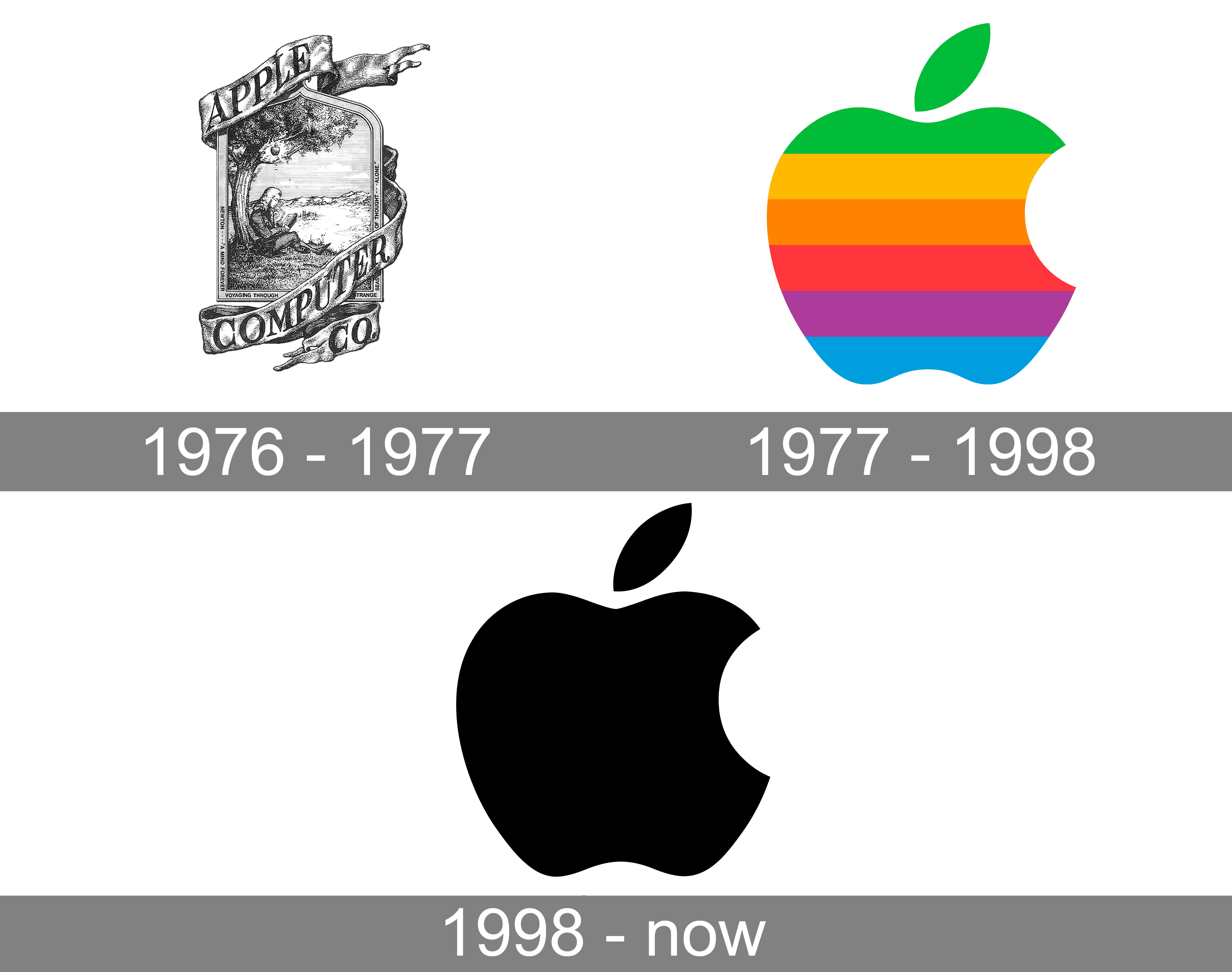
The Apple logo is one of the most well-known logos in the world. It shows a bitten apple and stands for innovation, sleek design, and a premium user experience. The Apple logo we see today has a rich history of changes and improvements.

1976 to 1977: Newton Makes an Appearance

The first Apple logo, designed by co-founder Ronald Wayne in 1976, featured an intricate illustration of Isaac Newton sitting under an apple tree.

This logo included the phrase, “Newton… A Mind Forever Voyaging Through Strange Seas of Thought … Alone,” and aimed to symbolize knowledge and discovery. However, this detailed design proved impractical for branding purposes, leading to its swift replacement.

1977 to 1998: The Rainbow Spectrum

In 1977, graphic designer Rob Janoff was commissioned to create a new logo that was simpler and more scalable.

Janoff designed the now-famous apple with a bite taken out of it, filled with a rainbow spectrum of colors. The bite was added to ensure the logo was easily recognizable as an apple and not mistaken for a cherry.

The logo was also used in Super Bowl advertisement of 1984 – which exemplified marketing brilliance, as it unveiled Macintosh to the global audience and captivated the American public. To this day, the Macintosh product line remains one of the most successful series of computing, raking in tens of billions in annual sales.

The rainbow colors also highlighted the Apple II’s screen capabilities, showcasing the company’s technological advancements.

This colorful logo became a symbol of creativity and innovation, resonating with a diverse audience and establishing Apple’s unique brand identity in the technology sector.

1998 to 2001: The Classic Design

Upon Steve Jobs’ return to Apple in 1997, the company underwent a significant rebranding to shift its image towards a luxury and minimalist aesthetic, incorporating cutting-edge AI technologies. In 1998, the rainbow colors were replaced with a sleek monochromatic design, initially in blue and then transitioning to black.

This change aligned with the launch of the iMac, reflecting Apple’s commitment to simplicity and elegant design.

The classic monochrome logo was versatile and sophisticated, seamlessly integrating with Apple’s new range of products and reinforcing the company’s focus on user experience and innovative technology.

2001 to 2007: Full Of Depth

In 2001, Apple introduced the Aqua Apple logo, featuring a more three-dimensional and glossy finish. This version complemented the design of the newly launched iPod, reflecting Apple’s continued emphasis on sleek, user-friendly products.

The depth and shine of the Aqua logo symbolized the advanced technology and premium quality of Apple’s offerings, reinforcing the brand’s position as a leader in the tech industry.

2007 to 2017: A 3D Spin

The launch of the iPhone in 2007 prompted another evolution of the Apple logo. The emblem adopted a glass-inspired texture, moving away from the previous chrome finish to better complement the design of Apple’s smartphones and other products.

This iteration of the logo maintained the minimalist apple shape while adding a sense of modernity and sophistication. The glassy texture underscored Apple’s focus on cutting-edge technology and aesthetic appeal, aligning with the company’s innovative product line.

2017 to Today: Chrome Takes The Stand

In 2017, Apple transitioned to a flat, monochromatic logo, reflecting contemporary design trends and a minimalist approach. The new chrome logo is sleek, versatile, and easily adaptable across various products and marketing materials.

This latest iteration symbolizes Apple’s unwavering commitment to simplicity, innovation, and user-centric design. The flat logo not only enhances brand recognition but also aligns perfectly with the modern, sophisticated image that Apple continues to uphold.

Evolution of Slogans Through Decades

Apple’s slogans have changed over time, just like the Apple logo. These changes show how the company’s goals and target audience have shifted. Early on, they focused on technical innovation. Now, they focus more on simplicity and user experience. Their slogans have helped shape how people see the brand.

Looking at how Apple’s slogans have evolved gives us a closer look at their marketing strategies. It shows how well they understand what consumers want. It also shows how they adapt their messages to connect with people around the world.

1980s: Establishing Innovation

During the 1980s, Apple focused on positioning itself as an innovator in the personal computer market. Although not associated with a specific enduring slogan during this period, Apple’s marketing emphasized the unique features and creative potential of its Macintosh computers.

This era laid the foundation for Apple’s reputation as a company that valued design, user experience, and technological advancement, setting the stage for future branding efforts like the “Think Different” campaign.

1990s-2000s: Emphasizing Simplicity and Creativity

The 1990s marked a turning point for Apple, characterized by the introduction of the “Think Different” slogan and a renewed focus on simplicity and creativity. This period saw Apple overcoming financial struggles and reestablishing itself as a leader in the tech industry.

Think Different” became synonymous with Apple’s brand, encapsulating the company’s innovative spirit and commitment to breaking away from the status quo. This slogan not only resonated with consumers but also inspired employees to push the boundaries of technology and design.

In the early 2000s, Apple’s slogans continued to highlight simplicity and user experience, aligning with the launch of products like the iPod, iPhone, and MacBook Pro. These slogans reinforced Apple’s dedication to creating intuitive, high-quality products that enhanced users’ lives.

Evolution Of Apple’s Brand Messaging

Evolution Of Apple’s Brand Messaging

Apple’s brand message has changed a lot over the years. This change happened because of shifts in the market, new technologies, and the forward-thinking ideas of Steve Jobs.

Transition From “Think Different” to Modern Campaigns

While “Think Different” remains one of Apple’s most iconic slogans, the company’s brand messaging has evolved to reflect its expanding product line and technological advancements.

In recent years, Apple’s campaigns have shifted towards emphasizing privacy, sustainability, and seamless user experiences.

The transition from “Think Different” to modern campaigns showcases Apple’s ability to adapt its messaging to address contemporary issues and consumer expectations.

This evolution ensures that Apple’s brand remains relevant and continues to resonate with a diverse global audience.

Current Focus On Innovation, Privacy, and Simplicity

Today, Apple’s brand messaging centers around innovation, user privacy, and simplicity.

Campaigns highlight the advanced technology behind products like the iPhone, MacBook Pro, and Apple Watch, while also emphasizing the company’s commitment to protecting user data and ensuring a seamless user experience.

This focus aligns with Apple’s broader mission to enhance people’s lives through technology, reinforcing the brand’s reputation as a trusted and forward-thinking technology company.

What Are Other Notable Apple Taglines?

What Are Other Notable Apple Taglines?

Beyond “Think Different,” Apple has employed various taglines to promote its products and brand.

Some notable examples include:

  1. “The only thing that’s changed is everything.” – iPhone 6s
  2. “Blows minds, not budgets.” – iMac 1998
  3. “1,000 songs in your pocket.” – iPod Classic
  4. “Light. Years Ahead.” – MacBook Pro
  5. “The most amazing iPhone yet.” – iPhone 4S
  6. “The future of television.” – Apple TV

These slogans reflect Apple’s emphasis on innovation, quality, and enhancing user experiences across its diverse product range.

Why is “Think Different” Iconic?

Why is “Think Different” Iconic?

The phrase “Think Different” goes beyond being just a slogan. It is part of our culture now. Its strong message, linked to Steve Jobs’ great leadership, helped make it powerful.

This slogan resonated with people who wanted to break traditions and be themselves. Its influence is not just in technology; it has inspired many creative thinkers and new innovators over the years.

Cultural and Historical Significance

Think Different” transcended traditional advertising slogans by embodying a cultural movement that celebrated nonconformity and creativity.

By associating its brand with renowned figures like Albert Einstein, Pablo Picasso, and Thomas Edison, Apple positioned itself as a champion of innovation and intellectual freedom.

This cultural resonance made “Think Different” more than just a tagline; it became a mantra for individuals and organizations striving to challenge the status quo and drive meaningful change.

Influence On Apple’s Marketing Success

The “Think Different” campaign played an important role in Apple’s marketing success, helping the company regain its footing in the late 1990s and propelling it to unprecedented heights. The slogan reinforced Apple’s identity as a forward-thinking, creative technology company, altering perceptions of campaigns, attracting a loyal customer base and increasing its market share.

By fostering an emotional connection with consumers and inspiring them to embrace innovation, “Think Different” significantly contributed to Apple’s enduring brand legacy and continued success in the competitive technology landscape.

FAQ’s:

How Has Apple’s Slogan Changed Over The Years?

Apple’s slogan has evolved from the original focus on simplicity and user experience to the iconic “Think Different” campaign in 1997.

In recent years, Apple’s messaging has shifted towards themes like privacy, sustainability, and seamless user experiences, reflecting the company’s expanding product line and technological advancements.

Why Did Apple Choose “Think Different” As a Slogan?

Apple chose “Think Different” to encapsulate its innovative spirit and distinguish itself from competitors like IBM.

The slogan aimed to celebrate creativity, nonconformity, and the visionary ideas of influential figures, aligning with Steve Jobs’ vision for the company and its commitment to pushing technological boundaries.

Is “Think Different” Still Used By Apple?

While “Think Different” remains one of Apple’s most memorable and influential slogans, the company has expanded its brand messaging to address contemporary themes such as privacy, sustainability, and user experience.

However, “Think Different” continues to hold a significant place in Apple’s brand legacy and is occasionally referenced in marketing materials.

How Did “Think Different” Help Apple’s Revival?

The “Think Different” campaign was instrumental in reviving Apple’s brand in the late 1990s. Positioning the company as a leader in innovation and creativity, the slogan helped attract a loyal customer base and restore Apple’s market share.

The campaign reinforced Apple’s identity as a forward-thinking technology company, paving the way for the successful launch of products like the iMac, iPod, and iPhone.

Conclusion

Apple Inc.’s journey from a small startup in Cupertino, California, to a global technology powerhouse is deeply intertwined with its strategic use of slogans and the evolution of its logo. The “Think Different” slogan and the iconic bitten apple logo are not just symbols of the brand but representations of Apple’s core values of innovation, creativity, and user-centric design.

Throughout the decades, Apple’s ability to adapt its branding to reflect technological advancements and cultural shifts has been key to its enduring success.

Consistently promoting a message of simplicity, elegance, and forward-thinking, Apple has maintained its position as a leader in the technology industry, influencing both consumer perceptions and industry standards.

As Apple continues to innovate and expand its product offerings, its slogans and logo will undoubtedly evolve, further solidifying its legacy as a trailblazer in technology and branding.

What is Yandex? Everything About Russia’s Leading Search Engine

Many people consider Google the default search engine for any query. However, there is another popular search engine that dominates the Russian market: Yandex Search.

Created by a Russian company, Yandex is more than just a platform for search queries.

It has evolved into a technology company offering web browser solutions, analytics, digital marketing opportunities, and various other services. Its remarkable history of growth in the region is a major reason it has earned the nickname “Google of Russia.”

This guide provides comprehensive information on the history of Yandex, the key features of Yandex, why it matters, and how you can optimize your web page or website content for this leading search engine.

What is Yandex?

What is Yandex?

Yandex is a Russian search engine founded by Arkady Volozh, Ilya Segalovich, and Arkady Borkovsky.

The word “Yandex” was initially an abbreviation of “Yet Another Index,” reflecting its early focus on indexing search results.

Established as an independent company, Yandex quickly became the largest search engine in Russia, surpassing other local portals that struggled to match the tools and user experience it provided.

As of today, the Yandex Search Engine claims a significant share of the search engine market within Russia and has even released a global English version of its web browser.

Operating as a technology company, Yandex extends far beyond its search bar.

It offers many services: Yandex Maps, ride-hailing apps, cloud-based solutions, artificial intelligence tools, and more. It has a strong base in software development and invests heavily in user experience optimization to ensure relevant content is delivered fast.

Because it is tailored to handle the Russian language—including its complex grammar—Yandex consistently wins over local users who want the best way to find relevant search results in their native tongue.

Why is Yandex Important?

Why is Yandex Important?

Yandex holds a robust market share in the Russian Federation, where it once outpaced Google in certain metrics. Its deep familiarity with Russian content and culture is a primary factor.

Furthermore, Yandex has the backing of the Russian government in certain infrastructure areas and plays a key role in the digital landscape of Eastern Europe.

One of the main reasons Yandex captures a large slice of the search engine market share is the platform’s capacity to handle local SEO challenges, especially in the world of multilingual or region-specific optimization.

Companies targeting Russian-speaking audiences must keep track of how Yandex’s algorithm ranks relevant content.

What Are The Key Features and Services Offered By Yandex?

What Are The Key Features and Services Offered By Yandex?

  1. Yandex Search Engine: Focused on delivering relevant search results in the Russian language.
  2. Yandex Browser: A web browser that can integrate with other Yandex services, providing advanced security tools and efficient page loading.
  3. Yandex Maps: Similar to Google Maps, but designed specifically for the Russian market, providing local businesses, transit routes, and real-time traffic data.
  4. Yandex Webmaster Tools: A suite that allows you to optimize web pages, monitor search queries, and examine indexing status.
  5. Yandex SEO Support: The platform offers resources that help site owners gain organic traffic by following best practices for the search engine Yandex.
  6. Artificial Intelligence: Behind many Yandex products is a sophisticated AI system that helps refine search intent, voice queries, and more.

Yandex Vs. Google: A Brief Comparison

Yandex Vs. Google: A Brief Comparison

Yandex is often described as the “Google of Russia” due to its comprehensive range of services, large search engine market share, and broad user base.

However, a few differences stand out:

  1. Language Handling: Yandex’s algorithm excels with Russian grammar and morphological nuances. Google sometimes struggles with the complexities of the Russian language, whereas Yandex was built to handle them.
  2. Local Results: Yandex invests heavily in local SEO, delivering region-specific listings and geo-targeted search results more effectively than Google for Russian content.
  3. Market Share: Within Russia, Yandex often secures a high percentage of search engine market share, while Google dominates many other parts of the globe.
  4. Mobile Market: Google has more traction globally on Android devices, but at times, Yandex appears on Russian Android phones as a choice for the default search engine.
  5. Speed of Indexing: Google crawls new content faster, while Yandex sometimes indexes at a slower rate, particularly if the web page carries minimal relevant content or is hosted outside Russia.
  6. User Data: Yandex’s approach to storing user data is subject to Russian regulations, whereas Google adheres to a global standard (with local data centers). This can affect how each handles privacy considerations.
  7. Keyword Stuffing: Both Yandex and Google penalize manipulative tactics, though Yandex is known for being especially sensitive to it. Overuse of the same search term might be flagged quickly, resulting in ranking drops.

Benefits of Using Yandex

Benefits of Using Yandex

Adopting Yandex for your digital marketing efforts or general searches comes with clear benefits:

  1. Tailored For Russian Speakers: If your target audience consists of Russian-speaking users, you will likely find Yandex more accurate in delivering relevant content.
  2. Local SEO Advantage: Firms with local branches in Russia often gain more traffic through Yandex, thanks to the search engine’s attention to regional signals.
  3. Strong Tools: Services like Yandex Webmaster Tools and Yandex Browser simplify link building, SEO auditing, and content optimization. This can help your business gather comprehensive information about site performance.
  4. Competitive Advertising: While Google Ads is huge globally, Yandex.Direct reaches a Russian audience efficiently and might win if you wish to tap into local markets.
  5. Wide Product Ecosystem: Yandex offers multiple integrated technologies—artificial intelligence, mapping tools, and translation features—that can improve user engagement on your site and feed into your marketing campaigns.

How Yandex Became More Popular Than Google in Russia?

How Yandex Became More Popular Than Google in Russia?

Yandex’s popularity in the Russian market can be traced to several factors.

First, it was launched in 1997 by Arkady Volozh, Ilya Segalovich, and Arkady Borkovsky—all intimately familiar with Russian linguistic complexities. At a time when Google was still evolving its indexing approach, Yandex was already good at delivering relevant search results in the Russian language.

Moreover, Yandex strategically partnered with local hardware and software providers.

At one point, many Russian Android phones gave users the chance to pick Yandex as the default search engine, boosting its penetration.

Add to that Yandex’s cooperation with the Russian government, which regarded it as an important local resource, and the outcome was a strong position in the national market.

The company also ensured that sites written in Russian produced better results on Yandex than they might on Google, effectively locking in a loyal user base.

Why Should You Optimise For Yandex?

Why Should You Optimize For Yandex?

Businesses hoping to target the Russian-speaking world or break into Eastern European markets need to consider Yandex optimization. Thanks to Yandex’s strong local presence, ignoring it could cause you to miss potential leads.

Some reasons:

  1. High Penetration Rate: Yandex’s market share in Russia can exceed 50% at times, making it an important avenue for digital marketing within the region.
  2. Search Intent: Yandex addresses queries in a manner often more aligned with local habits, so optimizing for Yandex helps ensure your site is front and center for relevant search results.
  3. Local Preferences: Because Yandex includes local SEO signals effectively, businesses with a strong offline presence in Russia can rank well for region-specific search term queries.
  4. Organic Traffic: Improving your presence in Yandex can generate more organic traffic if your product or service is relevant to Russian audiences.

At VH Info, we see first-hand how link building targeting Yandex can open new paths for businesses. Our team offers strategies that improve your site’s performance on Yandex and maximize your reach in the Russian market.

Best Practices For Optimizing For Yandex

Best Practices For Optimizing For Yandex

Yandex’s unique priorities call for slightly different SEO strategies than those used for Google Search.

Below are steps you can integrate today:

  1. Avoid Keyword Stuffing: Yandex punishes unnatural repetition of keywords. Aim for a balanced approach that suits user readability. Adding synonyms and using variations of key terms is the best way to maintain relevance without risking a penalty.
  2. Create High-Quality, Relevant Content: Yandex closely measures dwell time and bounce rate to evaluate user experience. If readers spend time on your web page, it indicates your content is valuable. This signals to Yandex that you deserve a higher position in search results.
  3. Optimize For Russian Language: If your target audience is primarily in Russia, your site should support the local language thoroughly. Ensure your translations are accurate and accessible for native speakers.
  4. Use Yandex Webmaster Tools: Submitting a site map to Yandex, tracking indexing status, and studying search queries in your Yandex Webmaster Tools account are vital steps. These actions help you gather data about how Yandex’s algorithm sees your site.
  5. Pay Attention to Local Directories: If you have a physical storefront, consider signing up for Yandex business directories or adding location-based keywords for local SEO.
  6. Ensure Technical Compatibility: Certain JavaScript frameworks may experience slower indexing in Yandex. The source code of your site should be optimized for Yandex’s crawler. Keep the site structure clean and ensure your hosting is reliable to help Yandex understand your content.
  7. Observe Link Building Quality: Yandex’s algorithm values link relevance over sheer quantity. A few well-placed, authoritative links are far superior to many low-quality inbound links. Focus your link-building on credible sources that are thematically aligned with your niche.
  8. Speed & Mobile-Friendliness: The Russian mobile market is sizable, so ensure fast, mobile-optimized pages. A slow site can negatively impact search engine rankings on both Yandex and Google.
  9. Monitor User Data: Although Yandex collects user data, especially for personalization, it also expects sites to be mindful of privacy. Watch out for any potential security vulnerabilities or spammy tactics that might lower your Yandex rankings.
  10. Think About Search Intent: With advanced AI integrated into Yandex, the platform tries to match each search term to the precise need behind the user query. Create content that matches your audience’s expectations, whether they are informational or transactional queries.

FAQ’s:

How Does Yandex Fit Into The Search Engine Picture?

Yandex is a leading search engine in Russia, with a considerable search engine market share. Often regarded as the “Google of Russia,” it is a mainstay in Eastern Europe.

While it ranks behind Google in many global metrics, its strength in handling the Russian language, providing a seamless user experience, and supporting local businesses makes it a critical player.

How Is Yandex Different From Google?

Both search engines handle billions of search queries across the globe. However, Yandex invests heavily in local factors such as region-based search results, geotargeting, and morphological analysis for the Russian language.

By comparison, Google’s indexing is generally quicker, and it has a massive global user base.

Still, Yandex stands out by offering dedicated features such as Yandex Maps, powerful local SEO signals, a robust web browser known as Yandex Browser, and in-depth Yandex SEO resources.

Conclusion

Yandex has championed a strong foothold in the Russian search market and remains a popular search engine among native speakers. Its history of Yandex spans years of software development, partnerships, and expansions.

As a leading technology company, it harnesses artificial intelligence to deliver relevant results for millions of queries each day. If you aim to capture a target audience in Russia and beyond, focusing on Yandex SEO is a wise strategic move.

At VH Info, our goal is to provide clear, helpful knowledge about link building and digital marketing strategies — including how to make the most of the search engine Yandex.

With our expertise in SEO for Russian speakers, we can help you optimize your site for Yandex’s market share. Whether you want to boost organic traffic, explore new ways to rank your web pages or refine existing campaigns, Yandex deserves your consideration.

Link Explorer: What is it, It’s Features, Why & How To Use It?

Link building remains a major focus for SEO professionals who want to boost rankings, increase organic traffic, and establish a trustworthy online presence.

A solid link profile often reflects robust domain authority, and this leads to better placement in search results on Google or any other search engine. However, a solid link profile doesn’t happen by accident.

Tools such as a site explorer, backlink checker, or dedicated link explorer solutions are vital for investigating link data, spotting potential problems, and improving anchor text usage.

At VH-info, we have guided numerous SaaS brands toward more impactful link building strategies. Our approach involves anchor text analysis, inbound links reviews, spam score checks, and other methods that help create a clean backlink profile. A reliable free link explorer or paid link explorer provides in-depth link metrics, highlights page authority, and reveals how your link data interacts with search engine algorithms.

This article covers the key features of an effective link explorer, how to make the most of its interface and metrics, and ways to integrate link research data into broader SEO strategies.

Whether you’re new to link building or an experienced SEO professional, a well-structured link explorer routine can give you a better grasp of domain authority, anchor text patterns, and future link building opportunities.

What is Link Explorer?

What is Link Explorer?

A link explorer is a specialized platform or tool designed to provide insight into a website’s inbound links, anchor text distribution, backlink profile, spam metrics, and related performance indicators. Many SEO professionals consider it a central component of their workflow, often speaking of it as a site explorer or backlink checker on steroids.

In short, it gathers link data across various URLs, compiles metrics such as domain authority and spam score, and presents them in a format that helps with link research.

In addition, a link explorer digs into the relationships between your own web page and other external websites. It identifies the nature of the link, anchor text usage, any issues with spam, and which links contribute positively to your domain authority.

When SEO professionals mention link metrics, they are typically referring to data provided by a link explorer, including page authority, inbound links count, anchor text diversity, and historical link trends.

Why Use Link Explorer?

SEO hinges on numerous factors, but domain authority, anchor text relevance, and a clean backlink profile remain at the core of higher Google rankings. A link explorer provides:

  1. Better Link Data Collection: It aggregates inbound links so you can see every web page that connects back to your site or to a competitor’s site.
  2. Anchor Text Analysis: It detects repetitive anchors or suspicious patterns that might affect spam score.
  3. Domain Authority Insights: Analyzing page authority and domain data can help SEO professionals identify areas where strategic link building can boost a site’s reputation.
  4. Keyword Research Synergy: Link explorer platforms often integrate with keyword metrics, making it simpler to connect your link-building efforts to specific keywords.

A free link explorer might be enough for smaller websites wanting a quick overview. Larger brands often require additional metrics, CSV and PDF exporting capabilities, and historical data to track changes in domain authority and link metrics over time.

How to Use Link Explorer?

How to Use Link Explorer?

Getting Started With Link Explorer

Starting out involves selecting a platform that offers a user-friendly interface, relevant metrics (domain authority, spam score, inbound links, anchor text usage), and data export options like CSV and PDF.

Some tools provide a free trial, enabling SEO professionals to test features like link building analysis and spam detection. Once you log in, you typically begin by entering the URL of the web page or domain you want to investigate.

Professional SEO platforms, including those that include Moz metrics, let you run quick checks on potential inbound links, anchor usage, and link data volume. This approach delivers a better picture of what link building tasks lie ahead.

Analyzing Backlink Profiles

A strong backlink profile is about more than just quantity. High-quality inbound links from authoritative sources are essential for ranking boosts on Google. A link explorer helps you see whether your domain is picking up spam links, or if your anchor text usage is too repetitive.

Having a large number of questionable inbound links might hurt SEO, so quick detection of suspect domains is critical. A balanced backlink profile combines varied anchor text, relevant link sources, and minimal spam.

Tracking Domain and Page Authority

Most link explorer platforms track domain authority or page authority, though they may use distinct metrics or labels. These figures indicate how a search engine perceives a site’s trustworthiness. A rising domain authority suggests successful link building campaigns.

Using an interface that visualizes these metrics lets you see trends. If your domain authority is on a downward trajectory, you might need to examine the anchor text distribution, identify spammy inbound links, or reconsider your link building approach.

Why is Link Explorer Important For Domain Authority?

Domain authority often becomes a proxy for SEO performance. When domain authority improves, you typically see better visibility in search results, higher organic traffic, and improved Google rankings. A link explorer shines light on all the link data that inform domain authority calculations, making it invaluable for site owners.

When your SEO team or marketing department works with a link explorer, they can verify whether domain authority changes align with new inbound links, anchor text adjustments, or link building strategies. Ongoing checks help you see if new inbound links have a beneficial effect on domain authority or if suspicious links negatively sway your spam score and hamper your rankings.

Key Features Of Link Explorer

Key Features Of Link Explorer

Link Data and Metrics

Link metrics are the heartbeat of any link explorer. These metrics include:

  1. Inbound Links Count: The quantity of domains and URLs linking back to your pages.
  2. Spam Score: An evaluation of how likely incoming links may appear spammy.
  3. Domain Authority and Page Authority: Figures that approximate how influential a domain or page might be in search engine rankings.
  4. Anchor Text Usage: The text used to form the link, helpful for anchor text analysis and link building.
  5. Historical Link Data: Trends showing link profile growth or decline over time.

Many link explorer platforms, including those that include Moz data, allow a user to export these metrics as CSV or PDF files.

In addition, they frequently show additional data like link velocity (rate of link acquisition), a metric that helps you gauge if your domain is acquiring inbound links at a natural pace.

Identifying Broken Links

A robust link explorer also pinpoints dead or broken inbound links.

Broken links often appear when external sites change their URL structure, or content is removed without proper redirects.

Ideally, a site explorer or link explorer also flags 404s on your own domain. Those 404s could have inbound links that end in error pages, depriving your domain of potential organic traffic.

How Does Link Explorer Compare to Other SEO Tools in the Market?

Plenty of SEO software platforms track link data, but a dedicated link explorer typically provides deeper insight.

A standard backlink checker might show you inbound links, but a specialized explorer goes further by revealing anchor text patterns, spam score, page authority, domain authority, and historical trends.

Some site explorer or link explorer tools offer integrated keyword research functions, enabling you to tie anchor text analysis directly to your targeted keywords. Others deliver a versatile interface with advanced metrics, PDF/CSV exporting, and monthly progress updates for domain authority.

VH-info often encourages clients to test a free trial from different link explorer providers before subscribing, to see which interface, features, and insights align best with a particular SEO project. Some solutions, like Moz’s Link Explorer, excel at anchor text analysis and spam detection, while others might offer more dynamic competitor analysis or automated link building strategies.

Advanced Features Of Link Explorer

Many Link Explorer tools have more than just basic features. They offer advanced options for deeper analysis.

Competitor Analysis

Analyzing competitor domains helps you see how your backlink profile compares.

For example, you can collect inbound link metrics for both your domain and your competitor’s domain, culminating in a side-by-side comparison of domain authority, anchor text usage, and link velocity.

When you notice that a competitor’s inbound links are superior, you might reach out to similar domains to create a link building partnership. Observing their anchor text distribution can also shed light on safe anchor usage for your own website.

Identifying Link Building Opportunities

A link explorer presents link data that helps you spot potential outreach targets or content segments lacking sufficient inbound links. If your anchor text usage is heavily skewed toward a single keyword, you can diversify anchor text distribution for more stable Google rankings.

A full report of inbound links can reveal places where you can strengthen domain authority.

Monitoring Historical Data

Tracking link data growth over time clarifies whether your link building campaigns are generating results. Tools that retain data over multiple months or years help you recognize patterns in domain authority, anchor text, spam metrics, and overall link profile changes.

Instead of a static snapshot, historical insight becomes a roadmap for how your domain has progressed. If domain authority has remained flat, your link building approach might require fresh anchor text or new content partnerships.

On the other hand, if inbound links keep soaring without a parallel rise in domain authority, there may be a spam issue.

Best Practices For Using Link Explorer

Conducting Regular Backlink Audits

Consistent auditing of your link profile is central to a well-rounded SEO strategy. A few spammy inbound links might not immediately harm domain authority, but they can do damage if they accumulate.

A link explorer that tracks spam score is very useful for this because you can isolate questionable links, consider disavowing them, or reach out to webmasters to remove them.

Furthermore, consistent audits with a site explorer help you identify link building trends early, whether positive or negative. This timely awareness ensures that your domain authority remains stable and your web pages keep generating beneficial organic traffic.

Avoiding Toxic Links

Not all links are positive. Low-quality inbound links often come from domains with high spam scores or unrelated content. If your anchor text repeats suspicious phrases that indicate potential spam, search engine algorithms might penalize your rankings.

Integrating With Other SEO Strategies

A link explorer shouldn’t operate in isolation. Combining its data with other SEO tactics typically drives better results.

Integrating link analysis alongside:

  1. Keyword Research: Fine-tune anchor text to match relevant keywords.
  2. Content Marketing: Enhance your web page content so it naturally attracts inbound links.
  3. Technical SEO: Improve site speed, fix broken pages, adjust URL structures.
  4. Local SEO: Target any local anchors that align with your location-based strategy, especially if you serve localized audiences.

Additionally, a thorough approach uses on-page SEO, social signals, and user experience enhancements for a well-rounded push toward higher Google rankings. At VH-info, our own SaaS link building service and SEO for Startups aim to unify these efforts for a stable boost in domain authority. Review the VH process to learn more about how we do link building.

FAQ’s:

What Purpose Does Link Explorer Serve in SEO?

A link explorer highlights a website’s inbound links, anchor text usage, spam metrics, domain authority characteristics, and more. SEO professionals rely on these insights to shape link building strategies, gauge spam score, and maintain a strong backlink profile.

What Makes Link Explorer an Essential Tool For SEO Practitioners?

It simplifies link research, reveals spammy domains, shows anchor text patterns, and pinpoints problems with domain authority. A link explorer also assists in competitor analysis, bridging the gap between your domain’s link metrics and your rivals’ performance.

How Often Should I Analyze My Links Using Link Explorer?

Routine checks, such as monthly backlink audits, can provide timely insights into new inbound links, anchor text changes, or spam score increases. Some prefer weekly analysis for fast-moving niches. It depends on how competitive your segment is and how often you introduce new content.

How Does Link Explorer Help in Improving a Website’s SEO Performance With Link Data?

It draws attention to harmful or beneficial inbound links, allows anchor text analysis, monitors domain authority changes, calculates spam score, and typically offers a user-friendly interface.

Acting on this link data can help you refine link building strategies, shape your anchor text approach, and resolve any issues related to spam or broken links.

Is There a Way to Use Link Explorer For Local SEO Improvement?

Yes.

Examining your backlink profile for local directories, citations, and regional anchors can help you refine anchor text and inbound link quality to boost local visibility.

In such scenarios, linking to specific location-based pages ensures your domain shows relevance for geo-targeted searches.

Conclusion

A link explorer is crucial for SEO in competitive settings. It shows metrics like inbound links, anchor text, page authority, and domain authority. The tool allows for exporting data, analyzing competitors, and integrating with keyword research.

A free link explorer is a good starting point, but premium tools offer deeper insights into anchor text and spam detection. SEO professionals use these tools for daily tasks like checking new links and assessing anchor text quality. Link explorers help agencies and teams develop data-driven strategies for better Google rankings. VH-info supports SaaS brands with link building solutions and domain authority optimization.

Link explorers reveal how inbound links impact Google results. Combining content marketing and clean link profiles boosts organic traffic and rankings. Analyzing anchor text and links improves outcomes for SaaS brands.

Start link research now to monitor anchors, spam scores, domain authority changes, and projects with your chosen link explorer. Consistent effort leads to higher rankings, brand visibility, and measurable SEO success.

What is a SaaS Business Intelligence Solution & How Does it Work?

In today’s fast-paced digital era, businesses need to use data effectively to maintain a competitive advantage.

SaaS business intelligence (SaaS BI) solutions offer a powerful way to transform raw business data into actionable insights, enabling informed strategic planning and better decision-making.

This guide, brought to you by VH-info, your trusted resource for SaaS link-building strategies, will break down the complexities of SaaS BI, providing you with a clear understanding of its benefits, key features, implementation steps, and future trends.

With our direct, knowledgeable, and helpful approach, we aim to equip you with the knowledge you need to make the most of SaaS business intelligence for your organization.

VH-info understands the need for actionable insights so you can take full advantage of your business intelligence software.

What is SaaS Business Intelligence?

What is SaaS Business Intelligence?

SaaS Business Intelligence refers to business intelligence software delivered as a service over the internet.

Unlike traditional BI solutions that require on-premises installation and maintenance, SaaS BI allows users to access business analytics, data analysis, and data visualization tools from anywhere with an internet connection.

This model offers greater flexibility, scalability, and cost-effectiveness, making it an attractive option for organizations of all sizes.

Modern SaaS BI empowers businesses to analyze business data in real-time, identify trends, and gain a deeper understanding of their performance. VH-info specializes in helping SaaS companies like yours make the most of your data.

Benefits Of SaaS Business Intelligence

Benefits Of SaaS Business Intelligence

SaaS BI offers a multitude of advantages that can significantly impact your organization’s performance and growth.

  1. Accessibility and Scalability: Saas BI tools are easily accessible online, great for team collaboration. They allow info access from anywhere. Saas BI scales up or down as needed, saving costs.
  2. Enhanced Data Analysis and Reporting: Saas BI helps analyze data for insights. It offers predictive analytics and natural language processing for trend forecasting. These tools enhance business understanding beyond basic reporting.
  3. Improved Decision-Making and Strategic Planning: Providing a comprehensive view of your business data, SaaS BI allows for informed strategic planning and decision-making. You can identify areas for improvement, optimize resource allocation, and develop targeted strategies to achieve your business objectives. With interactive visualizations and customizable dashboards, you can easily monitor key performance indicators and track progress towards your strategic goals.
  4. Increased Efficiency and Productivity: Saas BI makes data analysis easier and saves time. It has user-friendly tools like drag-and-drop features. Users can access business data quickly without technical skills. This boosts productivity and speeds up insights.
  5. Access Cutting-Edge Innovation & Rapid Deployment: SaaS BI tools integrate easily for better business insights. Vendors keep updating with new features. Choose SaaS BI for advanced tech like AI and machine learning without complex management. These solutions deploy fast, ensuring quick access to business benefits.
  6. Cost-Effective Revenue Growth: SaaS BI is a cost-effective solution that can drive revenue growth and optimize your business operations. Its subscription-based pricing model eliminates the need for large upfront investments in hardware and software, reducing your total cost of ownership. Using SaaS BI to improve decision-making, streamline processes, and identify new opportunities can help you achieve higher profitability and sustainable revenue growth.
  7. Collaboration and Sharing: SaaS BI promotes collaboration among team members by providing a centralized platform for data analysis and share insights. With features like shared dashboards and collaborative workspaces, you can easily discuss findings, brainstorm ideas, and work together to solve complex business problems. This improved collaboration fosters a data-driven culture and empowers everyone to contribute to the success of your organization.
  8. Monitoring and Performance Optimization: SaaS BI enables real-time monitoring of your business performance, allowing you to identify and address issues proactively.

Key Features To Look For in a SaaS BI Tool

Key Features To Look For in a SaaS BI Tool

When selecting a SaaS BI tool, consider the following key features to ensure it aligns with your business needs.

  1. Seamless Integration With Multiple Data Sources: The ideal bi tool should seamlessly connect to various data sources, including databases, spreadsheets, cloud applications, and social media platforms. This integration capabilities allows you to consolidate all your business data in one place, providing a holistic view of your organization’s performance. SaaS BI should integrate seamlessly with sage intacct and your tech stack.
  2. Advanced AI-Driven Search Analytics and Insights: Look for a SaaS BI tool that offers advanced analytics capabilities, such as predictive analytics, natural language processing, and machine learning. These features can help you uncover hidden patterns, forecast future trends, and gain deeper actionable insights from your business data.
  3. Robust Data Modeling: A robust data modeling feature allows you to transform and structure your business data to meet your specific analytical requirements. This includes capabilities like data cleansing, transformation, and aggregation, ensuring that your data analysis is accurate and reliable.
  4. Elastic Scalability and Robust Security Measures: Choose a SaaS BI solution that offers elastic scalability to accommodate your growing business needs. The bi tool should also have robust data security measures in place to protect your sensitive data from unauthorized access and cyber threats. Ensure that the SaaS BI vendor complies with industry standards and regulations, such as GDPR and HIPAA.

5 Steps To Follow When Implementing SaaS BI

Steps To Follow When Implementing SaaS BI

Implementing SaaS BI requires careful planning and execution.

Here are five steps to help you get started:

  • Step 1: Define Your Business Objectives and Goals: Clearly define your business objectives and goals for implementing SaaS BI. What key metrics do you want to track? What questions do you want to answer? By setting clear objectives, you can ensure that your SaaS BI implementation aligns with your overall business strategy.
  • Step 2: Assess Your Data Sources and Infrastructure: Identify all the data sources you want to integrate with your SaaS BI tool. Assess the quality and completeness of your data, and identify any data gaps or inconsistencies. Evaluate your existing IT infrastructure to ensure it can support the demands of SaaS BI.
  • Step 3: Choose The Right SaaS BI Solution: Research and compare different SaaS business intelligence tools to find the one that best meets your specific needs. Consider factors like functionality, ease of use, integration capabilities, affordable pricing, and data security. Take advantage of free trials to test out different solutions before making a decision.
  • Step 4: Plan and Execute The Implementation: Develop a detailed implementation plan that outlines the tasks, timelines, and resources required. Assign responsibilities to team members, and establish clear communication channels. Migrate your business data to the SaaS BI platform, and configure the system according to your business requirements.
  • Step 5: Train Your Team and Continuously Improve: Provide comprehensive user training to your team members to ensure they can effectively use the SaaS BI solution. Encourage user adoption by showcasing the benefits of SaaS BI and providing ongoing support. Continuously monitor the performance of the system, and make adjustments as needed to optimize its effectiveness.

Top 10 SaaS Business Intelligence Tools in 2025

SaaS Business Intelligence Tools

Here are ten of the leading SaaS BI tools that VH-info recommends in 2025, each with unique features and strengths:

Coefficient

Coefficient

Coefficient is a SaaS BI tool that brings live business data into Google Sheets and Excel. It’s known for its ease of use, allowing both technical and non-technical users to work with real time data in a familiar spreadsheet environment.

Coefficient provides seamless integration and actionable insights, enhancing data quality and streamlining reporting.

With its no-code platform, users can automate workflows and build custom reports without technical expertise. Coefficient’s key features include data integration, real-time updates, and collaboration tools.

Tableau

Tableau

Tableau is a powerful business intelligence tool that excels in data visualization and analysis. It enables users to transform raw business data into interactive dashboards and share insights with ease. Many organizations also choose to hire Tableau developers to build custom dashboards and streamline complex reporting workflows.

Tableau offers a wide range of chart types, real-time analytics, and the ability to connect to various data sources. With its intuitive drag-and-drop interface, users can create compelling visualizations without coding. Tableau helps stakeholders make informed decisions based on real-time processed data.

Microsoft Power BI

Power BI is a SaaS BI solution known for its integration with the Microsoft ecosystem and its powerful analytics capabilities. It allows users to create interactive visualizations, share insights, and access real time data.

Power BI features natural language queries, AI-powered analysis, and seamless integration with Excel and other Microsoft products. It’s a comprehensive business intelligence tool suitable for organizations of all sizes.

Qlik Sense

Qlik Sense

Qlik Sense is a SaaS BI tool distinguished by its focus on empowering users to freely explore business data. It moves beyond simple reporting by using AI to uncover hidden connections and provide meaningful insights that might otherwise go unnoticed.

The intuitive drag-and-drop interface makes it accessible to users of all technical skill levels, and the built-in collaboration tools foster teamwork in the search for valuable trends and patterns. It’s a great platform to take full advantage of your business intelligence software.

Qlik Sense encourages asking questions about the data to derive actionable insights.

Chartio

Chartio

Chartio emphasizes making data visualization accessible to a broad range of users, regardless of their technical backgrounds. It utilizes a visual drop interface to simplify the process of creating charts and exploring your business data without writing code.

Chartio’s dedication to fostering data exploration makes it easy for teams to ask questions of their data and uncover meaningful insights.

Its features include integration capabilities and collaboration tools, enabling teams to work together seamlessly on data-driven initiatives. Chartio’s version control lets you track changes to your dashboards.

Domo

Domo

Domo provides real time visibility into your key metrics by bringing all your important data into interactive dashboards. It integrates with a wide variety of data sources, from spreadsheets to cloud applications, to give you a unified view of your business data.

Domo prioritizes accessibility with its mobile-friendly design, enabling users to monitor key performance indicators from anywhere.

With an emphasis on collaboration, Domo streamlines the process of sharing findings and ensuring everyone is aligned on strategic objectives. Domo also gives you the power of making quick decisions.

Looker

Looker

Looker’s strength lies in its ability to establish a reliable, single source of truth for all your business data. This is achieved through robust data modeling and governance features, which ensure data consistency and accuracy across the organization.

By defining relationships between data points, Looker allows for in-depth data analysis and the discovery of trends that drive better strategic planning.

With its advanced analytics capabilities, you’ll be empowered to extract valuable knowledge and generate actionable insights for data-driven decision-making.

Sisense

Sisense

Sisense is a SaaS BI solution specifically designed to handle complex data analysis scenarios and large datasets with ease. It goes beyond basic reporting with sophisticated advanced analytics, including predictive analytics and machine learning capabilities.

Sisense enables users to uncover hidden patterns, forecast future trends, and identify opportunities for improvement, with the ultimate goal of providing actionable insights that drive significant business results.

Zoho Analytics

Zoho Analytics

If your organization already utilizes Zoho’s suite of business applications, Zoho Analytics offers a seamless and synergistic SaaS BI experience.

It integrates effortlessly with the Zoho ecosystem, providing data visualization, data analysis, and reporting features that allow you to closely monitor key performance indicators and track progress towards your strategic goals.

The platform is known for its comprehensive range of integration capabilities and particularly affordable pricing, making it an excellent option for businesses seeking value and ease of use.

IBM Cognos Analytics

IBM Cognos Analytics

IBM Cognos Analytics is a comprehensive business intelligence platform that offers a wide range of analytics capabilities, including reporting, data visualization, and advanced analytics.

It supports various data sources and provides robust security features, making it suitable for large enterprises with complex business requirements. Cognos Analytics focuses on providing actionable insights for informed strategic planning.

SaaS Business Intelligence Challenges

SaaS Business Intelligence Challenges

While SaaS BI offers numerous benefits, it also presents some challenges that organizations should be aware of.

  1. Data Security Concerns: Data security is a top concern when implementing SaaS BI, as sensitive data is stored and processed in the cloud. Organizations must ensure that their SaaS BI vendor has robust data security measures in place to protect their business data from unauthorized access and cyber threats.
  2. Integration Complexities: Integrating SaaS BI with existing systems can be complex, especially if you have a heterogeneous IT environment. Organizations may need to invest in data connectors or custom integrations to ensure seamless integration between SaaS BI and their other applications.
  3. User Adoption Challenges: User adoption can be a challenge if team members are resistant to change or lack the necessary skills to use the SaaS BI solution effectively. Organizations must provide adequate user training and support to encourage user adoption and ensure that everyone can benefit from SaaS BI.

Strategies To Improve Your Company’s SaaS Business Intelligence

Strategies To Improve Your Company’s SaaS Business Intelligence

To maximize the value of your SaaS BI implementation, consider these strategies:

  1. Data Integration and Centralization: Pull all your business data from different data sources into one place. This data integration makes it easier to see the big picture and get meaningful insights.
  2. Data Quality and Governance: Make sure your business data is accurate and reliable. Implement rules for data quality to avoid data quality issues and ensure everyone trusts the insights they’re seeing.
  3. Data Warehousing and Architecture: Design a solid system for storing and managing your business data. A good data warehouse makes it faster to access and analyze information for strategic planning.
  4. Data Security and Compliance: Protect your sensitive data with strong data security measures. Make sure your SaaS BI practices follow industry rules to avoid legal problems and keep customer trust.
  5. Advanced Analytics and Machine Learning: Use advanced analytics features like machine learning and predictive analytics to find hidden patterns in your business data. This helps you make smarter decisions and anticipate future trends.
  6. Scalability and Performance Optimization: Ensure your SaaS BI solution can handle increasing amounts of business data and users without slowing down. Optimize performance so everyone can get real time answers to their questions.
  7. Real-time Data Processing: Process business data as it comes in so you can see what’s happening right now. Real time insights help you respond quickly to changing conditions.
  8. Data Visualization and Reporting: Create clear, easy-to-understand charts and dashboards to display your business data. Effective data visualization helps everyone share insights and make informed decisions.
  9. User Training and Adoption: Teach your team members how to use the SaaS BI tool effectively. Good user training ensures everyone can get the most out of the system and promotes user adoption.
  10. Continuous Monitoring and Performance Tuning: Keep an eye on how your SaaS BI solution is performing and make adjustments as needed. Regular monitoring helps you identify and fix problems quickly.
  11. Collaboration and Integration: Use collaboration tools within your SaaS BI platform to help team members collaborate on data analysis. Integrate SaaS BI with other SaaS tools in your tech stack for seamless integration of your business intelligence.
  12. Cost Management: Keep track of the costs associated with your SaaS BI solution and look for ways to optimize spending. Choose a SaaS BI tool that offers affordable pricing while still meeting your business needs.

Future Trends and Innovations in SaaS BI

Future Trends and Innovations in SaaS BI

The field of SaaS BI is constantly evolving, with new trends and innovations emerging all the time.

Some of the key trends to watch out for include:

  1. Artificial Intelligence (AI) and Machine Learning (ML): AI and ML are being integrated into SaaS BI tools to automate data analysis, provide predictive analytics, and generate actionable insights.
  2. Natural Language Processing (NLP): NLP enables users to interact with SaaS BI tools using natural language queries, making it easier to access and analyze business data.
  3. Real-Time Analytics: Real-time analytics is becoming increasingly important for businesses that need to make decisions quickly based on the latest data.
  4. Embedded Analytics: Embedded analytics allows you to integrate SaaS BI capabilities directly into your existing applications, providing users with seamless access to business insights within their familiar workflows.

Best Practices For Implementing SaaS BI

Best Practices For Implementing SaaS BI

To ensure a successful SaaS BI implementation, follow these best practices:

  1. Establishing Clear Goals and Objectives: Before you start, know what you want to achieve with SaaS BI. Define your business objectives and the key metrics you’ll track. Clear strategic goals will guide your implementation and ensure you get actionable insights.
  2. Ensuring Data Quality and Accuracy: Garbage in, garbage out! Make sure your business data is clean and correct. Address any data quality issues early on to ensure that your data analysis is reliable and leads to sound decisions.
  3. Providing Adequate User Training and Support: Don’t just give your team the SaaS BI tool and expect them to figure it out. Offer thorough user training so they know how to use all the features effectively. Ongoing support will encourage user adoption and ensure they can get the meaningful insights they need.
  4. Encouraging User Adoption and Engagement: Make SaaS BI a part of everyone’s daily routine. Show how it can make their jobs easier and help them achieve their goals. When users are engaged, you’ll see a better return on your bi-tool investment.
  5. Continuously Monitoring and Optimizing the System: Your SaaS BI setup isn’t a “set it and forget it” thing. Keep an eye on how the system is performing and make tweaks as needed. This ensures you’re getting the most out of your SaaS BI solution and that it continues to meet your evolving business needs.

FAQ’s:

Is SaaS BI Suitable For Small Businesses?

Absolutely! SaaS BI is often an attractive option for smaller companies. It offers affordable pricing, is scalable as you grow, and provides ease of use. It lets small businesses use business analytics without the big upfront costs of traditional BI solutions.

Can I Integrate SaaS BI With My Existing Systems?

Yes, most SaaS BI tools are designed for seamless integration. They can connect to various data sources, like spreadsheets, databases, and cloud apps. This integration capabilities help you bring all your business data together for a unified view.

How Secure is SaaS BI?

Data security is a top priority for SaaS BI providers. They use various data security measures to protect your sensitive data in the cloud. Look for vendors who comply with industry standards and regulations.

How Much Does A SaaS BI Solution Typically Cost?

The cost varies depending on the vendor, features, and the number of users. However, SaaS BI generally offers affordable pricing with subscription-based models. This can be more budget-friendly than investing in and maintaining on-premises business intelligence software.

Conclusion

SaaS Business Intelligence empowers businesses to transform raw business data into actionable insights, enabling informed strategic planning and better decision-making.

Understanding the benefits, key features, implementation steps, and future trends of SaaS BI can help you harness its power to enhance your organization’s performance and stay ahead of the competition.

At VH-info, we’re committed to providing you with the knowledge and resources you need to succeed with SaaS BI.

Contact us today to learn more about how we can help you optimize your SaaS BI strategy and drive revenue growth. VH-info can help you drive growth and improve your data quality today.

15 Best CRM For B2B SaaS in 2025 (Top Picks)

Selecting the best CRM for your B2B SaaS business is a pivotal decision that can significantly impact customer relationships, lead generation, and revenue growth.

With the CRM market continually evolving, SaaS companies need a CRM solution that not only aligns with their specific needs but also enhances their sales strategies.

This guide highlights premier SaaS CRM options for 2025, helping you make an informed choice to optimize your sales process and foster stronger customer relationships.

What is a B2B SaaS CRM?

What is a B2B SaaS CRM?

A B2B SaaS CRM (customer relationship management) is a specialized CRM system designed for SaaS businesses that sell to other businesses.

Unlike CRMs focused on direct-to-consumer sales, a B2B SaaS CRM is tailored to manage the complexities of B2B sales cycles, which often involve multiple decision-makers and longer deal stages.

The right CRM can transform how SaaS companies manage customer data, streamline sales management, and improve customer experience.

This CRM tool is essential for enhancing lead management, lead scoring, and customer support, thereby driving sales performance and customer retention.

Key Features to Look For in a CRM For B2B SaaS

Key Features to Look For in a CRM For B2B SaaS

When choosing a SaaS CRM software, consider these key features to ensure it meets your business requirements and enhances your sales team’s effectiveness.

  1. Subscription Management: Effective subscription management is vital for SaaS businesses. Your CRM platform should handle recurring billing, upgrades, downgrades, and cancellations seamlessly. This ensures accurate sales data and helps in sales forecasting.
  2. Sales Pipeline Visualization: A clear, visual sales pipeline is important for sales management. It allows sales reps to track progress of deals through various deal stages, identify bottlenecks, and prioritize important tasks. Pipeline management features should offer customization options to fit your specific needs.
  3. Customer Retention Tools: Customer retention is more cost-effective than acquisition. Look for CRM features like automated email campaigns, customer journey mapping, and feedback collection to maintain strong customer relationships.
  4. Integration Capabilities: Seamless integration with other tools in your tech stack is essential. The best free CRM should integrate effortlessly with marketing automation platforms, email marketing services, social media channels, and various forms of customer support software, including options for outsource customer support for SaaS companies, to create a single platform for all customer interactions.

The 15 Best CRM For B2B SaaS Enterprises in 2025

Best CRM For B2B SaaS Enterprises

Here are fifteen of the top CRM solutions that SaaS businesses should consider to enhance their lead management, streamline their sales cycle, and improve customer relationships in 2025.

Salesforce CRM

Salesforce CRM

Salesforce CRM is a top-tier CRM platform known for its extensive customization options and powerful features, making it a strong contender for the best CRM. It helps SaaS companies manage customer relationships effectively by providing a single platform to streamline sales automation and enhance lead management.

With features like lead scoring, sales forecasting, and comprehensive contact management, Salesforce supports sales reps in optimizing the sales process and boosting sales performance. Salesforce Devops practices further enhance the platform by enabling faster, more reliable development and deployment of customizations and integrations

Its AI-driven insights help in understanding customer interactions, making it a valuable CRM solution for large enterprises aiming for revenue growth. However, new users might face a steep learning curve due to its complexity. To fully leverage these capabilities, partnering with a skilled Salesforce AppExchange development company can help create tailored apps and integrations that meet specific business needs.

NetHunt CRM – SaaS CRM Software for Growing Teams

nethunt1

NetHunt CRM is powerful SaaS CRM software built inside Gmail, designed to help SaaS teams manage leads, automate workflows, and drive predictable revenue. With customizable pipelines, multichannel communication, sales automation, tasks, and notifications, NetHunt helps convert more leads and shorten the sales cycle.

Whether you’re running outbound campaigns or nurturing inbound leads, NetHunt CRM provides the tools to scale efficiently—without juggling multiple apps.

Flexible and easy to set up, NetHunt CRM is ideal for fast-growing SaaS businesses that need a single source of truth for sales, marketing, and customer success.

HubSpot CRM

HubSpot CRM

HubSpot CRM is a popular choice among SaaS companies, especially those looking for a user-friendly interface and a robust free plan. It excels in marketing automation, lead generation, and sales pipeline management, making it suitable for SaaS businesses of all sizes.

HubSpot’s free CRM software offers tools for sales, marketing, customer support, and operations. Its seamless integration with existing sales processes and a shallow learning curve make it easy to implement, helping sales teams improve lead management and customer retention.

It is the best SaaS CRM for businesses seeking a balance between functionality and ease of use.

Zoho CRM

Zoho CRM

Zoho CRM is a versatile CRM tool offering a wide array of features at a competitive price point, making it an attractive crm solution for saas business. It provides robust sales automation, cross-platform support, and a modern user interface.

SaaS companies can use Zoho CRM to manage customer interactions across multiple channels, including email, social media, and live chat, enhancing the customer experience.

With AI-powered analytics, Zoho assists in identifying sales trends and improving sales strategies, making it a strong contender in the crm market. It is a customizable crm system that allows for better contact management and efficient sales cycle management.

vCita

vcita logo 1

vCita is a CRM and all-in-one small business management platform designed to simplify client relationships, scheduling, payments, and marketing for businesses. Its intuitive interface, combined with powerful automation tools, makes it ideal for B2B SaaS businesses looking to streamline operations without juggling multiple tools.

One of vCita’s standout features is its built-in AI business advisor, BizAI, which offers actionable insights based on your business data and industry benchmarks. From smart scheduling to automated invoicing and personalized client communication, vCita acts like a virtual operations manager for your SaaS company.

Its flexibility and scalability make it an excellent fit for growing service-led SaaS teams and solo founders who want to maximize efficiency and client engagement in one place.

Microsoft Dynamics 365

Microsoft Dynamics 365

Microsoft Dynamics 365 combines CRM and ERP capabilities into a single platform, making it well-suited for enterprise-level SaaS businesses. It offers advanced reporting and analytics, assisting businesses in tracking sales performance and making data-driven decisions.

With features like sales force automation and lead management, it helps streamline the sales process and improve customer relationships.

Seamless integration with other Microsoft products enhances its appeal, but its complexity may require dedicated training for sales reps to ensure effective use. To address this, many companies also Hire Microsoft CRM Developers to tailor the system, automate workflows, and ensure smooth adoption across teams. It is a comprehensive crm solution for saas companies looking to integrate their sales and business operations.

Oracle NetSuite

Oracle NetSuite

NetSuite CRM provides comprehensive CRM functionalities, including marketing automation, sales automation, and relationship management, making it a robust crm platform.

It integrates all customer interactions and sales data, providing a holistic view of the customer journey, which enhances customer retention.

Known for its strength in tracking communications and support cases, NetSuite is particularly useful for SaaS businesses needing detailed contact management and sales data analysis, and organizations facing deployment challenges often turn to NetSuite implementation rescue services to realign the system with their operational needs.

Its capabilities extend to sales forecasting and pipeline management, supporting informed decision-making. It is a scalable saas crm solution that grows with your saas business.

Pipedrive

Pipedrive

Pipedrive is designed to streamline the sales process for small businesses with its visual sales pipeline and intuitive user interface. It helps sales teams track leads, manage deals, and automate important tasks, enhancing sales efficiency.

SaaS companies can customize pipeline management to match their specific needs and set up automated reminders, ensuring timely follow-up with leads and customers.

Its focus on sales pipeline visibility and ease of use makes it a practical crm tool for businesses aiming to improve their sales performance.

Freshsales By Freshworks

Freshworks

Freshsales, by Freshworks, is an AI-powered CRM solution that helps sales teams build their sales pipeline, improve conversions, and achieve targets.

It brings sales and marketing automation tools together on a single platform, making it easier to personalize customer interactions and boost sales performance. With features like lead scoring and email marketing, it enhances lead management and customer engagement.

Freddy AI provides insights to help teams identify promising leads, close more deals, and build lasting customer relationships, making it a competitive option in the crm market.

Insightly CRM

Insightly CRM

Insightly is a CRM tool focused on B2B relationship management, helping SaaS businesses create memorable customer experiences. It offers sales pipeline management, workflow automation, and lead management features, streamlining the sales cycle.

With project management capabilities, Insightly helps manage and keep a close eye on every stage, enhancing customer support and customer retention. Its customizability makes it a versatile crm system for saas companies with specific needs.

ActiveCampaign

ActiveCampaign

ActiveCampaign is designed to deliver personalized customer experiences across different stages of the sales cycle, offering powerful sales automation capabilities.

It helps B2B companies focus on sales by automating manual important tasks, updating contact details automatically, and providing instant access to a prospect’s history.

With features like email marketing and marketing automation, it enhances lead nurturing and customer retention. Its focus on automation and customer journey optimization makes it a valuable crm platform for driving revenue growth.

Copper CRM

Copper CRM

Copper CRM is tailored for Google Workspace users, offering seamless integration with Google apps, which enhances its appeal as a crm tool.

It focuses on contact management, lead management, and sales pipeline visibility, making it ideal for SaaS teams heavily reliant on Google’s ecosystem.

With its user-friendly user interface, it streamlines data entry and helps sales reps focus on building customer relationships, improving overall sales management. It’s a practical choice for businesses seeking efficient contact management within the Google environment.

Salesflare

Salesflare

Salesflare automates data entry and tracks customer interactions automatically, reducing manual work for sales reps, which is invaluable for improving sales performance.

It offers a clear overview of the sales pipeline, helping SaaS companies focus on building customer relationships and closing deals.

Its focus on automation simplifies lead management and enhances the sales process, making it an efficient crm solution for small to medium-sized saas companies. With automated workflow automation, it ensures sales data is always up-to-date, improving sales forecasting.

Less Annoying CRM

Less Annoying CRM

As its name suggests, Less Annoying CRM is designed to be simple and easy to use, making it a great choice for small SaaS businesses that want a straightforward CRM without excessive features.

It focuses on contact management, task management, and pipeline management, streamlining important tasks for sales reps.

Its simplicity reduces the learning curve, making it accessible to new users and allowing sales teams to focus on customer relationships rather than navigating complex software. It is ideal for saas business looking for a best crm that is straightforward.

Monday.com CRM

Monday.com CRM

Monday.com CRM offers a visual and collaborative approach to CRM, allowing SaaS teams to manage leads, customer data, and sales processes in a centralized workspace.

It provides customization options to tailor the CRM to business needs, enhancing lead management and workflow automation.

Its collaborative environment fosters better customer interactions and improves sales team coordination, making it a versatile crm solution for SaaS companies seeking to streamline operations and improve sales strategies.

With its user-friendly interface, it simplifies contact management and pipeline management.

Nimble

Nimble

Nimble CRM focuses on social media contact management, integrating contact details from various social media platforms to provide a comprehensive view of customer interactions.

It is designed to help SaaS companies nurture customer relationships and improve lead generation through social media channels, making it a valuable crm tool for businesses focused on social media marketing.

Centralizing customer data from social media enhances lead scoring and allows for more personalized email campaigns, improving sales performance. Its unique approach to contact management makes it a standout option in the CRM market.

Keap (Formerly Infusionsoft)

Keap

Keap is tailored for small to medium-sized SaaS companies, offering advanced sales automation, email marketing with A/B testing, and seamless e-commerce integration.

Its focus on automation helps streamline lead nurturing and improves customer retention, making it a strong crm solution for driving revenue growth.

Its add-on membership plans offer access to dedicated support and coaching, ensuring sales teams can maximize its potential. With features designed to enhance customer experience and optimize the sales process, Keap is a comprehensive crm platform for saas business.

How to Choose the Right CRM Solution For Your SaaS Business?

How to Choose the Right CRM Solution For Your SaaS Business?

Choosing the right CRM for your SaaS business involves several considerations:

  1. Assess Your Business Needs: Identify your specific needs and pain points. What CRM features are most important for your sales team?
  2. Evaluate Integration Capabilities: Ensure the CRM integrates seamlessly with your existing tech stack, including marketing automation and customer support tools.
  3. Consider Scalability: Choose a CRM that can scale with your SaaS business as you grow, without incurring unexpected costs.
  4. User-Friendliness: The user interface should be intuitive and easy to navigate, minimizing the learning curve for new users.
  5. Review Pricing: Evaluate the pricing structure and ensure it aligns with your budget. Look for free trial options to test the CRM before committing.
  6. Check Data Security: Ensure the CRM provides robust data security measures to protect customer data.
  7. Read Customer Reviews: See what other SaaS companies are saying about the CRM to make sure it’s the best crm and identify potential pros and cons.

FAQ’s:

What Makes A CRM Ideal For B2B SaaS Companies?

A CRM is ideal for B2B SaaS companies when it aligns with their specific needs, offering features like subscription management and sales pipeline visualization. It should support the complexities of B2B sales cycles, helping manage multiple decision-makers and longer deal stages.

The best CRM enhances lead management, lead scoring, and customer support, improving customer relationships and driving revenue growth. It should also integrate seamlessly with other tools, creating a single platform for all customer interactions.

How Can CRM Integration Improve SaaS Operations?

CRM integration improves SaaS operations by centralizing customer data, streamlining workflow automation, and enhancing lead management. It connects sales and marketing automation tools, allowing for personalized email campaigns and better customer experience.

This integration leads to improved sales performance, better sales forecasting, and more efficient sales process.

Ultimately, it enables SaaS companies to make data-driven decisions and enhance their sales strategies.

Can Small B2B SaaS Startups Benefit From Premium CRMs?

Yes, small B2B SaaS startups can benefit from premium CRMs, but it’s important to weigh the cost against the potential benefits.

Premium CRMs offer advanced features like lead scoring, sales automation, and detailed sales forecasting. These tools can significantly improve lead management, personalize email campaigns, and streamline the sales process, driving revenue growth.

However, startups should ensure the CRM aligns with their business needs and that the sales team can effectively utilize its features without facing a steep learning curve.

What Are The Latest Trends in CRM For B2B SaaS?

The latest trends in CRM for B2B SaaS include AI-powered insights, workflow automation, personalized customer experiences, and mobile-first design. AI helps in lead scoring and predicting sales trends, enhancing sales performance.

Workflow automation streamlines important tasks, reducing data entry for sales reps. Personalized customer experiences and a mobile app enhance customer retention and accessibility, driving revenue growth for SaaS companies.

Conclusion

In conclusion, picking the best CRM for your B2B SaaS business is super important for building strong customer relationships and boosting revenue growth. Think about your specific needs and how well a CRM solution fits into your current tech stack.

Whether it’s a powerhouse like Salesforce or something simpler like HubSpot, the right CRM can seriously streamline your sales process and make your sales team more effective.

Focusing on features that enhance lead management, automate important tasks, and improve the customer experience will set your SaaS company up for success.

Ultimately, the crm platform you choose should help you understand your customer journey, improve customer retention, and drive overall sales performance. With the crm market constantly evolving, staying informed and adapting your sales strategies will ensure you stay ahead.

How to Make PPC and SEO Work Together: SEM 101 Guide

Many digital marketing teams debate the value of pay-per-click and organic search together.

Some wonder if focusing on one channel is enough to boost website traffic. In reality, giving equal attention to both PPC advertising and search engine optimization yields substantial search visibility and can guide a target audience toward a desired action.

From our experience at VH Info, combining a solid PPC campaign with consistent SEO efforts is a powerful way to take advantage of immediate results while laying a foundation for stable future growth.

This blog post examines how PPC and SEO strategies reinforce each other in a modern marketing landscape.

Key points include how SEO can inform your PPC ad copy, how paid search can reveal relevant keywords, and why organic search results can get stronger as you balance your investments in ads and technical SEO.

Addressing search intent from multiple angles can help maximize the amount of traffic your brand receives in a search engine result. That lift translates into higher conversion rate outcomes, greater brand awareness, and deeper trust with potential customers.

What Are PPC and SEO?

What Are PPC and SEO?

Pay-per-click refers to a form of paid search marketing in which you bid on specific keywords to display a paid ad in search results.

Google Ads remains one of the most popular PPC strategies, although Microsoft’s platform and social media channels also provide options to run search ads.

With PPC, you only pay when someone clicks. You can A/B test ad copy quickly, set a budget, measure search visibility, and fine-tune the PPC data you collect. These PPC efforts can bring visitors to a landing page right away, often placing your offering near the top of search engine pages. High positions come at a cost, but prime real estate can deliver immediate traffic, especially when competitive keywords are involved.

Search engine optimization is the process of creating and refining seo content, backlinks, and technical elements so your pages rank well in organic listings. SEO strategies center on matching your content creation with the search intent of your target audience.

This involves using keyword research and optimizing page titles, meta descriptions, and internal links to clarify what a page covers.

Good SEO also relies on a combination of short- and long-tail specific keywords, simple site navigation, relevant headings, fast load times, and resonates with user experience standards.

It takes time to see results, but once you start ranking on the first page, you gain a relatively stable flow of organic traffic. Coupled with social media promotion and strategic link building, an SEO plan drives brand awareness and helps you engage prospects who are ready to convert.

Does SEO Affect PPC, Or Does PPC Affect SEO?

Does SEO Affect PPC, Or Does PPC Affect SEO?

Teams often ask how SEO and PPC work together, or if they operate in separate lanes. In practice, PPC work and SEO efforts constantly influence one another.

Here’s a closer look:

  1. SEO affects PPC: When your website has high-quality pages and user-friendly navigation, your landing page experience for paid search improves. A better landing page experience can lift your Google Ads quality score, potentially reducing cost-per-click. Successful SEO also yields keyword data through Google Search Console, which your paid ad team can analyze for insights. Content that ranks well can guide the ad approach: you can see which relevant keywords bring organic clicks and then decide if you should use PPC for those terms to capture a bigger share of search engine traffic.
  2. PPC affects SEO: Paid search can reveal quick patterns in keyword performance. For instance, if you run a PPC campaign on a test set of keywords, you’ll gather ppc data on click rates, bounce rates, and other metrics faster than your standard SEO approach might. That immediate insight helps shape your SEO strategies by confirming which relevant keywords match user intent and lead to conversions. Also, as users see your paid ads, they become more familiar with your brand. That has a modest effect on brand recognition, which can improve dwell time and conversions on your organic listing.

In short, both channels rely on a search engine’s user data and help each other refine your marketing strategies. PPC might influence the next round of content you plan for organic search, while SEO might point to a new set of terms worth allocating budget to in your next paid ad.

Why PPC and SEO Should Work Together?

Why PPC and SEO Should Work Together?

PPC and SEO represent two paths that lead to the same goal: putting your brand in front of people at precisely the time they need your unique selling points. Instead of letting them operate as disconnected parts, it’s far more effective to integrate them. This approach allows your team to utilize search console metrics, Google Analytics data, and the synergy of both paid search and organic content.

Benefits of Integrating PPC and SEO

  1. Increased Search Engine Visibility: Appearing both in organic search results and search ads on the top of search engine pages amplifies your likelihood of a user click. Dominating both paid and organic real estate can help you capture a larger market share.
  2. Better Keyword Research: PPC advertising delivers valuable keyword data quickly. Through Google ads reports and Google keyword planner, you can see which specific keywords spark user interest. That data can guide SEO content to target identified gaps or confirm that your blog post is aligned with consumer search intent.
  3. Reduced Reliance on One Channel: Relying solely on paid or organic can be risky. If your paid budget drops, your brand might vanish from the first page. If organic ranking algorithms shift, you might lose traffic. When PPC strategies and SEO strategies are coordinated, you’ll have a more balanced online presence.
  4. More Precise A/B Test: You can run a b test on ad copy quickly to see what resonates. Then, you can adapt those insights in your meta descriptions and page titles across your organic content. This cross-channel testing can improve user experience and strengthen your conversion rate.
  5. Faster Feedback Loop: PPC can show immediate results about keyword performance and audience behavior. That data can feed back into your SEO content pipeline, letting you optimize technical SEO factors, topics, and calls to action faster.

Challenges of Using PPC and SEO Together

  1. Budget Constraints: Paid search requires ongoing spending, so if resources are tight, investing in either PPC or SEO alone might feel safer. However, overspending on ads can lead to fewer resources for content creation and link building.
  2. Complex Analytics: When you mix Google search console metrics with PPC data from Google Analytics, it can be tricky to spot clear patterns. Teams often need to unify data sets across both channels so they can wholeheartedly focus on a single source of truth.
  3. Organizational Silos: Bigger teams may keep SEO and PPC separate. If the two groups rarely coordinate, they might miss out on synergy. A good practice is to align keyword research and share SEO data, PPC data, and new ideas for future marketing strategies.
  4. Difficulty Balancing Immediate Needs with Long-Term Vision: Some marketing teams want instant conversions from PPC, but they fail to invest properly in SEO. Others commit solely to SEO, only to watch their rivals gain a strong presence in paid ad spaces. Balancing short-term PPC strategies and long-term SEO efforts can require patience and resources.

Can SEO and PPC Work Together?

Can SEO and PPC Work Together?

The short answer is yes. Combining them is key if you aim to cover all the bases of search engine marketing. The interplay between them is what leads to the highest return on your marketing resources.
For instance, imagine you run search ads for a set of relevant keywords and glean valuable user engagement data. You realize your PPC ad has generated steady clicks with certain terms.

Meanwhile, your SEO team spots that your blog post on a related topic consistently lands among the top organic listings, but the bounce rate is higher than expected.

This is where synergy helps: you can include knowledge from your paid search data (like which ad copy or call to action works best) into your on-page SEO. You might also create a new landing page that specifically addresses user issues uncovered in your search ads.

When you unify PPC and SEO, you’re using PPC to gather immediate insights and adjust your site’s organic content based on real user behavior. The result is a more streamlined user experience, better alignment with search intent, and a boost in overall website traffic.

At VH Info, we see this union as a near necessity for building a consistent online presence.

5 Tactics & Strategies to Make SEO and PPC Work Together

Tactics & Strategies to Make SEO and PPC Work Together

  1. Align Keywords and Content Across Channels: Use Google keyword planner and Google search console to spot high-traffic queries. Run a short PPC campaign for these terms to check click-through rates and see how your landing page experience functions for those specific keywords. If results look strong, integrate them into your SEO content strategy with dedicated pages or sections. With this approach, the PPC data from Google ads reveals user behavior quickly, and the organic content ensures longevity. Aim for 360-degree coverage where your brand appears on both the paid and organic listing.
  2. Use PPC to Test Ad Copy for Organic SEO Elements: PPC strategies let you quickly try new headlines, calls to action, and synonyms for your products. Suppose you discover that a particular line in your PPC ad receives a high click-through rate. Take that winning phrase and include it in your page titles or meta descriptions on your organic pages. Repeating the phrase in the content might also help you reach the top of search engine pages. This helps unify your brand message and lifts your quality score by sending search engines consistent relevance signals.
  3. Coordinate Landing Pages for Both SEO and PPC: If your PPC and SEO teams are separate, they might each build their landing pages. That can lead to mixed signals and wasted time. Instead, collaborate to design a single, optimized landing page for paid search and organic search. Ensure it meets user experience guidelines, matches relevant keywords, and talks directly to your target audience. Also track performance with Google Analytics, measuring bounce rate and dwell time. If the page performs well, replicate that winning layout for other topics. This synergy produces a unified brand message at every touchpoint.
  4. Run Technical SEO Audits With PPC in Mind: Many teams run technical SEO checks to improve site structure, mobile responsiveness, and page speed. Include insights from paid campaigns in your audits. If your PPC ads for a certain product get plenty of clicks but a high bounce rate on the landing page, it may indicate an issue with page load time or form design. That signals your technical SEO team to check the page for performance issues or missing content.
  5. Unify Reporting on SEO and PPC: Combine SEO and PPC data into one dashboard by integrating Google Search Console for organic query impressions with Google Analytics or Google Ads data. Viewing all data in one place helps identify high-traffic keywords, revealing any overlap or missed opportunities. Adjust PPC bids based on organic rankings to optimize performance.

Should I invest in SEO Or PPC?

Should I invest in SEO Or PPC?

Teams often debate whether to focus on SEO or PPC. The best solution usually depends on your goals and resources.

If you need immediate results, paid ads can secure attention. If resources allow for a more long-term focus that builds trust and authority, SEO might be a better option.

Often, a combination of both yields the most robust strategy, especially for businesses that want consistent brand awareness and strong reach.

Here are some pointers:

  1. When to Lean Toward PPC: If you’re running time-sensitive promotions, such as a short product launch, or have new offerings that you expect people to search for but you’re not ranking yet, PPC advertising can position you quickly at the top of search engine pages. You can measure your conversion rate in real time and adjust your marketing spend accordingly.
  2. When to Emphasize SEO: If you want stable organic traffic and user trust, or you aim to grow your domain authority, it’s smart to invest in link building, content creation, and technical improvements. Over time, your site will generate leads without the consistent spending required by paid ads. SEO is also ideal if you need brand credibility or want to capture a broad array of low-competition search queries.
  3. When to Combine: For many businesses, the best approach is to unify them. Let PPC strategies provide early keyword insights, and use those insights to refine your SEO content. Then harness your strong organic positions to reduce your reliance on paid ads, or concentrate that ad spend on new keywords that are too competitive for immediate organic success.

For SaaS companies especially, investing in a blend of technical SEO and PPC can greatly accelerate user acquisition.

That’s something our team at VH Info sees repeatedly in the SaaS link-building projects we run: clients who sync their paid and organic search strategies attract more qualified leads.

Conclusion

PPC and SEO both serve a single ultimate purpose: drawing the right kind of visitors to your site so they can take the desired action. Combining a robust organic listing with well-executed search ads is one of the best practices for building brand awareness and reaching your target audience. The synergy comes from shared keyword data, aligned content themes, and an ongoing commitment to consistent user experience.

Using search engine marketing across these two strategies provides you with a chance to capture a larger market share at every stage of the customer journey. Teams that use both PPC and SEO together often achieve better Google ad scores, improved search results data, and increased conversions. This method allows you to refine each channel: new PPC data can improve SEO strategies, while fresh SEO insights can help with PPC.

Whether launching a new product, optimizing a landing page, or expanding online presence, combining SEO and PPC offers valuable solutions. This strategy provides a comprehensive view for creating the right marketing mix in your digital plan.

For tips on enhancing search visibility, reach out to VH Info for link-building services and SaaS-focused marketing strategies. These are designed to secure top search engine rankings through immediate PPC actions or long-term growth from quality SEO content.

Reciprocal Links SEO: Meaning, Importance, Mistakes, Tools & Tips

Reciprocal linking often appears in discussions about digital marketing and search engine success. Many site owners see a reciprocal link as a mutual benefit that might boost their backlink profile.

However, applying reciprocal links the right way requires careful decisions. When handled well, such practices may unlock helpful referral traffic and enhance search engine optimization.

When misused, they might turn into a link scheme and have a negative impact on a site’s authority and performance.

At VH Info, we focus on SaaS SEO and link building strategies that align with Google’s webmaster guidelines. Our goal is to offer real value through content marketing that benefits you in modern SEO.

In this detailed breakdown, learn how reciprocal links work, how to avoid mistakes, and how to maintain healthy search engine visibility.

What is a Reciprocal Link?

What is a Reciprocal Link?

A reciprocal link is a hyperlink shared between two websites under a mutual agreement.

In simple terms, website A links to website B, and website B returns the favor by linking back to website A. Many site owners see it as a quick path to expand their link profile and potentially draw more website traffic.

Reciprocal links can happen naturally or through an intentional link exchange. A natural scenario might be when two blogs reference each other for related content or case studies.

On the other hand, an intentional link exchange may occur when two businesses email each other to arrange a mutual deal. If done strategically, reciprocal linking can enhance your site’s SEO. But if forced or abused, it can appear as black hat SEO and harm site authority.

Why Are Reciprocal Links Important?

Why Are Reciprocal Links Important?

Reciprocal Links are important for the following reasons:

  1. Improved Search Engine Rankings: Search engines generally notice incoming external links as signals that your site might contain relevant content. When websites exchange quality links with each other, it can boost a page’s visibility. If you keep your reciprocal links thoughtful and limit them to relevant websites with good SEO metrics, search engines often judge those partnerships as positive.
  2. Increased Website Traffic: A reciprocal link can send referral traffic from the linking partner to your website. When readers on the other site see your link, they might click on it, resulting in extra organic traffic. These visitors are likely more motivated because they come from a page or blog post that is related to your niche.
  3. Better User Experience: When executed properly, reciprocal linking can enhance the user experience. Including Internal Links alongside reciprocal links further improves navigation and engagement. Imagine you publish an article on digital marketing and refer readers to additional relevant links elsewhere. This approach may keep visitors engaged by giving them direct access to supporting data or related content. Ensuring that every site you link to is a trusted source of information and truly relevant also boosts the trust of search engines.
  4. Cost-Effective Marketing: Reciprocal links may be generated without incurring large costs. Instead of paying for placements or ad campaigns, a mutual agreement allows you to widen your reach at minimal expense. Compared to some other link building strategies, a link exchange makes sense when budgets are tight. However, always be sure to link with relevant sites to avoid artificial link patterns.
  5. Positions You As a Trusted Authority: A reciprocal link with a respected site adds credibility to your brand. When you partner with recognized authorities and share valuable outbound links, search engines interpret it as a sign of reliability. Users might also view you as a trustworthy figure who cooperates with other credible entities in your niche.

Are Reciprocal Links Good Or Bad For SEO?

Are Reciprocal Links Good Or Bad For SEO?

The question of whether reciprocal links are good or bad for SEO is not easy to answer. It depends on the situation. Reciprocal links can help improve your backlink profile and boost website traffic. However, they can also come with risks.

It’s important to understand how search engines, especially Google, look at these links. If you use excessive reciprocal linking just to trick search rankings, it can lead to penalties.

On the other hand, if you have organic and relevant reciprocal links that help users, they can be a good part of your SEO strategy.

Positive Impacts of Reciprocal Links

  1. Enhanced Reputation: In some situations, reciprocal linking shows collaboration with relevant sites. This boosts your website authority when done among trustworthy partners.
  2. Diversified Link Profile: Rounded link profiles typically include various link types, including organic and strategic reciprocal links.
  3. Improved Referral Flow: Since you and your partner site both link to each other, visitors can find your pages more easily. This leads to increased website traffic that may translate to new leads or customers.

Negative Impacts of Reciprocal Links

  1. Risk of Link Schemes: If two websites repeatedly exchange links without providing real value to users, search engines may view it as a manipulative act. This may trigger penalties, hurting the site’s ranking.
  2. Potential Irrelevant Websites: Linking to sites outside your niche or that host irrelevant content reduces link quality. That mismatch raises red flags in the eyes of search engines and disrupts user experience.
  3. Loss of Link Equity: When you focus too much on reciprocal links, the site’s SEO might suffer in the long term. Constantly linking back to the same partners can dilute the perceived authority of your website and hamper your search engine ranking.

How To Use Reciprocal Links To Help Your SEO?

How To Use Reciprocal Links To Help Your SEO?

The role of reciprocal links in search engine optimization is highly dependent on context.

It’s usually wise to ensure each outbound link makes sense for your readership. Link only to relevant links that match target keywords or that expand on the content quality of your article.

Aim for a reciprocal link that aligns with your anchor text strategy, so it flows naturally rather than appearing forced.

Tools like Link Explorer can help analyze your backlink profile and identify opportunities for reciprocal linking by providing insights into anchor text usage, spam metrics, and domain authority.

Look for ways to add real value, rather than just trading for traffic. This involves thorough research to confirm that your link exchange partner maintains a strong backlink profile or uses acceptable link-building practices.

Avoid linking to irrelevant websites purely for volume. When structured carefully, reciprocal links can provide an incremental SEO boost, improve referral traffic, and strengthen the site’s authority without triggering black hat suspicions.

Should You Build Reciprocal Links?

Should You Build Reciprocal Links?

Reciprocal linking works best for website owners who already produce high-quality content and have stable SEO performance.

If your existing site authority is reasonably healthy, adding reciprocal links that support relevant content can yield benefits of reciprocal links such as expanded reach and increased referral traffic.

However, it’s not wise to rely solely on reciprocal links. Diversify your link building strategies through guest post outreach, broken link building, digital PR, or social media promotion.

A balanced approach ensures that your link profile remains natural and not saturated with excessive reciprocal linking. Keep in mind that the best reciprocal link is typically part of a broader approach, rather than the sole tactic used to climb search engine rankings.

Common Mistakes To Avoid With Reciprocal Links

Common Mistakes To Avoid With Reciprocal Links

Reciprocal links can help your SEO efforts. However, there are common mistakes that can hurt you which are as follows:

  1. Overdoing Link Exchanges: Too many link exchanges in a short period can resemble a link scheme. Google’s webmaster guidelines caution against excessive link exchanges. Doing these excessively suggests an attempt to game the system. It’s best to limit reciprocal links to sites that truly complement your content marketing strategy. That way, you avoid a negative impact on your search engine ranking.
  2. Linking to Low-Quality Sites: Avoid linking to sites that have questionable or irrelevant content, poor domain authority, or a track record of black hat strategies. The reputation of the sites that you link to influences how your website is perceived. As a site owner, vet each potential partner to ensure their site’s authority and SEO metrics are up to par. Linking to suspicious pages or spammy platforms can rapidly undermine your site’s credibility.
  3. Not Auditing Links: Reciprocal linking requires periodic review. A partner site that was quality at first might change or get penalized, turning into an unwanted liability. Use an SEO tool or free backlink checker to assess your link profile. If any link exchange looks risky, consider updating or removing it to preserve your site’s authority.

How to Find Reciprocal Link Partners?

How to Find Reciprocal Link Partners?

  1. Seek Relevant Websites: Use industry-specific directories, social media groups, and professional networks to spot potential link exchange partners in your niche. Sites with complementary (but not conflicting) content are usually prime candidates.
  2. Check Their SEO Metrics: Investigate domain authority, spam scores, and organic traffic trends. A site with stronger metrics than yours may be more beneficial. Tools like Ahrefs, Moz, or other SEO tools can facilitate quick checks.
  3. Analyze Their Content Quality: If their blog posts are thorough, up to date, and aligned with your target keywords, that’s a sign they could add real value to your visitors.
  4. Study Their Link Profile: If they appear to rely on black hat methods or link schemes, steer clear. Consider only relevant sites that follow a balanced, authentic approach to link building.
  5. Start the Conversation: Send a short, friendly email explaining how both websites can achieve mutual benefit. Reference a specific blog post or page on their site that you appreciate, and mention how your website might offer relevant links in return.

Best Practices For Reciprocal Links (And All Links)

Best Practices For Reciprocal Links (And All Links)

  1. Focus On Creating High-Quality Content: Quality content is the biggest magnet for authentic links. When your pages feature in-depth advice, compelling data, or unique case studies, others are more likely to link to you naturally. If you want relevant links, create something that addresses user needs.
  2. Ensure The Link Is Relevant and Valuable: Reciprocal links should only exist if the link has real value for the user. Double-check that the link you give or receive fits neatly into the surrounding content. Random or irrelevant links diminish the user experience and could push you closer to black hat territory.
  3. Use Links Naturally: Anchor text should flow with the sentence. Repetitive anchor text patterns or cramming target keywords into every hyperlink can appear unnatural, which may trigger penalties. A balanced approach where anchor text reflects the subject matter helps maintain trust with readers and the trust of search engines.
  4. Avoid Linking to Competitors: A link exchange with direct competitors can generate more harm than good. Helping them rank might weaken your SEO position. It’s usually best to link to partner sites that occupy related fields without directly competing with your top target keywords.
  5. Write Unique, Varied Anchor Text: The same anchor text repeated everywhere creates artificial link patterns. Vary your phrasing. For instance, if you’re referencing “SaaS SEO,” you can alternate anchor text like “SaaS SEO best practices,” “SaaS optimization insights,” or “SaaS link building tips.” This variety helps your link profile look more credible in the eyes of search engines.
  6. Don’t Overdo It: Excessive link exchanges or reciprocal linking with multiple partners at once sends negative signals to search engine algorithms. Keep reciprocal link usage moderate, and prioritize organic approaches first. The line between beneficial and spammy is easy to cross if you fail to moderate your approach.

Tools To Monitor Reciprocal Links

Tools To Monitor Reciprocal Links

  1. Ahrefs: A widely used tool to evaluate backlinks, anchor text, and site ranking variations. It helps you spot changes in your link profile and gauge the site authority of potential partners.
  2. Moz Link Explorer: Provides domain authority, spam scores, and data about outbound links. Great for seeing if a website meets your standards before a link exchange.
  3. SEMrush: Offers advanced backlink tracking and competitor insights. Plus, you can track search engine visibility trends for your site.
  4. Google Search Console: Allows you to review inbound links, see any large traffic shifts, and confirm your search engine indexing status.
  5. Free Backlink Checker Tools: Some free options give quick glimpses of your existing link profile. They’re ideal if you operate on a limited budget.

Alternatives To Reciprocal Linking

Alternatives To Reciprocal Linking

  1. Create High-Quality Content: Draw others to link to you naturally by delivering strong content quality. Factual research, unique visuals, or interactive resources can attract organic traffic and gain links from relevant websites without direct requests.
  2. Broken Link Building: This approach involves spotting broken outbound links on other sites, and then suggesting your relevant links as a replacement. It’s a mutual benefit: they fix their broken links, and you earn a live backlink.
  3. Guest Posting: Guest posts let you publish on third-party websites and include a link back to your platform. If you offer relevant content that suits the host blog, you can earn valuable links. Keep the anchor text consistent and avoid stuffing target keywords.
  4. Digital PR: Public relations campaigns can yield mentions on news outlets or resource pages. When you create data-packed reports or thought leadership pieces, journalists may link back as a reference. These mentions can help your backlink profile at scale.
  5. Create Linkable Assets: Interactive tools, calculators, or infographics on your website can attract mentions from other sites. People often share resources they find genuinely helpful. This approach can significantly boost your site’s authority.

Are Reciprocal Links Still Relevant in 2025?

Are Reciprocal Links Still Relevant in 2025?

Reciprocal linking persists as a viable method in modern SEO, but the emphasis on authenticity is greater than ever. Google’s webmaster guidelines consistently penalize black hat link schemes.

While reciprocal links can still help with search engine ranking when used carefully, the tolerance for excessive link exchanges is extremely low.

As algorithm updates become more advanced, it’s essential to maintain real value in any reciprocal link strategy.

The key is to ensure your link partners have credible site authority, relevant content, and strong SEO metrics. Done with moderation, reciprocal links in 2025 can be part of a broader plan for growing organic traffic.

FAQ’s:

Are Reciprocal Links Considered a Black Hat SEO Tactic?

They are not necessarily black hats by nature. Reciprocal links move into black hat territory only if they are part of a scheme without adding real value. A few relevant exchanges with high-quality partners are still acceptable.

Can Google Penalize Sites For Reciprocal Links?

Yes, Google can penalize sites when excessive reciprocal linking is detected. If there is a pattern of spammy or repeated link exchanges without any connection to relevant content, the algorithm or a manual review can trigger a penalty.

Should Reciprocal Links Be Nofollow Or Dofollow?

It depends on the context. If you trust the site and see value in the link for search engine optimization, dofollow is often used. If uncertain about the partner site or if you want to avoid passing link equity, use nofollow.

What Should I Do If A Reciprocal Link Partner Removes My Link?

Reach out to find out why they removed it. Sometimes site changes or content overhauls lead to link removals. If the partnership is still valid, you can request a new placement or suggest a suitable page to link to.

Can Reciprocal Links Lead To Penalties From Search Engines?

Yes, especially when it resembles a link scheme. If there is a pattern of excessive link exchanges with irrelevant or spammy partners, it can harm your site’s SEO. Genuine, relevant exchanges with credible partners are less risky.

How Can Websites Effectively Use Reciprocal Links in Their SEO Strategy?

Keep it moderate, relevant, and valuable to the user. Perform link audits and collaborate with sites that share related content. Vary your anchor text and keep your reciprocal linking consistent with overall SEO best practices.

Conclusion

Reciprocal links remain a viable approach to enhancing a website’s backlink profile. Yet, they can only help when they reflect genuine cooperation with relevant websites.

Random or excessive link exchanges can diminish trust from search engines and weaken your site’s authority.

At VH Info, we focus on quality content and measure link building strategies that comply with Google’s webmaster guidelines. Combine reciprocal linking with guest blogging, digital PR, and original case studies for maximum impact.

Pay attention to link profile audits, track SEO metrics, and ensure each partner truly aligns with the value you offer. The role of reciprocal links in modern SEO remains beneficial when tackled systematically.

Social Signals SEO: Boosting Your Online Visibility & Rankings

In digital marketing, achieving prominent placement in search results is a primary goal for brands hoping to increase website traffic.

While established practices in search engine optimization involve creating quality content, targeting the right keywords, and building links, there is an additional factor that SEO experts often emphasize: social signals.

Platforms like Facebook, LinkedIn, X (formerly Twitter), and others can shape a site’s online visibility by yielding a strong social media presence.

This article explains social signals SEO in a straightforward way. We at VH-info specialize in actionable insights for SaaS link building, and we have seen how social signals can play a role in organic search success.

Below, we detail different ways social media can help drive search engine results and what you can do to amplify your websites in this context.

What is a Social Signal?

What is a Social Signal?

A social signal is any user interaction on a social media platform that indicates interest in a piece of content. Reactions such as likes, shares, comments, retweets, or any other engagement metrics send a message that a target audience found the post valuable.

From an SEO standpoint, search engine algorithms may track social media signals to gauge a site’s popularity.

Even though some have questioned how direct this effect of social signals might be, these interactions can influence a site’s search engine ranking prospects in multiple indirect ways.

A strong social media presence often goes hand in hand with a steady flow of social signals.

For instance, if a piece of content on your site garners significant shares across social media sites, it becomes more likely that new visitors will land on your domain. More visits increase user engagement, strengthen brand awareness, and can lead to additional organic traffic.

Why is Social Signal Important?

Why is Social Signal Important?

Social signals can indirectly impact search rankings and help content marketing in multiple respects:

  1. Indicator of Popularity: A high level of engagement rates on social media suggests that your piece of content or service is resonating with an audience.
  2. Potential For Backlinks: When a site is widely shared, there is a higher likelihood of building links from other websites.
  3. Enhanced Authority: While there is debate about whether social signals count as a direct ranking factor, strong social signals can improve your reputation in the marketplace.
  4. Better User Interaction: Social platforms often facilitate easy discussion, commentary, and user feedback. This can inform your future marketing strategy.

At VH-info, we see social signals as part of a marketing flywheel that propels search engine optimization forward over the long term. Each share deepens audience engagement and can prompt new conversations, leading to better online visibility.

Are Social Signals A Ranking Factor?

Are Social Signals A Ranking Factor?

Search engine representatives, including Matt Cutts and John Mueller, have historically indicated that social signals do not serve as a direct ranking factor in Google’s search algorithm.

Put simply, likes and retweets do not automatically translate into higher search results placement. However, the story does not end there.

When social media users share your content, it can spark indirect benefits that trickle down into better rankings. Think of it this way: if your social media content triggers more visitors to your site and those visitors stay longer, your user interaction metrics improve.

A satisfied user often spends more time perusing your pages, which can signal relevance to the search engine. This is where social sharing complements broader SEO efforts in a meaningful way.

How Do Social Signals Affect SEO?

How Do Social Signals Affect SEO?

  1. Boost Organic Traffic To Your Website: When a social media site drives a larger audience to your domain, you get spikes in organic traffic. Higher site visits increase the odds that search engine metrics like dwell time and pages visited per session will improve. Over time, that can help you rank in organic search.
  2. Amplify Brand Awareness: A social network can enhance brand awareness by exposing your type of content to new communities. This recognition leads to stronger social signals in the form of recurring likes, comments, and shares. More people discussing your brand on social media platforms translates to a broader reach for your website content.
  3. Improve Content Distribution Success: Social media sites are valuable for content distribution, allowing you to broadcast new pieces of content instantly. A strong social media strategy ensures more eyes on your post initially, which maximizes the effect of social signals on your visibility online.
  4. Bolster Local SEO: Social media marketing can be especially helpful for local businesses. When local audiences engage with a brand’s social posts, repeated mentions and clicks can eventually improve search engine results in geography-based queries.
  5. Generate Backlinks: A direct ranking factor in SEO is a strong link profile. If your social media content gets shared by industry influencers, they might cite your site and build links back to your domain. This can boost your search engine ranking, help domain authority, and spur more audience engagement down the road.
  6. Enhance Content Longevity: When social posts generate consistent conversation, they can extend a piece of content’s life cycle. Repeated mentions and link references keep a page relevant far beyond its initial publication date, a definite advantage in a competitive digital marketing space.
  7. Drive SEO Strategy Through Analysis: By tracking engagement metrics, SEO experts gauge which social media content resonates most. This analysis can shape your content marketing approach and help you constantly refine the type of content you produce.

How Do Social Signals Could Affect SEO Indirectly?

How Do Social Signals Could Affect SEO Indirectly?

Social signals often function as catalysts for the behaviors that search engines look at.

For instance, a post on LinkedIn that inspires significant discussion can lead to more outside blog mentions, effectively building links. Also, increased user engagement on social platforms might show search engines that your brand is relevant.

Although social signals are not always coded into a search engine’s ranking algorithm directly, they can set in motion a chain reaction that raises your general online presence.

At VH-info, we’ve noticed that clients with strong social media signals generally exhibit steady growth in website traffic.

Over time, Google Analytics typically confirms this upward trend, showing that effective strategies on social media can enhance a site’s performance in search engine results.

Are Social Posts Good For Building Links?

Are Social Posts Good For Building Links?

Social posts may not produce immediate dofollow links, but they do accelerate content distribution.

If your content is shared frequently, you have higher odds of attracting individuals who control websites or blogs, making them more likely to feature and link to your content. These links can significantly boost your Google ranking.
A single post can place your content in front of an entirely new target audience. Pair that advantage with the habit of regularly posting relevant content on your social media accounts, and you can see the marketing strategy behind using social posts for building links.

Users might reference your page on their own websites or social media content distribution channels, resulting in stronger authority.

Strategies For Improving Social Signals For SEO

Strategies For Improving Social Signals For SEO

  1. Create High-Quality Content: Nothing sparks social sharing like great content that speaks to readers’ needs. Articles, infographics, videos, and other pieces of content should provide value to social media users. In many case studies, “quality” translates into well-researched, relevant content that solves problems or offers new insights.
  2. Encourage User Engagement: User engagement signals to social media algorithms that your post is worth showing to a broader group. Posing questions, running polls, or adding calls to action can prompt interaction. When people comment, you gain more visibility, and your brand is seen as a welcoming conversation.
  3. Optimize Your Content For Different Social Media Platforms: Every social network has varying content preferences. For example, Facebook can handle longer text and video; X (formerly Twitter) often benefits from concise text updates; LinkedIn tends to favor B2B insights. Knowing how to present your content on each platform can lead to deeper audience engagement.
  4. Inspire Users to Share Your Content: If you want social media signals, you have to give readers something to share. This might be a surprising statistic, an engaging video, or a fresh perspective. Make your posts visually appealing, highlight a clear takeaway, and you will likely see your pieces of content spread more broadly.
  5. Connect With Influencers and Seek Partnerships: Influencer partnerships can help you connect with new user groups. When influencers mention or share your piece of content, you can acquire strong social signals. Additionally, influencer relationships can potentially turn into direct backlinks if they reference you on their websites.
  6. Post Consistently: A strong social media presence rarely happens overnight. Maintaining a consistent posting schedule keeps your followers engaged. It also gives social media algorithms more reason to show your posts to new viewers. Consistency is particularly helpful on platforms like Facebook, LinkedIn, and Instagram, where the timeline has partial algorithmic curation.

Social Signals and SEO: Best Practices

Social Signals and SEO: Best Practices

Create Shareable and Engaging Content

  1. Developing Shareable Content: The first step is generating text or visuals that social media users find compelling enough to pass along. This might be unique research, telling case studies, or an interesting format like a short explainer video. Look at user interaction data to pinpoint which themes they appreciate.

  2. Create Compelling Headlines: On social platforms, headlines are critical for capturing a user’s attention. Choose descriptive language that indicates the type of content readers can expect. A well-created title sets the stage for high engagement rates.
  3. Include Multimedia Elements: Images, infographics, and short video clips improve your content distribution. Native content with strong visuals can spark conversation quickly. This approach also helps with brand awareness as distinctive images or branding elements begin to stand out.
  4. Provide Valuable Insights: Whether your subject is content marketing, local SEO, or SaaS link building, make it worth the reader’s time. Provide tips and data they might not find elsewhere. People share posts that deliver something memorable or beneficial.

Optimize Social Media Profiles

  1. Complete and Accurate Profiles: Ensure your social media manager has filled out each field on your company’s social accounts. This includes using your logo, linking to your domain, and adding a succinct description. An accurate profile can help raise your site’s credibility if onlookers move from social platforms to your homepage.
  2. Use Relevant Keywords: Much like SEO, your social media profiles can include relevant keywords that reflect your brand’s expertise. Include terms that fit your niche so that users searching within the platform can more easily find you.

Encourage and Facilitate Social Sharing

  1. Include Social Sharing Buttons: Featuring one-click sharing icons on your website content encourages readers to share on platforms like LinkedIn or Facebook. This technique can drive a spike in social media signals if readers see direct calls for engagement.
  2. Actively Engage On Social Media: Responding to comments is a good way to foster a sense of community. Direct ranking factor or not, active engagement can lead to more trust and loyal followers, which indirectly affects your brand’s position in search results.

Monitor and Analyze Social Signals

  1. Use Comprehensive Analytics Tools: Marketers typically rely on Google Analytics to track referral sources, user behavior, and traffic spikes. You can also blend data from analytics platforms that interpret how your social media signals correlate with your website metrics.
  2. Track Key Social Signals: Keep an eye on shares, likes, comments, and any sign of broader audience engagement. If you see that X (formerly Twitter) posts receive more activity than Facebook, you might shift your social media strategy to focus on that channel.

Build Relationships For Backlink Opportunities

  1. Engage With Influencers and Thought Leaders: When you connect with people who have established authority, your content can reach a larger audience. Their endorsement can produce strong social signals or social media signals that feed back into your SEO efforts.
  2. Cultivate Relationships For Organic Backlinks: If your brand invests in helping others, fosters Q&A sessions, or contributes to industry events, you might get pitched with voluntary backlink placements. That can magnify your online presence over the long term.

Tracking Social Signals: Tools and Techniques

Tracking Social Signals: Tools and Techniques

  1. Google Analytics: Google Analytics is fundamental for measuring website traffic and analyzing the sources of those visits. Looking into referral data can reveal how your social media presence leads to visits. This data helps you calibrate your marketing strategy for better results.
  2. Social Media Analytics Tools: Many social media platforms have native analytics sections that measure engagement rates, user feedback, and more. A social media manager can use these insights to fine-tune content distribution. Third-party tools can also deliver deeper intelligence in areas like demographic breakdowns or trending topics.
  3. Custom UTM Parameters: Adding UTM tracking to your social posts can clarify which links yield the best outcomes. It’s a straightforward way to see which campaigns, platforms, or individual social posts generate the most website traffic.
  4. Sentiment Analysis Tools: Tools that focus on sentiment can show you whether your brand’s presence on social media sites is creating positive or mixed feelings. Maintaining a constructive sentiment can contribute to stronger social signals, leading to better search engine results over time.

FAQ’s:

Will More Social Signals Help My Content Rank Higher in Google?

They can help indirectly. Although platforms like Google have said social signals are not a direct Google ranking factor, an increase in discussions and shares often leads to boosts in brand awareness, referral traffic, and link-building opportunities. This can nurture better placement in search rankings.

Do Paid Social Media Campaigns Boost Social Signals?

Paid social media marketing can jumpstart attention to your content, increasing the effect of social signals. Consequently, higher visibility might trigger organic shares. While this may not directly improve search engine ranking in a mechanical sense, it can bring immediate user engagement and help your content be seen by a larger audience.

How Often Should Brands Post on Social Media For Optimal SEO Benefit?

Frequency can vary based on the social platform and your goals. Many SEO experts suggest that consistency is key. Posting at least several times a week can promote user engagement while ensuring there is regular fresh content reaching your followers.

Are Some Social Platforms More Important For SEO Than Others?

It depends on your market. Platforms like LinkedIn might be critical for B2B brands, while Instagram or TikTok might be better if your business is visually oriented. Focus on platforms where you can establish a strong social media presence and connect with the most relevant audience.

How Do You Track Social Signals?

Tools like Google Analytics, native social media analytics, and third-party monitoring solutions can all track traffic and engagement metrics. Check total shares, likes, click-throughs, and brand mentions to see if your social network strategy is leading to improvements in your search engine optimization.

Conclusion

In the long term, social signals can connect you with valuable readers, enhance user interaction, and drive more organic traffic to your site.

Although platforms like Google maintain that a strong social media presence is not a direct ranking factor, many marketers agree that it paves the way for a better search engine ranking by improving brand visibility and indirectly prompting more backlinks.

Social signals SEO is about enabling your content to capture attention on social media sites and maintaining an effective social media strategy that converts engagement into better standing in organic search.

Focusing on great content, consistent interaction, and strategic distribution can create a marketing flywheel.

If you want to support optimizing these pieces of content for search engines, our team at VH-info offers SaaS link building expertise and social media content insights to strengthen your online presence in different ways.

Content Refresh: Why it Matters & How to Get Better Results in SEO

If you create website content as part of your digital marketing efforts, you know how fast online information can become outdated. Even pieces of content that once thrived in search results might now struggle to reach the first page. That’s where a content refresh comes in.

A refreshed strategy helps breathe new life into older content, boosting organic traffic and improving vital metrics like lead generation and overall website performance.

This article by VH Info explores how a content refresh benefits your content marketing strategy, how to identify content decay, and how to update your pieces of content to reflect current best practices.

What is Content Refresh?

What is Content Refresh?

Content refresh is the process of revisiting your existing content—such as blog posts, product pages, or landing pages—and updating them to address changes in search engine optimization trends, user intent, and business goals.

A refresh can range from making minor edits (like adding new keywords, improving alt text, or replacing outdated information) to restructuring entire paragraphs so that your content resonates better with your target audience.

When you revise older content, you give these pages new life without creating new content from scratch. Content marketers often find that a thorough refresh helps maintain relevance, sustain organic traffic, and convert more visitors into customers.

Why Does Content Refresh Matter For SEO?

Why Does Content Refresh Matter For SEO?

Content refreshes are very important for improving your website’s SEO.

Impact on Search Engine Rankings and Organic Traffic

Search engine algorithms prioritize relevant content that meets current user needs. When you apply a content refresh strategy, you boost the likelihood that your pieces of content will continue appearing in top search engine results.

Addressing content decay, when older content loses its ranking over time, can help you preserve or even improve your position.

Monitoring the impact through Google Analytics or Google Search Console is an effective way to see how your refreshed content influences website traffic and organic search visibility.

Enhancing User Experience and Readability

It’s not just about search engine rankings. A refreshed piece also improves user experience by addressing pain points, organizing information, and adding visual elements. This means revising older content to include better formatting, updated data, and fresh examples.

When users find the information they need quickly and efficiently, your site’s bounce rate tends to go down, and there’s a greater chance they’ll click through internal links to see what else you offer.

Relevance to User Intent

User intent can shift as new trends pop up, and as your business goals evolve. Including relevant keywords that match how your target audience currently searches is the first step.

For instance, if your readers once searched for “content refresh” but now type in “content refresh SEO,” you’ll want to include this newer phrase to match their search intent.

Regularly adapting to user intent strengthens your credibility and helps you maintain domain authority in your niche.

Role in Content Marketing Strategy and Digital Marketing

Refreshed content aligns perfectly with a forward-thinking marketing strategy.

Rather than devoting all your resources to creating new content, a content refresh allows you to optimize your existing content for less time and cost. It can be integrated effortlessly into broader digital marketing activities such as social media promotion, email newsletters, or paid campaigns.

This type of proactive content creation, combined with a robust content marketing strategy, keeps your brand relevant while reducing production overhead.

When to Refresh Content?

When to Refresh Content?

When updating your content can depend on several things.

When The Content is Outdated Or Irrelevant

If your blog post or webpage contains older research or outdated content that no longer reflects current industry standards, it’s time for a refresh. This ensures that site visitors get relevant content that matches your business goals and the latest changes in your sector. Failing to remove or update outdated information could lead to a decline in organic traffic and lower audience trust.

When You Want to Target New Keywords

Searches evolve. Keyword research may reveal new organic search opportunities that weren’t prominent when you first published your content. If substantial search volume has emerged for a fresh set of relevant keywords, updating your existing content to reflect these queries is wise. Doing so keeps your page aligned with new user intent and offers a chance to outrank competitors.

How Do Content Refreshes Work?

How Do Content Refreshes Work?

A good content refresh needs a clear and organized plan.

Identifying Outdated Content and Pages With Content Decay

Content decay happens when pieces of content gradually lose relevance or position in search engine results. A typical reason might be improved material from competitors, changes in user intent, or Google’s algorithm updates.

Using data from systems like Google Search Console, you can spot pages suffering from traffic dips and lower search engine rankings. These pages are prime candidates for a refresh strategy.

Content Audit: Assessing Existing Content and Metrics

A content audit is the process of evaluating your website content for performance indicators such as bounce rate, average session duration, and conversion rates.

Tools like Google Analytics can reveal how each piece performs over time. This competitive analysis helps pinpoint what’s working, what needs improvement, and whether you require a total rewrite or just subtle enhancements.

It also uncovers pages that are ripe for merging or repurposing based on search volume, domain authority, and user intent.

Updating and Optimizing Content

After you isolate your prime candidates, start the actual optimization process.

  1. Add New Keywords and Relevant Keywords: Inserting new, relevant keywords found during your keyword research can align your content more closely with today’s search patterns. Doing so often lifts your pages in search results, giving them a significant advantage.
  2. Improve Metadata: Meta Descriptions, Title Tags, Headers, and Alt Text: Fine-tuning metadata elements like title tags, meta descriptions, and alt text can improve click-through rates in search results. Optimized headers also help Google better crawl and understand your content’s hierarchy. This clarity can reduce confusion for readers while increasing organic search visibility.
  3. Enhance Content With Infographics, Screenshots, and Fresh Content: A blog post that includes dynamic visuals can generate more engagement than text alone. Infographics, updated screenshots, or short videos can deepen the user experience, increase social media shares, and encourage higher dwell time. It might also be advantageous to add brand-new paragraphs or examples to enrich your text, addressing additional pain points your target audience might have.
  4. Strategies For Improving CTR and Bounce Rate: A content refresh should aim to keep readers on your page longer and prompt them to explore other relevant pages. Simple changes such as restructuring subheadings, adding a clear call-to-action, and providing internal links to other helpful content can significantly improve CTR. In turn, a lower bounce rate often indicates that you’re meeting user intent effectively.

How to Identify Content That Needs Refreshing?

How to Identify Content That Needs Refreshing?

Identifying content that needs a refresh means looking at how well your content is doing.

  1. Analyse Your Content’s Performance: Start by reviewing your website traffic metrics in Google Analytics. Evaluate if the piece ranks well and whether visitors stay long enough to read the full article. If you spot a decline in engagement or an unusual bounce rate, it might signal that your content requires updating.
  2. Lead Generation: Assess how effectively each piece contributes to your lead-generation goals. For instance, if a particular article once supplied a healthy stream of leads but has slowed recently, content decay could be the culprit. Refreshing the copy or adding new calls to action might reinstate its conversion power.
  3. Authority Or Thought Leadership: Consider your status as a thought leader. If your content no longer reflects the current realities of your niche, you risk falling behind. Refreshing content ensures you retain a leadership position by offering readers valuable insights and up-to-date data based on the latest industry trends.
  4. Social Influence: Many businesses use social media to distribute their website content. If shares, comments, or likes on a piece stagnate, it’s an indication that readers no longer find it as compelling. A content update with modernized data might be exactly what is needed to reignite interest.

Types Of Content That Should Be Refreshed

Types Of Content That Should Be Refreshed

  1. Blog Posts: A blog post can require relatively frequent updates. When rewriting or adjusting your posts, you might add relevant keywords to match user intent shifts. You can also remove obsolete sections and present brand-new case studies or examples to maintain credibility.
  2. Landing Pages: Landing pages often drive specific marketing goals, such as collecting leads or generating trial signups. Enhancing these pages with new headings, updated CTAs, and improved visual elements can raise conversions and keep the content aligned with your current marketing strategy.
  3. Product Pages: Product pages also benefit from content refresh. If your product or service has changed, refresh the details, update pricing, or include testimonials. Always reflect your brand’s unique value to strike a chord with your target audience.

Content Refresh Strategies

Content Refresh Strategies

Content refreshing doesn’t mean you have to start over. It’s about finding ways to make your current content better and fitting it with your new marketing goals. It’s not just about rewriting. It’s about improving what you already have.

This method can save you time and money compared to making new content all the time. It also helps you take advantage of the SEO benefits of your older content. Think about which of these strategies works best for your content goals to get the best results.

Expand Existing Content

If an article already performs decently, expanding it with up-to-date insights can keep it competitive.

Provide additional sections on keyword-specific subtopics. Adding more depth—whether through new references, data, or fresh content—often positions your website content as a more thorough resource.

Retarget Old Content

Retargeting old content means refining it to address a slightly different search intent or a new set of relevant keywords.

This might involve reviewing your on-page copy, rewriting headings, or providing novel solutions for your readers’ pain points. As search behavior shifts, realigning with the current audience is beneficial.

Merge Similar Pages

If multiple pieces of content overlap, merging them can reinforce domain authority and consolidate signals to search engines.

Pick the most authoritative URL, then combine the best information from all similar pages. Redirect leftover pages to preserve any existing backlinks or social media shares.

Repurpose Old Content

Your old content provides a foundation for other formats. Consider repurposing blog articles into infographics, podcasts, or long-form guides.

This multiplicity of formats helps your message reach new segments of your target audience and demonstrates that your brand remains active in content creation.

Best Practices For Content Refresh

Best Practices For Content Refresh

Successfully updating your content means following some best practices. These practices help make sure your hard work leads to real outcomes. By knowing and using these methods, content marketers can get the most from their content refresh strategies.

  1. Prioritizing High-Impact Pages: Landing Pages, Evergreen Content, and Pillar Content: Focus on high-impact assets first. Evergreen material that historically drew in steady organic traffic or a pillar content page central to your site’s architecture should be checked periodically. These areas typically offer the greatest returns when refreshed.
  2. Refresh Strategy: Planning and Implementing: You can schedule your refresh strategy in an editorial calendar. This allows content marketers to spread out tasks and ensure every piece gets attention without overloading the team. Having an organized plan also guarantees you spend less time scrambling, which helps keep the quality of your refreshed content high.
  3. Monitoring Performance and Measuring Results: Once you’ve updated your older content, watch metrics such as search engine rankings, website traffic, and conversions. Look at the numbers to see if the refresh genuinely boosted performance. Tools like Google Search Console deliver insights into keyword positions, while Google Analytics shows how users engage with your site.

Additional Considerations For a Successful Content Refresh

Additional Considerations For a Successful Content Refresh

In addition to the best practices mentioned before, other important things can help make your content refresh a success.

  1. Keep a consistent brand voice, whether direct and knowledgeable like VH Info or another style that complements your brand identity.
  2. Pay attention to word count—strive for enough depth that addresses all user questions but avoid fluff.
  3. Use internal links and external links wisely. Internal links strengthen site architecture and help readers find more helpful content. External links to credible sources boost your reliability.
  4. Always align your refresh with your marketing efforts and evaluate if each update supports your business goals.

How to Refresh Your Content: 10 Actionable Tips to Get Started

How to Refresh Your Content?

Ready to refresh your content? Here are 10 easy tips to help you start your content refresh strategy.

  1. Conduct A SERP Analysis: Look up the current top-ranking pages for your target keyword. Match their headers, subtopics, and structure. Adapt your page to fill any gaps or overlooked angles they don’t cover. Doing so is often the first time you’ll see exactly how you stack up against competing pages.
  2. Evaluate The Effectiveness Of The Introduction: Check whether your introduction draws readers in. The first few lines should clearly state the content’s purpose, addressing questions or pain points right away. Use an active, direct tone that resonates with online readers.
  3. Replace Outdated Information With The Latest: If your text references events, data, or facts that have changed, remove or revise it. Replace older stats and quotes so your audience trusts the content. Nothing erodes authority faster than outdated information left in plain view.
  4. Include More Visuals: Readers often skim. Add relevant images, infographics, or screenshots. These visual elements break up text blocks, cater to shorter attention spans, and provide a fresh perspective. Adding alt text for each image also aids in search engine optimization.
  5. Add Examples Throughout Your Post: Real-world examples, short case studies, or bullet-pointed lists help readers apply what they learn. Provide specific illustrations that demonstrate how your solutions address their immediate challenges.
  6. Focus On SEO: Insert relevant keywords in the title, headers, and subheadings while making sure they read naturally. Pay special attention to metadata like meta descriptions to encourage more clicks. Evaluate search volume for your target keyword, and refine anchor texts for internal links and external links if needed.
  7. Focus On Google’s E-E-A-T: E-E-A-T stands for Experience, Expertise, Authoritativeness, and Trustworthiness. Show your subject knowledge by quoting reliable references, linking to credible sources, and presenting trustworthy information. High trust fosters improved ranking potential and keeps readers around longer.
  8. Add/Remove Information: Not every paragraph in your older content needs to stay. Eliminate fluff or duplicate content that doesn’t serve a purpose. Fill in gaps with fresh insights that tackle emerging queries or highlight new angles based on user intent.
  9. Improve The Narrative Flow: Use subheadings and short paragraphs to keep your content manageable. A logical flow that offers solutions step by step will earn higher engagement. An improved narrative structure also pinpoints areas where internal links to other pages can be added naturally.
  10. Focus On Increasing Paid Conversions: If your marketing strategy revolves around direct sales, consider weaving calls-to-action into your updated copy that encourages readers to sign up, download resources, or purchase your product. A content refresh is an ideal occasion to include timely offers.

Content Refresh Examples

Content Refresh Examples

To show the benefits of updating content, let’s check out some real-world examples. Some businesses have used content refresh strategies. They improved their online presence and reached their marketing goals.

These examples show how various industries and business types can use content refresh. It helps them remain relevant, engage their target audiences, and achieve the results they want.

Online Learning Platform For Coding

An online coding education platform realized its old blog posts had falling search engine results.

After a content audit, they conducted a content refresh by adding updated coding examples and new references to emerging programming languages. The result was an increase in organic traffic and a significant rise in signups for their free trial courses.

Women’s Clothing Boutique

A boutique with a large eCommerce site found that their product pages didn’t reflect the current fashion season.

They refreshed descriptions, replaced images to match the latest trends, and added user-generated social media content. The result was an uptick in sales and click-through rates from organic search.

Scheduling & Time Tracking Software

A SaaS company offering time management tools noticed that their landing pages lacked modern user intent signals.

They replaced older content, included new success stories, and clarified product benefits. Monitoring changes through Google Analytics showed a reduction in bounce rate and more leads filling out demo requests.

Online Password Manager Tool

This software service noticed outdated content referencing older security protocols.

They updated each blog post, included urgent data on password threats, and embedded infographics. In the weeks after applying these updates, they saw improved website traffic and renewed interest from security-conscious consumers.

Tools to Help With Content Refreshing

Tools to Help With Content Refreshing

  1. Google Search Console Tracks keyword rankings, search engine results positions, and identifies potential site issues.
  2. Google AnalyticsMonitors website traffic and user engagement metrics, giving content marketers valuable insights into post-refresh performance.
  3. Keyword Research Tools – Tools like Ahrefs, SEMrush, or various free platforms help you identify new target keyword sets to address user intent shifts.
  4. Editorial Calendar Software – Platforms like Trello or Asana allow you to plan your refresh schedule, so you maintain a steady pace.
  5. Competitive Analysis Tools – SpyFu or Moz can help you compare your content’s performance with that of your top competitors.

FAQ’s:

Does Updating Older Content Improve SEO Performance?

Yes. Revitalizing old content can boost rankings in search engine results, keep your material current, and enhance user experience. Many content marketers report improved organic traffic once they refresh out-of-date posts.

What Types of Content Benefit Most From a Refresh?

Pieces that once ranked well, evergreen topics, landing pages important to lead generation, and blog posts with historically high engagement often yield the greatest returns after a refresh. Any content that lags behind your competitors is a candidate too.

How Often Should I Refresh My Content?

The frequency varies. Some sites check their content’s performance quarterly, others twice a year. Maintain a schedule that helps you stay consistent, focusing on pages critical to your marketing goals first.

Can Content Refresh Improve My Site’s Bounce Rate?

Absolutely. A relevant, timely article keeps visitors engaged longer, reducing bounce rates. Adding internal links, visual elements, or updated data also leads to more thorough site exploration.

How to Determine If a Content Refresh Is Successful?

Use Google Analytics and Google Search Console metrics. Look at changes in impressions, website traffic, time on page, and conversions to see if the refreshed content meets your marketing strategy objectives.

What Are The Signs of Content Decay?

A steady drop in search engine rankings and fewer clicks through search results are strong indicators. Additionally, if your bounce rate climbs or the content no longer generates leads or social shares, you likely need to address content decay.

Conclusion

A content refresh gives your older content new life, preserves your competitive advantage, and aligns your pages with user intent.

Whether you’re updating blog posts, product descriptions, or other website content, making deliberate changes improves your search engine optimization and organic traffic. Implementing a refresh strategy ensures every page meets evolving reader expectations, reflects your business goals, and contributes to long-term digital marketing success.

Maintaining a steady refresh schedule and relying on analytics tools to guide each step can keep your content marketing strategy in top shape. When done consistently, refreshed content positions you as a trusted source, drives higher search engine rankings and supports all of your future marketing efforts.

PPC Competitor Analysis Tools: Research Like A PRO (Free & Paid)

PPC campaigns thrive on solid data. Intensely competitive markets demand every advantage to stay ahead and keep ROI climbing.

At VH-info, we advise businesses on SaaS link-building strategies, but we also know the importance of PPC competitor analysis.

In this blog post, we will examine how PPC competitor analysis tools can give advertisers more visibility, refine marketing efforts, and uncover the most important keywords for success. By adopting the right techniques and analysis tools, marketers can improve conversion rate and dominate search engine results in a competitive landscape.

What Are PPC Competitor Analysis Tools?

What Are PPC Competitor Analysis Tools?

A PPC competitor analysis tool is any software or platform that reveals vital data about other advertisers in your niche. This kind of analysis helps you gauge impression share, identify new keywords, and track ad copy patterns.

It extends beyond a single search engine; it can also include social media platforms such as Facebook, Instagram, Twitter, or LinkedIn to see how your ppc competitor advertises on multiple channels.

Many solutions even track organic search positions and provide alerts on changes in rankings.

Whether you run marketing campaigns for large brands or local businesses, these solutions highlight where your competitor invests, which keywords see the highest search volume, and how they attract subscribers through newsletters, email marketing, or social media posts.Some offer free plan tiers or a free trial, while others are priced according to metrics like how much data you want to see or how many competitor URLs you want to track.

The main goal is to generate competitive analysis reports so you can refine your strategies, plug content gaps, and optimize website traffic.

Importance Of PPC Competitor Analysis

Importance Of PPC Competitor Analysis

PPC efforts hinge upon solid data and a grasp of the competitive landscape. Successful advertising depends on your ability to track competitor improvements, spot content gaps, and adjust to real-world performance indicators.

Here are several reasons why a PPC competitor analysis matters:

  1. Uncover the most profitable keywords: By seeing which keywords your competitor chooses, you can guide your own keyword research more intelligently.
  2. Improve ad copy: By reviewing the language other advertisers use in their marketing campaigns, you can refine your own copy and experiment with new CTAs.
  3. Benchmark search volume: Need to know which keywords have consistent traffic or rising popularity? A competitor analysis tool helps you align your marketing strategies with real-time metrics.
  4. Optimize website traffic: Identify the channels bringing the most visitors to competing domains, whether from social media channels, organic search, or direct traffic.
  5. Boost conversion rate optimization: Knowing how others structure landing pages, which calls to action they prefer, and what messaging they push can prompt changes that positively impact user experience.
  6. Refine your content strategy: By detecting competitor blog posts or hot topics on a YouTube channel, you can adjust your plan for broader visibility and better SEO data.
  7. Identify new marketing efforts: You might see that an advertiser uses email marketing or brand awareness campaigns you’ve never tried.

Key Features to Look For in PPC Competitor Analysis Tools

Key Features to Look For in PPC Competitor Analysis Tools

A variety of analysis tools are available for PPC competitor research. Not all platforms offer the same features, so here are key elements to keep in mind:

  1. Comprehensive Data Coverage: The tool should handle competitor analysis across different search engines and social media channels (LinkedIn, Facebook, Twitter, etc.).
  2. Keyword Research Details: Basic search volume data, cpc ranges, and ranking insights are the foundation. High-level insights for discovering the most profitable keywords create a big edge.
  3. Competitive Analysis Reports: Exportable or shareable dashboards can be instrumental in guiding your entire team’s approach.
  4. Alerts and Notifications: Many PPC competitor tools offer automated alerts about competitor pricing changes, new ad copy, or shifts in marketing strategies.
  5. Integration With Marketing Campaigns: Some solutions feed data into your existing dashboards, so you can unify data around SEO, PPC, and social media posts in one place.
  6. Free Trial Or Free Plan: Testing a platform is often essential before committing. Look for solutions that let you explore features at no cost.

15+ Must-Have PPC Competitor Analysis Tools For 2025

PPC Competitor Analysis Tools

Navigating the world of PPC can be tricky. There is a lot of competition for the same people. But don’t worry! We have put together a list of 20 helpful tools. These tools will give you an edge over others.

They come with different features and prices to fit your needs and budget. You will get the insights you need to outsmart your competition. This will help you find PPC success in 2025 and after.

SEMrush

SEMrush

SEMrush is a top platform in the digital marketing community, featuring an extensive suite of competitive research capabilities.

It tracks keywords, ad copy, rankings, and more. Its marketing strategies data points help you see where your traffic comes from and how your PPC competitor runs ads.

SEMrush also offers search volume metrics, and users can export competitive analysis reports quickly.

  1. Key Benefits: Great for analyzing website traffic sources, discovering content gaps, and exploring most important keywords.
  2. Pricing: Subscription-based with different tiers. A free trial is sometimes offered.

SpyFu

SpyFu

SpyFu specializes in competitive research around PPC, SEO, and keyword selection.

It shows which keywords an advertiser is bidding on and how many clicks they receive. If you aim for an edge in google ads, SpyFu reveals cpc data, top competitor ads, and a complete breakdown of each domain’s marketing efforts.

  1. Key Benefits: Competitive research tool for ppc competitor data, including ad history and domain comparisons.
  2. Pricing: Multiple monthly packages, with an option for deeper historical data.

Adalysis

Adalysis

Adalysis offers advanced analytics aimed at conversion rate optimization.

It focuses on testing ad copy, verifying your landing pages, and automating routine tasks. This platform highlights which marketing campaigns deliver the best ROI and tracks competitor fluctuations in each search engine environment.

  1. Key Benefits: Automation of split-testing, comprehensive alert settings, and data-driven improvements to ads.
  2. Pricing: Tiered system based on ad spend and feature requirements.

Owler

Owler

Owler provides broad competitor analysis with a focus on insights related to company performance, funding, and social media presence.

While not strictly a PPC platform, it can pair well with digital marketing efforts by showing competitor growth, financial news, and marketing strategies on a macro level.

  1. Key Benefits: Broad perspective on competitor data, expansions, and social media involvement.
  2. Pricing: Offers limited data for free, plus paid packages for advanced insights.

Ahrefs

Ahrefs

Ahrefs is widely known for SEO data, but it also has competitor analysis functions for PPC.

From identifying the most profitable keywords to spotting how your ppc competitor ranks in organic search, Ahrefs helps you create a content strategy that aligns with both paid and non-paid channels.

It can reveal important site metrics, including domain authority and website traffic volume.

  1. Key Benefits: Extensive backlink tracking, thorough domain analysis, and powerful keyword data for marketing campaigns.
  2. Pricing: Monthly or annual subscriptions, with varying data limits.

iSpionage

iSpionage

iSpionage is a competitor analysis tool built around PPC strategies. This platform gathers ad copy, landing page insights, and dynamic data on competitor updates. Alerts can notify you whenever a competitor changes landing pages, brand messaging, or ad groups.

This tool helps monitor user experience factors to keep your site on top in a crowded niche.

  1. Key Benefits: Landing page galleries, brand monitoring, and automated alerts on changes in competitor marketing.
  2. Pricing: Subscription-based, with personalized tiers for agencies or in-house teams.

AdBeat

AdBeat

AdBeat focuses on display ad campaigns across various channels. It offers advanced analysis tools for tracking competitor display ad copy, creative assets, and target sites.

For those who want a deeper insight into marketing strategies beyond google ads, AdBeat covers content networks, social media, and more.

  1. Key Benefits: Insights into competitor display campaigns, brand messaging, and audience targeting.
  2. Pricing: Premium service starting with monthly rates, plus in-depth custom reporting.

BuzzSumo

BuzzSumo

BuzzSumo specializes in social media and influencer analysis.

While not strictly for PPC, it shows which topics generate shares, how much traffic certain content pieces get, and which influencers are driving interest. Combining BuzzSumo with PPC insights can expand brand visibility across multiple channels, from a website to social platforms.

  1. Key Benefits: Identifies trending topics, top-performing blog posts, and influencer data for a robust content strategy.
  2. Pricing: Varies by tier, some free plan options with limited features.

LowFruits

LowFruits

LowFruits is popular among SEO professionals who want to locate less competitive keywords. It breaks down keyword difficulty with clarity, so you can quickly see which terms might cost less in PPC.

This helps refine marketing campaigns by letting you focus on phrases that yield higher traffic at manageable cpc levels.

  1. Key Benefits: Potential for discovering niche keywords, synergy with SEO data, and practical for micro marketing efforts.
  2. Pricing: Subscription-based, often used alongside other free trial tools.

SimilarWeb

SimilarWeb

SimilarWeb is an analytics platform that analyzes website traffic sources, user engagement, and competitor data.

The detailed breakdown includes channel split (organic search, referral, direct, paid) to see how each advertiser distributes resources. It’s equally helpful for social media posts, seeing a competitor’s YouTube channel strategies, or even analyzing a domain’s Twitter presence.

  1. Key Benefits: Deep coverage of multiple channels, revealing user experience metrics and competitor site visits.
  2. Pricing: Offers a free plan with limited data, plus enterprise plans for advanced metrics.

Brand24

Brand24

Brand24 tracks social media mentions, brand sentiment, and trending discussions.

As a competitive analysis tool, it provides a picture of consumer opinions surrounding your brand and competitor brands. Pairing brand sentiment data with google ads performance reveals whether a marketing push aligns with audience perception.

  1. Key Benefits: Real-time mention tracking, sentiment scoring, and brand health checks for better marketing strategies.
  2. Pricing: Tier-based, with some limited free trial capability.

BuiltWith

BuiltWith

BuiltWith is a technology profiler that shows which tools or platforms a competitor uses.

It can reveal tracking scripts, marketing automation software, or even email marketing solutions. Armed with that knowledge, you can see how advanced their marketing tech stack is, whether they rely on certain analytics scripts, or how they handle conversion rate optimization.

  1. Key Benefits: Quick detection of competitor tech usage, insight into potential marketing frameworks, and better planning for your own site.
  2. Pricing: Free plan for basic data, plus paid tiers for deeper research.

Google Ads

Google Ads

Google Ads platform includes Auction Insights. This feature reveals which competitors are bidding on the same keywords and how often your PPC competitor outranks you.

Impression share metrics show who else is capturing user searches, revealing fresh angles to improve your ads.

  1. Key Benefits: Direct data from Google, straightforward competitor research integrated into your existing campaigns.
  2. Pricing: Free to access with a Google account, charges apply only for your live ads.

MagicBrief

MagicBrief

MagicBrief tracks competitor channels and helps you design your own funnel or marketing angle.

Focus on YouTube channel data, social media posts, or even collaboration with influencers. MagicBrief points out where your competitor engages audiences and how you might create your content strategy to match or surpass them.

  1. Key Benefits: Omni-channel competitor data, helpful for building integrated marketing campaigns.
  2. Pricing: Tiered subscriptions based on content volume and analytics depth.

BrandVerity

BrandVerity

BrandVerity focuses on brand protection. If a competitor targets your branded keywords or misuses your name, you get alerts. This fosters brand consistency and helps you keep your marketing strategies intact.

  1. Key Benefits: Quick notifications on brand usage, brand protection from unauthorized PPC campaigns, and stronger brand presence.
  2. Pricing: Contact for quotes, typically used by larger advertisers who want to preserve brand integrity.

ChatGPT

ChatGPT

ChatGPT from OpenAI is not just for text generation. Clever marketing professionals can use it for competitive research, brainstorming new ad copy angles, or identifying potential content gaps.

Although not strictly an analytics platform, ChatGPT’s AI capabilities interpret competitor data, user feedback, or brand mentions from raw text. This assists in shaping better marketing campaigns.

  1. Key Benefits: Ideas for new marketing initiatives, content outlines, or alternative ways to respond to competitor challenges.
  2. Pricing: Free version, with premium subscriptions for more advanced features.

Google Analytics

Google Analytics

Whether you’re monitoring website traffic, user pathways, or campaign performance, Google Analytics is a pillar of many digital marketing stacks.

Use it for your own domain, but also consider it when analyzing publicly available competitor data, such as bounce rates they might reveal in case studies or blog posts. The synergy with google ads can help you measure the immediate impact of each campaign.

  1. Key Benefits: Dashboard tracking for traffic, content performance, and advanced metrics like conversion rate.
  2. Pricing: Free to use, with advanced premium tiers for large enterprises.

Canva

Canva

Canva is an accessible design tool. Though not a competitor analysis tool by nature, it can help you replicate competitor visual formats or produce new ad creative quickly.

If your competitor invests heavily in polished visuals on social media, you can implement a stronger brand style that might keep your marketing efforts consistent.

  1. Key Benefits: Speedy graphics creation for social ads or blog visuals, plus brand templates.
  2. Pricing: Subscription-based, with a free plan offering limited functionality.

Google Trends

Google Trends

Google Trends provides insight into seasonal patterns around specific queries.

While not built for competitor analysis in a strict sense, it can help scope opportunities. If your competitor invests in certain terms right when they spike, you can watch the search volume and pivot your CTA or Ad Copy accordingly.

  1. Key Benefits: Publicly viewable tool for tracking real-time interest in specific topics or queries, ensures timely marketing adjustments.
  2. Pricing: Free to use at google.com/trends.

How to Choose The Right PPC Competitor Analysis Tool?

How to Choose The Right PPC Competitor Analysis Tool?

Selecting analysis tools for your ppc competitor strategy depends on your niche, budget, and planned approach:

  1. Identify Your Budget: Check whether a free plan or a free trial can provide enough data before moving to a bigger subscription.
  2. Look For Integration: If you already use analytics tools like Google Analytics or a CRM, see which competitor analysis platforms work with them seamlessly.
  3. Check Historical Data Scope: Some solutions store data for years, allowing deeper competitive research and trending analysis.
  4. Evaluate Interface and User Experience: A user-friendly dashboard, ease of exporting data, and simplified navigation are game-changers.
  5. Assess Your Focus: Some businesses care more about social media or influencer marketing. Others focus on search engine results or direct google ads. Choose the tool that zeros in on your biggest priorities.

FAQ’s:

How Often Should I Conduct a PPC Competitor Analysis?

It helps to review competitor insights every few weeks or monthly, depending on how dynamic your market is. Regular checks catch big shifts quickly and let you respond with fresh marketing efforts or ad copy adjustments.

Can Small Businesses Benefit From PPC Competitor Analysis Tools?

Absolutely. Even small companies can learn about cpc levels, pricing tactics, or content gaps that are easy to target. A free trial or entry-level subscription can offer enough data to get started.

Are There Free PPC Competitor Analysis Tools Available?

Yes, certain platforms (like Google Trends or partial versions of SEMrush and SpyFu) have free plan or trial options. Combine them with other free analytics to piece together a decent competitor overview at minimal cost.

How Do These Tools Help Improve My PPC Campaigns?

They clarify which keywords to target, how to create better ad copy, and how to handle your daily marketing strategies. Data from competitor analysis also pinpoints your niche’s evolving trends, so you can pivot and maintain a solid ROI.

Are There Any Limitations to Using These Tools?

They may not reveal proprietary metrics such as exact competitor budgets or real-time conversions. Some rely on estimates or partial data, so use them to guide you, but rely on your own testing for the fullest picture.

Conclusion

PPC competitor analysis tools deliver actionable data across many channels, including Facebook, Google, Instagram, Twitter, and LinkedIn.

They draw insights from organic search, measure a domain’s impression share, flag top influencers in your niche, and guard your branded keywords from misuse.

At VH-info, we see these platforms as pillars of digital marketing success. They pinpoint content gaps, uncover competitor marketing efforts, and reveal which metrics to track for long-term ROI.

Focusing on continuous competitive research can help you keep a watchful eye on competitor ad copy, harness leading analysis tools, and shape marketing campaigns that stand head and shoulders above the rest.