Can you really do SEO yourself? The answer is a big yes. Many people think search engine optimization is magic or rocket science. They believe you need to be a computer genius to get your website to show up in Google search.
But that is not true. DIY SEO is something any website owner can learn. You do not need to hire an expensive SEO agency right away. With some time and effort, you can improve your search rankings and get more people to visit your site.
When you start to do SEO yourself, you are taking control of your business. You will learn how search engines work and what your customers are looking for. The goal is to get organic traffic.
This means people click on your website from the search results without you paying for ads. This guide will walk you through every step you need to take. We will look at keyword research, content creation, technical SEO, and link building.
At VH-info, we know that getting started can feel big. We are here to break it down.
We want to show you how to do SEO on your own website using simple methods. Whether you have a blog or a store, these tips will help. You will learn about free tools, Google Analytics, and how to fix technical issues. By the end of this, you will have a clear plan for your SEO efforts.
Let’s start learning how to do SEO for my website, free of cost.
Why You Should Do SEO Yourself Instead of Hiring an Agency?

Many small businesses wonder if they should pay an expert or try to do it alone. There are good reasons to try it yourself first. It helps you understand your own marketing strategy much better.
Saving Money on Marketing Costs
The biggest reason to do SEO yourself is to save money. Hiring a professional SEO expert or a big agency can cost thousands of dollars every month. For a new business, that is a lot of money. When you focus on DIY SEO, your only cost is your time.
You can use many free tools like Google Search Console and Google Keyword Planner to get the job done.
You do not need to pay for expensive software right away. You can write your own blog posts, fix your own meta descriptions, and track your website traffic for free. This allows you to put your money into other parts of your business while you grow your organic search presence.
Gaining Full Control Over Your Strategy
When you handle your own SEO tasks, you have full power. You know your business better than anyone else. You know who your potential customers are and what they want. When you hire an agency, sometimes they might not understand your exact voice or goals.
By doing it yourself, you choose the target keywords that matter to you. You decide what new content to write.
You can move fast and change your SEO strategy whenever you want. If you see a new trend, you can write about it that same day. You do not have to wait for an agency to approve it. This control helps you build a strong foundation before you ever need outside help.
Step 1: The Foundation – Keyword Research

Keyword research is the most important part of SEO. It tells you what words people type into search engines. If you do not know these words, you cannot write the right content.
How to Find the Right Search Terms?
To find the right search terms, think like your customer. What would they type into Google to find you? These are your keyword ideas. You want to find words that have a good amount of search volume. This means enough people are searching for them.
Start by making a list of topics related to your business. Then, type those topics into a keyword tool. Look for specific phrases. Instead of just “shoes,” look for “best running shoes for men.” These longer phrases are often easier to rank for.
Check the keyword difficulty too. If a keyword has great difficulty, it means many big websites are already using it. As a beginner, try to find keywords with lower difficulty, so you have a better chance of appearing in search engine results.
Understanding User Search Intent
Search intent is the reason why someone searches for something. Do they want to buy something? Do they want to learn something? Or do they just want to find a specific website? Google search is very smart. It wants to show results that match what the user wants.
If someone searches “buy red shoes,” they want to shop. If you write a long history of shoes, that does not match their intent.
You need to make sure your web pages match what the user is looking for. If your content optimization matches the intent, Google will like your page more. Always ask yourself: “Does this page help the user do what they want to do?” This is key for good user experience.
Free Keyword Research Tools to Get Started
You do not need to pay for tools to find target keywords. There are great keyword research tools available for free.
- Google Keyword Planner: This is a free tool inside Google Ads. It shows you search volume and new keyword ideas.
- Google Search: Just start typing in the search bar. Google will suggest endings to your sentence. These suggestions are what real people search for.
- AnswerThePublic: This tool shows you questions people ask about your topic. It is great for finding ideas for blog posts.
Using these tools gives you a list of primary keyword options and secondary keywords to use in your text.
Step 2: On-Page Optimization When You Do SEO Yourself

On-page optimization means fixing the things that are on your actual website. This helps search engines read your content better.
Creating Click-Worthy Title Tags and Meta Descriptions
Your title tag is the headline that shows up in search results. It is the first thing people see. It needs to be catchy so people want to click it.
Make sure your primary keyword is in the title. Keep it short and clear.
The meta description is the small paragraph under the title. It does not directly help you rank, but it helps get clicks. Think of it as a small ad for your page. Describe what is on the page and tell the user why they should read it.
If your title and description are good, your organic traffic will go up because more people will click your link.
Structuring Your Content with Proper Headings (H1, H2, H3)
A wall of text is hard to read. You need to break up your content with headings. This is good for readers and for Google search. Your main title is the H1. You should only have one H1 per page. Use H2s for your main sections and H3s for sub-points.
This structure helps Google understand what your main points are. It also helps readers skim your quality content. When you use SEO elements like proper headings, you show search engines that your content is organized and valuable.
Try to put keywords in your headings naturally if they fit.
Image Optimization and Alt Text
Images make your content look good, but Google cannot “see” images. It reads text. You need to tell Google what is in the picture.
This is called alt text. Alt text is a short description of the image.
For example, instead of “image1.jpg,” use “man-walking-dog-in-park.”
This helps with SEO efforts because it gives Google more context. Also, make sure your images are not too big. Big images slow down your page speed. You should compress images before you upload them. Fast images improve user experience and keep people on your site longer.
Step 3: Tackling Technical SEO (No Coding Required)

Technical SEO sounds scary, but the basics are simple. It is about making sure your website works well for users and robots.
Improving Your Website’s Loading Speed
Page speed is a huge ranking factor. If your site takes too long to load, people will leave. Google also prefers fast sites. You can check your speed using Google Pagespeed Insights. This tool will tell you how fast your site is and give you tips to fix it.
Usually, you can improve site speed by making image file sizes smaller, as we discussed. You can also use a simple caching plugin if you use WordPress. You do not need to code this yourself; plugins handle the hard work. A fast site makes your SEO performance much better.
Ensuring Mobile-Friendliness
Most people search on their phones today. Your website must look good on mobile devices. If your text is too small or buttons are too close together on a phone, Google will not rank you well.
Check your site on your phone. Is it easy to read? Is it easy to click? This is called being mobile-friendly. Google uses “mobile-first indexing.” This means it looks at your mobile site first to decide where to rank you.
Making your site mobile-friendly is a vital step in your SEO checklist.
Setting Up Google Search Console and Analytics
You cannot fix what you cannot measure. You need to set up google search console and google analytics.
Google Search Console is a free tool from Google. It tells you how Google sees your site. It warns you about technical issues like broken links or security problems. It also shows you what search query people used to find you.
Google Analytics tells you what people do once they are on your site. It shows which web pages they visit and how long they stay. Setting these up is the first step in tracking your success. They are the best free tools for any website owner.
Step 4: Off-Page SEO and Building Authority
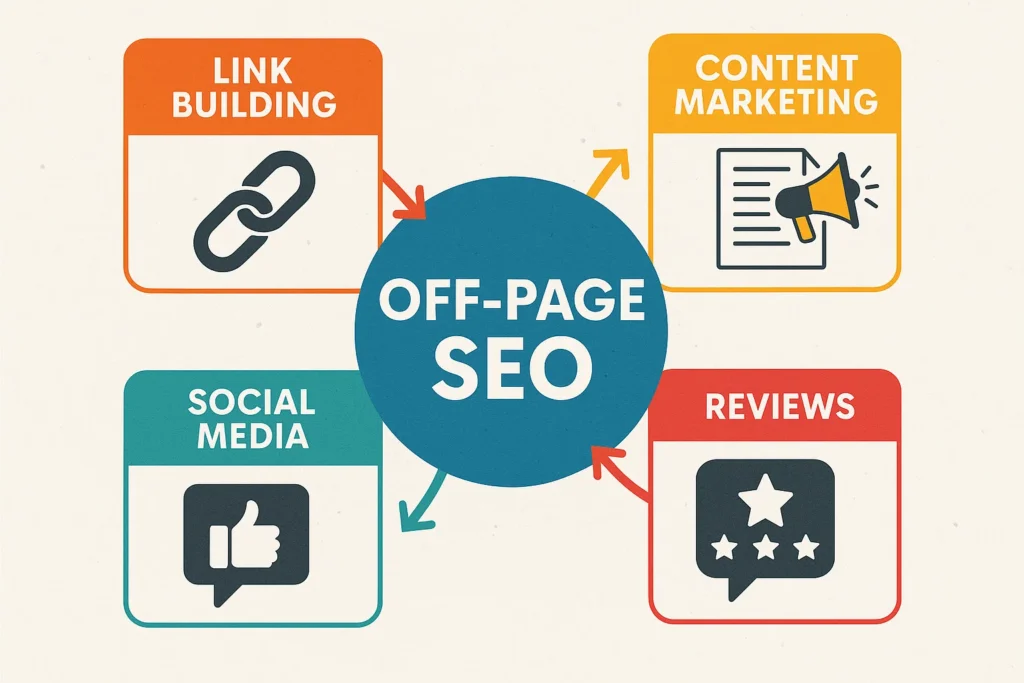
Off-page SEO is everything that happens outside of your website. The biggest part of this is link building.
How to Build High-Quality Backlinks?
A backlink is when another website links to your site. Google sees this as a vote of confidence.
If a trusted site links to you, Google thinks your site is trusted too. This improves your domain authority.
Getting high-quality backlinks is hard work. You can start by asking partners or friends to link to you. You can write guest posts for other blogs. The best way is to create amazing content marketing pieces that people want to share. However, for SaaS companies, this is very competitive. This is where VH-info comes in. While you can handle on-page tasks, link building takes a lot of time and connections.
At VH-info, we specialize in getting these trusted links for SaaS brands. But for a beginner doing DIY SEO, start small. Focus on quality over quantity. One link from a good site is better than ten links from bad sites.
Using Local SEO and Google Business Profile
If you have a local shop, you need local SEO. This helps you show up when people search for “shops near me.” The most important tool here is your Google Business Profile. Claim your profile and fill out all the details.
Add your address, phone number, and hours. Add photos of your business. Ask happy customers to leave reviews. This helps you appear in the map pack in search results. It is a free and powerful way to get organic traffic from people nearby.
Using Social Media to Boost Visibility
Social media does not directly improve your Google rankings, but it helps a lot. When you share your blog posts on social media, more people see them. If people like your content, they might share it or link to it from their own websites.
This drives website traffic. It also helps build your brand. Being active on social media shows that your business is alive and helpful. It connects you with your target audience and gets more eyes on your new content.
The Best Free Tools to Help You Do SEO Yourself

You need the right tools to do a good job. Luckily, the best SEO tools are often free.
Google Analytics & Search Console
We mentioned these before, but they are essential. Google Analytics helps you understand your audience.
You can see where they come from and what they like. Google Search Console is your direct line to Google. It helps you submit your sitemap and check for technical issues. You should look at these tools every week to see how your SEO strategy is working.
Free Chrome Extensions For SEO Audits
There are browser extensions that help you check any webpage instantly.
- SEO Minion: This helps you check on-page SEO data, check for broken links, and preview how your site looks in search.
- Keywords Everywhere: This shows you keyword ideas and search volume right in your browser.
- Lighthouse: This is built into Chrome. It audits your page speed and performance.
Using these free tools makes performing a quick SEO audit very easy.
FAQ’s:
Can You Do SEO Yourself, Or Do You Really Need an Agency?
You can absolutely do SEO yourself. It requires time to learn the basics like keyword research and writing content. Agencies are great when you need to scale up or do complex link building, but for most beginners, DIY SEO is the best way to start.
Is It Hard to Do SEO Yourself Without Any Prior Experience?
It is not too hard if you are willing to learn. The concepts of search engine optimization are logical. You just need to follow a guide, use the right SEO tools, and be consistent. You do not need a degree to understand search intent or update meta descriptions.
How Long Does It Take to See Results When Doing SEO Yourself?
SEO is a long-term game. It usually takes 3 to 6 months to start seeing real movement in search rankings. It depends on how much quality content you create and how competitive your keywords are. Do not give up; organic traffic builds up slowly over time.
Can I Completely Do SEO For Free?
Yes, you can do almost everything for free.
You can use Google Search Console, Google Keyword Planner, and free versions of other keyword research tools. Writing content costs only your time. The only thing that usually costs money eventually is advanced link-building services or premium tools.
Do I Need to Know How to Code to Do SEO?
No, you do not need to know how to code. Most modern website builders manage the code for you. You can handle technical SEO tasks like site speed and mobile-friendliness using plugins or simple settings. You focus on the content and structure, not the raw code.
When Should I Stop Doing SEO Myself and Hire A Professional?
You should hire a professional when your business grows too big for you to manage alone. If you have the budget and need to compete for very hard keywords, an expert helps. Also, for specialized tasks like massive link-building campaigns, agencies like VH-info are very helpful.
What Are the Top Mistakes to Avoid When Doing Your Own SEO?
A big mistake is trying to trick Google with too many keywords (keyword stuffing). Another mistake is ignoring mobile-friendliness or having a slow site. Also, do not forget to write for humans first, not just for search engines. User experience is very important.
What Are the Best Free Tools For DIY SEO?
The best tools are Google Search Console, Google Analytics, and Google Keyword Planner. For checking your site, Google PageSpeed Insights is great. These tools come directly from Google, so the data is accurate and helps your SEO efforts effectively.
Conclusion
Learning how to do SEO on your own website is a journey. It starts with a single step. By understanding keyword research, writing helpful content, and fixing technical issues, you are building a strong asset. You are saving money and learning a valuable skill.
Remember, search engine optimization does not happen overnight. It takes patience. Keep creating blog posts that answer your customers’ questions. Keep checking your Google Search Console to see how you are doing.
Fix your internal links and optimize your images. Every small change helps your search rankings.
While you can manage your content and on-page changes, remember that building authority through links is tough. As you grow, you might need help with that specific part. That is where we at VH-info can step in to support your growth.
But for now, trust yourself. You have the tools and the knowledge. Start your SEO tasks today and watch your organic traffic grow. You can do SEO yourself, and you can be successful at it.

 Vishal ambani
  Share
Share
 VH Info