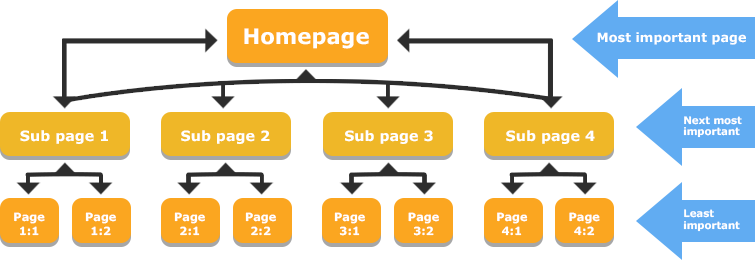
On your website, you have many different pages. An internal link is a link that goes from one page on your site to another page on your site. This is different from external links, which go to other websites.
Your internal linking is very important. It helps people find related content and stay on your site longer. It also helps search engines like Google find all of your pages and know which ones are the most important pages.
A good internal linking structure guides both users and Google. But building this link structure by hand takes a lot of time. This is why many people use an internal link tool to help. This guide will show you the best tools and how to use them.
What is an Internal Link Tool & Why Do You Need One?

An internal link tool is a piece of software that helps you manage your internal linking strategy. It scans your entire website to find internal link opportunities. It can find pages that need more links and suggest relevant pages to link to.
This is much faster than looking for link opportunities yourself. These tools can save website owners and SEO professionals countless hours.
The Problem With Manual Internal Linking
Doing your internal linking by hand is hard.
- It takes too much time: If you have hundreds of pages, finding every good linking opportunity is almost impossible. You have to check all your existing content every time you write new content.
- You miss pages: It is easy to forget about older posts. This creates orphan pages, which are pages with no internal links pointing to them. Search engines have a hard time finding orphan pages, so they often don’t show up in Google search results.
- It’s hard to track: Do you know all your anchor texts (the clickable words in a link)? Are you linking to your important pages enough? Without a tool, it’s hard to see your internal link structure clearly.
Key SEO Benefits: How Internal Linking Tools Help
Using an internal link tool helps your SEO performance in big ways:
- Passes “Link Juice“: Every page has link equity, also called link juice. When you link from one page to another, some of this “juice” flows to the new page. This tells Google that the linked page is also important. A good internal linking structure spreads this link juice to all your important pages.
- Helps Google Find Content: A tool helps you fix orphan pages. This makes sure Google can crawl your entire site and find all your relevant content.
- Improves User Experience: When you provide relevant internal links, you help visitors find more related content. This makes them stay on your site longer and lowers bounce rates.
- Builds Topical Authority: You can use tools to build topic clusters. This is when you link many related articles to one main “pillar” page. This shows Google you are an expert on that topic, which helps your search engine rankings.
How These Tools Work (AI Suggestions Vs. Automation)
Internal linking tools work in a few different ways.
- Rule-Based Tools: Some tools follow simple rules you set. For example, “Every time I write the words ‘SEO strategy’, link to my ‘SEO Strategy Guide’ page.” This can be fast but is not very smart.
- AI Suggestions: A modern ai internal linking tool is much smarter. It uses natural language processing (NLP). This means it reads your new content like a human. It uses semantic analysis to find relevant keywords and topics. Then, it suggests contextual links to your existing content that are truly relevant. This is much better for user experience and SEO performance.
Key Features to Look For in an Internal Link Tool
When you look for the best internal link tool, here are the advanced features you should check for.
AI-Powered Contextual Link Suggestions
This is the most helpful feature. An AI internal linking tool will read your post as you write it. It will find relevant pages and related posts on your own site to link to. This is much better than just matching keywords. It finds links that are actually helpful.
Orphan Page & Broken Link Reports
A good tool must be ableP to scan your entire site and find problems.
- Orphan Page Reports: It must show you a list of all orphan pages. You should be able to quickly add internal links to these pages so they get found.
- Broken Link Reports: The tool should also find broken internal links. These are bad for user experience and waste link juice.
Anchor Text Management & Reporting
The anchor text is the clickable text of a link. You don’t want all your links to have the same anchor texts. A good tool will show you a report of all the anchor texts used for different pages. This helps you make your linking structure look natural.
Bulk Linking & Automation Rules
For a large website, you need speed. Some tools let you add relevant internal links to many pages at once. For example, you could add a link to your new blog post from 10 old, related posts with just a few clicks. This saves a lot of time.
CMS Integration (WordPress, Shopify, etc.)
Your internal link tool must work with your website. If you have a WordPress site, you will want a WordPress plugin like Link Whisper or Rank Math. These tools work right inside your editor, making the internal linking process very easy.
The 10 Best Internal Link Tools to Scale Your SEO in 2026
Here are 10 great tools that SEO professionals and website owners use.
Link Whisper

Think of Link Whisper as a very smart link assistant that sits inside your WordPress site. It’s a special WordPress plugin built only for internal linking. As you write new content, Link Whisper uses AI to read your words.
It then looks at all your existing content and suggests relevant internal links for you to add. This makes the internal linking process so much faster. It’s a true ai internal linking tool because it suggests contextual links (links that make sense in the sentence) to relevant pages.
It is also amazing at finding orphan pages—those lonely pages with no links pointing to them. You can easily add links from other posts and choose your anchor texts. This tool saves website owners countless hours and helps you build a smart internal link structure that search engines love.
AIOSEO (All in One SEO)

AIOSEO is a popular SEO plugin for WordPress that helps with many parts of your SEO strategy. It has a special feature called “Link Assistant” which acts as your internal link tool. This tool scans your entire website and gives you a big report.
This report shows you all the internal linking opportunities you missed. It will point to an old post and suggest you add a link to your new content, or find related content that should be linked together. It’s great for fixing your site structure because you can see your whole linking structure clearly. You can see the anchor texts you are using and find related pages to link to. This helps you build a better internal linking strategy without ever leaving your WordPress dashboard, which helps both user experience and your search rankings.
Ahrefs
Ahrefs is a giant, powerful tool that SEO professionals use for their whole SEO strategy.
It is not just an internal link tool, but its “Site Audit” feature is one of the best for this job. You tell Ahrefs to scan your entire site. It will crawl all of your internal pages just like search engines do. Then, it gives you a detailed report on your site architecture. It will find every single orphan page you have. It also shows you how link equity (or link juice) flows through your website.
You can see which important pages have a lot of page authority and which ones need more relevant links. It’s a very technical tool, but it gives you complete control over your internal linking structure and is perfect for fixing problems on large websites to improve SEO performance.
Internal Link Juicer
The Internal Link Juicer is a WordPress plugin that is all about automation. This is a great internal link tool if you want to “set it and forget it.” Here is how it works: You tell the plugin what your specific keywords are for your important pages.
Then, whenever you write those relevant keywords in other posts, the plugin automatically adds a link to that important page. This is a very fast way to build your internal link structure and pass link juice to your main pages.
It’s especially useful for building topic clusters, as you can make sure all your related posts link back to your main pillar page. It also has a good free version to help you start improving your site structure and get relevant links to your relevant pages right away.
Yoast SEO (Premium)
Many people use the free version of the Yoast SEO plugin.
The premium (paid) version of Yoast SEO includes a helpful internal linking feature. It is simpler than other tools, but very useful. As you are writing a post, Yoast SEO will show you a box with a list of related posts from your own site.
It scans all your existing content to find relevant content that matches your new post. This makes it easy to find good link opportunities without having to search your own site. This helps you guide users to related pages and improves your user experience.
It also makes sure your internal pages are connected, which is good for your site structure and helps search engines understand your content. It’s a great, simple way to find internal linking opportunities and boost your search engine rankings.
LinkStorm

LinkStorm is a newer and very smart ai internal linking tool. It is not a plugin. It is a web tool that focuses on one big thing: building topic clusters. You use it when you have new content ready to publish. You give your new article to LinkStorm, and it uses semantic analysis (a smart way of understanding topics, not just keywords) to scan your entire website.
Then, it gives you a list of the best existing content to link from. It helps you build topical authority by showing Google you have many pages on one topic, all linked together. It’s a powerful tool for a modern SEO strategy because it creates smart contextual links that help you own a topic. It’s a great way to plan your internal linking strategy and show search engines you are an expert.
Linkilo

Linkilo is another strong ai internal linking tool that works as a WordPress plugin. It is packed with advanced features.
Like other tools, it suggests internal link opportunities as you write. But Linkilo has a special trick: it can connect to your Google Search Console data. This helps it find relevant pages that are already getting some traffic, so you can link from them. It also gives you great suggestions for your anchor texts. Its best feature for website owners with big sites is “bulk linking.” You can add one new contextual link to dozens of your old posts with just a few clicks. This part of its internal link building system can save you countless hours.
It’s a very fast way to improve your internal link structure and get your pages to rank better in search results.
LinkActions

LinkActions is an internal link tool that works a bit differently. It is a “cloud-based” tool, which means it’s a website you log into.
It works for any kind of website, not just WordPress. You connect your site, and LinkActions scans your entire website to understand your site structure. Its main job is to find problems and give you a simple “to-do” list.
It will find all your orphan pages and show you which important pages need more link juice.
It gives you clear internal link opportunities to work on. This is great for website owners who want a clear plan. By following its suggestions, you can build topical authority, fix your linking strategy, and improve your SEO performance and search rankings step by step.
Rank Math
Rank Math is a very popular SEO plugin for WordPress that has grown fast. It is an “all-in-one” WordPress plugin that helps with your entire SEO strategy. Its internal linking features are built right in.
As you write, Rank Math suggests relevant content from your existing content to link to. This makes it very easy to add relevant internal links as part of your writing process. The premium version of this internal link tool is even more powerful, helping you track your internal link structure to make sure your most important pages are getting links. Even the free version of Rank Math gives you some help.
It’s a great choice if you want one powerful SEO plugin that helps you build topic clusters and manage all your on-page SEO in one place.
Screaming Frog SEO Spider
Screaming Frog SEO Spider is the classic internal link tool for SEO professionals. This is not a simple plugin. It is a powerful program you run on your computer. You tell it your website address, and it “crawls” your entire site just like Google.
It gives you huge spreadsheets of data. You can use it to find every single orphan page, all your broken internal links, and see a map of your entire site architecture. It shows you how link equity flows and helps you spot big problems in your internal link structure.
This tool is very technical and takes time to learn, but it gives you complete control and more data than any other tool. If you want to do a deep, technical audit to improve your SEO performance, this is the tool to use.
Internal Linking Tools For WordPress: What Works Best?
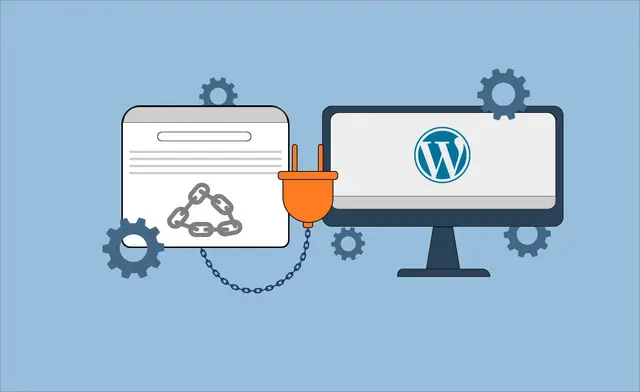
For a WordPress site, your best choice is a WordPress plugin. This is because the tool works inside your writing editor, making the internal linking process fast.
- For AI Suggestions: Link Whisper is a top choice. It is built just for internal linking and does it very well. Its suggestions for contextual links are excellent.
- For an All-in-One Plugin: If you want one SEO plugin to do everything, Rank Math or AIOSEO are great. Their internal link tool features are strong and part of a bigger package.
- For Automation: If you want to “set it and forget it,” Internal Link Juicer is good. Its ability to automatically link specific keywords helps build topic clusters quickly.
- For Simple Helpers: Yoast SEO Premium offers good, basic suggestions for related posts if you don’t need all the advanced features.
Are Free Internal Link Tools Worth It?
What about a free internal linking tool?
A free internal linking tool can be useful. For example, the free version of Internal Link Juicer offers good automation for a small site. The free version of Rank Math also gives you some basic help.
However, most free internal link tool options are limited. They might not use AI, or they might not find orphan pages.
They usually don’t have reports for anchor texts or bulk linking. Often, a free trial of a paid tool is a better idea. This lets you try the advanced features and see how much time they can save you. For most serious website owners, a paid internal link tool is a good investment.
How to Effectively Use Your New Internal Link Tool?
Getting a new internal link tool is the first step. Here is how to use it right.
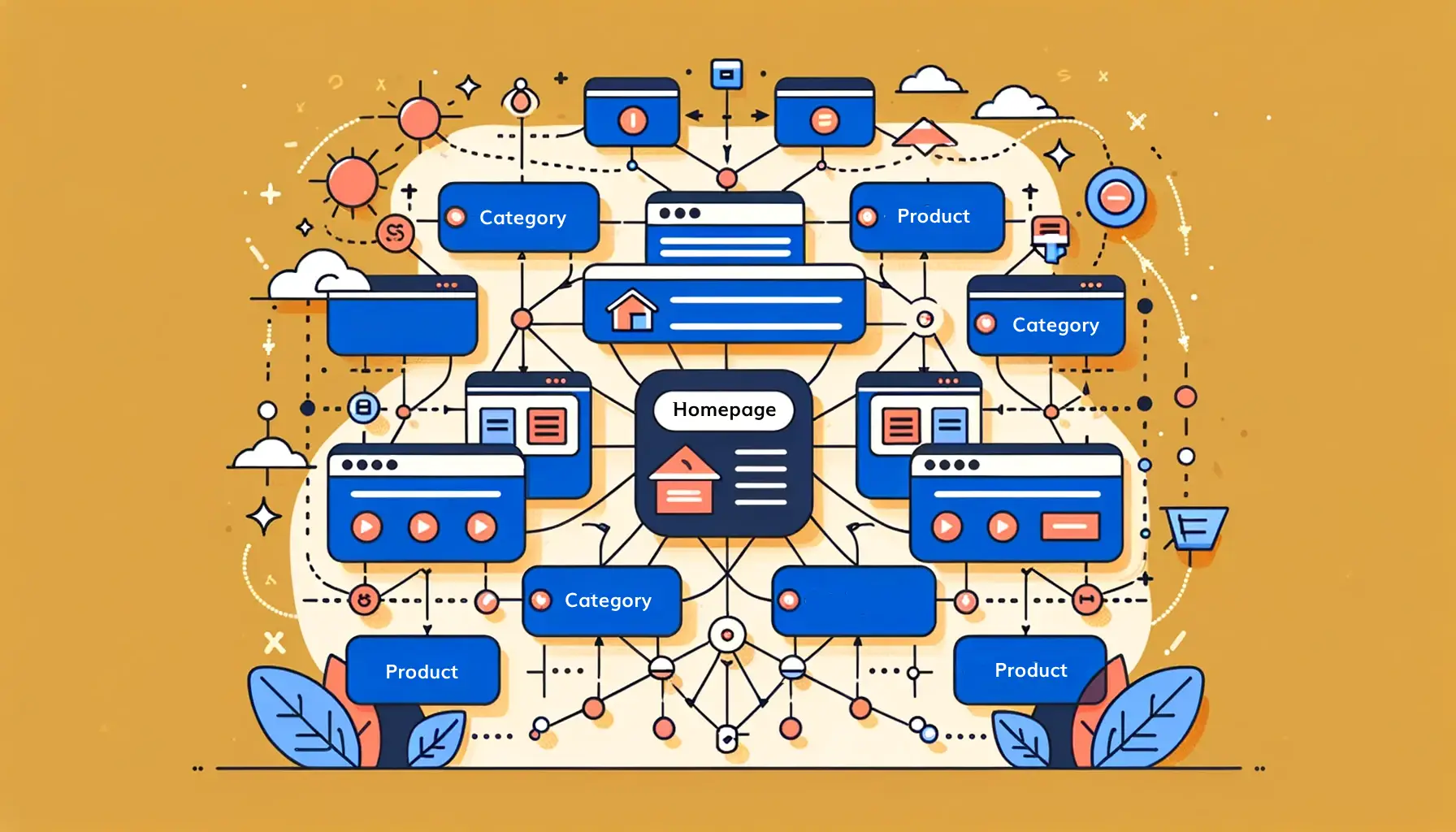
- Step 1: Running Your First Site Audit – Start by running a full audit of your entire website. Let the tool scan all your internal pages. This will create a map of your current internal linking structure. The tool will find all your broken links and, most importantly, your orphan pages.
- Step 2: Prioritizing Orphan Pages – Your first job is to fix orphan pages. These pages are invisible to search engines and users. Go through the report and add at least one or two relevant internal links to every orphan page. This gets them into your site structure so they can start getting link juice and ranking in search results.
- Step 3: Building Topical Clusters – Now, think about your SEO strategy. You want to build topic clusters. Pick your most important pages (your “pillar” pages). Use your internal link tool to find all the smaller, related posts and related pages on that topic. Link all of them to the pillar page. This builds topical authority and tells Google you are an expert.
- Step 4: Setting Up Automation Without Spamming – If your tool has automation, use it carefully. Don’t just link the same specific keywords 100 times. This looks bad to users and search engines. Set up rules that feel natural. Use the AI internal linking tool features to find contextual links that are truly helpful. Always follow SEO best practices and focus on user experience.
FAQ’s:
What Exactly Does an Internal Link Tool Do?
An internal link tool scans your entire website to find internal linking opportunities. It helps you find orphan pages, suggest relevant links between different pages, manage your anchor texts, and fix your site architecture.
Is an Internal Link Tool Necessary For SEO?
For a very small site (less than 20 pages), you can probably manage your internal linking by hand.
But for any growing website, an internal link tool is a huge help. It saves countless hours and helps you build a much better linking strategy, which is key to improving your search engine rankings.
Can Internal Linking Tools Fix Broken Links Automatically?
No. Most internal linking tools will find your broken internal links and show you where they are. But they cannot fix them automatically. You still need to go to the page and update the link yourself.
Can These Internal Linking Tools Handle Large Websites?
Yes, many of these tools are built for large websites. Tools like Ahrefs and Screaming Frog SEO Spider are designed for SEO professionals managing sites with thousands of pages. A WordPress plugin like Link Whisper or Rank Math can also handle a large WordPress site very well.
Conclusion
A strong internal linking structure is a key part of any good SEO strategy. It guides users to relevant content, helps search engines find your pages, and passes link equity to your most important pages.
While you can do it by hand, an internal link tool makes the internal linking process much faster and more effective. A good tool helps you find orphan pages, get smart AI link suggestions, and build topic clusters that improve your search rankings.
But a tool is just one piece of the puzzle. A tool can suggest links, but building a powerful linking strategy that drives real results for SaaS is different. That requires expert guidance.
At VH-info, we are a SaaS link building agency. We don’t just build external links; we help SaaS companies create a complete linking strategy. This includes building a smart internal linking structure to win in Google search.
While these tools are great for your internal link building, a partnership with an expert can take your SEO strategy to the next level.

 Share
Share