
Have you ever pasted a link to your website on Facebook or LinkedIn, only to see a boring, gray box or the wrong picture pop up? It is frustrating. You worked hard on your web content, but it looks broken when you share it.
This is where OpenGraph SEO steps in to save the day.
Think of your website link like a digital business card. When you hand it to someone, you want it to look professional and tell them exactly what you do. Open Graph is the set of rules that helps social media platforms create a business card for you.
It turns a plain link into a rich, clickable preview with a picture, a title, and a description.
At VH-info, we spend a lot of time helping SaaS companies build better links. We know that getting a link is only the first step. You also need people to click on it. If your shared content looks bad, people will scroll right past it. But if it looks good, you get more organic traffic.
In this guide, we will walk you through exactly how to use Open Graph meta tags. We will keep it simple so you can set it up even if it is your first time. We want to make sure your social previews look amazing every time.
What is OpenGraph SEO and Why Does It Matter?

OpenGraph SEO might sound technical, but it is quite simple. It is all about control. Without it, social networks like Facebook, LinkedIn, and Twitter have to guess what is on your page. They might pick a random image or cut off your sentence halfway through.
When you use open graph tags, you tell these platforms exactly what to show. You control the image, the headline, and the text. This matters because humans are visual. We like clicking on things that look interesting and clear.
Understanding the Open Graph Protocol
The Open Graph protocol was created by Facebook back in 2010.
Before this, sharing a link was messy. This protocol standardized how information travels from a web page to a social feed. Think of it like a translator. Your website speaks “HTML code,” and social media sites speak their own language.
The Open Graph protocol translates your content so the social platform understands it perfectly. It uses pieces of code called meta tags that sit in the background of your site. You do not see them on the page, but the robots reading your site certainly do.
The Difference Between Traditional SEO and Social Metadata
It is easy to confuse standard search engine optimization with OpenGraph SEO, but they have different jobs.
Traditional SEO focuses on search engines like Google. You use title tags and meta descriptions to rank higher in search results. You want to please the Google algorithm so people can find you when they search for keywords.
Open Graph meta data is different. It does not directly change your rank in Google. Instead, it focuses on social media. It is about how your link looks when it is shared on a timeline or in a private message. While Google looks at your page title, Facebook looks at your og:title.
They are separate, but both are important for a complete digital marketing strategy.
How OpenGraph SEO Influences Click-Through Rates (CTR)?
At VH-info, we always tell our clients: appearances matter. A link with a large, beautiful image and a catchy headline gets many more clicks than a plain text link. When your link previews look professional, users trust your brand more.
If a link looks broken, users might think the website is unsafe or low quality.
By fixing your og tags, you make your content look inviting. This increases your Click-Through Rate (CTR). High CTR means more people visiting your site from social platforms, which brings in more potential customers without spending extra money on ads.
Essential Tags For A Successful OpenGraph SEO Strategy

You do not need to learn hundreds of tags. There are only a few key opengraph tags that really matter. If you get these right, your SEO performance on social media will improve instantly. Let us look at the main ones.
og:title – Creating Headlines For Social Feeds
The og:title is the headline of your link preview. This is usually the biggest text in the card. It tells people what your page is about. You might think, “Can I just use my regular SEO title?” You can, but you don’t have to.
On Google, you might write a title to rank for a keyword. On social media, you want to write a title that makes people curious. You can make your og:title punchier or more dramatic to grab attention in a fast-moving news feed.
Best Practice: Keep it under 60 characters so it does not get cut off.
og:image – Best Practices For Visual Engagement
The og:image is the most critical tag. This is the image tag that defines the picture users see.
This picture takes up the most space on the screen. If you do not set an open graph image, the social platform will scrape your page and pick the first image it finds. This could be your logo, an icon, or an ad, which looks terrible. You should create a specific image for every page.
VH-info recommends using an image size of 1200 x 630 pixels. This ensures high quality on high-resolution screens. Keep the text on the image centered so it doesn’t get cropped.
og:description – Writing Compelling Hooks
The og:description is similar to the meta description you see in Google results. It sits below the title. This is your chance to add a short description of the content. Do not just stuff keywords here. Write a sentence that explains the value. Why should they click? Is it a guide?
Is it a news update? Give them a reason to leave their social app and visit your website.
og:url – Managing Canonical Links and Attribution
The URL tag, written as og:url, tells the social platform the permanent address of the page. This is important for data. Sometimes, you might have multiple URLs for the same page (like tracking codes). The og:url acts like a canonical URL. It tells Facebook, “Ignore the extra tracking codes; count all the likes and shares for this main URL.” This keeps your social proof metrics accurate.
og:type – Defining Your Content Category
The og:type tag tells the platform what type of content you are sharing. Is it a blog post? A video? A product? Or just a general website?
For most pages, you will use “website“. If it is an article, you use “article“. This helps the platform decide how to display the card. For example, if you set it to “video“, Facebook might put a play button right over the image.
How to Implement OpenGraph SEO on Your Website?
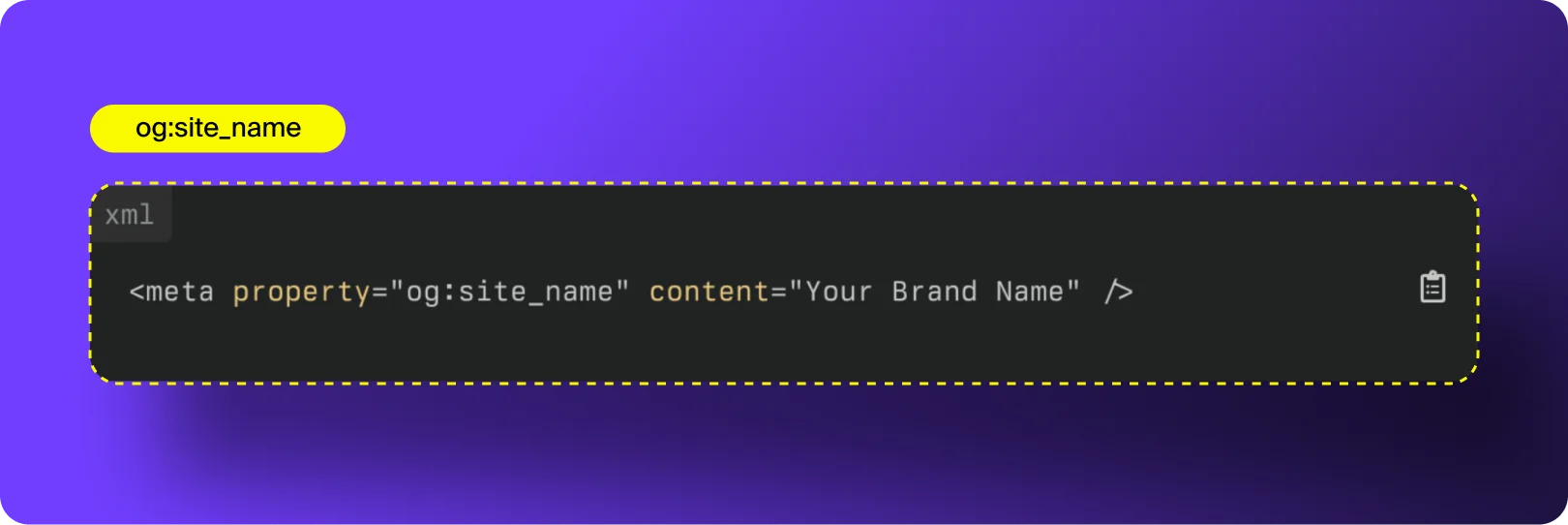
Now that you know what the tags are, you need to put them on your site. Don’t worry, you don’t always need to be a coder to do this.
Adding Open Graph Meta Tags to HTML Manually
If you built your website from scratch using code, you will add these tags manually. You place them in the <head> section of your HTML code.
Here is what the source code looks like:
<meta property=”og:title” content=”Your Amazing Title Here” />
<meta property=”og:type” content=”website” />
<meta property=”og:url” content=”https://www.yourwebsite.com/” />
<meta property=”og:image” content=”https://www.yourwebsite.com/image.jpg” />
<meta property=”og:description” content=”A simple description of your content.” />
You simply copy this structure and change the content for each page. It takes a little manual work, but it gives you total control.
Setting Up OpenGraph SEO in WordPress (Yoast & RankMath)
If you use WordPress, you are in luck. You do not need to touch the code. You can use an SEO plugin like Yoast SEO or Rank Math.
Using Yoast SEO:
- Go to the editor for your post or page.
- Scroll down to the Yoast box.
- Click on the “Social” tab (it looks like a sharing icon).
- Here you can upload your Facebook image and type in your title and description.
Using Rank Math:
- Open your post.
- Click the Rank Math icon in the corner.
- Click the “Social” tab.
- Click “Facebook Editor.”
- Upload your featured image and add your text.
These plugins automatically handle the code for you. They save you a lot of time.
Optimizing Open Graph For Shopify and Squarespace
If you run an e-commerce store, Open Graph is vital for your product pages.
Shopify:
Most Shopify themes have open graph meta tags built-in. They usually pull the product image and description automatically. To customize this, you might need to edit your theme’s theme.liquid file or use a Shopify App specifically for SEO.
Squarespace:
Squarespace also does this automatically. It uses your page title and the “Social Sharing Image” you upload in the page settings. To change it:
- Go to the Pages menu.
- Click the gear icon next to a page.
- Click the “Social Image” tab.
- Upload your specific image file.
Testing and Debugging Your OpenGraph SEO Implementation
After you add the tags, you must test them. Sometimes, the changes do not show up immediately because social sites save (or cache) the old version. You need to force them to look at your new image or text.
Using the Facebook Sharing Debugger
Facebook provides a free tool called the Sharing Debugger. This is the official documentation tool for testing.
- Go to the Facebook Sharing Debugger website.
- Paste your URL.
- Click “Debug.”
- If the image is old, click “Scrape Again.”
This forces Facebook to re-read your page source and update the preview. It will also tell you if you are missing any tags, like the app id or size properties.
Using the LinkedIn Post Inspector
LinkedIn has its own version called the LinkedIn Post Inspector. It works exactly the same way.
- Paste your link.
- Click “Inspect.”
- It shows you the image, title, and description tag LinkedIn is seeing.
This is very helpful for B2B companies. At VH-info, we use this often to ensure our professional articles look sharp on LinkedIn.
Using the Twitter Card Validator
Twitter (now X) uses slightly different tags called Twitter Cards, but they often fall under the Open Graph umbrella. The Twitter Card Validator tool used to show a preview.
Note: Twitter recently removed the preview feature from their validator tool, but it still checks if your meta tags are correct.
To make sure your Twitter card works, you should add specific twitter card tags like twitter:card, twitter:title, and twitter:image. If you don’t add these, Twitter usually falls back to using your Open Graph tags, which is a nice backup.
Fixing Common Image Scraper Issues
A common problem is the “missing image.” You share a link, and the image box is blank.
This usually happens because:
- The file size is too big (keep it under 5MB).
- The image dimensions are too small (must be at least 200×200 pixels).
- The image file format is weird (stick to JPG or PNG).
- Robots are blocked from crawling your site.
Check your site audit tools or the debuggers mentioned above to find the specific error.
Advanced OpenGraph SEO Techniques

Once you master the basics, you can try some advanced moves to make your web content stand out even more.
Using Video Tags For Richer Previews
If you share a video, you can use og:video tags. This allows the video to play directly in the news feed. This is great for user experience because people do not have to leave the app to watch your content. It grabs attention much faster than a static image.
Localizing Open Graph Tags For International SEO
Do you have readers in different countries? You can use the og:locale tag. The default is usually en_US (American English).
But if you have a Spanish version of your site, you can change this tag to es_ES. This tells the social media sites to show the content in the correct language format. You can even list “alternate” locales if your site supports multiple languages.
Integrating Twitter Cards with Open Graph Data
As mentioned, Twitter has its own system. To get the best results, you should use both Open Graph data and Twitter Card tags.
Specifically, use twitter:card set to “summary_large_image“. This gives you a big, bold image similar to Facebook. If you do not define this, Twitter might show a tiny thumbnail, which gets fewer clicks. By combining OG tags and additional tags for Twitter, you cover all bases.
FAQ’s:
Does OpenGraph SEO Directly Affect Google Rankings?
No, OpenGraph SEO does not directly change where you rank on Google. However, it helps you get more clicks from social media. More traffic and engagement can eventually send positive signals to search engines, helping your overall visibility.
What is the Ideal Image Size For Open Graph Tags?
The best size for an og image is 1200 pixels wide by 630 pixels tall. This ratio works perfectly on Facebook, LinkedIn, and Twitter. If your image is smaller, it might look blurry or get shown as a tiny thumbnail instead of a full picture.
Can I Use the Same Text For My SEO Meta Description and my og:description?
Yes, you absolutely can use the same text for both to save time. However, some people like to write a catchier version for social media and a more keyword-focused version for Google. But using the same one is fine.
Why Isn’t My New Image Showing Up When I Share My Link?
Social platforms save a copy of your old image to load it faster. This is called caching. To fix this, you need to use a tool like the Facebook Debugger and click “Scrape Again.” This tells the platform to look for your new image.
What Happens If I Don’t Use Open Graph Tags?
If you do not use them, the social platform will guess what to show. It might pick a random button image, a boring sentence from your footer, or nothing at all. This makes your link look unprofessional and lowers the chance of people clicking it.
What Mistakes Should I Avoid When Adding Open Graph Meta Tags For SEO?
Avoid using images that are too small or have too much text. Also, make sure your og:url matches the actual page link. Do not leave the tags blank. Finally, always check your work using a debugger tool before sharing.
Are There Free Tools to Generate and Validate Open Graph Tags?
Yes, there are many. For generating tags, you can use sites like Mega Tags or Small SEO Tools. To validate them, use the official Facebook Sharing Debugger, LinkedIn Post Inspector, or Twitter Card Validator. These are all free to use.
Conclusion
OpenGraph SEO is one of the easiest wins in digital marketing.
It does not require you to be a computer genius. It just requires a little attention to detail. By setting up your opengraph tags, you ensure that every time someone shares your link, it acts as a perfect advertisement for your brand. Remember to focus on the “Big Three“: a strong og:title, a clear og:description, and a high-quality og:image. These elements work together to stop the scroll and earn the click.
At VH-info, we believe that every detail counts. From building high-quality backlinks to ensuring your social tab previews look crisp, it is all part of a solid strategy to grow your organic traffic. If you start using these best practice tips today, you will see a difference in how your content performs. Take control of your social media appearance. Don’t let the algorithms guess for you.
If handling all these technical details feels like too much, or if you want to focus on growing your business while experts handle your visibility, VH-info is here to help. We specialize in effective strategies for SaaS companies. Let’s make your brand stand out online.
 Share
Share