
You’re three months into a link building campaign. The report looks good, with twenty new links and rankings slowly going up. Then your CEO asks, “So how much revenue did this bring in?” Nobody has a clear answer.
This happens a lot, because links take time to pay off. Ahrefs studied new pages and found only 1.74% reached Google’s top 10 within a year. Links do bring results. They just show up in your revenue later than most people expect.
That’s why it helps to track link building ROI from the very first day. In this guide, you’ll learn how to measure link building ROI with easy formulas, real examples, and a simple GA4 setup. We’ll also cover the link building metrics worth watching and the hidden costs that quietly eat into your returns.
TL;DR
Link building ROI tells you whether the money and time you spend on backlinks is actually paying off.
You can work it out with a simple formula: (revenue from links − total cost) ÷ total cost × 100.
Count every cost, including tools, content, team time, and replacing lost links, not just the price per link.
Links work slowly. Rankings usually move in 3–6 months, and clear returns often show up in 6–12 months.
In GA4, compare pages that got links with similar pages that didn’t, so you only count the growth links created.
When you report results, focus on revenue, pipeline, and cost per customer instead of Domain Rating.
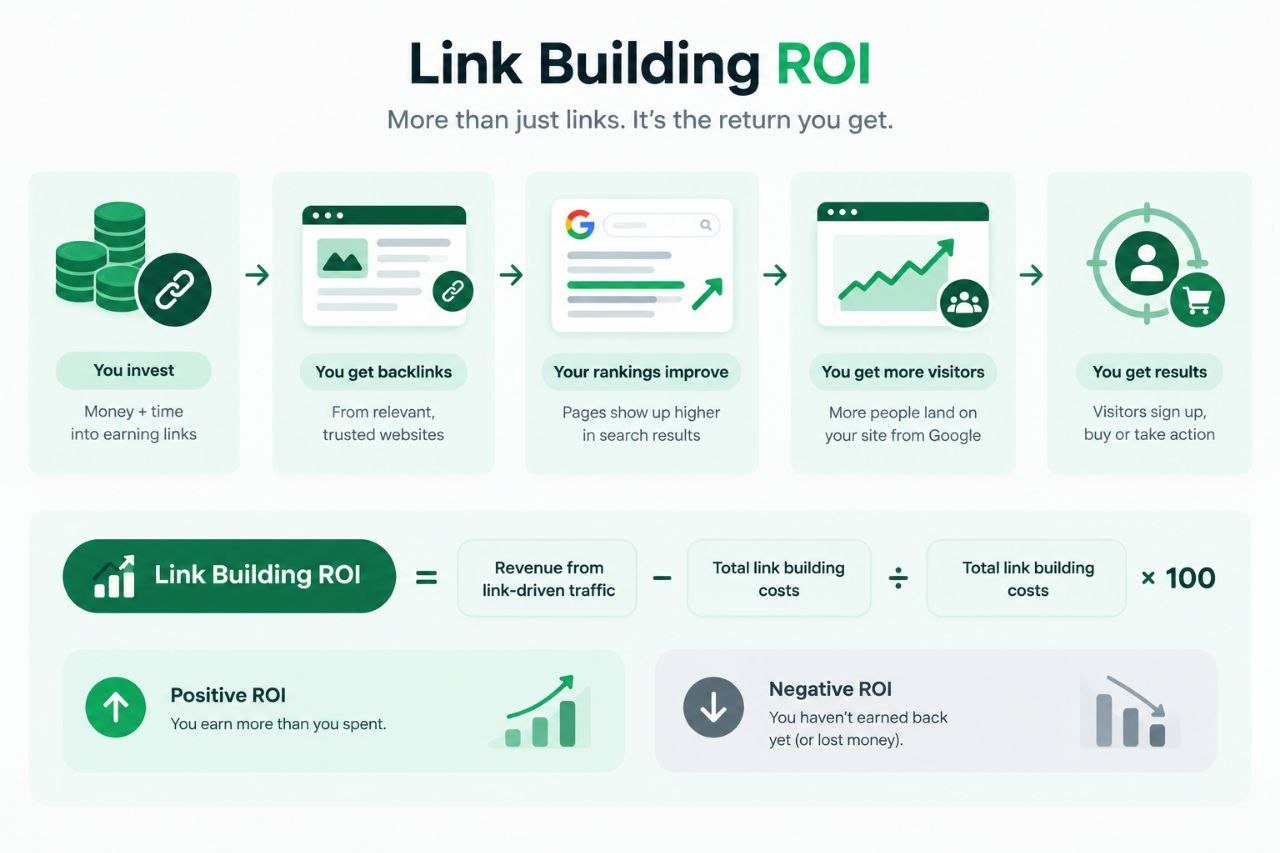
Link building ROI is the return you get on the money and time you put into earning backlinks, shown as a percentage. If the number is positive, your links have earned more than they cost. If it’s negative, they haven’t paid for themselves yet.
Links don’t make sales by themselves. They help your pages rank higher, and better rankings bring in visitors from Google who sign up or buy. That chain of events is what people mean by SEO ROI from backlinks. It’s also why the payoff usually comes months after you’ve paid for the links.
To calculate link building ROI, you only need two numbers, what you spent and what you earned. Most mistakes happen when one of them is a rough guess or leaves something out. Below are the four formulas you’ll use, what each part means, and a full example worked out step by step.
This is the main link building ROI formula. Every other formula in this guide feeds into it, so start here.
The formula
Link Building ROI (%)=
×100
→ Quick example: You spend $10,000 and earn 25,000.ROI=(25,000 − $10,000) ÷ $10,000 × 100 = 150%. Every dollar spent brought back $1.50 in profit.
The link building ROI formula needs a revenue number, and that’s the hardest part. Revenue rarely comes straight from a link. It comes from the extra organic traffic your target pages gain. This formula turns that traffic into dollars.
The price per link is only part of the bill. If you leave out the rest, your ROI will look better than it really is.
This formula pairs well with the link building ROI formula, and finance teams love it. It lets you compare links with paid ads or any other channel.
Link-Driven CAC=
Total Link Building Cost
Customers Gained From Links
Let’s put all four formulas together and calculate link building ROI for one company. The numbers below are made up, but they’re realistic for a small B2B SaaS company.
| Cost Item | Calculation | Yearly Cost |
|---|---|---|
| Agency fees | $3,000 × 12 months | $36,000 |
| SEO tool (Ahrefs Lite) | $129 × 12 months | $1,548 |
| Team time | 8 hours × $60 × 12 months | $5,760 |
| Total cost | $43,308 | |
Notice what happens if you only count agency fees. ROI jumps to 140%, which overstates the real result by 40 points.
SaaS customers keep paying after year one. If the average customer stays three years, each one is worth $3,600. Revenue then becomes 72 × $3,600 = 259,200.LifetimeROI=(259,200 − $43,308) ÷ $43,308 × 100 = 498.5%.
Both numbers are honest. Just label which one you’re using when you share it.
Knowing how to measure link building ROI starts with the right metrics. The ROI formula gives you one number once results arrive. But you need other metrics to know if you’re on track before then. Some metrics move early and warn you of problems. Others move late and prove the business impact.
Below are the metrics that matter most and why each one counts.
| Metric | Why It Matters | Where to Find It |
|---|---|---|
|
01Referring domains
|
Shows how many unique, relevant sites link to you | Ahrefs, Semrush, or Search Console |
|
02Rankings for target keywords
|
The first sign that links are working | Rank tracker or Search Console |
|
03Organic traffic to target pages
|
Turns rankings into visitors | GA4 landing page reports |
|
04Referral visits from links
|
Direct clicks from the sites linking to you | GA4 traffic acquisition report |
|
05Key events and conversion rate
|
Shows if visitors take action | GA4 key events |
|
06Revenue, pipeline, and CAC
|
Proves the business result | Your CRM |
|
07Lost links
|
Shows if your results are slowly shrinking | Your backlink tool |
Look at how many different websites link to you, not your total number of links. Ten links from the same site help far less than one link each from ten different sites. The type of site matters too. One link from a SaaS blog your buyers read is worth more than several from random lifestyle sites.
Rankings are usually the first sign your links are working. Keep an eye on the keywords each target page should rank for. The big moment is when a page moves from page two to page one, since that’s where most people click.
Higher rankings only count if people actually visit. So track Google visits to the pages your links point to, not your whole site. Site-wide numbers include blog posts, brand searches, and other campaigns, which hides what your links really did.
Some links bring people straight to your site when they click. One guest post on a popular industry blog could send a few hundred visitors in a year. These clicks come in fast, so they give you an early win while rankings catch up.
Visitors only matter if they take action. Track trial sign-ups, demo requests, or purchases on your target pages. If traffic goes up but sign-ups don’t, the page probably needs work. The links are doing their job.
This is what your leadership team really wants to see. Track the deals and revenue that began on your target pages. Then figure out your link-driven CAC, which is what each new customer costs you, and compare it with paid ads.
Links don’t always last. Sites get redesigned, old posts get deleted, and new editors remove links. A regular backlink quality analysis helps you spot lost or weak links early, so you can replace them before your rankings drop.
Link building ROI grows a lot like compound interest. The first few months feel slow, and most of the payoff comes later. If everyone knows this from the start, you’ll avoid a lot of awkward meetings. Below is a realistic timeline for a steady campaign targeting keywords with moderate competition.
| Timeframe | What Usually Happens | What to Judge It By |
|---|---|---|
| Month 0–1 | Baseline set, target pages chosen | ➜ Clean tracking in GA4 |
| Months 1–3 | Links go live and get indexed | ➜ Referring domains, early ranking moves |
| Months 4–6 | Target pages climb for easier keywords | ➜ Rankings, organic traffic |
| Months 7–12 | Traffic turns into leads and revenue | ➜ Key events, pipeline, ROI |
| Month 12+ | Older links keep working | ➜ Cumulative ROI and CAC |
Before any links go live, note down the last three months of organic traffic and key events for your target pages. This is your starting point, and without it you can’t prove what changed. Also pick a few similar pages that won’t get links. These become your control group.
Your links get placed, and Google begins to find them. You’ll see more referring domains and maybe a few small ranking changes. Revenue usually doesn’t move yet. Your ROI will look negative at this stage, and that’s completely normal.
Target pages usually start climbing for easier, long-tail keywords first. Organic traffic begins to pick up. At VH Info, most clients see rankings move within five to six months. The exact timing depends on your niche, your site’s authority, and how tough the competition is.
This is usually when SEO ROI from backlinks starts to show. More keywords reach page one, and leads grow along with the traffic. Many campaigns break even somewhere in these months. This is the right time to judge results, not month three.
Links you built in year one keep helping your rankings in year two. Your costs stay about the same, but total revenue keeps climbing. That’s why ROI in year two is often much higher than in year one.
Some things can stretch this timeline. If any of these sound like you, plan for a few extra months.
Your own numbers matter most, but outside benchmarks help you see if your link building ROI is on track. The studies below are well known in the SEO world, and the examples after them show how this works in real life. Below are three key benchmarks, followed by three practical examples.
First Page Sage tracked SEO results across industries for three years. For B2B SaaS, it found a 702% average ROI and a break-even point of around seven months. This covers SEO as a whole, not just links. Still, links play a big part in those results.
Ahrefs found that the average page in Google’s #1 spot is about five years old. Only 13.7% of top-10 pages were less than a year old. Put simply, strong rankings take time, so most of your return shows up later.
Backlinko looked at 11.8 million Google results. It found the #1 result had 3.8x more backlinks than pages ranking 2 to 10. This doesn’t prove links cause higher rankings. But it does show how often the two go hand in hand.
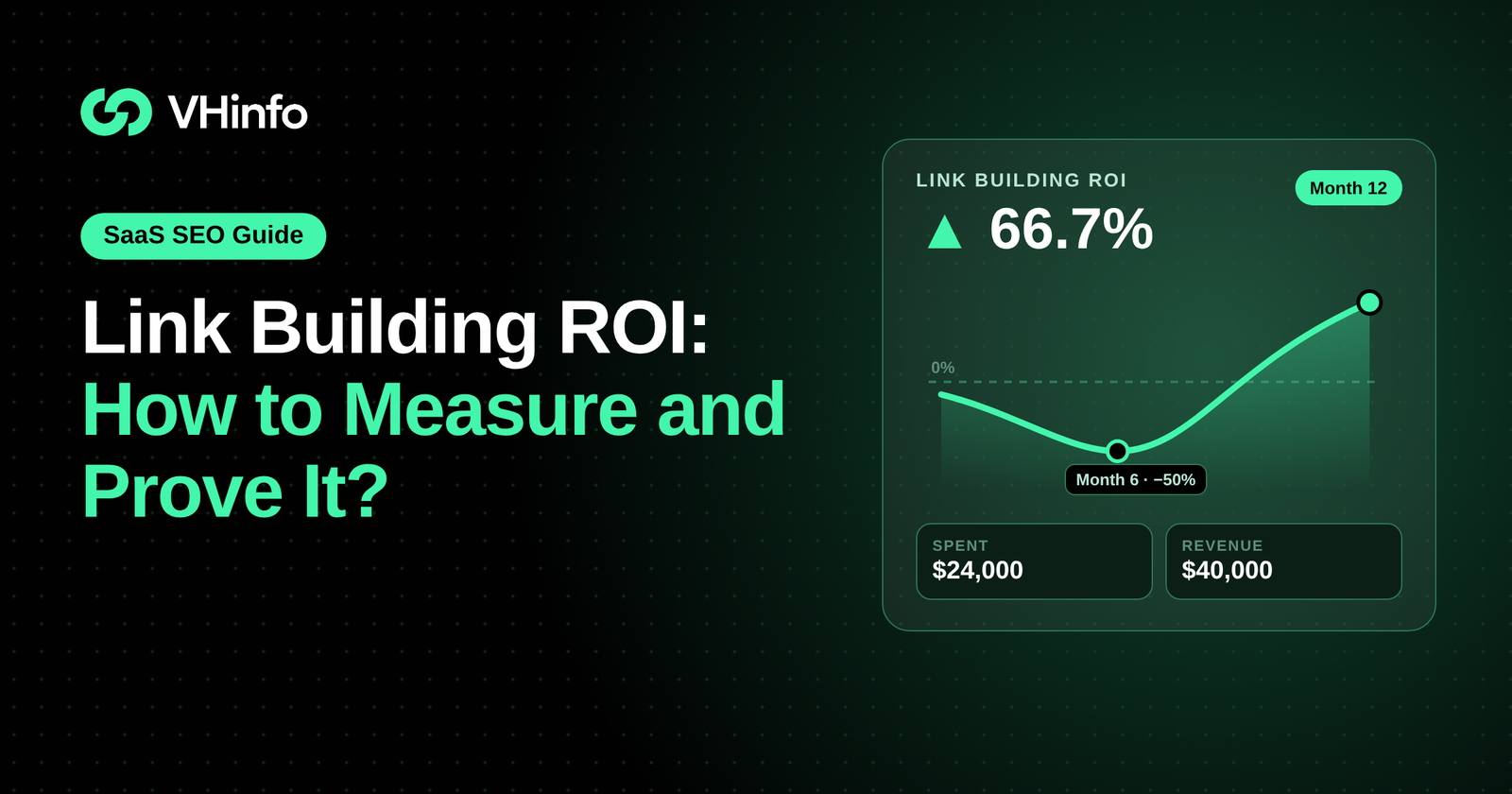
A SaaS company spends $2,000 a month on links. The numbers below show its cumulative results.
| Point in Time | Total Spent | Revenue From Links | Link Building ROI |
|---|---|---|---|
| Month 6 | $12,000 | $6,000 | ▼ −50% |
| Month 12 | $24,000 | $40,000 | ▲ 66.70% |
At month six: ($6,000 − $12,000) ÷ 12,000×100=-50%.Atmonthtwelve:(40,000 − $24,000) ÷ $24,000 × 100 = 66.7%. Cutting the budget at month six would have locked in the loss.
One guest post costs $400. It sends 120 referral visits over a year. At a 3% sign-up rate, that’s about 4 trials. If one becomes a 1,200-a-yearcustomer,referralROI=(1,200 − $400) ÷ $400 × 100 = 200%. That’s before counting any ranking boost.
Two target pages each gain 1,200 extra visits a month from links. Page A converts 1% of visitors into trials, giving 12 trials. Page B converts 2%, giving 24 trials. Same links, same cost, but Page B doubles the return.
GA4 won’t tell you a sale came from a backlink. Links help your rankings, and better rankings bring organic visits that GA4 does record. So your job is to separate the traffic and actions your links most likely caused. Below is how to measure link building ROI in GA4, in eight simple steps.
Make a list of the pages you plan to build links to. In GA4, export their organic sessions and key events for the past three months. Save this as your starting point. Everything you report later gets compared with these numbers.
First, decide which actions count as a win, like a trial sign-up, demo booking, or purchase. In GA4, go to Admin, then Data display, then Events. Mark those actions as key events. Without this step, you’ll see visits but not results.
Most SaaS sign-ups aren’t paying customers yet. So give each key event an estimated value using this simple formula.
Example: Say 20% of demo requests turn into customers paying $5,000 a year. Each demo is then worth 0.20 × $5,000 = $1,000.
Call the pages getting links your target pages. Then choose a few similar pages that won’t get any new links. These are your control pages. They show what would have happened anyway, due to seasons, Google updates, or your brand growing.
In GA4, open Explore and pick Free-form. Add “Landing page + query string” and “Session default channel group” as dimensions. Then add Sessions, Key events, and Total revenue as metrics. Finally, filter the landing pages to show only your target and control pages.
GA4 groups visits from unpaid search results under Organic Search. Visits from other websites show up as Referral. Organic traffic shows how links helped your rankings. Referral traffic shows people who clicked a link directly, which you can match to your list of linking sites.
Next, split the growth your links created from the growth that would have happened anyway.
Example: Your target pages grew from 2,000 to 3,600 visits a month. Over the same time, control pages grew 20%. Without links, you’d expect 2,000 × 1.20 = 2,400 visits. So link-driven visits = 3,600 − 2,400 = 1,200 a month. This is the number you use in Formula 2.
SaaS deals often close weeks after someone’s first visit. When a person signs up, save their landing page and traffic source in a hidden form field. Send that data to HubSpot, Salesforce, or whichever CRM you use. Now you can see which closed deals began on your target pages.
★ Tip
Check Google Search Console along with GA4. Impressions and average position for your target pages usually go up before clicks do. That gives you an early sign of progress, months before revenue shows up.
Most teams only plan for the price of each link. That makes their link building ROI look better than it really is. Other costs add up quietly in the background, and they can shrink your real return by a lot. At the same time, some of the value links bring is easy to overlook. Below are the hidden costs with real numbers, plus a few simple ways to get more out of the same budget.
| Cost Item | Example Monthly Cost | Example Yearly Cost |
|---|---|---|
| Quoted link building fee | $3,000 | $36,000 |
| Team time (8 hours × $60) | $480 | $5,760 |
| SEO tool (Ahrefs Lite) | $129 | $1,548 |
| Replacing lost links (4 × $400) | About $133 | $1,600 |
| True total | About $3,742 | $44,908 |
In this example, the real cost is about 25% higher than the quoted fee.
Someone on your team has to brief writers, approve sites, check drafts, and put reports together. If that takes eight hours a month at $60 an hour, it costs $480 a month, or $5,760 a year. You won’t see it on an invoice, but it’s still real money.
You need tools to find sites to pitch and to track your links and rankings. Ahrefs Lite costs $129 a month, and the Semrush SEO plan costs $139 a month. Using both adds more than $3,200 a year to your link building costs.
Writing your own guest posts costs money too. Say you pay a freelancer $200 an article for four articles a month. That’s $800 a month, or $9,600 a year. That’s more than a quarter of the agency fee in our earlier example.
Websites delete posts, change owners, or drop links when they redesign. Say you build 40 links in a year and lose 10% of them. Replacing those 4 links at $400 each costs $1,600. Before you sign with any provider, ask if replacements are included.
Google’s spam policies say paid links need a sponsored or nofollow tag. These tags tell Google not to pass any ranking value through the link. So a $500 sponsored placement might bring a few clicks, but very little SEO ROI from backlinks.
SaaS buyers often visit your site several times before signing up. Their first visit might come from a ranking your links helped, but the deal could close months later. If you only look at 30 days of data, you’ll miss a lot of that value. Look at 90 days or more instead.
Links bring people to your page, but the page has to turn them into customers. If you raise a page’s conversion rate from 1% to 2%, you double the revenue from the same links. So sharpen your headline, add proof, and make the next step clear before you spend on links.
Links to blog posts can help, but links to pricing, product, or comparison pages sit closer to revenue. Aim for a mix of both. Let blog content earn links naturally, then pass that value to your money pages with smart internal links.
Links also help more people recognize your brand. They can even help your brand show up in AI-generated answers. GA4 won’t pick up most of this. Mention it in your reports, but don’t attach a made-up number to it.
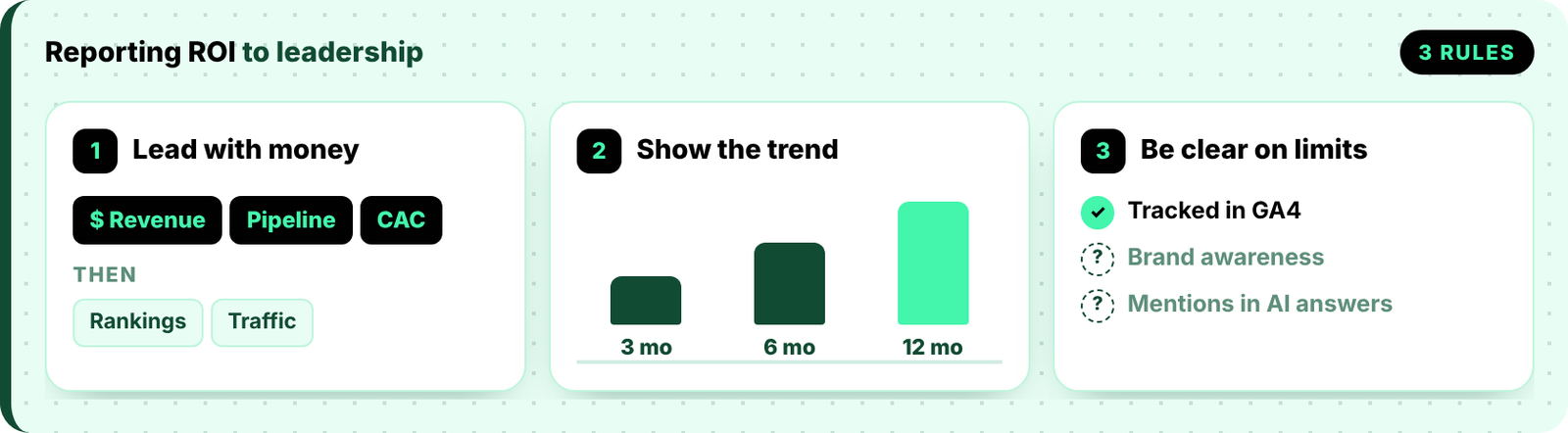
Even great results can fall flat if you report them the wrong way. Leaders want a clear story about the business, not a pile of SEO terms. Below are three simple ways to make your report stick.
Start with the revenue, pipeline, and link-driven CAC from your target pages. After that, show the rankings and traffic that got you there. Leaders care about results first, so share the business impact before you get into the SEO details.
A single month of data can look like luck. Share your results at three, six, and twelve months instead. A steady climb makes a much stronger case than one good month. It also helps everyone know what to expect next.
Let leaders know that some value, like brand awareness or mentions in AI answers, won’t show up in GA4. People trust reports that are upfront about their limits. Being honest here makes the numbers you can track more believable.
Proving link building ROI isn’t as hard as it sounds. You just need a plan in place before your first link goes live. Set a baseline, choose your target and control pages, and count every cost honestly.
After that, be patient. Judge the results at twelve months, not three. Most of what links give back shows up long after you’ve already paid for them.
At VH Info, we run every SaaS campaign this way. We agree on target pages from the start, share every live link, and measure results against a clear baseline. So when the CEO asks what the links brought in, you’ll have a real answer ready.
Link building ROI is calculated by subtracting your total cost from the revenue links helped generate. Divide the result by the total cost, then multiply by 100. Include agency fees, content, tools, and team time to get a true figure.
The best way to measure link building ROI is to compare pages with links against similar pages without. Track organic traffic, key events, and revenue for both in GA4. The difference between them is the real lift your links created.
Start by adding up every campaign cost. Next, estimate revenue using extra organic visits, conversion rates, and customer value. Then use this formula: (revenue − cost) ÷ cost × 100. For example, $30,000 revenue on a $12,000 cost equals 150% ROI.
No, 3% is a weak ROI for link building. Even the S&P 500 has averaged about 10% a year since 1957, according to Fidelity. A healthy link building campaign should clearly beat its full cost within twelve to eighteen months.
A good link building ROI clearly beats your total cost within twelve months. It should then keep growing every year. Early months are usually negative. For context, First Page Sage reports a 702% average three-year SEO ROI for B2B SaaS.
Link building usually takes three to six months to move rankings and six to twelve months to show clear ROI. New domains and very competitive keywords take longer. First Page Sage reports that B2B SaaS SEO breaks even in about seven months.
Yes, but only partly. GA4 shows referral visits from sites linking to you and organic traffic to the pages they point to. It can’t list your backlinks or show their ranking value. Use Ahrefs, Semrush, or Search Console for that.
Yes, link building is usually worth it for SaaS companies that can wait six to twelve months. Links keep supporting rankings after you pay for them. SaaS customers also pay every month, so each new customer adds value year after year.
SEO ROI from backlinks is the return you earn when links lift rankings and bring in organic traffic that converts. It includes revenue from better rankings plus direct referral visits. It usually grows over time, because links keep working after placement.
Every article dives deep into what works, why it works, and how to use it.
Do you remember HARO? For years, Help a Reporter Out was the easiest way to win links from journalists. Then…
 Vishal ambani
October 16, 2026
Vishal ambani
October 16, 2026
Back in January 2014, Google’s Matt Cutts posted something that made a lot of SEO people nervous. “So stick a…
Vishal ambani
October 15, 2026
Back in early 2011, J.C. Penney ranked No. 1 on Google for searches like “living room furniture.” Then The New…
Vishal ambani
October 14, 2026

 Share
Share